
spring-boot 速成(8) 集成druid+mybatis
spring-boot与druid、mybatis集成(包括pageHelper分页插件), 要添加以下几个依赖项:
    compile('mysql:mysql-connector-java:6.0.5')

    compile('tk.mybatis:mapper-spring-boot-starter:1.1.1')

    compile('org.mybatis.spring.boot:mybatis-spring-boot-starter:1.3.0')

    compile('com.github.pagehelper:pagehelper-spring-boot-starter:1.1.1')

    compile('com.alibaba:druid:1.0.28')
一、集成druid
1.1 编写自定义属性类
package com.cnblogs.yjmyzz.druid;

import lombok.Data;

import org.springframework.boot.context.properties.ConfigurationProperties;

@ConfigurationProperties(prefix = "druid")

@Data

public class DruidProperties {

    private String url;

    private String username;

    private String password;

    private String driverClass;

    private int maxActive;

    private int minIdle;

    private int initialSize;

    private boolean testOnBorrow;

}
注:这里只列出了主要属性,其它属性如果需要,可自行添加
1.2 创建自定义配置类
package com.cnblogs.yjmyzz.druid;

import com.alibaba.druid.pool.DruidDataSource;

import org.springframework.beans.factory.annotation.Autowired;

import org.springframework.boot.autoconfigure.AutoConfigureBefore;

import org.springframework.boot.autoconfigure.condition.ConditionalOnClass;

import org.springframework.boot.autoconfigure.condition.ConditionalOnProperty;

import org.springframework.boot.autoconfigure.jdbc.DataSourceAutoConfiguration;

import org.springframework.boot.context.properties.EnableConfigurationProperties;

import org.springframework.context.annotation.Bean;

import org.springframework.context.annotation.Configuration;

import javax.sql.DataSource;

import java.sql.SQLException;

@Configuration

@EnableConfigurationProperties(DruidProperties.class)

@ConditionalOnClass(DruidDataSource.class)

@ConditionalOnProperty(prefix = "druid", name = "url")

@AutoConfigureBefore(DataSourceAutoConfiguration.class)

public class DruidAutoConfiguration {

    @Autowired

    private DruidProperties properties;

    @Bean

    public DataSource dataSource() {

        DruidDataSource dataSource = new DruidDataSource();

        dataSource.setUrl(properties.getUrl());

        dataSource.setUsername(properties.getUsername());

        dataSource.setPassword(properties.getPassword());

        if (properties.getInitialSize() > 0) {

            dataSource.setInitialSize(properties.getInitialSize());

        }

        if (properties.getMinIdle() > 0) {

            dataSource.setMinIdle(properties.getMinIdle());

        }

        if (properties.getMaxActive() > 0) {

            dataSource.setMaxActive(properties.getMaxActive());

        }

        dataSource.setTestOnBorrow(properties.isTestOnBorrow());

        try {

            dataSource.init();

        } catch (SQLException e) {

            throw new RuntimeException(e);

        }

        return dataSource;

    }

}
注1:如果多数据源的,参考上面的代码自行修改
注2:上面这二个类,可以抽出来放到公用类库里,方便以后复用。
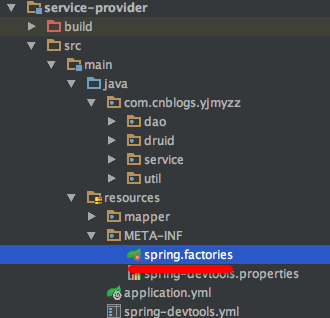
1.3 添加 META-INF/spring.factories
参考如下内容(告诉spring-boot,如何自动加载配置)
# Auto Configure

org.springframework.boot.autoconfigure.EnableAutoConfiguration=\

com.cnblogs.yjmyzz.druid.DruidAutoConfiguration
1.4 application.yml中配置
druid:

    url: jdbc:mysql://localhost:3306/study?useSSL=false

    driver-class: com.mysql.jdbc.Driver

    username: root

    password: ***

    initial-size: 1

    min-idle: 1

    max-active: 20

    test-on-borrow: true
二、集成mybatis
2.1 常规的mapper/xml配置
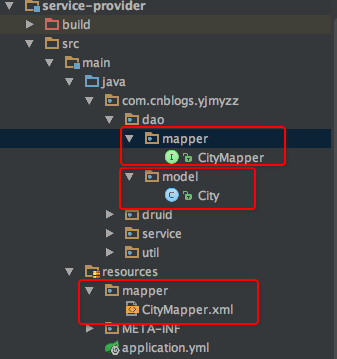
这个跟常规使用mybatis并没有什么不同,参考上图的结构
2.2 抽象一个通用Mapper
package com.cnblogs.yjmyzz.util;

import tk.mybatis.mapper.common.Mapper;

import tk.mybatis.mapper.common.MySqlMapper;

public interface MyMapper<T> extends Mapper<T>, MySqlMapper<T> {

}
写这个通用Mapper是为了后面写crud代码更简单,其它具体的XXXMapper都应该继承它,类似:
package com.cnblogs.yjmyzz.dao.mapper;

import com.cnblogs.yjmyzz.dao.model.City;

import com.cnblogs.yjmyzz.util.MyMapper;

public interface CityMapper extends MyMapper<City> {

}
2.3 application.yml配置
mybatis:

    type-aliases-package: com.cnblogs.yjmyzz.service.dao

    mapper-locations: classpath:mapper/*.xml

mapper:

    mappers:

        - com.cnblogs.yjmyzz.util.MyMapper

    not-empty: false

    identity: MYSQL

pagehelper:

    helperDialect: mysql

    reasonable: true

    supportMethodsArguments: true

    params: count=countSql
还有一个常见问题:如何在调试时输出SQL语句,以及屏蔽掉一些不需要的日志?可参考下面的配置
logging:

    level:

        root: DEBUG

        tk.mybatis: DEBUG

        com.alibaba.dubbo: ERROR

        org.apache.zookeeper: ERROR

    file: "/var/log/application/dubbo-provider.log"
最后使用的地方,代码就跟常规代码完全一样了,参考下面:
package com.cnblogs.yjmyzz.service.impl;

import com.alibaba.dubbo.config.annotation.Service;

import com.cnblogs.yjmyzz.dao.mapper.CityMapper;

import com.cnblogs.yjmyzz.dao.model.City;

import com.cnblogs.yjmyzz.service.api.DemoService;

import com.cnblogs.yjmyzz.service.api.vo.CityVO;

import com.github.pagehelper.PageHelper;

import org.slf4j.Logger;

import org.slf4j.LoggerFactory;

import org.springframework.beans.factory.annotation.Autowired;

import org.springframework.util.CollectionUtils;

import java.util.ArrayList;

import java.util.List;

/**

 * Created by 菩提树下的杨过(http:/yjmyzz.cnblogs.com) on 2017/5/21.

 */

@Service(version = "1.0.0")

public class DemoServiceImpl implements DemoService {

    Logger logger = LoggerFactory.getLogger(DemoServiceImpl.class);

    @Autowired

    CityMapper cityMapper;

    @Override

    public List<CityVO> getCityList(int pageIndex, int pageSize) {

        PageHelper.startPage(pageIndex, pageSize);//设置分页参数

        List<City> list = cityMapper.selectAll();

        com.github.pagehelper.PageInfo page = new com.github.pagehelper.PageInfo<>(list);//取页面信息

        List<CityVO> result = new ArrayList<>();

        if (!CollectionUtils.isEmpty(list)) {

            for (City c : list) {

                CityVO v = new CityVO();

                v.setCityName(c.getName());

                v.setProvinceName(c.getState());

                result.add(v);

            }

        }

        logger.info("pageInfo=> page:" + page.getPageNum() + "/" + page.getPages());

        return result;

    }

}
文中的示例代码,已经托管在github上,地址:https://github.com/yjmyzz/spring-boot-dubbo-demo
spring-boot 速成(8) 集成druid+mybatis的更多相关文章
- 14、Spring Boot 2.x 集成 Druid 数据源
14.Spring Boot 2.x 集成 Druid 数据源 完整源码: Spring-Boot-Demos
- Spring Boot 2.0 集成 Druid 数据源
一.Maven项目依赖 <!-- 开发者工具(热部署 修改classpath下的文件springboot自动重启) --> <dependency> <groupId&g ...
- 6、Spring Boot 2.x 集成 MyBatis
1.6 Spring Boot 2.x 集成 MyBatis 简介 详细介绍如何在Spring Boot中整合MyBatis,并通过注解方式实现映射. 完整源码: 1.6.1 创建 spring-bo ...
- spring boot rest 接口集成 spring security(2) - JWT配置
Spring Boot 集成教程 Spring Boot 介绍 Spring Boot 开发环境搭建(Eclipse) Spring Boot Hello World (restful接口)例子 sp ...
- spring boot rest 接口集成 spring security(1) - 最简配置
Spring Boot 集成教程 Spring Boot 介绍 Spring Boot 开发环境搭建(Eclipse) Spring Boot Hello World (restful接口)例子 sp ...
- Spring Boot 2.X(五):MyBatis 多数据源配置
前言 MyBatis 多数据源配置,最近在项目建设中,需要在原有系统上扩展一个新的业务模块,特意将数据库分库,以便减少复杂度.本文直接以简单的代码示例,如何对 MyBatis 多数据源配置. 准备 创 ...
- 7、Spring Boot 2.x 集成 Redis
1.7 Spring Boot 2.x 集成 Redis 简介 继续上篇的MyBatis操作,详细介绍在Spring Boot中使用RedisCacheManager作为缓存管理器,集成业务于一体. ...
- 06.深入浅出 Spring Boot - 数据访问之Druid
代码下载:https://github.com/Jackson0714/study-spring-boot.git 一.Druid是什么? 1.Druid是数据库连接池,功能.性能.扩展性方面都算不错 ...
- spring boot / cloud (三) 集成springfox-swagger2构建在线API文档
spring boot / cloud (三) 集成springfox-swagger2构建在线API文档 前言 不能同步更新API文档会有什么问题? 理想情况下,为所开发的服务编写接口文档,能提高与 ...
随机推荐
- CS229 笔记02
CS229 笔记02 公式推导 $ {\text {For simplicity, Let }} A, B, C \in {\Bbb {R}}^{n \times n}. $ $ {\bf {\t ...
- github for Mac 教程
Mac系统自带git,所有我们使用Mac搬的github客户端,无需安装git,所以使用github for Mac 超级简单,下载安装就好了. 1github for Mac 下载地址:https: ...
- 第11月第20天 sqlite3_open xcode mysql connector
1. sqlite3_open 死锁 * thread #1, queue = 'com.apple.main-thread', stop reason = signal SIGSTOP frame ...
- spring如何管理mybatis(一) ----- 动态代理接口
问题来源 最近在集成spring和mybatis时遇到了很多问题,从网上查了也解决了,但是就是心里有点别扭,想看看到底怎么回事,所以跟了下源码,终于发现了其中的奥妙. 问题分析 首先我们来看看基本的配 ...
- E1. Array and Segments (Easy version)(暴力) && E2. Array and Segments (Hard version)(线段树维护)
题目链接: E1:http://codeforces.com/contest/1108/problem/E1 E2:http://codeforces.com/contest/1108/problem ...
- LINUX下 USB转串口 【转】
转自:http://blog.163.com/smilexiao_11015461/blog/static/2122052182012102410399459/ 1.将设备u口插入pc2.输入#lsm ...
- javascript-dom文档对象模型2
每个标签都是一个对象 一:查找元素 1.直接查找 document.getElementById 根据ID获取一个标签 document.getElementsByName 根据name属性获取标签集 ...
- css-实现图标在输入框中显示
一:JavaScript 是脚本语言 JavaScript 是一种轻量级的编程语言. JavaScript 是可插入 HTML 页面的编程代码. JavaScript 插入 HTML 页面后,可由所有 ...
- K-means聚类算法的三种改进(K-means++,ISODATA,Kernel K-means)介绍与对比
一.概述 在本篇文章中将对四种聚类算法(K-means,K-means++,ISODATA和Kernel K-means)进行详细介绍,并利用数据集来真实地反映这四种算法之间的区别. 首先需要明确 ...
- linux convert mp3 to wav and opus to wav
link : https://www.cyberciti.biz/faq/convert-mp3-files-to-wav-files-in-linux/ Install mpg321 or mpg ...