
配置maven访问nexus,配置项目pom.xml以发布maven项目到nexus中
maven访问nexus有三种配置方法,分别为:
项目pom.xml,优先级最高;
user的settings.xml,优先级中,未在pom.xml中配置repository标签,则使用这个配置;
maven的settings.xml,优先级最低,在项目pom.xml和user的settings.xml都没有配置仓库时,才使用这个配置;
项目pom.xml配置,在pom.xml中添加以下内容:
    <repositories>

        <repository>

            <id>public</id>

            <name>public</name>

            <url>http://localhost:8081/nexus/content/groups/public/</url>

            <releases>

                <enabled>true</enabled>

            </releases>

            <snapshots>

                <enabled>true</enabled>

            </snapshots>

        </repository>

    </repositories>

    <pluginRepositories>

        <pluginRepository>

            <id>public</id>

            <name>public</name>

            <url>http://localhost:8081/nexus/content/groups/public/</url>

            <releases>

                <enabled>true</enabled>

            </releases>

            <snapshots>

                <enabled>true</enabled>

            </snapshots>

        </pluginRepository>

    </pluginRepositories>
以上仓库配置也可以在maven用户的setting.xml文件中(注意localhost应为设计的ip地址或url),如下:
  <profiles>

    <profile>

        <id>ourRepositoryGroup</id>

        <repositories>

            <repository>

                <id>public</id>

                <name>public</name>

                <url>http://localhost:8081/nexus/content/groups/public/</url>

                <releases>

                    <enabled>true</enabled>

                </releases>

                <snapshots>

                    <enabled>true</enabled>

                </snapshots>

            </repository>

        </repositories>

        <pluginRepositories>

            <pluginRepository>

                <id>public</id>

                <name>public</name>

                <url>http://localhost:8081/nexus/content/groups/public/</url>

                <releases>

                    <enabled>true</enabled>

                </releases>

                <snapshots>

                    <enabled>true</enabled>

                </snapshots>

            </pluginRepository>

        </pluginRepositories>

    </profile>

  </profiles>

  <activeProfiles>

    <activeProfile>ourRepositoryGroup</activeProfile>

  </activeProfiles>
关注maven配置文件的优先级,简单的做法是让其保持一致。
以上配置了访问Nexus的Public Repositories仓库组,id和name都无关紧要,要紧的是url必须适配。
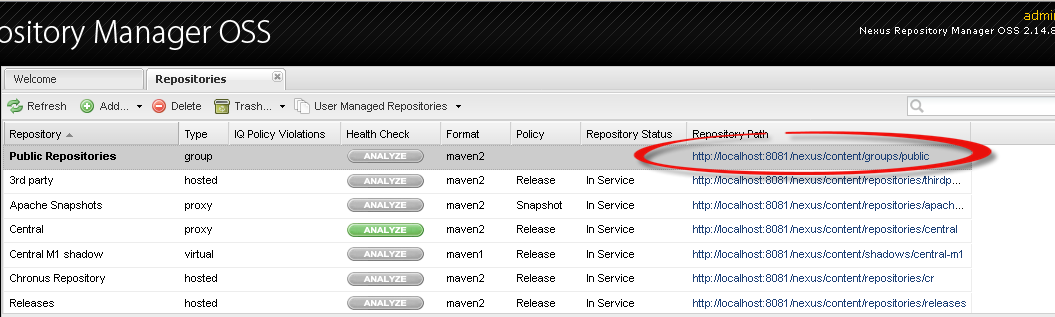
发布项目到Nexus,在pom.xml中添加以下内容:
    <!-- 发布项目到Nexus -->

    <distributionManagement>

        <repository>

            <id>releases</id>

            <url>http://localhost:8081/nexus/content/repositories/releases</url>

        </repository>

        <snapshotRepository>

            <id>snapshots</id>

            <url>http://localhost:8081/nexus/content/repositories/snapshots</url>

        </snapshotRepository>

    </distributionManagement>
带源码发布的插件配置,在pom.xml中添加以下内容:
    <build>

        <plugins>

            <!-- 发布源码,需要这个插件 -->

            <plugin>

                <groupId>org.apache.maven.plugins</groupId>

                <artifactId>maven-source-plugin</artifactId>

                <version>3.0.1</version>

                <executions>

                    <execution>

                        <id>attach-sources</id>

                        <goals>

                            <goal>jar</goal>

                        </goals>

                    </execution>

                </executions>

            </plugin>

        </plugins>

    </build>
发布需要nexus登录
在user的settings.xml
        <!--配置nexus仓库认证信息 -->

        <server>

            <id>releases</id>

            <username>admin</username>

            <password>admin123</password>

        </server>

        <server>

            <id>snapshots</id>

            <username>admin</username>

            <password>admin123</password>

        </server>
配置maven访问nexus,配置项目pom.xml以发布maven项目到nexus中的更多相关文章
- Maven项目pom.xml配置详解
maven项目pom.xml文件配置详解,需要时可以用作参考: <project xmlns="http://maven.apache.org/POM/4.0.0" xmln ...
- 关于导入本地maven项目pom.xml出现missing artifact org....报错处理
一.导入本地maven项目步骤:
- Maven项目pom.xml文件简单解析
Maven项目pom.xml简单解析 <project xmlns="http://maven.apache.org/POM/4.0.0" xmlns:xsi="h ...
- maven项目pom.xml第一行报错
maven项目pom.xml第一行报错 这是第一行:<project xmlns="http://maven.apache.org/POM/4.0.0" xmlns:xsi= ...
- java maven项目 pom.xml plugin 报错, build path 找不到 jconsole-1.8.0.jar 和 tools-1.8.0.jar 包
maven项目pom.xml突然报错,在Java Build Path 中并没有引用的jar包出现在了Maven Dependencies的依赖包中. 这个错误直接导致了pom.xml文件中 < ...
- 在idea中打开maven项目pom.xml未识别
在idea中打开maven项目pom.xml没有识别出来,导致idea不能自动下载依赖包, 解决办法是选中pom.xml文件,右键-" add as maven project"
- IDEA Maven项目 pom.xml 找不到 Dependency 依赖
转载: IDEA Maven项目 pom.xml 找不到 Dependency 依赖 如果你的pom.xml中使用了dependencyManagement管理依赖并且添加了你本地仓库中不存在的依赖可 ...
- maven项目解决pom.xml头部 http://maven.apache.org/xsd/maven-4.0.0.xsd报错的问题
版权声明:本文为博主原创文章,遵循 CC 4.0 BY-SA 版权协议,转载请附上原文出处链接和本声明.本文链接:https://blog.csdn.net/qq_36611526/article/d ...
- Maven简介(五)——pom.xml
6 Maven的pom.xml介绍 6.1 简介 pom.xml文件是Maven进行工作的主要配置文件.在这个文件中我们可以配置Maven项目的groupId.artifactId ...
随机推荐
- 学习笔记之Intermediate Python for Data Science | DataCamp
Intermediate Python for Data Science | DataCamp https://www.datacamp.com/courses/intermediate-python ...
- vSphere 查看FC HBA的WWNN和WWPN
# 查看WWN号
- Android app widget中实现跑马灯效果(非widget部件也实用)
原文地址:http://blog.csdn.net/luoyebuguigen/article/details/37533631 关键是需要在TextView中嵌入requestForcus标签才会有 ...
- postgresql定位分析消耗CPU高的SQL语句
第一步:使用TOP命令查看占用CPU高的postgresql进程,并获取该进程的ID号,如图该id号为3640 第二步:切换到postgres用户,并且psql连接到数据库,执行如下查询语句 SELE ...
- 我推荐阅读的微信公众号-IT类
微信,正深刻影响着我们的生活,每个使用微信的人,从微信这个窗口去了解这个世界. 微信公众号,微信生态圈是核心功能之一,每天都有大量的文章创作.传播.转发出来,海量的信息扑面而来,微信阅读成为微信使用者 ...
- (转)App.Config详解及读写操作
App.Config详解 应用程序配置文件是标准的 XML 文件,XML 标记和属性是区分大小写的.它是可以按需要更改的,开发人员可以使用配置文件来更改设置,而不必重编译应用程序.配置文件的根节点是c ...
- Java - 22 Java 多态
Java 多态 多态是同一个行为具有多个不同表现形式或形态的能力. 多态性是对象多种表现形式的体现. 比如我们说"宠物"这个对象,它就有很多不同的表达或实现,比如有小猫.小狗.蜥蜴 ...
- ubuntu播放音频没声音
1. 安装pavucontrol sudo apt install pavucontrol 2.配置pavucontrol 在终端执行pavucontrol,弹出设置框进行如下设置:
- Java swing 代码例子
package com; import java.awt.Button; import java.awt.Container; import java.awt.event.ActionEvent; i ...
- uiautomator 代码记录 : BT发送测试
package rom; import java.lang.*; import java.util.Random; import java.io.File; import com.android.ui ...