
31.网站数据监控-2(scrapy文件下载)
温州数据采集

这里采集网站数据是下载pdf:http://wzszjw.wenzhou.gov.cn/col/col1357901/index.html
(涉及的问题就是scrapy 文件的下载设置,之前没用scrapy下载文件,所以弄了很久才弄好,网上很多不过写的都不完善。)

主要重点就是设置:
1.piplines.py  文件下载代码 这部分可以直接拿来用不需要修改。

2.就是下载文件的url要放在列表里   item['file_urls']=[url](wenzhou.py)

3. setting.py 主要配置
ITEM_PIPELINES = {
    'wenzhou_web.pipelines.WenzhouWebPipeline': 300,
    # 下载文件管道
    'scrapy.pipelines.MyFilePipeline': 1,
}
#下载路径
FILES_STORE = './download'

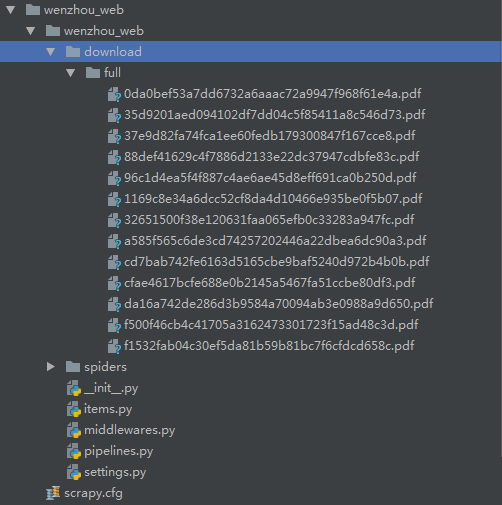
4.下载的文件就会保存到download文件夹中
如图:

wenzhou.py # -*- coding: utf-8 -*-
import scrapy
import re
from wenzhou_web.items import WenzhouWebItem
class WenzhouSpider(scrapy.Spider):
name = 'wenzhou'
base_url=['http://wzszjw.wenzhou.gov.cn']
allowed_domains = ['wzszjw.wenzhou.gov.cn']
start_urls = ['http://wzszjw.wenzhou.gov.cn/col/col1357901/index.html']
custom_settings = {
"DOWNLOAD_DELAY": 0.5,
"ITEM_PIPELINES": {
'wenzhou_web.pipelines.MysqlPipeline': 320,
'wenzhou_web.pipelines.MyFilePipeline': 321,
},
"DOWNLOADER_MIDDLEWARES": {
'wenzhou_web.middlewares.WenzhouWebDownloaderMiddleware': 500,
},
} def parse(self, response):
_response=response.text
tag_list=re.findall("<span>.*?</span><b>·</b><a href=\'(.*?)\'",_response)
for tag in tag_list:
url=self.base_url[0]+tag
# print(url)
yield scrapy.Request(url=url,callback=self.parse_detail) def parse_detail(self,response):
# _response=response.text.encode('utf8')
# print(_response)
_response=response.text item=WenzhouWebItem() pdf_url=re.findall(r'<a target="_blank" href="(.*?)"',_response)
for u in pdf_url: u=u.split('pdf')[0]
# print(u) #链接
url="http://wzszjw.wenzhou.gov.cn"+u+"pdf"
# print(url) item['file_urls']=[url] yield item
# # #标题
# # try:
# # title=re.findall('<img src=".*?".*?><span style=".*?">(.*?)</span></a></p><meta name="ContentEnd">',_response)
# # print(title[0])
# # except:
# # print('有异常!')
items.py

# -*- coding: utf-8 -*-

# Define here the models for your scraped items

#

# See documentation in:

# https://doc.scrapy.org/en/latest/topics/items.html

import scrapy

class WenzhouWebItem(scrapy.Item):

    # define the fields for your item here like:

    # name = scrapy.Field()

    # pass

    #链接

    file_urls=scrapy.Field()
middlewares.py

# -*- coding: utf-8 -*-

# Define here the models for your spider middleware

#

# See documentation in:

# https://doc.scrapy.org/en/latest/topics/spider-middleware.html

from scrapy import signals

class WenzhouWebSpiderMiddleware(object):

    # Not all methods need to be defined. If a method is not defined,

    # scrapy acts as if the spider middleware does not modify the

    # passed objects.

    @classmethod

    def from_crawler(cls, crawler):

        # This method is used by Scrapy to create your spiders.

        s = cls()

        crawler.signals.connect(s.spider_opened, signal=signals.spider_opened)

        return s

    def process_spider_input(self, response, spider):

        # Called for each response that goes through the spider

        # middleware and into the spider.

        # Should return None or raise an exception.

        return None

    def process_spider_output(self, response, result, spider):

        # Called with the results returned from the Spider, after

        # it has processed the response.

        # Must return an iterable of Request, dict or Item objects.

        for i in result:

            yield i

    def process_spider_exception(self, response, exception, spider):

        # Called when a spider or process_spider_input() method

        # (from other spider middleware) raises an exception.

        # Should return either None or an iterable of Response, dict

        # or Item objects.

        pass

    def process_start_requests(self, start_requests, spider):

        # Called with the start requests of the spider, and works

        # similarly to the process_spider_output() method, except

        # that it doesn’t have a response associated.

        # Must return only requests (not items).

        for r in start_requests:

            yield r

    def spider_opened(self, spider):

        spider.logger.info('Spider opened: %s' % spider.name)

class WenzhouWebDownloaderMiddleware(object):

    # Not all methods need to be defined. If a method is not defined,

    # scrapy acts as if the downloader middleware does not modify the

    # passed objects.

    @classmethod

    def from_crawler(cls, crawler):

        # This method is used by Scrapy to create your spiders.

        s = cls()

        crawler.signals.connect(s.spider_opened, signal=signals.spider_opened)

        return s

    def process_request(self, request, spider):

        # Called for each request that goes through the downloader

        # middleware.

        # Must either:

        # - return None: continue processing this request

        # - or return a Response object

        # - or return a Request object

        # - or raise IgnoreRequest: process_exception() methods of

        #   installed downloader middleware will be called

        return None

    def process_response(self, request, response, spider):

        # Called with the response returned from the downloader.

        # Must either;

        # - return a Response object

        # - return a Request object

        # - or raise IgnoreRequest

        return response

    def process_exception(self, request, exception, spider):

        # Called when a download handler or a process_request()

        # (from other downloader middleware) raises an exception.

        # Must either:

        # - return None: continue processing this exception

        # - return a Response object: stops process_exception() chain

        # - return a Request object: stops process_exception() chain

        pass

    def spider_opened(self, spider):

        spider.logger.info('Spider opened: %s' % spider.name)
piplines.py

# -*- coding: utf-8 -*-

# Define your item pipelines here

#

# Don't forget to add your pipeline to the ITEM_PIPELINES setting

# See: https://doc.scrapy.org/en/latest/topics/item-pipeline.html

from scrapy.conf import settings

from scrapy.exceptions import DropItem

from scrapy.pipelines.files import FilesPipeline

import pymysql

from urllib.parse import urlparse

import scrapy

class WenzhouWebPipeline(object):

    def process_item(self, item, spider):

        return item

# 数据保存mysql

class MysqlPipeline(object):

    def open_spider(self, spider):

        self.host = settings.get('MYSQL_HOST')

        self.port = settings.get('MYSQL_PORT')

        self.user = settings.get('MYSQL_USER')

        self.password = settings.get('MYSQL_PASSWORD')

        self.db = settings.get(('MYSQL_DB'))

        self.table = settings.get('TABLE')

        self.client = pymysql.connect(host=self.host, user=self.user, password=self.password, port=self.port, db=self.db, charset='utf8')

    def process_item(self, item, spider):

        item_dict = dict(item)

        cursor = self.client.cursor()

        values = ','.join(['%s'] * len(item_dict))

        keys = ','.join(item_dict.keys())

        sql = 'INSERT INTO {table}({keys}) VALUES ({values})'.format(table=self.table, keys=keys, values=values)

        try:

            if cursor.execute(sql, tuple(item_dict.values())):  # 第一个值为sql语句第二个为 值 为一个元组

                print('数据入库成功!')

                self.client.commit()

        except Exception as e:

            print(e)

            print('数据已存在!')

            self.client.rollback()

        return item

    def close_spider(self, spider):

        self.client.close()

#定义下载

class MyFilePipeline(FilesPipeline):

    def get_media_requests(self, item, info):

        for file_url in item['file_urls']:

            yield scrapy.Request(file_url)

    def item_completed(self, results, item, info):

        image_paths = [x['path'] for ok, x in results if ok]

        if not image_paths:

            raise DropItem("Item contains no file")

        item['file_urls'] = image_paths

        return item
setting.py

# -*- coding: utf-8 -*-

# Scrapy settings for wenzhou_web project

#

# For simplicity, this file contains only settings considered important or

# commonly used. You can find more settings consulting the documentation:

#

#     https://doc.scrapy.org/en/latest/topics/settings.html

#     https://doc.scrapy.org/en/latest/topics/downloader-middleware.html

#     https://doc.scrapy.org/en/latest/topics/spider-middleware.html

BOT_NAME = 'wenzhou_web'

SPIDER_MODULES = ['wenzhou_web.spiders']

NEWSPIDER_MODULE = 'wenzhou_web.spiders'

# mysql配置参数

MYSQL_HOST = "192.168.113.129"

MYSQL_PORT = 3306

MYSQL_USER = "root"

MYSQL_PASSWORD = ""

MYSQL_DB = 'web_datas'

TABLE = "web_wenzhou"

# Crawl responsibly by identifying yourself (and your website) on the user-agent

#USER_AGENT = 'wenzhou_web (+http://www.yourdomain.com)'

# Obey robots.txt rules

ROBOTSTXT_OBEY = False

# Configure maximum concurrent requests performed by Scrapy (default: 16)

#CONCURRENT_REQUESTS = 32

# Configure a delay for requests for the same website (default: 0)

# See https://doc.scrapy.org/en/latest/topics/settings.html#download-delay

# See also autothrottle settings and docs

#DOWNLOAD_DELAY = 3

# The download delay setting will honor only one of:

#CONCURRENT_REQUESTS_PER_DOMAIN = 16

#CONCURRENT_REQUESTS_PER_IP = 16

# Disable cookies (enabled by default)

#COOKIES_ENABLED = False

# Disable Telnet Console (enabled by default)

#TELNETCONSOLE_ENABLED = False

# Override the default request headers:

#DEFAULT_REQUEST_HEADERS = {

#   'Accept': 'text/html,application/xhtml+xml,application/xml;q=0.9,*/*;q=0.8',

#   'Accept-Language': 'en',

#}

# Enable or disable spider middlewares

# See https://doc.scrapy.org/en/latest/topics/spider-middleware.html

#SPIDER_MIDDLEWARES = {

#    'wenzhou_web.middlewares.WenzhouWebSpiderMiddleware': 543,

#}

# Enable or disable downloader middlewares

# See https://doc.scrapy.org/en/latest/topics/downloader-middleware.html

DOWNLOADER_MIDDLEWARES = {

   'wenzhou_web.middlewares.WenzhouWebDownloaderMiddleware': 500,

}

# Enable or disable extensions

# See https://doc.scrapy.org/en/latest/topics/extensions.html

#EXTENSIONS = {

#    'scrapy.extensions.telnet.TelnetConsole': None,

#}

# Configure item pipelines

# See https://doc.scrapy.org/en/latest/topics/item-pipeline.html

ITEM_PIPELINES = {

    'wenzhou_web.pipelines.WenzhouWebPipeline': 300,

    # 下载文件管道

    'scrapy.pipelines.MyFilePipeline': 1,

}

FILES_STORE = './download'

# Enable and configure the AutoThrottle extension (disabled by default)

# See https://doc.scrapy.org/en/latest/topics/autothrottle.html

#AUTOTHROTTLE_ENABLED = True

# The initial download delay

#AUTOTHROTTLE_START_DELAY = 5

# The maximum download delay to be set in case of high latencies

#AUTOTHROTTLE_MAX_DELAY = 60

# The average number of requests Scrapy should be sending in parallel to

# each remote server

#AUTOTHROTTLE_TARGET_CONCURRENCY = 1.0

# Enable showing throttling stats for every response received:

#AUTOTHROTTLE_DEBUG = False

# Enable and configure HTTP caching (disabled by default)

# See https://doc.scrapy.org/en/latest/topics/downloader-middleware.html#httpcache-middleware-settings

#HTTPCACHE_ENABLED = True

#HTTPCACHE_EXPIRATION_SECS = 0

#HTTPCACHE_DIR = 'httpcache'

#HTTPCACHE_IGNORE_HTTP_CODES = []

#HTTPCACHE_STORAGE = 'scrapy.extensions.httpcache.FilesystemCacheStorage'
31.网站数据监控-2(scrapy文件下载)的更多相关文章
- 12.利用kakatips对网站数据信息监控
网站信息监控 kakatips软件 百度云链接:https://pan.baidu.com/s/1lNH8OGODbIvYeFTjz6kVEQ 密码:5qtz 这是我编辑好的具体详情如下: 有效标记需 ...
- 在MVC中实现和网站不同服务器的批量文件下载以及NPOI下载数据到Excel的简单学习
嘿嘿,我来啦,最近忙啦几天,使用MVC把应该实现的一些功能实现了,说起来做项目,实属感觉蛮好的,即可以学习新的东西,又可以增加自己之前知道的知识的巩固,不得不说是双丰收啊,其实这周来就开始面对下载在挣 ...
- Scrapy实战:爬取http://quotes.toscrape.com网站数据
需要学习的地方: 1.Scrapy框架流程梳理,各文件的用途等 2.在Scrapy框架中使用MongoDB数据库存储数据 3.提取下一页链接,回调自身函数再次获取数据 重点:从当前页获取下一页的链接, ...
- 抓取网站数据不再是难事了,Fizzler(So Easy)全能搞定
首先从标题说起,为啥说抓取网站数据不再难(其实抓取网站数据有一定难度),SO EASY!!!使用Fizzler全搞定,我相信大多数人或公司应该都有抓取别人网站数据的经历,比如说我们博客园每次发表完文章 ...
- DEDECMS网站数据备份还原教程
备份织梦网站数据 dedecms备份教程 进入DedeCms后台 -> 系统 -> 数据库备份/还原 备份文件在\data\backupdata 下载数据库备份资料\data\backup ...
- 5、Qt Project之键盘数据监控
键盘数据监控: 同样的,键盘的检测和鼠标的情形很类似,都是以QWidget为基类的工程 Step1:在UI设计中添加该模块需要使用的相关组件,如下所示: <width>141</wi ...
- php特级课---4、网站服务监控
php特级课---4.网站服务监控 一.总结 一句话总结:这些是架构师的知识 网络流量监控:cacti,mrtg 邮件报警系统:postfix 压力测试工具:Apache压力测试软件-ab,Mysql ...
- KnockoutJS 3.X API 第二章 数据监控(1)视图模型与监控
数据监控 KO的三个内置核心功能: 监控(Observable)和依赖性跟踪(dependency tracking) 声明绑定(Declarative bindings) 模板(Templating ...
- 解决MS Office下载网站数据失败的问题
最近遇到在MS Excel中建立的Web Query在创建完成后过了一段时间(或关闭文件后再次打开文件并刷新数据)出现无法刷新的问题,点击刷新时报错如下: 无法下载您要求的信息. 这是一个很不友好的报 ...
随机推荐
- 初次使用CentOs7遇到的问题
初次使用CentOs7遇到的问题 1.XXX[用户名]不在sudoers文件中.此事将被报告 解决方案:CentOs自带命令visudo,其作用为调用vim来修改“/etc/sudoers”文件,从而 ...
- Delphi XE5的Android开发平台搭建[转]
Delphi XE5支持Android ARM的开发,可以在Android虚拟机里运行,因此建议将XE5安装在64bit的Windows,内存可以大于3GB Delphi XE5安装光盘中包含了最基本 ...
- 一个OpenGL小程序
发个没什么技术含量的文,最近准备通过opengl的学习来好好c++,于是找了网上的教程来搭建opengl的编写环境,建了个空项目,又找了个案例稍微改了改运行了下,还成,ok了~喜不自禁~ 贴个图: 代 ...
- WPF Demo14 依赖属性
using System.Windows; namespace DependencyPropertyDemo1 { public class Student:DependencyObject { pu ...
- ROS学习材料/链接
ROS的3D模型建立:http://blog.csdn.net/sujun3304/article/details/18962719 ubuntu14 ROS安装:http://blog.csdn.n ...
- Dubbo的原理以及详细原理、配置
Dubbo的背景 随着互联网的发展,网站应用的规模不断扩大,常规的垂直应用架构已无法应对,分布式服务架构以及流动计算架构势在必行,亟需一个治理系统确保架构有条不紊的演进. Dubbo的应用 用于大规模 ...
- 我的ehcache笔记
我的EhcacheUtils类: package com.shinho.bi.utils; import org.ehcache.CacheManager; import org.ehcache.co ...
- bzoj4865: [Ynoi2017]由乃运椰子
在线询问区间众数,传统的分块(记录块间众数和每个权值的出现次数)做法被卡空间(分块用的空间是O(块数*(块数+权值种类数))),因此考虑去掉出现次数较小的数,只用分块维护出现次数较大的数.设K为分界线 ...
- uoj #58【WC2013】糖果公园
http://uoj.ac/problem/58 树上带修莫队模板题 #include<bits/stdc++.h> ; typedef long long i64; ],*ptr=buf ...
- 解决python中路径中包含中文无法找到文件的问题
a="C:\Users\Dell\Desktop\ATOU\公共测试用例" (带中文的路径) a=a.decode("utf-8").encode(" ...