
mysql学习------二进制日志
一.什么是二进制日志
1.记录对数据发生或潜在发生更改的sql语句
2.二进制格式保存
3.用途广泛,包括
a.查看数据库变更历史
b.数据库增量备份
c.数据库灾难恢复
d.mysql replication
二.不重启修改二进制日志配置
1.set @@global.log_bin=1;
2.set @@global.binlog_size=37268 (单位是bytes)
3.其他参数通过以下命令查阅
show variables like '%bin%';
三.常用二进制日志相关参数
修改以下配置后,需要重启数据库服务使其生效
1.log-bin=
开启并指定二进制日志的保存路径及文件名,不设置则使用默认值,默认存放位置为数据库文件所在目录下,名称为hostname-bin.xxxx
2.max-binlog-size=500m
设置单个二进制日志文件的最大值,默认为1G,最大也为1G
3.binlog-do-db与binlog-ignore-db
指定二进制日志文件记录那些数据库操作,不记录那些数据库操作
4.binlog-cache-size=100m
设置二进制日志缓存大小
5.sync-binlog=N
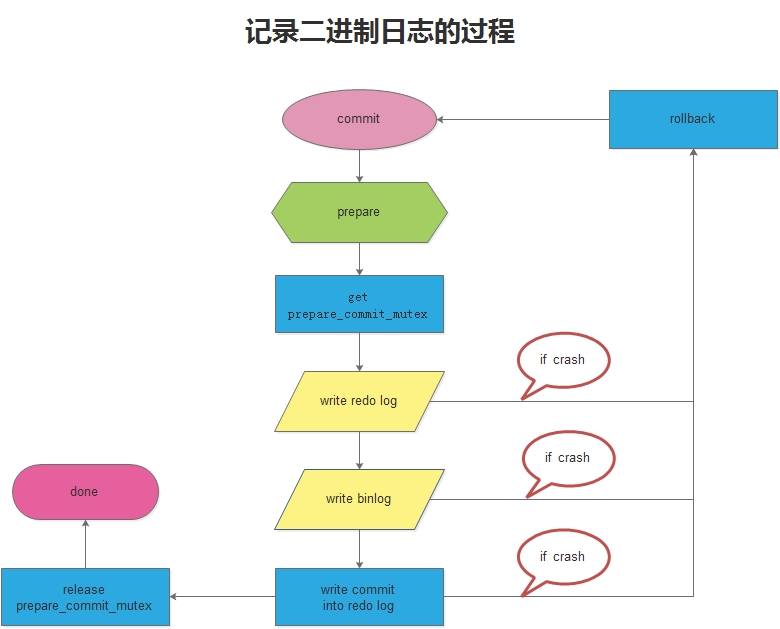
每隔N秒将缓存中的二进制日志记录写回硬盘,默认为0,不过,你经常会陷入group commit函数与I/O之间的二选一矛盾,如果在replication环境中,由于考虑到耐久性及一致性,则需设置为1,同时还需要设置innodb-flush-log-at-trx-commit=1 及 innodb-support-xa=1(默认已开启)
三.二进制的操作及总结
1.暂停二进制日志
set sql_log_bin = {0|1}
2.查看二进制日志
mysqlbinlog master-bin.000001
mysqlbinlog -v master-bin.000001
mysqlbinlog -v master-bin.000001 > test.sql #导出二进制日志到sql脚本
mysqlbinlog -v master-bin.000001 >> test.sql #追加二进制日志到sql脚本
3.mysqlbinlog的命令参数
Usage: mysqlbinlog [options] log-files

  -?, --help          Display this help and exit.

  --base64-output=name

                      Determine when the output statements should be

                      base64-encoded BINLOG statements: 'never' disables it and

                      works only for binlogs without row-based events;

                      'decode-rows' decodes row events into commented

                      pseudo-SQL statements if the --verbose option is also

                      given; 'auto' prints base64 only when necessary (i.e.,

                      for row-based events and format description events).  If

                      no --base64-output[=name] option is given at all, the

                      default is 'auto'.

  --bind-address=name IP address to bind to.

  --character-sets-dir=name

                      Directory for character set files.

  -d, --database=name List entries for just this database (local log only).

  --debug-check       Check memory and open file usage at exit .

  --debug-info        Print some debug info at exit.

  --default-auth=name Default authentication client-side plugin to use.

  -D, --disable-log-bin

                      Disable binary log. This is useful, if you enabled

                      --to-last-log and are sending the output to the same

                      MySQL server. This way you could avoid an endless loop.

                      You would also like to use it when restoring after a

                      crash to avoid duplication of the statements you already

                      have. NOTE: you will need a SUPER privilege to use this

                      option.

  -F, --force-if-open Force if binlog was not closed properly.

                      (Defaults to on; use --skip-force-if-open to disable.)

  -f, --force-read    Force reading unknown binlog events.

  -H, --hexdump       Augment output with hexadecimal and ASCII event dump.

  -h, --host=name     Get the binlog from server.

  -l, --local-load=name

                      Prepare local temporary files for LOAD DATA INFILE in the

                      specified directory.

  -o, --offset=#      Skip the first N entries.

  -p, --password[=name]

                      Password to connect to remote server.

  --plugin-dir=name   Directory for client-side plugins.

  -P, --port=#        Port number to use for connection or 0 for default to, in

                      order of preference, my.cnf, $MYSQL_TCP_PORT,

                      /etc/services, built-in default (3306).

  --protocol=name     The protocol to use for connection (tcp, socket, pipe,

                      memory).

  -R, --read-from-remote-server

                      Read binary logs from a MySQL server. This is an alias

                      for read-from-remote-master=BINLOG-DUMP-NON-GTIDS.

  --read-from-remote-master=name

                      Read binary logs from a MySQL server through the

                      COM_BINLOG_DUMP or COM_BINLOG_DUMP_GTID commands by

                      setting the option to either BINLOG-DUMP-NON-GTIDS or

                      BINLOG-DUMP-GTIDS, respectively. If

                      --read-from-remote-master=BINLOG-DUMP-GTIDS is combined

                      with --exclude-gtids, transactions can be filtered out on

                      the master avoiding unnecessary network traffic.

  --raw               Requires -R. Output raw binlog data instead of SQL

                      statements, output is to log files.

  -r, --result-file=name

                      Direct output to a given file. With --raw this is a

                      prefix for the file names.

  --secure-auth       Refuse client connecting to server if it uses old

                      (pre-4.1.1) protocol.

                      (Defaults to on; use --skip-secure-auth to disable.)

  --server-id=#       Extract only binlog entries created by the server having

                      the given id.

  --server-id-bits=#  Set number of significant bits in server-id

  --set-charset=name  Add 'SET NAMES character_set' to the output.

  -s, --short-form    Just show regular queries: no extra info and no row-based

                      events. This is for testing only, and should not be used

                      in production systems. If you want to suppress

                      base64-output, consider using --base64-output=never

                      instead.

  -S, --socket=name   The socket file to use for connection.

  --start-datetime=name

                      Start reading the binlog at first event having a datetime

                      equal or posterior to the argument; the argument must be

                      a date and time in the local time zone, in any format

                      accepted by the MySQL server for DATETIME and TIMESTAMP

                      types, for example: 2004-12-25 11:25:56 (you should

                      probably use quotes for your shell to set it properly).

  -j, --start-position=#

                      Start reading the binlog at position N. Applies to the

                      first binlog passed on the command line.

  --stop-datetime=name

                      Stop reading the binlog at first event having a datetime

                      equal or posterior to the argument; the argument must be

                      a date and time in the local time zone, in any format

                      accepted by the MySQL server for DATETIME and TIMESTAMP

                      types, for example: 2004-12-25 11:25:56 (you should

                      probably use quotes for your shell to set it properly).

  --stop-never        Wait for more data from the server instead of stopping at

                      the end of the last log. Implicitly sets --to-last-log

                      but instead of stopping at the end of the last log it

                      continues to wait till the server disconnects.

  --stop-never-slave-server-id=#

                      The slave server_id used for --read-from-remote-server

                      --stop-never.

  --stop-position=#   Stop reading the binlog at position N. Applies to the

                      last binlog passed on the command line.

  -t, --to-last-log   Requires -R. Will not stop at the end of the requested

                      binlog but rather continue printing until the end of the

                      last binlog of the MySQL server. If you send the output

                      to the same MySQL server, that may lead to an endless

                      loop.

  -u, --user=name     Connect to the remote server as username.

  -v, --verbose       Reconstruct pseudo-SQL statements out of row events. -v

                      -v adds comments on column data types.

  -V, --version       Print version and exit.

  --open-files-limit=#

                      Used to reserve file descriptors for use by this program.

  -c, --verify-binlog-checksum

                      Verify checksum binlog events.

  --binlog-row-event-max-size=#

                      The maximum size of a row-based binary log event in

                      bytes. Rows will be grouped into events smaller than this

                      size if possible. This value must be a multiple of 256.

  --skip-gtids        Do not print Global Transaction Identifier information

                      (SET GTID_NEXT=... etc).

  --include-gtids=name

                      Print events whose Global Transaction Identifiers were

                      provided.

  --exclude-gtids=name

                      Print all events but those whose Global Transaction

                      Identifiers were provided.
4.删除二进制日志
a.二进制日志会不断的增长,并产生多个文件,因此需要制定备份计划和管理策略,无用的二进制日志要记得及时删除
b.删除二进制日志有三种方法:
1.操作系统命令直接删除
2.reset master
3.purge
purge {master | binary} logs to 'log_name'
purge {master | binary} logs before 'date'
5.总结
a.日志影响mysql的性能有大量的磁盘空间,因此,往往做采样分析时才打开
b.即使做采样分析,也最好仅在一台测试机器上开启
c.二进制日志由于用途广泛,大多数情况下会开启,需要制定合理的备份计划和管理策略
mysql学习------二进制日志的更多相关文章
- mysql学习------二进制日志管理
MySQL二进制日志(Binary Log) a.它包含的内容及作用如下: 包含了所有更新了数据或者已经潜在更新了数据(比如没有匹配任何行的一个DELETE) 包含关于每个更新数据库( ...
- 如何通过Mysql的二进制日志恢复数据库数据
经常有网站管理员因为各种原因和操作,导致网站数据误删,而且又没有做网站备份,结果不知所措,甚至给网站运营和盈利带来负面影响.所以本文我们将和大家一起分享学习下如何通过Mysql的二机制日志(binlo ...
- MySQL使用二进制日志恢复数据库
一.二进制日志简介 MySQL有不同类型的日志,其中二进制文件记录了所有对数据库的修改,如果数据库因为操作不当或其他原因丢失了数据,可以通过二进制文件恢复. 在my.ini文件中设置了log-bin, ...
- mysql删除二进制日志文件
一.RESET MASTER 这个语句可以验证首次配置主机备机是否成功.步骤如下: 1. 启动master和 slave,开启replication (即 复制) 注:replication (复制) ...
- mysql使用二进制日志恢复数据
一.恢复到某个二进制文件 1.开启二进制日志 在mysqld的配置节点下添加如下配置 log-bin="E:/Mysql57BinLog/binlog"(windows下的路径,l ...
- MYSQL使用二进制日志来恢复数据
mysqlbinlog工具的使用,大家可以看MySQL的帮助手册.里面有详细的用, 在这个例子中,重点是--start-position参数和--stop-position参数的使用. ·--star ...
- Mysql清理二进制日志的技巧
1:二进制日志 二进制日志记录了所有的DDL(数据定义语言)语句和DML(数据操作语言)语句,但是不记录包括数据查询的语句.语句以"事件"的形式保存,它描述了数据的更改过程,此日志 ...
- mysql学习------错误日志和通用查询日志
一.启动错误日志 1.在不同情况下,错误日志会记录在不同的位置.如果没有在配置文件中指定文件名,则文件名默认为hostname.err 2.在mysql5.6的rpm发布方式中,错误的日志默认的放置在 ...
- Mysql binlog二进制日志
Mysql binlog日志有三种格式,分别为Statement,MiXED,以及ROW! 1.Statement:每一条会修改数据的实际原sql语句都会被记录在binlog中. 优点:不需要记录每一 ...
随机推荐
- C语言和go语言之间的交互 - C语言中使用go语言,使用的go语言又使用了c语言
一.go语言中使用C语言 go代码中使用C代码,在go语言的函数块中,以注释的方式写入C代码,然后紧跟import “C” 即可在go代码中使用C函数 代码示例: go代码:testC.go 1 pa ...
- Software-Defined Networking:A Comprehensive Survey--Day2
Software-Defined Networking:A Comprehensive Survey (续+1s) IV. SOFTWARE-DEFINED NETWORKS: BOTTOM-UP S ...
- PAT 甲级 1022 Digital Library
https://pintia.cn/problem-sets/994805342720868352/problems/994805480801550336 A Digital Library cont ...
- Cloudstack 的搭建
Note: 关闭了NFS Storage 的防火墙 service iptables stop 1. 新创建的Linux没有获取IP; vi /etc/sysconfig/network-script ...
- 5 vue-cli整合axios的几种方法
vue-cli配置axios https://www.cnblogs.com/rinzoo/p/7880525.html https://www.cnblogs.com/XHappyness/p/76 ...
- 提升jmeter自身性能
JMeter负载测试时使用GUI界面和较多的收集测试结果的监听器容易造成jmeter的性能瓶颈,远程测试时的控制台尤为明显.提升JMeter负载测试时性能的方法如下: 官方的解决办法:http://j ...
- 理解 Continuation
理解 Continuation (2012-08-26 10:39:34) 终于,我也不能免俗地要来谈谈这几个 Schemer 的必谈话题(顺便山寨了一个标题). Scheme 是一门神奇的编 ...
- 「BJWC2018」Border 的四种求法
「BJWC2018」Border 的四种求法 题目描述 给一个小写字母字符串 \(S\) ,\(q\) 次询问每次给出 \(l,r\) ,求 \(s[l..r]\) 的 Border . \(1 \l ...
- 再谈Scala集合
集合!集合!一个现代语言平台上的程序员每天代码里用的最多的大概就是该语言上的集合类了,Scala的集合丰富而强大,至今无出其右者,所以这次再回过头再梳理一下. 本文原文出处: 还是先上张图吧,这是我 ...
- bzoj 4664: Count
这道题和bzoj上一道叫魔法碰撞的题很像,只不过做法更加巧妙了. 一开始的想法是$f[i][j][k][0/1/2]$表示后i个数有j段当前混乱程度为k的方案,最后一维表示边界还能放几个. 转移的时候 ...