
Apache shiro权限基本使用
l shiro框架的核心功能:认证、授权、会话管理、加密
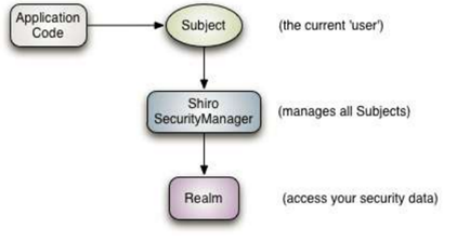
Application Code:应用程序代码,由开发人员负责开发的
Subject:框架提供的接口,代表当前用户对象
SecurityManager:框架提供的接口,代表安全管理器对象
Realm:可以开发人员编写,框架也提供一些,类似于DAO,用于访问权限数据
一 、在pom中引入相关依赖
1 <!-- 引入shiro框架的依赖 -->

2 <dependency>

3     <groupId>org.apache.shiro</groupId>

4     <artifactId>shiro-all</artifactId>

5     <version>1.2.2</version>

6 </dependency>
二、在web.xml中配置spring框架提供的用于整合shiro框架的过滤器
<!-- 配置shiro框架,进行权限认证 -->

  <filter>

      <filter-name>shiroFilter</filter-name>

      <filter-class>org.springframework.web.filter.DelegatingFilterProxy</filter-class>

  </filter>

  <filter-mapping>

      <filter-name>shiroFilter</filter-name>

      <url-pattern>/*</url-pattern>

  </filter-mapping>
三、在spring配置文件中配置bean,id为shiroFilter
 1 <!-- 配置shiro框架过滤器工厂对象 -->

 2     <bean id="shiroFilter" class="org.apache.shiro.spring.web.ShiroFilterFactoryBean">

 3         <!-- 注入安全管理器对象 -->

 4         <property name="securityManager" ref="securityManager"></property>

 5         <!-- 注入相关页面的url -->

 6         <property name="loginUrl" value="/login.jsp"></property>

 7         <property name="successUrl" value="/index.jsp"></property>

 8         <property name="unauthorizedUrl" value="/unauthorized.jsp"></property>

 9         <!-- 注入url拦截规整 -->

10         <property name="filterChainDefinitions">

11             <value>

12                 /css/** anon

13                 /js/** = anon

14                 /images/** = anon

15                 /validatecode.jsp* = anon

16                 /login.jsp = anon

17                 /userAction_login.action = anon

18                 /page_base_staff.action = perms["staff-list"]

19                 /* = authc

20             </value>

21         </property>

22     </bean>
1 <!-- 注册安全管理器对象 -->

2 <bean id="securityManager" class="org.apache.shiro.web.mgt.DefaultWebSecurityManager">

3         <property name="realm" ref="borRealm"></property>

4         <!-- 注入缓存管理器 -->

5         <property name="cacheManager" ref="ehCacheManager"></property>

6 </bean>
<!-- 注册realm -->

    <bean id="borRealm" class="com.itheima.bos.realm.BOSRealm"></bean>
1 <!-- 开启shrio框架注解支持 -->

2     <bean id="defaultAdvisorAutoProxyCreator" class="org.springframework.aop.framework.autoproxy.DefaultAdvisorAutoProxyCreator">

3         <!-- 强制使用cglib代理,为Action对象创建代理对象 -->

4         <property name="proxyTargetClass" value="true"></property>

5     </bean>

6     <!-- 配置shrio框架提供的切面类,用于创建代理对象 -->

7     <bean id="" class="org.apache.shiro.spring.security.interceptor.AuthorizationAttributeSourceAdvisor"/>
1 <!-- 注册缓存管理器 -->

2     <bean id="ehCacheManager" class="org.apache.shiro.cache.ehcache.EhCacheManager">

3         <property name="cacheManagerConfigFile" value="classpath:ehcache.xml"></property>

4     </bean>
四、修改login方法
 1 public String login() {

 2         //校验验证码是否通过

 3         HttpSession session = ServletActionContext.getRequest().getSession();

 4         String key = (String) session.getAttribute("key");

 5         if(StringUtils.equals(checkcode, key)) {

 6             //使用shrio框架提供的方式进行验证

 7             Subject subject = SecurityUtils.getSubject();//获得当前用户对象,状态为 未认证

 8             AuthenticationToken token = new UsernamePasswordToken(model.getUsername(),MD5Utils.md5(model.getPassword()));//创建用户名和密码令牌对象

 9             try {

10                 subject.login(token);

11             } catch (Exception e) {

12                 e.printStackTrace();

13                 return LOGIN;

14             }

15             User user = (User) subject.getPrincipal();

16             session.setAttribute("loginUser", user);

17             return HOME;

18         }else {

19             //验证码错误

20             this.addActionError("输入验证码错误");

21             return LOGIN;

22         }

23     }
五、自定义realm,并注入给安全管理器
 1 public class BOSRealm extends AuthorizingRealm {

 2     @Autowired

 3     private UserDao userDao;

 4     @Autowired

 5     private FunctionDao functionDao;

 6

 7     //认证

 8     @Override

 9     protected AuthenticationInfo doGetAuthenticationInfo(AuthenticationToken token) throws AuthenticationException {

10         System.out.println("自定义的认证方法执行了");

11         UsernamePasswordToken passwordToken = (UsernamePasswordToken) token;

12         //获得页面输入的用户名

13         String username = passwordToken.getUsername();

14         //根据用户名密码查询数据库中的密码

15         User user = userDao.findUserByUsername(username);

16         if(user == null) {

17             //页面输入的用户名不存在

18             return null;

19         }

20         //简单认证信息对象

21         AuthenticationInfo info = new SimpleAuthenticationInfo(user,user.getPassword(),this.getName());

22         return info;

23     }

24     //授权

25     @Override

26     protected AuthorizationInfo doGetAuthorizationInfo(PrincipalCollection principalCollection) {

27         SimpleAuthorizationInfo info = new SimpleAuthorizationInfo();

28         //为用户授权

29         //info.addStringPermission("staff-list");

30         //根据当前登录用户查询数据库,获取实际对应的权限

31         User user = (User) SecurityUtils.getSubject().getPrincipal();//获取当前登录用户对象

32         //User user2 = (User) principalCollection.getPrimaryPrincipal();

33         List<Function> list = null;

34         if(user.getUsername().equals("admin")) {

35             DetachedCriteria detachedCriteria = DetachedCriteria.forClass(Function.class);

36             list = functionDao.findByCriteria(detachedCriteria );

37         }else {

38             list = functionDao.findFunctionListByUserId(user.getId());

39         }

40         for(Function function : list) {

41             info.addStringPermission(function.getCode());

42         }

43         return info;

44     }

45 }
六、在方法上使用注解
1 //批量删除

2     @RequiresPermissions("staff-delete")//执行这个方法,需要staff-delete权限

3     public String deleteBatch() {

4         staffService.deleteBatch(ids);

5         return LIST;

6     }
Apache shiro权限基本使用的更多相关文章
- Apache Shiro权限框架在SpringMVC+Hibernate中的应用
在做网站开发中,用户权限必须要考虑的,权限这个东西很重要,它规定了用户在使用中能进行哪 些操作,和不能进行哪些操作:我们完全可以使用过滤器来进行权限的操作,但是有了权限框架之后,使用起来会非常的方便, ...
- SpringBoot整合Apache Shiro权限验证框架
比较常见的权限框架有两种,一种是Spring Security,另一种是Apache Shiro,两种框架各有优劣,个人感觉Shiro更容易使用,更加灵活,也更符合RABC规则,而且是java官方更推 ...
- Apache Shiro 权限框架
分享一个视屏教程集合 http://www.tudou.com/home/konghao/item 1.Shiro Apache Shiro是一个强大且易用的Java安全框架,执行身份验证.授权.密码 ...
- SpringBoot + Apache Shiro权限管理
之前配置过Spring + SpringMVC + JPA + Shiro后台权限管理 + VUE前台登录页面的框架,手动配置各种.xml,比较繁琐,前几天写了个SpringBootShiro的Dem ...
- 关于Apache Shiro权限框架的一些使用误区的解释
多了不说了,进入正题,shiro是个权限框架提供权限管理等功能,网上的教程一般都是互相抄,比如<shiro:principal property="xxx"/>这个标签 ...
- Apache Shiro和Spring Security的详细对比
参考资料: 1)Apache Shiro Apache Shiro:http://shiro.apache.org/ 在Web项目中应用 Apache Shiro:http://www.ibm.com ...
- 快速搭建Spring Boot + Apache Shiro 环境
个人博客网:https://wushaopei.github.io/ (你想要这里多有) 一.Apache Shiro 介绍及概念 概念:Apache Shiro是一个强大且易用的Java安全框 ...
- Apache Shiro 开源权限框架
在 Web 项目中应用 Apache Shiro 开源权限框架 Apache Shiro 是功能强大并且容易集成的开源权限框架,它能够完成认证.授权.加密.会话管理等功能.认证和授权为权限控制的核心, ...
- 将 Shiro 作为应用的权限基础 五:SpringMVC+Apache Shiro+JPA(hibernate)整合配置
配置web.xml,applicationContext.xml, spring-mvc.xml,applicationContext-shiro.xml,而且都有详细的说明. Web.xml是web ...
随机推荐
- Java I/O体系从原理到应用(非原创)
基础概念 在介绍I/O原理之前,先重温几个基础概念: 1 操作系统与内核 操作系统:管理计算机硬件与软件资源的系统软件内核:操作系统的核心软件,负责管理系统的进程.内存.设备驱动程序.文件和网络系统等 ...
- 华为SEO搜索引擎主管招聘内容
http://www.wocaoseo.com/thread-166-1-1.html 华为SEO搜索引擎主管招聘内容: 职位职责 1. 提出全站的SEO策略和实施计划,推动和监督计划实施:负责提升各 ...
- C语言如何动态分配二维数组
C语言如何动态分配二维数组(转载) 原文链接:https://www.cnblogs.com/0xWitch/p/9314621.html 使用malloc().free()函数进行动态分配,这两个函 ...
- 认识JavaScript中Let和Var的区别
本文转载自:https://www.cnblogs.com/songzxblog/p/11137117.html
- 善用Bash history 命令
大家好,我是良许 相信大家平时都有用 history 命令来查看命令历史记录,但是实际上 history 命令并非只有这个功能,history 还有很多有用的功能.尤其是 Bash 版本的 histo ...
- Android中_TextView属性的XML详解 包括单行显示等等。
<pre name="code" class="html">属性名称 描述 android:autoLink 设置是否当文本为URL链接/email ...
- 发生错误 1069 sqlserver
---------------------------SQL Server 服务管理器---------------------------发生错误 1069 - (由于登录失败而无法启动服务.),此 ...
- Mysql业务设计(物理设计)
物理设计 根据所选择的关系型数据库的特点对逻辑模型进行存储结构的设计 物理设计: 定义数据库.表及字段的命名规范 选择合适的存储引擎 为表中的字段选择合适的数据类型 建立数据库结构 定义数据库.表及字 ...
- C++STL中vector的初始化
vector的初始化有很多方式,在N维初始化时还会一些容易出现错误的地方.下面进行总结 以下的总结均以int作为模板参数 一维vector的初始化 vector的构造函数通常来说有五种,如下: vec ...
- 20190925-05Redis五大数据类型之String 000 026