
git alias all in one
git alias all in one
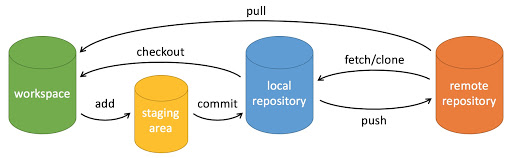
workspace:工作区
staging area:暂存区/缓存区
local repository:或本地仓库
remote repository:远程仓库
what's git commit -a -m meanings?
git commit -a -m
-a === --all
-m === --message
$ git commit -h

usage: git commit [<options>] [--] <pathspec>...

    -q, --quiet           suppress summary after successful commit

    -v, --verbose         show diff in commit message template

Commit message options

    -F, --file <file>     read message from file

    --author <author>     override author for commit

    --date <date>         override date for commit

    -m, --message <message>

                          commit message

    -c, --reedit-message <commit>

                          reuse and edit message from specified commit

    -C, --reuse-message <commit>

                          reuse message from specified commit

    --fixup <commit>      use autosquash formatted message to fixup specified commit

    --squash <commit>     use autosquash formatted message to squash specified commit

    --reset-author        the commit is authored by me now (used with -C/-c/--amend)

    -s, --signoff         add Signed-off-by:

    -t, --template <file>

                          use specified template file

    -e, --edit            force edit of commit

    --cleanup <mode>      how to strip spaces and #comments from message

    --status              include status in commit message template

    -S, --gpg-sign[=<key-id>]

                          GPG sign commit

Commit contents options

    -a, --all             commit all changed files

    -i, --include         add specified files to index for commit

    --interactive         interactively add files

    -p, --patch           interactively add changes

    -o, --only            commit only specified files

    -n, --no-verify       bypass pre-commit and commit-msg hooks

    --dry-run             show what would be committed

    --short               show status concisely

    --branch              show branch information

    --ahead-behind        compute full ahead/behind values

    --porcelain           machine-readable output

    --long                show status in long format (default)

    -z, --null            terminate entries with NUL

    --amend               amend previous commit

    --no-post-rewrite     bypass post-rewrite hook

    -u, --untracked-files[=<mode>]

                          show untracked files, optional modes: all, normal, no. (Default: all)
refs
xgqfrms 2012-2020
www.cnblogs.com 发布文章使用:只允许注册用户才可以访问!
git alias all in one的更多相关文章
- git Alias 设置
git Alias 设置 Git 使用比較多的话能够设置一些命令的 Alias ,简单的说就是用简写取代整个完整的命令. 如co 代表 checkout. Mac下,到根文件夹 cd ~ 然后 vi ...
- git config文件总结及git alias配置
1. 文件位置 mac /etc/.gitconfig 系统级~/.gitconifg 用户级(覆盖系统级) windows C:\Users\$user\.gitconfig 当前项目下 .git/ ...
- zsh & git alias
zsh & git alias $ code .zshrc $ code .bash_profile $ code ~/.oh-my-zsh # update changes $ source ...
- git alias & zsh
git alias & zsh VPN & git work tree # git pull === gp ➜ .git git:(feature/select-seat-system ...
- git别名;git配置使用shell函数;git别名使用shell函数;git获取当前分支;git alias
获取当前分支 git symbolic-ref -q --short HEAD 2. 在git别名里使用shell函数,$1获取第一个参数的值,$2……$n依次类推,根据自己习惯需要定制 3. 提交r ...
- git 设置别名 git alias
git config --global alias.st status git config --global alias.ck checkout git config --global alias. ...
- git alias
alias|grep git g=git ga='git add' gaa='git add --all' gapa='git add --patch' gb='git branch' gba='gi ...
- git alias和gitconfig配置
[alias] st = status -sb co = checkout br = branch mg = merge ci = commit ds = diff --staged dt = dif ...
- Git tricks: Unstaging files
NOTE: Following content is directly reprinted from http://andrewberls.com/blog/post/git-tricks-unsta ...
随机推荐
- __init__ raises an exception, then __del__ will still be called
issue 808164: socket.close() doesn't play well with __del__ - Python tracker https://bugs.python.org ...
- (006)每日SQL学习:关于to_char函数
to_char函数的官方文档说明: 详细to_char请移步:https://www.cnblogs.com/reborter/archive/2008/11/28/1343195.html 需求:n ...
- javamail发送邮件,支持yahoo,google,163.com,qq.com邮件发送
https://www.iteye.com/blog/fangyunfeng-1847352 https://blog.csdn.net/weixin_38465623/article/details ...
- Location和Content-Location
div.example { background-color: rgba(229, 236, 243, 1); color: rgba(0, 0, 0, 1); padding: 0.5em; mar ...
- 【LinuxShell】echo用法详解
使用echo打印信息到终端 1 [Shell]echo "yz test" 2 yz test 3 [Shell]echo yz test 4 yz test 5 [Shell]e ...
- 快速计算C(n,r)
在网上见的,引用出处为:http://blog.csdn.net/alexingcool/article/details/7997599 可以在logn内计算出,但是容易溢出. [cpp] view ...
- Spring听课笔记(tg)AOP
好文:https://blog.csdn.net/javazejian/article/details/56267036 通过一个实例来理解 1. 需求:实现算术计算器,可以加减乘除,同时记录日志 ...
- 改造xxl-job的客户端日志文件生成体系
为什么要改造XXL-JOB原有的日志文件生成体系 xxl-job原本自己的客户端日志文件生成策略是:一个日志记录就生成一个文件,也就是当数据库存在一条日志logId,对应的客户端就会生成一个文件, ...
- flutter环境部署
一,xcode开发环境配置问题记录 1,Signing for "Runner" requires a development team xcode需要配置AppleID: 1,X ...
- python join()方法的使用,可以应用到tcp压测发送指定数据长度的应用
Python join() 方法用于将序列中的元素以指定的字符连接生成一个新的字符串.其中,序列中的元素应是字符串类型. 学习join()方法主要是为了配合随机数的使用,生产某个指定位数的随机数,在t ...