
git alias all in one
git alias all in one
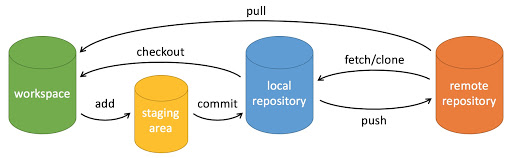
workspace:工作区
staging area:暂存区/缓存区
local repository:或本地仓库
remote repository:远程仓库
what's git commit -a -m meanings?
git commit -a -m
-a === --all
-m === --message
$ git commit -h

usage: git commit [<options>] [--] <pathspec>...

    -q, --quiet           suppress summary after successful commit

    -v, --verbose         show diff in commit message template

Commit message options

    -F, --file <file>     read message from file

    --author <author>     override author for commit

    --date <date>         override date for commit

    -m, --message <message>

                          commit message

    -c, --reedit-message <commit>

                          reuse and edit message from specified commit

    -C, --reuse-message <commit>

                          reuse message from specified commit

    --fixup <commit>      use autosquash formatted message to fixup specified commit

    --squash <commit>     use autosquash formatted message to squash specified commit

    --reset-author        the commit is authored by me now (used with -C/-c/--amend)

    -s, --signoff         add Signed-off-by:

    -t, --template <file>

                          use specified template file

    -e, --edit            force edit of commit

    --cleanup <mode>      how to strip spaces and #comments from message

    --status              include status in commit message template

    -S, --gpg-sign[=<key-id>]

                          GPG sign commit

Commit contents options

    -a, --all             commit all changed files

    -i, --include         add specified files to index for commit

    --interactive         interactively add files

    -p, --patch           interactively add changes

    -o, --only            commit only specified files

    -n, --no-verify       bypass pre-commit and commit-msg hooks

    --dry-run             show what would be committed

    --short               show status concisely

    --branch              show branch information

    --ahead-behind        compute full ahead/behind values

    --porcelain           machine-readable output

    --long                show status in long format (default)

    -z, --null            terminate entries with NUL

    --amend               amend previous commit

    --no-post-rewrite     bypass post-rewrite hook

    -u, --untracked-files[=<mode>]

                          show untracked files, optional modes: all, normal, no. (Default: all)
refs
xgqfrms 2012-2020
www.cnblogs.com 发布文章使用:只允许注册用户才可以访问!
git alias all in one的更多相关文章
- git Alias 设置
git Alias 设置 Git 使用比較多的话能够设置一些命令的 Alias ,简单的说就是用简写取代整个完整的命令. 如co 代表 checkout. Mac下,到根文件夹 cd ~ 然后 vi ...
- git config文件总结及git alias配置
1. 文件位置 mac /etc/.gitconfig 系统级~/.gitconifg 用户级(覆盖系统级) windows C:\Users\$user\.gitconfig 当前项目下 .git/ ...
- zsh & git alias
zsh & git alias $ code .zshrc $ code .bash_profile $ code ~/.oh-my-zsh # update changes $ source ...
- git alias & zsh
git alias & zsh VPN & git work tree # git pull === gp ➜ .git git:(feature/select-seat-system ...
- git别名;git配置使用shell函数;git别名使用shell函数;git获取当前分支;git alias
获取当前分支 git symbolic-ref -q --short HEAD 2. 在git别名里使用shell函数,$1获取第一个参数的值,$2……$n依次类推,根据自己习惯需要定制 3. 提交r ...
- git 设置别名 git alias
git config --global alias.st status git config --global alias.ck checkout git config --global alias. ...
- git alias
alias|grep git g=git ga='git add' gaa='git add --all' gapa='git add --patch' gb='git branch' gba='gi ...
- git alias和gitconfig配置
[alias] st = status -sb co = checkout br = branch mg = merge ci = commit ds = diff --staged dt = dif ...
- Git tricks: Unstaging files
NOTE: Following content is directly reprinted from http://andrewberls.com/blog/post/git-tricks-unsta ...
随机推荐
- CentOS安装mysql、JDK、Tomcat部署环境
1.1. 安装mysql-5.6 1.1.1. 检测系统内部有没有安装其他的mysql数据库 $ rpm -qa | grep mysql 1.1.2. 如果内部有需要先删除Mysql $ yum r ...
- (Oracle)已有数据表建立表分区—在线重定义
今天在做数据抽取的时候,发现有一张业务表数据量达到了5000W,所以就想将此表改为分区表.分区表的有点如下: 1.改善查询性能:对分区对象的查询可以仅搜索自己关心的分区,提高检索速度.2.增强可用性: ...
- 腾讯libco协程原理
https://blog.csdn.net/GreyBtfly/article/details/83688420 堆栈 https://blog.csdn.net/lqt641/article/det ...
- MongoTemplate聚合(一)$lookup
mongodb 最近入职了新的公司,新公司统一使用的mongodb,es等非关系型数据库.以前对es有一些了解,其实就是灵活的文档类型结构,不受限于关系型数据库的那种字段唯一确定的"死板 ...
- 编写高性能Java代码的最佳实践
博客地址: http://blog.csdn.net/dev_csdn/article/details/79033972
- 19.损坏磁盘阵列及修复&磁盘阵列+备份盘
1.在确认有一块物理硬盘设备出现损坏而不能继续正常使用后,应该使用mdadm 命令将其移除,然后查看RAID 磁盘阵列的状态,可以发现状态已经改变. [root@Centos ~]# mdadm /d ...
- docker部署 springboot 多模块项目+vue
之前学习了docker,今天就来试试将这个项目打包成docker镜像并通过运行一个镜像来运行项目.这里使用的项目是el-admin.是一个开源的springboot后端管理框架(前端vue),有兴趣的 ...
- HDU5740 Glorious Brilliance【最短路 KM匹配】
HDU5740 Glorious Brilliance 题意: 给出一张不一定合法的染色图,每次可以交换相邻两点的颜色,问最少多少次能使染色图合法 合法的染色图相邻点的颜色不能相同 题解: 首先要确定 ...
- poj 3436 ACM Computer Factory 最大流+记录路径
题目 题意: 每一个机器有一个物品最大工作数量,还有一个对什么物品进行加工,加工后的物品是什么样.给你无限多个初始都是000....的机器,你需要找出来经过这些机器操作后最多有多少成功的机器(111. ...
- PowerShell随笔2---初始命令
PowerShell便捷之处 PowerShell中兼容运行cmd的命令,比如 ipconfig.ping命令等 PowerShell的命令更友好,可读性更强.比如停止一个服务 CMD命令:sc st ...