
[Java] - Google API调用
由于Google已经完成被墙,要上Google必需使用代理或VPN。
这里使用的是Google的GoAgent代理做开发。(如何使用GoAgent,这里不写了,忽略500字。。。。。)
本地测试的GoAgent地址为:127.0.0.1:8087
一、Google的API设置
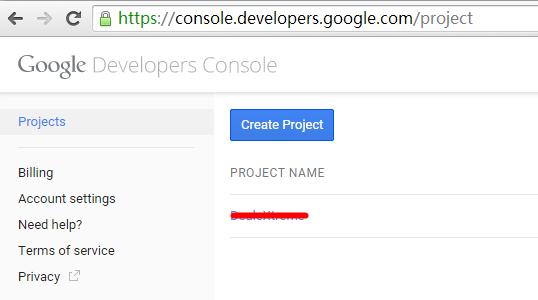
1、首先需要在Google的控制台中设置新增好Project,设置地址:
https://console.developers.google.com
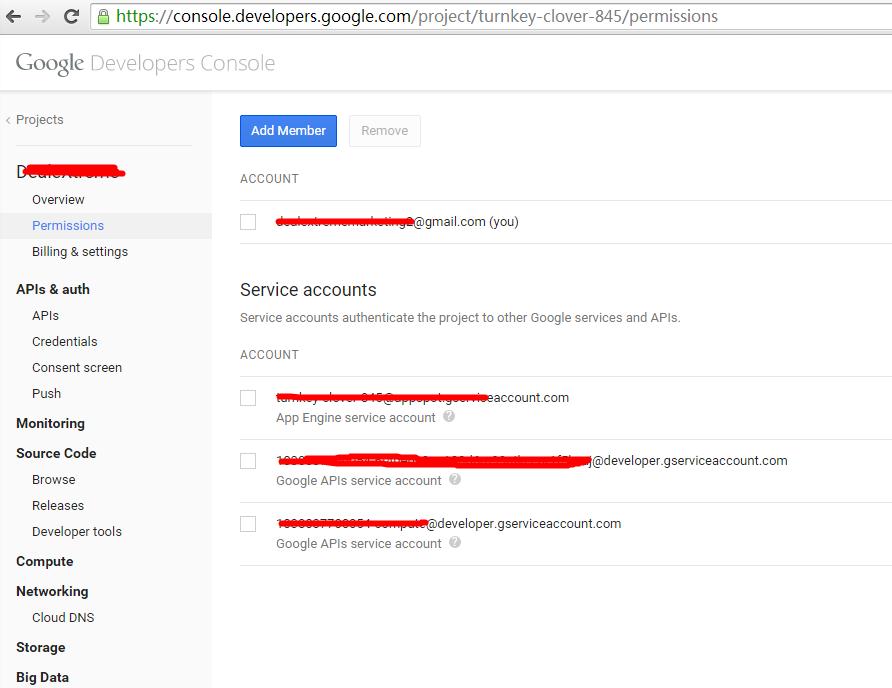
2、在Permissions中设置好Service Account:
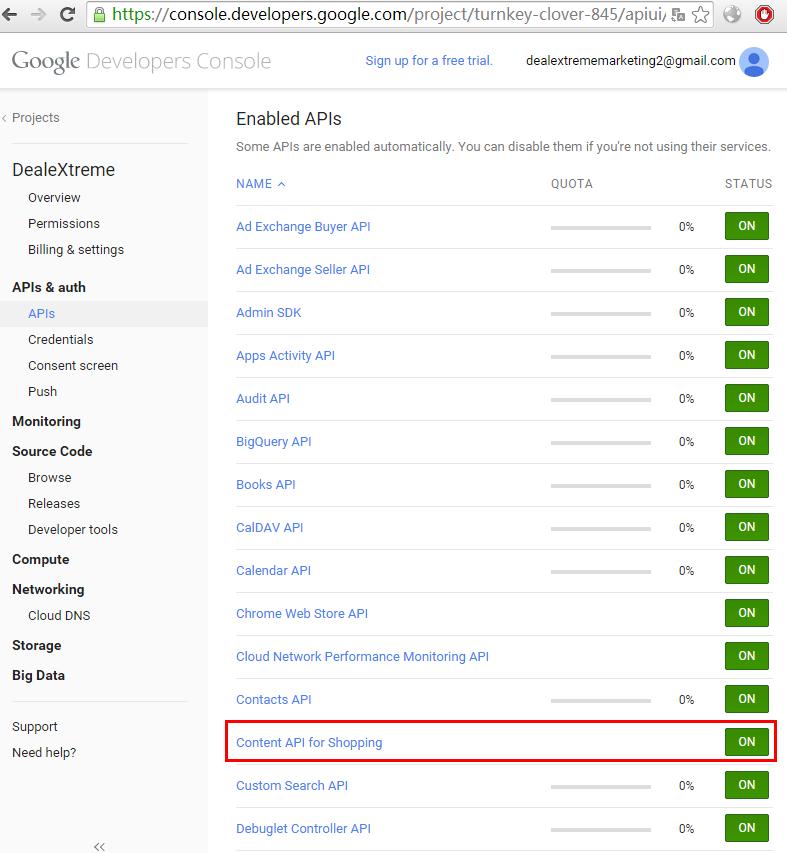
3、在APIs & Auth -> APIs中,加入所需要开放的API,如本例中使用的是ShoppingContent:
4、在APIs & Auth -> credential中生成或新增对应的键值或证书:
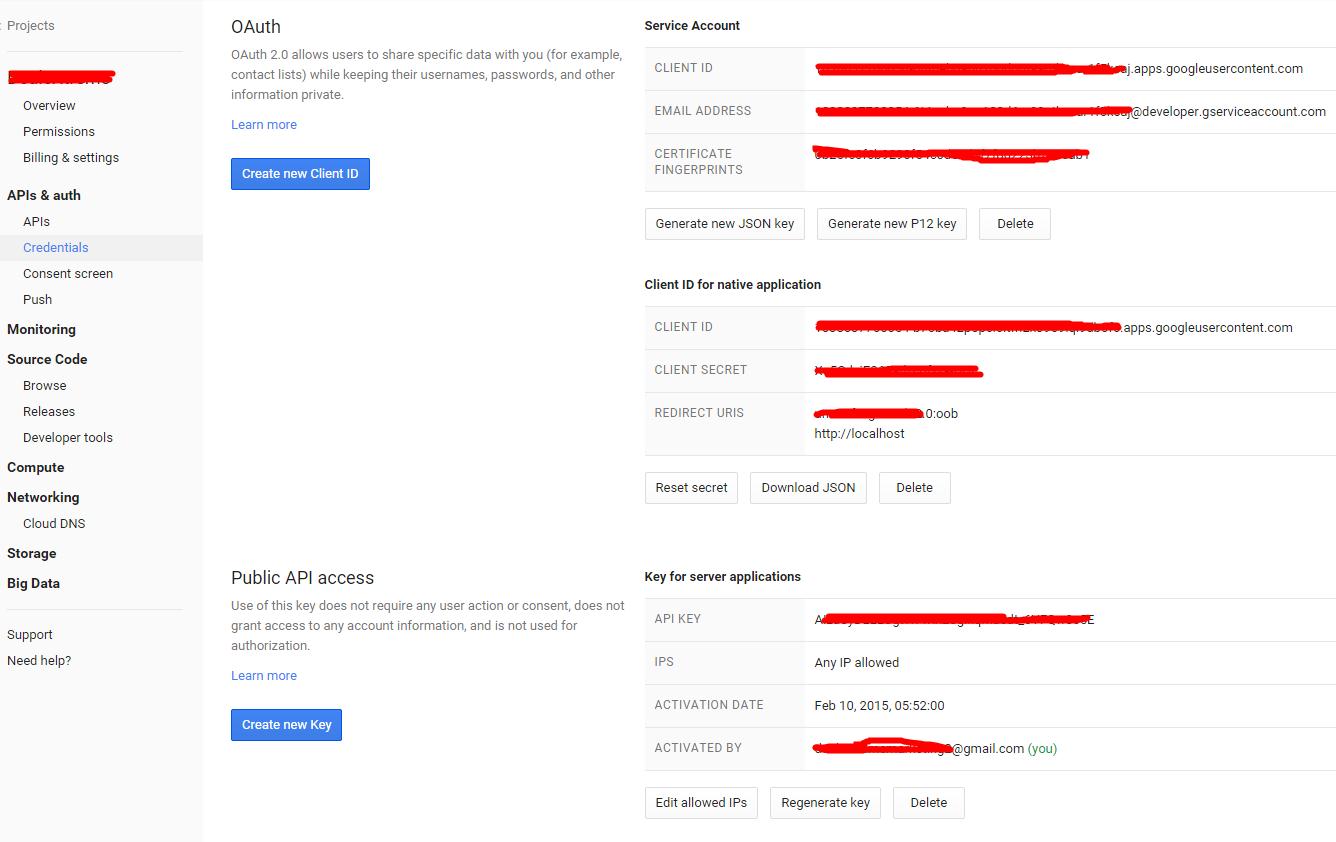
我这里使用的是证书形式的调用,证书的生成在Public API access当中。点生成证书key后,会导出一个p12证书。保存好这个证书到项目当中。
二、获取Google HTTPS证书,并导入到Java JRE里头信认此证书
因为使用java访问google API是以https形式访问的,默认情况下,google的证书是不被信认的。所以需要先把google https的证书添加到java信认证书当中。
1、首先使用chrome打开这个地址:https://accounts.google.com
2、点击地址栏上的绿色锁:
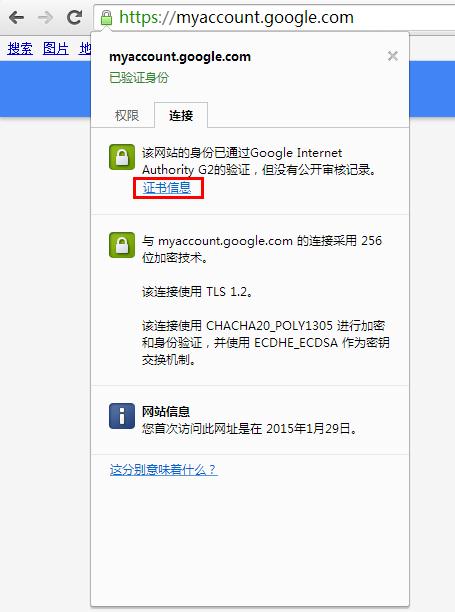
3、导出https证书保存成文件:
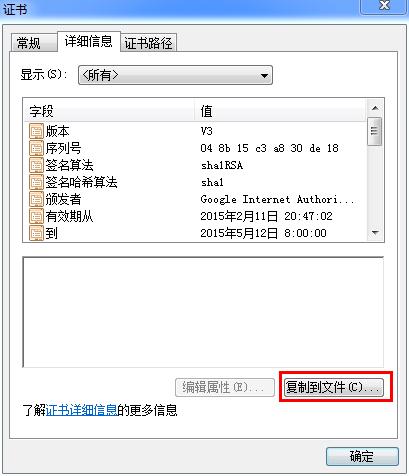
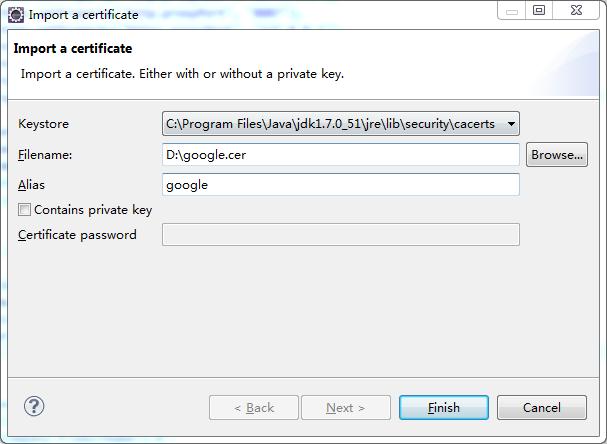
比如说我这里保存的文件是:google.cer
4、eclipse安装插件:net.sourceforge.keytool.plugin_1.4.2.jar
插件哪里下载,自行搜索。在http://sourceforge.net/中可以下到。
如何安装eclipse插件这里忽略。
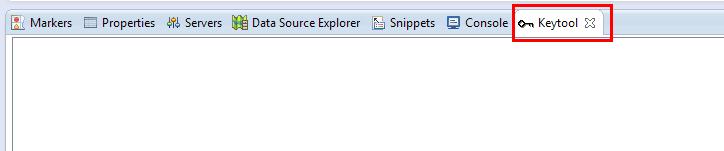
安装完后,可以在eclipse中看到:
工具栏:

下面窗口:
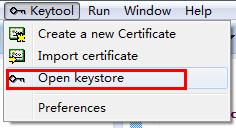
5、打开java的jdk证书文件,在eclipse中:
弹出窗口:
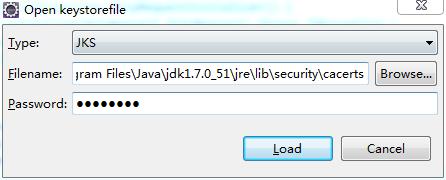
例如我本机的FileName中的位置是:C:\Program Files\Java\jdk1.7.0_51\jre\lib\security\cacerts
这里不要选错了,是JDK下的JRE下的lib,不要直接选到JRE下的lib。
默认密码为:changeit
打开后,将看到如下内容:
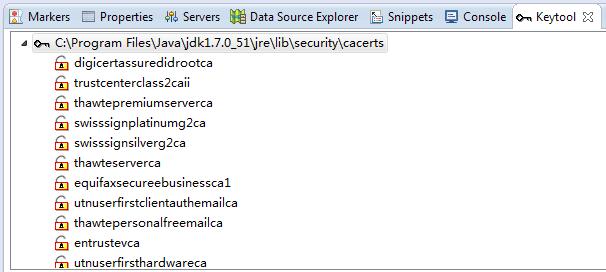
6、导入证书。右键->Import certificate
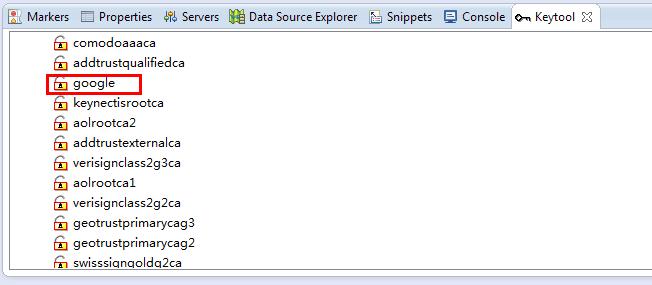
成功导入后将看到:
三、编码
1、eclipse新建一个maven项目。(如何在eclipse新建maven项目这里忽略,使用maven是方便下载jar包,也可以自行上网搜索下载比较烦锁)
这里使用的是Google API的ShoppingContent做例子,所以下的Jar包为ShoppingContent,使用别的API,需要自行修改
pom.xml内容为:
<project xmlns="http://maven.apache.org/POM/4.0.0" xmlns:xsi="http://www.w3.org/2001/XMLSchema-instance"

  xsi:schemaLocation="http://maven.apache.org/POM/4.0.0 http://maven.apache.org/xsd/maven-4.0.0.xsd">

  <modelVersion>4.0.0</modelVersion>

  <groupId>com.my.maven.googleapi</groupId>

  <artifactId>testapi</artifactId>

  <version>0.0.1-SNAPSHOT</version>

  <packaging>jar</packaging>

  <name>testapi</name>

  <url>http://maven.apache.org</url>

  <properties>

    <project.build.sourceEncoding>UTF-8</project.build.sourceEncoding>

  </properties>

  <dependencies>

    <dependency>

      <groupId>junit</groupId>

      <artifactId>junit</artifactId>

      <version>3.8.1</version>

      <scope>test</scope>

    </dependency>

    <dependency>

      <groupId>com.google.api-client</groupId>

      <artifactId>google-api-client</artifactId>

      <version>1.19.0</version>

    </dependency>

    <dependency>

        <groupId>com.google.http-client</groupId>

        <artifactId>google-http-client-jackson2</artifactId>

        <version>1.19.0</version>

    </dependency>

    <dependency>

      <groupId>com.google.apis</groupId>

      <artifactId>google-api-services-content</artifactId>

      <version>v2-rev33-1.19.1</version>

    </dependency>

  </dependencies>

</project>
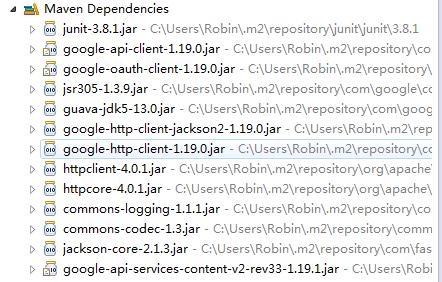
下载完后的jar包大致会有这些:
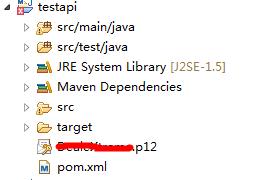
2、把p12证书文件也放到项目当中:
3、Java测试类:
package com.my.maven.googleapi.testapi;

import java.io.File;

import java.io.IOException;

import java.io.InputStreamReader;

import java.io.Reader;

import java.math.BigInteger;

import java.net.URL;

import java.net.URLConnection;

import java.security.cert.X509Certificate;

import java.util.Collections;

import java.util.Properties;

import javax.net.ssl.HostnameVerifier;

import javax.net.ssl.HttpsURLConnection;

import javax.net.ssl.SSLContext;

import javax.net.ssl.SSLSession;

import javax.net.ssl.TrustManager;

import javax.net.ssl.X509TrustManager;

import com.google.api.client.auth.oauth2.Credential;

import com.google.api.client.googleapis.auth.oauth2.GoogleCredential;

import com.google.api.client.googleapis.javanet.GoogleNetHttpTransport;

import com.google.api.client.http.HttpRequest;

import com.google.api.client.http.HttpRequestInitializer;

import com.google.api.client.http.HttpTransport;

import com.google.api.client.http.javanet.NetHttpTransport;

import com.google.api.client.json.JsonFactory;

import com.google.api.client.json.jackson2.JacksonFactory;

import com.google.api.services.content.ShoppingContent;

import com.google.api.services.content.ShoppingContentScopes;

import com.google.api.services.content.model.Product;

/**

 * Hello world!

 *

 */

public class App {

    public static void main(String[] args) throws Exception {

        String strJavaHome = System.getProperty("java.home");

        Properties systemProperties = System.getProperties();

        systemProperties.setProperty("http.proxyHost", "127.0.0.1");

        systemProperties.setProperty("http.proxyPort", "8087");

        systemProperties.setProperty("https.proxyHost", "127.0.0.1");

        systemProperties.setProperty("https.proxyPort", "8087");

        systemProperties.setProperty("socksProxyHost", "127.0.0.1");

        systemProperties.setProperty("socksProxyPort", "8087");

        System.setProperty("sun.net.client.defaultConnectTimeout", String.valueOf(900000));// (单位:毫秒)

        final Credential credential = authorize();

        ShoppingContent service = new ShoppingContent.Builder(HTTP_TRANSPORT, JSON_FACTORY, credential)

                .setApplicationName(APPLICATION_NAME)

//                .setHttpRequestInitializer(new HttpRequestInitializer() {

//                    public void initialize(HttpRequest httpRequest) throws IOException {

//                        httpRequest.setReadTimeout(90000000);

//                        credential.initialize(httpRequest);

//                    }

//                })

                .build();

        Product product = service.products()

                .get(merchantId, "online:en:JP:123456789").execute();

        System.out.printf("%s %s\n", product.getId(), product.getTitle());

    }

    /**

     * Be sure to specify the name of your application. If the application name

     * is {@code null} or blank, the application will log a warning. Suggested

     * format is "MyCompany-ProductName/1.0".

     */

    private static final String APPLICATION_NAME = "AdWords.MerchantCenterProxy";

    /** Global instance of the HTTP transport. */

    private static final HttpTransport HTTP_TRANSPORT = new NetHttpTransport();

    /** Global instance of the JSON factory. */

    private static final JsonFactory JSON_FACTORY = new JacksonFactory();

    private static final String SERVICE_ACCOUNT_EMAIL = "XXXXXXXXXXXXXXXXXXXXXXXXXXXXXXXXXXXXXXXX@developer.gserviceaccount.com";

    private static final String SERVICE_ACCOUNT_USER = "XXXXXXXXXXXXXXXXXXXX@gmail.com";

    private static final BigInteger merchantId = new BigInteger("123456789");

    /** Authorizes the installed application to access user's protected data. */

    private static Credential authorize() throws Exception {

        String p12FilePath = System.getProperty("user.dir") + "\\XXXXXXXXXX.p12";

        GoogleCredential credential = new GoogleCredential.Builder()

                .setTransport(HTTP_TRANSPORT)

                .setServiceAccountPrivateKeyFromP12File(new File(p12FilePath))

                .setJsonFactory(JSON_FACTORY)

                .setServiceAccountId(SERVICE_ACCOUNT_EMAIL)

                .setServiceAccountScopes(Collections.singleton(ShoppingContentScopes.CONTENT))

                .setServiceAccountUser(SERVICE_ACCOUNT_USER)

                .build();

        credential.refreshToken();

        return credential;

    }

}
代码说明:
注意到这一段:
        Properties systemProperties = System.getProperties();

        systemProperties.setProperty("http.proxyHost", "127.0.0.1");

        systemProperties.setProperty("http.proxyPort", "8087");

        systemProperties.setProperty("https.proxyHost", "127.0.0.1");

        systemProperties.setProperty("https.proxyPort", "8087");

        systemProperties.setProperty("socksProxyHost", "127.0.0.1");

        systemProperties.setProperty("socksProxyPort", "8087");
这是设置使用代理方式连接访问google。
这句:
System.setProperty("sun.net.client.defaultConnectTimeout", String.valueOf(900000));// (单位:毫秒)
是指连接超时设置,当然了,也可以单独使用我已经注释的这段来做单个httprequest connection readtimeout设置:
//                .setHttpRequestInitializer(new HttpRequestInitializer() {

//                    public void initialize(HttpRequest httpRequest) throws IOException {

//                        httpRequest.setReadTimeout(90000000);

//                        credential.initialize(httpRequest);

//                    }

//                })
运行输出结果:

最后附上.net的调用方法:
using System;

using System.Collections.Generic;

using System.Linq;

using System.Text;

using Google.GData.ContentForShopping;

using Google.GData.ContentForShopping.Elements;

using Google.GData.Client;

using Google.GData.Extensions;

using AdWords.Model;

using AdWords.Config;

using System.Xml;

using Google.Apis.Auth.OAuth2;

using Google.Apis.ShoppingContent.v2;

using System.Security.Cryptography.X509Certificates;

using Google.Apis.Services;

namespace AdWords.MerchantCenterProxy

{

    public class MerchantHelper

    {

        /// <summary>

        /// Merchant Account ID

        /// </summary>

        public static ulong MerchantCenterAccountId { get { return ulong.Parse(System.Configuration.ConfigurationManager.AppSettings["MerchantCenterAccountId"]); } }

        /// <summary>

        /// 登陆状态

        /// </summary>

        private static ServiceAccountCredential credential;

        /// <summary>

        /// 取得Google API OAuth2登陆状态

        /// </summary>

        /// <returns></returns>

        public static ServiceAccountCredential GetCredential()

        {

            if (credential == null)

            {

                String serviceAccountEmail = System.Configuration.ConfigurationManager.AppSettings["GoogleApiAccountEmail"];

                String certificateFilePath = System.Configuration.ConfigurationManager.AppSettings["GoogleApiCertificateFilePath"];

                String MerchantCenteruUser = System.Configuration.ConfigurationManager.AppSettings["MerchantCenterUserName"];

                var certificate = new X509Certificate2(certificateFilePath, "notasecret", X509KeyStorageFlags.Exportable);

                credential = new ServiceAccountCredential(

                   new ServiceAccountCredential.Initializer(serviceAccountEmail)

                   {

                       User = MerchantCenteruUser,

                       Scopes = new[] { ShoppingContentService.Scope.Content }

                   }.FromCertificate(certificate));

            }

            return credential;

        }

        /// <summary>

        /// 取得ShoppingContent Service

        /// </summary>

        /// <returns></returns>

        public static ShoppingContentService GenerateShoppingContentService()

        {

            var service = new ShoppingContentService(new BaseClientService.Initializer()

            {

                HttpClientInitializer = GetCredential(),

                ApplicationName = "AdWords.MerchantCenterProxy",

            });

            return service;

        }

    }

}
.net的Google API的dll下载,可以使用Package Manager Console中使用install命令下载得到。具体上网搜索一下即可。
[Java] - Google API调用的更多相关文章
- Java后端API调用身份验证的思考
在如今信息泛滥的数字时代中对产品安全性的要求越来越高了,就比如说今天要讨论的Java后端API调用的安全性,在你提供服务的接口中一定要保证调用方身份的有效性和合法性,不能让非法的用户进行调用,避免数据 ...
- JAVA客户端API调用memcached两种方式
1. memcached client for java客户端API:memcached client for java 引入jar包:java-memcached-2.6.2.jar package ...
- 利用 Google API 调用谷歌地图 演示1
<!DOCTYPE html PUBLIC "-//W3C//DTD XHTML 1.0 Transitional//EN" "http://www.w3.org/ ...
- 关于c#调用java中间件api的几个问题
由于项目需要,做的c#客户端数据库连接串首先肯定不能写死的程序里(数据库很容易被攻击,我们的项目半年改了几次密码...) 放置在配置文件内,都可以看得到,最开始想法将配置文件加密,老师说加密过的文件还 ...
- 五:用JAVA写一个阿里云VPC Open API调用程序
用JAVA写一个阿里云VPC Open API调用程序 摘要:用JAVA拼出来Open API的URL 引言 VPC提供了丰富的API接口,让网络工程是可以通过API调用的方式管理网络资源.用程序和软 ...
- 转载 基于JAVA每月运势api调用代码实例
代码描述:基于JAVA每月运势api调用代码实例 接口地址:http://www.juhe.cn/docs/api/id/58 原文链接:http://outofmemory.cn/code-snip ...
- Java 使用 UnixSocket 调用 Docker API
在 Docker 官网查阅 API 调用方式 例如:查询正在运行的容器列表,HTTP 方式如下: $ curl --unix-socket /var/run/docker.sock http:/v1. ...
- Java web与web gis学习笔记(二)——百度地图API调用
系列链接: Java web与web gis学习笔记(一)--Tomcat环境搭建 Java web与web gis学习笔记(二)--百度地图API调用 JavaWeb和WebGIS学习笔记(三)-- ...
- Redis和nosql简介,api调用;Redis数据功能(String类型的数据处理);List数据结构(及Java调用处理);Hash数据结构;Set数据结构功能;sortedSet(有序集合)数
1.Redis和nosql简介,api调用 14.1/ nosql介绍 NoSQL:一类新出现的数据库(not only sql),它的特点: 1. 不支持SQL语法 2. 存储结构跟传统关系型数 ...
随机推荐
- 头疼--windows之安装meteor.js
如果你的电脑是window,这篇文章会的对你有些帮助. 进入meteor官网下载的meteor for windows安装包老是安装失败而且很慢,很慢,经过一番研究之下,终于安装成功了,特此来分享下经 ...
- Java并发编程学习笔记(一)——线程安全性
主要概念:线程安全性.原子性.原子变量.原子操作.竟态条件.复合操作.加锁机制.重入.活跃性与性能. 1.当多个线程访问某个状态变量并且其中有一个线程执行写入操作时,必须采用同步机制来协同这些线程对变 ...
- WordPress博客平台的搭建--基于Ubuntu14服务器
环境:阿里云服务器,系统Ubuntu14.04, 阿里云域名 大致流程:LNMP+WordPress 主要参考博客:VPS+LNMP+WordPress搭建个人网站/博客 遇到的问题: 1.在登陆域名 ...
- 关于反射率(reflectance)
首先,BRDF的内容因为见的多,用的多,所以比较容易理解.但是由BRDF引申出来的反射率,跟BRDF比不太常见,有些东西反而不易理解.尤其是组里的某大牛都不甚清楚(说明这个问题不太容易或者太过冷门), ...
- JAVA(3)
接口注意事项: 1.接口不能被实例化 2.接口中所有的方法都不能有主体 (不能有{ }) 3.一个类可以实现多个接口 4.接口中可以有变量<但变量不能用private和protected修饰& ...
- css实现隐藏显示
<head> <meta http-equiv="content-type" content="text/html;charset=utf-8" ...
- ajax异步提交的两种方法
第一种是原始的ajax,第二种是在jQuery中使用ajax.这是我为测试两种提交方法而写的一段代码. 1.struts.xml <package name="json" e ...
- 黑马----JAVA迭代器详解
JAVA迭代器详解 1.Interable.Iterator和ListIterator 1)迭代器生成接口Interable,用于生成一个具体迭代器 public interface Iterable ...
- 《深入浅出Node.js》第8章 构建Web应用
@by Ruth92(转载请注明出处) 第8章 构建Web应用 一.基础功能 请求方法:GET.POST.HEAD.DELETE.PUT.CONNECT GET /path?foo=bar HTTP/ ...
- 转 git安装配置
Win7上Git安装及配置过程 一.安装说明 1.Git在windows平台上安装说明. Git 是 Linux Torvalds 为了帮助管理 Linux 内核开发而开发的一个开放源码的版本控制软件 ...