
Angular 2 HostListener & HostBinding
原文
https://www.jianshu.com/p/20c2d60802f7
大纲
1、宿主元素(Host Element)
2、HostListener
3、HostListenerDecorator 装饰器应用
4、HostBinding
5、HostBinding 装饰器应用
宿主元素(Host Element)
在介绍 HostListener 和 HostBinding 属性装饰器之前,我们先来了解一下 host element (宿主元素)。
宿主元素的概念同时适用于指令和组件。对于指令来说,这个概念是相当简单的。应用指令的元素,就是宿主元素。假设我们已声明了一个 HighlightDirective 指令 (selector: '[exeHighlight]'):
<p exeHighlight>

   <span>高亮的文本</span>

</p>
上面 html 代码中,p 元素就是宿主元素。如果该指令应用于自定义组件中如:
<exe-counter exeHighlight>

    <span>高亮的文本</span>

</exe-counter>
此时 exe-counter 自定义元素,就是宿主元素。
HostListener
HostListener 是属性装饰器,用来为宿主元素添加事件监听。
/*

  HostListenerDecorator 装饰器定义

*/

export interface HostListenerDecorator {

    (eventName: string, args?: string[]): any;

    new (eventName: string, args?: string[]): any;

}
HostListenerDecorator 装饰器应用
/*

    counting.directive.ts

*/

import { Directive, HostListener } from '@angular/core';

@Directive({

    selector: 'button[counting]'

})

class CountClicks {

    numberOfClicks = 0;

    @HostListener('click', ['$event.target'])

    onClick(btn: HTMLElement) {

        console.log('button', btn, 'number of clicks:', this.numberOfClicks++);

    }

}

/*

    app.component.ts

*/

import { Component} from '@angular/core';

@Component({

  selector: 'exe-app',

  styles: [`

    button {

      background: blue;

      color: white;

      border: 1px solid #eee;

    }

  `],

  template: `

    <button counting>增加点击次数</button>

  `

})

export class AppComponent {}

/*

    以上代码运行后浏览器显示的结果:

*/

此外,我们也可以监听宿主元素外,其它对象产生的事件,如 window 或 document 对象。具体示例如下:
/*

    highlight.directive.ts

*/

import { Directive, HostListener, ElementRef, Renderer } from '@angular/core';

@Directive({

    selector: '[exeHighlight]'

})

export class ExeHighlight {

    constructor(private el: ElementRef, private renderer: Renderer) { }

    @HostListener('document:click', ['$event'])

    onClick(btn: Event) {

        if (this.el.nativeElement.contains(event.target)) {

            this.highlight('yellow');

        } else {

            this.highlight(null);

        }

    }

    highlight(color: string) {

        this.renderer.setElementStyle(this.el.nativeElement, 'backgroundColor', color);

    }

}

/*

    app.component.ts

*/

import { Component} from '@angular/core';

@Component({

  selector: 'exe-app',

  template: `

    <h4 exeHighlight>点击该区域,元素会被高亮。点击其它区域,元素会取消高亮</h4>

  `

})

export class AppComponent {}

/*

    以上代码运行后浏览器显示的结果:

*/

我们也可以在指令的 metadata 信息中,设定宿主元素的事件监听信息,具体示例如下:
/*

    counting.directive.ts

*/

import { Directive } from '@angular/core';

@Directive({

    selector: 'button[counting]',

    host: {

      '(click)': 'onClick($event.target)'

    }

})

export class CountClicks {

    numberOfClicks = 0;

    onClick(btn: HTMLElement) {

        console.log('button', btn, 'number of clicks:', this.numberOfClicks++);

    }

}
HostBinding
HostBinding 是属性装饰器,用来动态设置宿主元素的属性值。
/*

    HostBinding 装饰器定义

*/

export interface HostBindingDecorator {

    (hostPropertyName?: string): any;

    new (hostPropertyName?: string): any;

}
HostBinding 装饰器应用
/*

    button-press.directive.ts

*/

import { Directive, HostBinding, HostListener } from '@angular/core';

@Directive({

    selector: '[exeButtonPress]'

})

export class ExeButtonPress {

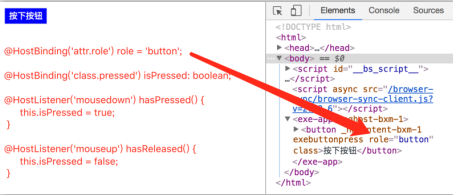
    @HostBinding('attr.role') role = 'button';

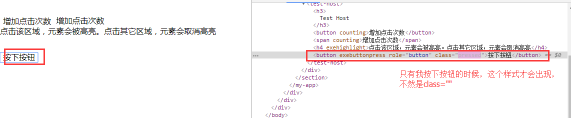
    @HostBinding('class.pressed') isPressed: boolean;

    @HostListener('mousedown') hasPressed() {

        this.isPressed = true;

    }

    @HostListener('mouseup') hasReleased() {

        this.isPressed = false;

    }

}

/*

    app.component.ts

*/

import { Component } from '@angular/core';

@Component({

  selector: 'exe-app',

  styles: [`

    button {

      background: blue;

      color: white;

      border: 1px solid #eee;

    }

    button.pressed {

      background: red;

    }

  `],

  template: `

    <button exeButtonPress>按下按钮</button>

  `

})

export class AppComponent { }

/*

    以上代码运行后浏览器显示的结果:

*/
Host Property Bindings
我们也可以在指令的 metadata 信息中,设定宿主元素的属性绑定信息,具体示例如下:
/*

    button-press.directive.ts

*/

import { Directive, HostListener } from '@angular/core';

@Directive({

    selector: '[exeButtonPress]',

    host: {

      'role': 'button',

      '[class.pressed]': 'isPressed'

    }

})

export class ExeButtonPress {

    isPressed: boolean;

    @HostListener('mousedown') hasPressed() {

        this.isPressed = true;

    }

    @HostListener('mouseup') hasReleased() {

        this.isPressed = false;

    }

}
宿主元素属性和事件绑定风格指南
优先使用 @HostListener 和 @HostBinding ,而不是 @Directive 和 @Component 装饰器的 host 属性。
对于关联到 @HostBinding 的属性或关联到 @HostListener 的方法,要修改时,只需在指令类中的一个地方修改。 如果使用元数据属性 host,你就得在组件类中修改属性声明的同时修改相关的元数据。
参考网址
https://segmentfault.com/a/1190000008878888
Angular 2 HostListener & HostBinding的更多相关文章
- [Angular Directive] Combine HostBinding with Services in Angular 2 Directives
You can change behaviors of element and @Component properties based on services using @HostBinding i ...
- Angular4 @HostBinding @HostListener
host属性 @Component({ selector: 'jhi-project', templateUrl: './project.html', styleUrls: [], host: { ' ...
- [Angular 2] Directive intro and exportAs
First, What is directive, what is the difference between component and directive. For my understandi ...
- Angular 4+ 修仙之路
Angular 4.x 快速入门 Angular 4 快速入门 涉及 Angular 简介.环境搭建.插件表达式.自定义组件.表单模块.Http 模块等 Angular 4 基础教程 涉及 Angul ...
- [Angular] Test Directive
directive: import { Directive, HostListener, HostBinding, ElementRef } from '@angular/core'; @Direct ...
- [Angular Directive] 3. Handle Events with Angular 2 Directives
A @Directive can also listen to events on their host element using @HostListener. This allows you to ...
- [Angular] Using directive to create a simple Credit card validator
We will use 'HostListener' and 'HostBinding' to accomplish the task. The HTML: <label> Credit ...
- [转]angular 监听窗口滚动
本文转自:https://blog.csdn.net/ittvibe/article/details/80060801 转自:http://brianflove.com/2016/10/10/angu ...
- Angular @HostBinding()和@HostListener()用法
@HostBinding()和@HostListener()在自定义指令时非常有用.@HostBinding()可以为指令的宿主元素添加类.样式.属性等,而@HostListener()可以监听宿主元 ...
随机推荐
- 阅读笔记—MVC
MVC设计模式 Model 1 体系结构 在Model 1 体系结构中,每一个请求的目标都是JSP页面.JSP页面负责完成请求所需要的而所有任务,其中包括验证客户.使用JavaBeans访问数据库及管 ...
- C# WPF开源控件库MaterialDesign介绍
介绍 1.由于前端时间萌发开发一个基础架构得WPF框架得想法, 然后考虑到一些界面层元素统一, 然后就无意间在GitHub上发现一个开源WPF UI, 于是下载下来了感觉不错. 官网地址:http:/ ...
- Springboot2.0访问Redis集群
Redis 是一个开源(BSD许可)的,内存中的数据结构存储系统,它可以用作高性能的key-value数据库.缓存和消息中间件,掌握它是程序员的必备技能,下面是一个springboot访问redis的 ...
- BZOJ 1108 POI2007 天然气管道Gaz
题目大意:给定平面上的n个黑点和n个白点.一个黑点仅仅能和右下方的白点匹配.代价为曼哈顿距离,求最小权值完备匹配 STO OTZ STO OTZ STO OTZ ans=Σ(y黑-y白+x白-x黑) ...
- zendiscovery 的Ping机制
ping是集群发现的基本手段,通过在网络上广播或者指定ping某些节点获取集群信息,从而可以找到集群的master加入集群.zenDiscovery实现了两种凭机制:广播与单播.本篇将详细分析一些这M ...
- UDP 打洞示例 包含 服务器 客户端
客户端示例: #include "Net.h" #include "../p2pInfo.h" int main() { CUdp udp; if (0!=u ...
- restcontroller和controller区别
http://www.cnblogs.com/softidea/p/5884772.html#undefined http://blog.csdn.net/blueheart20/article/de ...
- OR1200指令Cache使用举例
下面内容摘自<步步惊芯--软核处理器内部设计分析>一书 12.4 ICache中的特殊寄存器 通过ICache的接口可知其具有特殊寄存器,而且是不可读的特殊寄存器,OR1200处理器中IC ...
- arukas 的 Endpoint
arukas 的 Endpoint 什么是端点 What is Endpoint arukas.io 的实例几乎每周都自动重新启动,当实例重新启动时,其端口会更改.IP地址和端口的平均寿命是一周,有时 ...
- h5背景
1.背景属性复习: background-image background-color background-repeat background-position background-attachm ...