
Blink Coordinate Spaces
Blink Coordinate Spaces
Blink Coordinate Spaces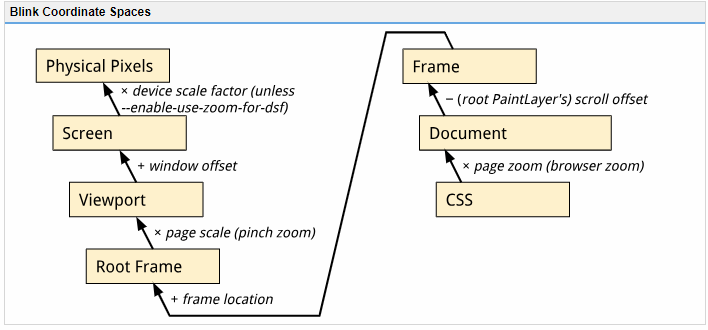
Types of ZoomThere are two types of zoom in Chromium: Browser Zoom and Pinch-Zoom. Browser zoom is what you get by using Ctrl+/- or the zoom buttons in the
 menu. It changes the size of a CSS pixel relative to a device independent pixel and so it will cause page layout to change. Throughout Blink, Browser-zoom is referred to as “Page Zoom” or “Zoom” more generally. menu. It changes the size of a CSS pixel relative to a device independent pixel and so it will cause page layout to change. Throughout Blink, Browser-zoom is referred to as “Page Zoom” or “Zoom” more generally. Pinch-zoom is activated by using a pinch gesture on a touchscreen. It scales the surface the web page is rendered onto and so it does not cause a relayout of the page. Throughout Blink, Pinch-zoom is referred to as “Page Scale”.
Types of PixelsPhysical Pixels: These are the actual pixels on the monitor or screen. Device Independent Pixels (DIPs): Modern devices sport high density displays (e.g. Apple’s Retina). In order to keep the UI at a comfortably readable size we scale it up based on the density of the display. This scaling factor is called the device pixel ratio in web APIs and device scale factor in Chromium code. A UI will always be the same size in DIPs regardless of how many pixels are actually used to display it. To go from physical pixels to DIPs we divide the physical pixel dimensions by the device scale factor.
CSS pixels: CSS defines its own pixel type that is also independent of physical pixels. When there is no Browser-Zoom or Pinch-Zoom applied, CSS pixels and DIPs are equivalent. However, browser zoom can make CSS pixels bigger or smaller relative to DIPs. You may come across the term un-zoomed CSS pixel below and in code. This refers to the fact that these pixels do not have browser zoom applied (but they do have pinch-zoom applied). I.e. Converting from frame-space (which is in un-zoomed CSS pixels) to Viewport using something like FrameView::frameToViewport will not apply the browser zoom.
A note about --use-zoom-for-dsf
The --use-zoom-for-dsf flag is used to have Blink use CSS based browser-zoom (the same kind as applied by Ctrl+/-) for screen-density based UI scaling. When this flag is passed, Blink doesn't scale anything using the device scale factor (and ensures it's set to 1) and instead boosts the page zoom factor by the requested amount.
This flag is currently shipped on all Aura platforms (ChromeOS, Linux, Windows), work is ongoing to bring it to Android, and remains unshipped on Mac.
Coordinate SpacesNote that the conversion methods between these spaces do not apply browser zoom. To go from CSS pixels to Document Content, FrameView Content, or Frame space you must first multiply by the browser-zoom scale factor.
Document
The coordinate space of the current FrameView's document content, in un-zoomed CSS pixels. The origin is the top left corner of the Frame’s document content. In Web/Javascript APIs this is referred to as "page coordinates" (e.g. MouseEvent.pageX) though there it is in CSS pixels (i.e. browser zoom applied). Because coordinates in this space are relative to the document origin, scrolling the frame will not affect coordinates in this space.
Frame
The coordinate space of the current FrameView in un-zoomed CSS pixels. The origin is the top left corner of the frame. Therefore, scrolling the frame will change the "frame-coordinates" of elements on the page. This is the same as document coordinates except that Frame coordinates take the Frame’s scroll offset into account. In Web/Javascript APIs this is referred to as "client coordinates" (e.g. MouseEvent.clientX) though there it is in CSS pixels (i.e. browser zoom applied).
Root Frame
The Frame coordinates of the top level (i.e. main) frame. This frame contains all the other child frames (e.g. elements create frames on a page).
(Visual) Viewport
The coordinate space of the visual viewport as seen by the user, in DIPs. The origin is at the top left corner of the browser view (Window or Screen). The difference between Viewport and RootFrame is the transformation applied by pinch-zoom. This is generally what you'd use to display something relative to the user's Window or Screen.
Screen
The final screen space on the user's device, relative to the top left corner of the screen (i.e. if we're in a Window, this will include the window's offset from the top left of the screen). Note that this is in DIPs rather than physical pixels.
Web-exposed input co-ordinate spacesTo see exactly how some of the above co-ordinate spaces are exposed to JavaScript in input events see https://rbyers.github.io/inputCoords.html.
|
Blink Coordinate Spaces的更多相关文章
- Input Team
The Chromium Input team (aka input-dev) is a web platform team focused on making touch (P1) and othe ...
- Layout Team
The layout team is a long-term engineering team tasked with maintaining, supporting, and improving t ...
- OpenCASCADE Coordinate Transforms
OpenCASCADE Coordinate Transforms eryar@163.com Abstract. The purpose of the OpenGL graphics process ...
- OpenCASCADE Camera
OpenCASCADE Camera eryar@163.com Abstract. OpenCASCADE introduce a new class Graphic3d_Camera for th ...
- 孙鑫MFC学习笔记11:保存图像
1.CPtrArray指针数组 2.CPtrArray返回void指针,需要做类型转换 3.View类中的OnPaint调用OnPrepareDC和OnDraw,如果覆盖OnPaint,就不会调用On ...
- golang.org/x/mobile/exp/gl/glutil/glimage.go 源码分析
看这篇之前,建议先看之前几篇,这几篇是基础. Go Mobile 例子 basic 源码分析 http://www.cnblogs.com/ghj1976/p/5183199.html OpenGL ...
- 图形变幻矩阵 Transforms
https://developer.apple.com/library/mac/documentation/GraphicsImaging/Conceptual/drawingwithquartz2d ...
- Foundations of Game Engine Development Volume 1 Mathematics (Eric Lengyel 著)
http://www.foundationsofgameenginedev.com/ Chapter1 Vectors and Matrices (已看) Chapter2 Transforms (已 ...
- Game Engine Architecture 6
[Game Engine Architecture 6] 1.Data-Parallel Computations A GPU is a specialized coprocessor designe ...
随机推荐
- Git 时间,将代码托管到GitHub 上
第一步:在github上创建一个项目,选择所属类型.会自动生成下面的文件. 第二步:使用安卓创建项目 第三步:使用git bash 进入项目目录,通过指令clone到本地 克隆完成后会出现下面的内容 ...
- legend---十一、thinkphp事务中if($ans1&&$ans2){}else{}方式和try{}catch{}方式事务操作的区别在哪里
legend---十一.thinkphp事务中if($ans1&&$ans2){}else{}方式和try{}catch{}方式事务操作的区别在哪里 一.总结 一句话总结:执行的条件其 ...
- (转载)Android平台下利用zxing实现二维码开发
Android平台下利用zxing实现二维码开发 现在走在大街小巷都能看到二维码,而且最近由于项目需要,所以研究了下二维码开发的东西,开源的二维码扫描库主要有zxing和zbar,zbar在iPos平 ...
- (转载)Android自定义ProgressDialog进度等待框
Android自定义ProgressDialog进度等待框 作者:无缘公子 字体:[增加 减小] 类型:转载 时间:2016-01-11我要评论 这篇文章主要介绍了Android自定义Progress ...
- 005.ES2016新特性--装饰器
装饰器在设计阶段可以对类和属性进行注释和修改,在Angular2中装饰器非常常用,可以用来定义组件.指令以及管道,并且可以与框架提供的依赖注入机制配合使用. 从本质上上讲,装饰器的最大作用是修改预定义 ...
- Golang环境配置Centos
1.下载go程序包( go1.7rc1.linux-amd64.tar.gz)(http://www.golangtc.com/static/go/1.7rc1/go1.7rc1.linux-am ...
- 企业微信H5支付返回不到自己指定的结果页面
项目:vue做的H5项目,嵌入到企业微信里 发现的问题:支付完成后的跳转页面 跳转不到自己指定的页面 问题在于:调支付接口时,redirectUrl: document.location.protoc ...
- [SCOI2012]喵星球上的点名(树状数组+后缀数组)
我们把所有的名,姓,询问都拼起来构成一个新的长串,然后跑一边SA.排完序后对于每一个询问,我们可以二分求出它所对应的区间(即满足这个区间的前缀都是这个询问串).然后问题就转化为很多区间问区间出现过的不 ...
- 性能测试中的TPS与HPS
性能测试中的TPS与HPS TPS(Transaction per second) 是估算应用系统性能的重要依据.其意义是应用系统每秒钟处理完成的交易数量.一般的,评价系统性能均以每秒钟完成的技术交易 ...
- crontab执行脚本和手动执行脚本输出结果不一致的问题处理
背景:huskiesir最近用公司给分配的账户写了脚本去检测某应用状态并发送到企业邮箱,写完脚本之后去执行了一下,发现效果还不错,在邮箱显示效果如下: 10.11.116.6 检查结果OK,检查时间 ...