
Spring Cloud 系列之 Gateway 服务网关(三)
本篇文章为系列文章,未读第一集的同学请猛戳这里:
本篇文章讲解 Gateway 网关过滤器和全局过滤器以及自定义过滤器。
过滤器
Spring Cloud Gateway 根据作用范围划分为 GatewayFilter 和 GlobalFilter,二者区别如下:
GatewayFilter:网关过滤器,需要通过spring.cloud.routes.filters配置在具体路由下,只作用在当前路由上或通过spring.cloud.default-filters配置在全局,作用在所有路由上。GlobalFilter:全局过滤器,不需要在配置文件中配置,作用在所有的路由上,最终通过GatewayFilterAdapter包装成GatewayFilterChain可识别的过滤器,它为请求业务以及路由的 URI 转换为真实业务服务请求地址的核心过滤器,不需要配置系统初始化时加载,并作用在每个路由上。
网关过滤器 GatewayFilter
点击链接观看:网关过滤器视频(获取更多请关注公众号「哈喽沃德先生」)
网关过滤器用于拦截并链式处理 Web 请求,可以实现横切与应用无关的需求,比如:安全、访问超时的设置等。修改传入的 HTTP 请求或传出 HTTP 响应。Spring Cloud Gateway 包含许多内置的网关过滤器工厂一共有 22 个,包括头部过滤器、 路径类过滤器、Hystrix 过滤器和重写请求 URL 的过滤器, 还有参数和状态码等其他类型的过滤器。根据过滤器工厂的用途来划分,可以分为以下几种:Header、Parameter、Path、Body、Status、Session、Redirect、Retry、RateLimiter 和 Hystrix。
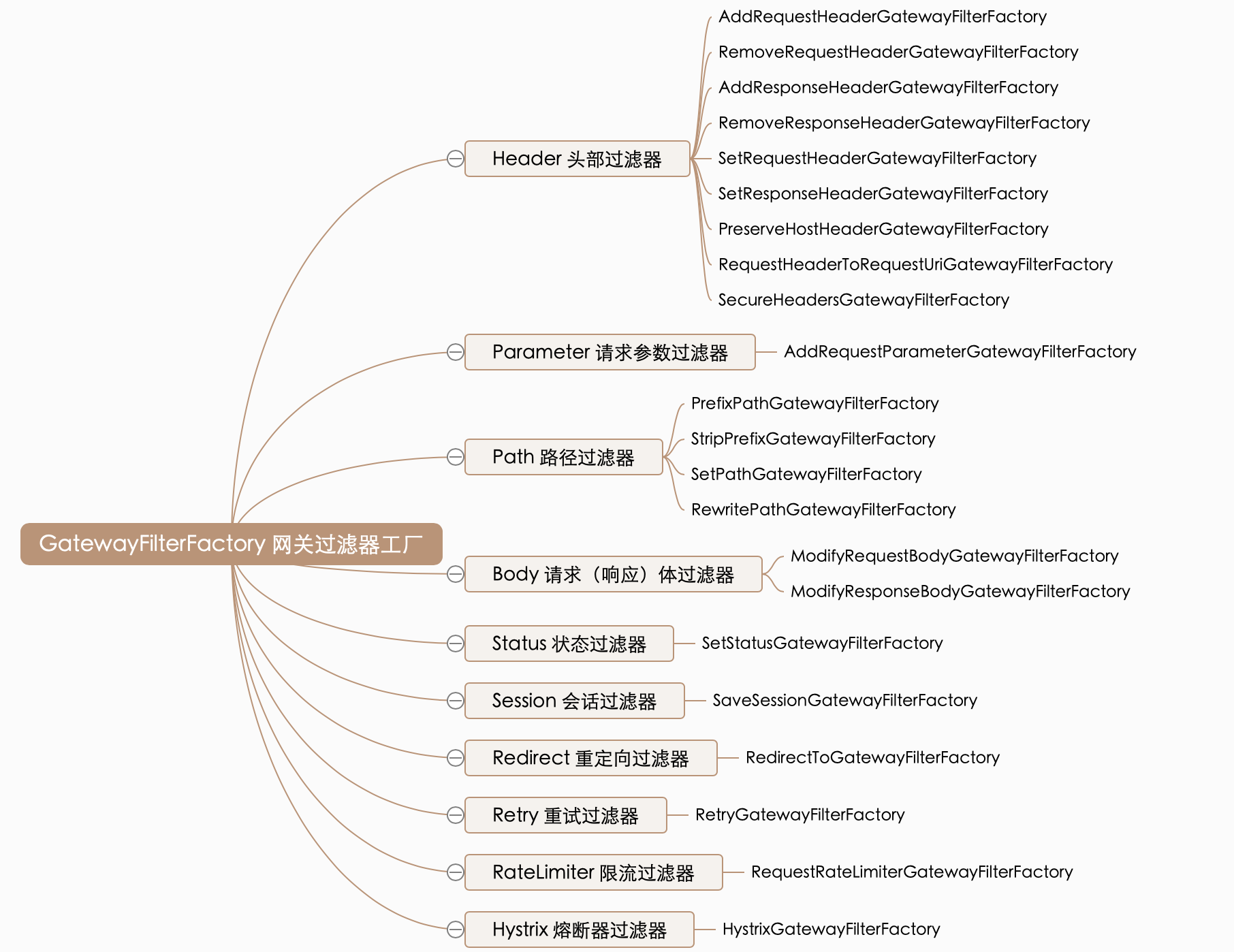
接下来我们举例说明其中一部分如何使用,其余等大家工作中需要应用时再查询资料学习或者咨询我也可以。
Path 路径过滤器
Path 路径过滤器可以实现 URL 重写,通过重写 URL 可以实现隐藏实际路径提高安全性,易于用户记忆和键入,易于被搜索引擎收录等优点。实现方式如下:
RewritePathGatewayFilterFactory
RewritePath 网关过滤器工厂采用路径正则表达式参数和替换参数,使用 Java 正则表达式来灵活地重写请求路径。
spring:

  application:

    name: gateway-server # 应用名称

  cloud:

    gateway:

      # 路由规则

      routes:

        - id: product-service           # 路由 ID,唯一

          uri: lb://product-service     # lb:// 根据服务名称从注册中心获取服务请求地址

          predicates:                   # 断言(判断条件)

            # 匹配对应 URI 的请求,将匹配到的请求追加在目标 URI 之后

            - Path=/product/**, /api-gateway/**

          filters:                      # 网关过滤器

            # 将 /api-gateway/product/1 重写为 /product/1

            - RewritePath=/api-gateway(?<segment>/?.*), $\{segment}
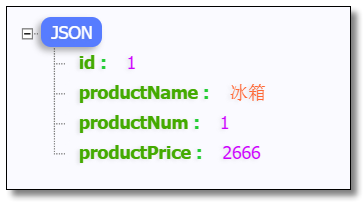
访问:http://localhost:9000/api-gateway/product/1 结果如下:
PrefixPathGatewayFilterFactory
PrefixPath 网关过滤器工厂为匹配的 URI 添加指定前缀。
spring:

  application:

    name: gateway-server # 应用名称

  cloud:

    gateway:

      # 路由规则

      routes:

        - id: product-service           # 路由 ID,唯一

          uri: lb://product-service     # lb:// 根据服务名称从注册中心获取服务请求地址

          predicates:                   # 断言(判断条件)

            # 匹配对应 URI 的请求,将匹配到的请求追加在目标 URI 之后

            - Path=/**

          filters:                       # 网关过滤器

            # 将 /1 重写为 /product/1

            - PrefixPath=/product
访问:http://localhost:9000/1 结果如下:
StripPrefixGatewayFilterFactory
StripPrefix 网关过滤器工厂采用一个参数 StripPrefix,该参数表示在将请求发送到下游之前从请求中剥离的路径个数。
spring:

  application:

    name: gateway-server # 应用名称

  cloud:

    gateway:

      # 路由规则

      routes:

        - id: product-service           # 路由 ID,唯一

          uri: lb://product-service     # lb:// 根据服务名称从注册中心获取服务请求地址

          predicates:                   # 断言(判断条件)

            # 匹配对应 URI 的请求,将匹配到的请求追加在目标 URI 之后

            - Path=/**

          filters:                       # 网关过滤器

            # 将 /api/123/product/1 重写为 /product/1

            - StripPrefix=2
访问:http://localhost:9000/api/123/product/1 结果如下:
SetPathGatewayFilterFactory
SetPath 网关过滤器工厂采用路径模板参数。 它提供了一种通过允许模板化路径段来操作请求路径的简单方法,使用了 Spring Framework 中的 uri 模板,允许多个匹配段。
spring:

  application:

    name: gateway-server # 应用名称

  cloud:

    gateway:

      # 路由规则

      routes:

        - id: product-service           # 路由 ID,唯一

          uri: lb://product-service     # lb:// 根据服务名称从注册中心获取服务请求地址

          predicates:                   # 断言(判断条件)

            # 匹配对应 URI 的请求,将匹配到的请求追加在目标 URI 之后

            - Path=/api/product/{segment}

          filters:                       # 网关过滤器

            # 将 /api/product/1 重写为 /product/1

            - SetPath=/product/{segment}
访问:http://localhost:9000/api/product/1 结果如下:
Parameter 参数过滤器
AddRequestParameter 网关过滤器工厂会将指定参数添加至匹配到的下游请求中。
spring:

  application:

    name: gateway-server # 应用名称

  cloud:

    gateway:

      # 路由规则

      routes:

        - id: product-service           # 路由 ID,唯一

          uri: lb://product-service     # lb:// 根据服务名称从注册中心获取服务请求地址

          predicates:                   # 断言(判断条件)

            # 匹配对应 URI 的请求,将匹配到的请求追加在目标 URI 之后

            - Path=/api-gateway/**

          filters:                       # 网关过滤器

            # 将 /api-gateway/product/1 重写为 /product/1

            - RewritePath=/api-gateway(?<segment>/?.*), $\{segment}

            # 在下游请求中添加 flag=1

            - AddRequestParameter=flag, 1
修改商品服务的控制层代码。
package com.example.controller;

import com.example.pojo.Product;

import com.example.service.ProductService;

import org.springframework.beans.factory.annotation.Autowired;

import org.springframework.web.bind.annotation.GetMapping;

import org.springframework.web.bind.annotation.PathVariable;

import org.springframework.web.bind.annotation.RequestMapping;

import org.springframework.web.bind.annotation.RestController;

@RestController

@RequestMapping("/product")

public class ProductController {

    @Autowired

    private ProductService productService;

    /**

     * 根据主键查询商品

     *

     * @param id

     * @return

     */

    @GetMapping("/{id}")

    public Product selectProductById(@PathVariable("id") Integer id, String flag) {

        System.out.println("flag = " + flag);

        return productService.selectProductById(id);

    }

}
访问:http://localhost:9000/api-gateway/product/1 控制台结果如下:
flag = 1
Status 状态过滤器
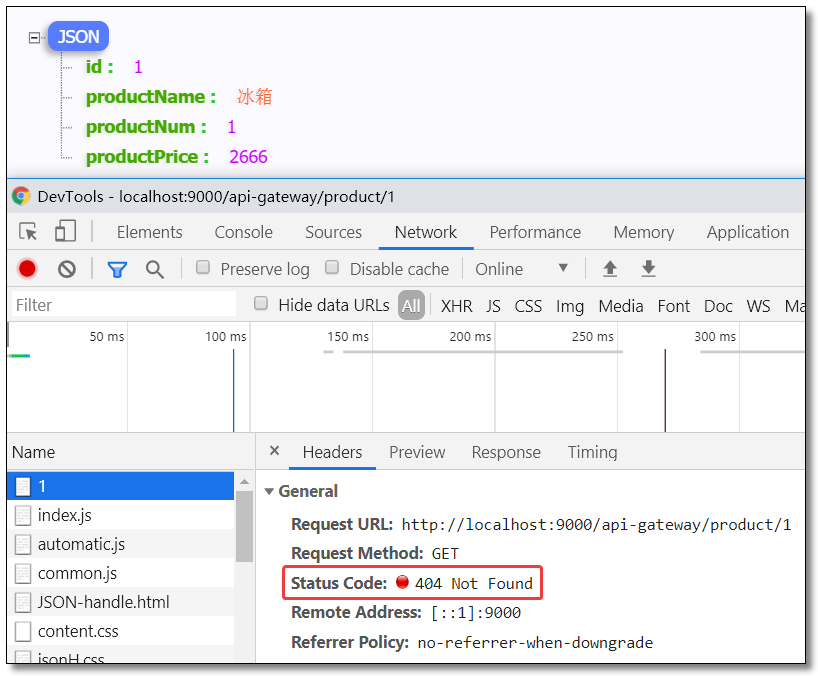
SetStatus 网关过滤器工厂采用单个状态参数,它必须是有效的 Spring HttpStatus。它可以是整数 404 或枚举 NOT_FOUND 的字符串表示。
spring:

  application:

    name: gateway-server # 应用名称

  cloud:

    gateway:

      # 路由规则

      routes:

        - id: product-service           # 路由 ID,唯一

          uri: lb://product-service     # lb:// 根据服务名称从注册中心获取服务请求地址

          predicates:                   # 断言(判断条件)

            # 匹配对应 URI 的请求,将匹配到的请求追加在目标 URI 之后

            - Path=/api-gateway/**

          filters:                       # 网关过滤器

            # 将 /api-gateway/product/1 重写为 /product/1

            - RewritePath=/api-gateway(?<segment>/?.*), $\{segment}

            # 任何情况下,响应的 HTTP 状态都将设置为 404

            - SetStatus=404 			 # 404 或者对应的枚举 NOT_FOUND
访问:http://localhost:9000/api-gateway/product/1 结果如下:
全局过滤器 GlobalFilter
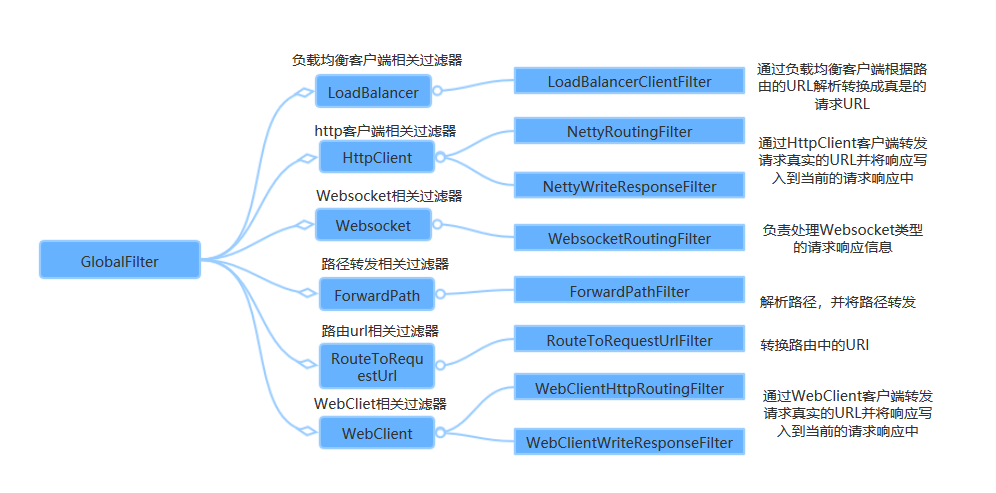
全局过滤器不需要在配置文件中配置,作用在所有的路由上,最终通过 GatewayFilterAdapter 包装成 GatewayFilterChain 可识别的过滤器,它是请求业务以及路由的 URI 转换为真实业务服务请求地址的核心过滤器,不需要配置系统初始化时加载,并作用在每个路由上。
自定义过滤器
即使 Spring Cloud Gateway 自带许多实用的 GatewayFilter Factory、Gateway Filter、Global Filter,但是在很多情景下我们仍然希望可以自定义自己的过滤器,实现一些骚操作。
自定义网关过滤器
自定义网关过滤器需要实现以下两个接口 :GatewayFilter,Ordered。
创建过滤器
CustomGatewayFilter.java
package com.example.filter;

import org.springframework.cloud.gateway.filter.GatewayFilter;

import org.springframework.cloud.gateway.filter.GatewayFilterChain;

import org.springframework.core.Ordered;

import org.springframework.web.server.ServerWebExchange;

import reactor.core.publisher.Mono;

/**

 * 自定义网关过滤器

 */

public class CustomGatewayFilter implements GatewayFilter, Ordered {

    /**

     * 过滤器业务逻辑

     *

     * @param exchange

     * @param chain

     * @return

     */

    @Override

    public Mono<Void> filter(ServerWebExchange exchange, GatewayFilterChain chain) {

        System.out.println("自定义网关过滤器被执行");

        return chain.filter(exchange); // 继续向下执行

    }

    /**

     * 过滤器执行顺序,数值越小,优先级越高

     *

     * @return

     */

    @Override

    public int getOrder() {

        return 0;

    }

}
注册过滤器
package com.example.config;

import com.example.filter.CustomGatewayFilter;

import org.springframework.cloud.gateway.route.RouteLocator;

import org.springframework.cloud.gateway.route.builder.RouteLocatorBuilder;

import org.springframework.context.annotation.Bean;

import org.springframework.context.annotation.Configuration;

/**

 * 网关路由配置类

 */

@Configuration

public class GatewayRoutesConfiguration {

    @Bean

    public RouteLocator routeLocator(RouteLocatorBuilder builder) {

        return builder.routes().route(r -> r

                // 断言(判断条件)

                .path("/product/**")

                // 目标 URI,路由到微服务的地址

                .uri("lb://product-service")

                // 注册自定义网关过滤器

                .filters(new CustomGatewayFilter())

                // 路由 ID,唯一

                .id("product-service"))

                .build();

    }

}
访问
注释配置文件中所有网关配置,重启并访问:http://localhost:9000/product/1 控制台结果如下:
自定义网关过滤器被执行
自定义全局过滤器
自定义全局过滤器需要实现以下两个接口 :GlobalFilter,Ordered。通过全局过滤器可以实现权限校验,安全性验证等功能。
创建过滤器
实现指定接口,添加 @Component 注解即可。
CustomGlobalFilter.java
package com.example.filter;

import org.springframework.cloud.gateway.filter.GatewayFilterChain;

import org.springframework.cloud.gateway.filter.GlobalFilter;

import org.springframework.core.Ordered;

import org.springframework.stereotype.Component;

import org.springframework.web.server.ServerWebExchange;

import reactor.core.publisher.Mono;

/**

 * 自定义全局过滤器

 */

@Component

public class CustomGlobalFilter implements GlobalFilter, Ordered {

    /**

     * 过滤器业务逻辑

     *

     * @param exchange

     * @param chain

     * @return

     */

    @Override

    public Mono<Void> filter(ServerWebExchange exchange, GatewayFilterChain chain) {

        System.out.println("自定义全局过滤器被执行");

        return chain.filter(exchange); // 继续向下执行

    }

    /**

     * 过滤器执行顺序,数值越小,优先级越高

     *

     * @return

     */

    @Override

    public int getOrder() {

        return 0;

    }

}
访问
访问:http://localhost:9000/product/1 控制台结果如下:
自定义全局过滤器被执行
统一鉴权
接下来我们在网关过滤器中通过 token 判断用户是否登录,完成一个统一鉴权案例。
创建过滤器
AccessFilter.java
package com.example.filter;

import org.slf4j.Logger;

import org.slf4j.LoggerFactory;

import org.springframework.cloud.gateway.filter.GatewayFilterChain;

import org.springframework.cloud.gateway.filter.GlobalFilter;

import org.springframework.core.Ordered;

import org.springframework.core.io.buffer.DataBuffer;

import org.springframework.http.HttpStatus;

import org.springframework.http.server.reactive.ServerHttpResponse;

import org.springframework.stereotype.Component;

import org.springframework.web.server.ServerWebExchange;

import reactor.core.publisher.Mono;

/**

 * 权限验证过滤器

 */

@Component

public class AccessFilter implements GlobalFilter, Ordered {

    private Logger logger = LoggerFactory.getLogger(AccessFilter.class);

    /**

     * 过滤器业务逻辑

     *

     * @param exchange

     * @param chain

     * @return

     */

    @Override

    public Mono<Void> filter(ServerWebExchange exchange, GatewayFilterChain chain) {

        // 获取请求参数

        String token = exchange.getRequest().getQueryParams().getFirst("token");

        // 业务逻辑处理

        if (null == token) {

            logger.warn("token is null...");

            ServerHttpResponse response = exchange.getResponse();

            // 响应类型

            response.getHeaders().add("Content-Type", "application/json; charset=utf-8");

            // 响应状态码,HTTP 401 错误代表用户没有访问权限

            response.setStatusCode(HttpStatus.UNAUTHORIZED);

            // 响应内容

            String message = "{\"message\":\"" + HttpStatus.UNAUTHORIZED.getReasonPhrase() + "\"}";

            DataBuffer buffer = response.bufferFactory().wrap(message.getBytes());

            // 请求结束,不在继续向下请求

            return response.writeWith(Mono.just(buffer));

        }

        // 使用 token 进行身份验证

        logger.info("token is OK!");

        return chain.filter(exchange);

    }

    /**

     * 过滤器执行顺序,数值越小,优先级越高

     *

     * @return

     */

    @Override

    public int getOrder() {

        return 1;

    }

}
访问
访问:http://localhost:9000/product/1 结果如下:
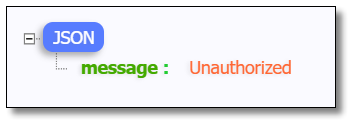
访问:http://localhost:9000/product/1?token=abc123 结果如下:
下一篇我们讲解 Gateway 网关如何实现限流、整合Sentinel实现限流以及高可用网关环境搭建,记得关注噢~

本文采用 知识共享「署名-非商业性使用-禁止演绎 4.0 国际」许可协议。
大家可以通过 分类 查看更多关于 Spring Cloud 的文章。
Spring Cloud 系列之 Gateway 服务网关(三)的更多相关文章
- Spring Cloud 系列之 Gateway 服务网关(四)
本篇文章为系列文章,未读第一集的同学请猛戳这里: Spring Cloud 系列之 Gateway 服务网关(一) Spring Cloud 系列之 Gateway 服务网关(二) Spring Cl ...
- Spring Cloud 系列之 Gateway 服务网关(二)
本篇文章为系列文章,未读第一集的同学请猛戳这里:Spring Cloud 系列之 Gateway 服务网关(一) 本篇文章讲解 Gateway 网关的多种路由规则.动态路由规则(配合服务发现的路由规则 ...
- Spring Cloud 系列之 Gateway 服务网关(一)
什么是 Spring Cloud Gateway Spring Cloud Gateway 作为 Spring Cloud 生态系统中的网关,目标是替代 Netflix Zuul,其不仅提供统一的路由 ...
- Spring Cloud(七)服务网关 Zuul Filter 使用
上一篇文章中,讲了Zuul 转发,动态路由,负载均衡,等等一些Zuul 的特性,这个一篇文章,讲Zuul Filter 使用,关于网关的作用,这里就不再次赘述了,重点是zuul的Filter ,我们可 ...
- Spring Cloud(六)服务网关 zuul 快速入门
服务网关是微服务架构中一个不可或缺的部分.通过服务网关统一向外系统提供REST API的过程中,除了具备服务路由.均衡负载功能之外,它还具备了权限控制等功能.Spring Cloud Netflix中 ...
- spring cloud深入学习(十一)-----服务网关zuul
前面的文章我们介绍了,Eureka用于服务的注册于发现,Feign支持服务的调用以及均衡负载,Hystrix处理服务的熔断防止故障扩散,Spring Cloud Config服务集群配置中心,似乎一个 ...
- Spring Cloud 2-Feign 声明式服务调用(三)
Spring Cloud Feign 1. pom.xml 2. application.yml 3. Application.java 4. Client.java 简化RestTemplate调 ...
- Spring Cloud系列之Eureka服务治理
写在前面 Spring Cloud Eureka是基于Netflix Eureka做的二次封装.主要包含两部分: 服务注册中心 eureka server 服务提供者 eureka client ps ...
- Spring Cloud Gateway 服务网关快速上手
Spring Cloud Gateway 服务网关 API 主流网关有NGINX.ZUUL.Spring Cloud Gateway.Linkerd等:Spring Cloud Gateway构建于 ...
随机推荐
- uni-app实现文件上传(h5方式)
1.嵌入H5页面,需要采用web-view标签,如下: <web-view src="/hybrid/html/index.html" @message="hand ...
- Java集合工具类使用的一些坑,Arrays.asList()、Collection.toArray()、foreach
Arrays.asList() 使用指南 最近使用Arrays.asList()遇到了一些坑,然后在网上看到这篇文章:Java Array to List Examples 感觉挺不错的,但是还不是特 ...
- vue 听说你很会传值?
前置 大小 vue 项目都离不开组件通讯, 在这里总结一下vue组件通讯方式并列出, 都是简单的例子. 适合像我这样的小白.如有错误,欢迎指正. 温馨提示: 下文没有列出 vuex, vuex 也是重 ...
- 三、【Docker笔记】Docker镜像
镜像是Docker的三大核心概念之一.Docker在运行容器之前,本地需要存有镜像,若不存在则Docker会首先尝试从默认的镜像仓库中去下载,当然我们也可以去配置自己的仓库,如此就会从我们配置的仓库中 ...
- SpringMVC里 form提交到controller404 解决方法
把 <form action="/logon"> 改为 <form action="${pageContext.request.contextPath} ...
- MapReduce( map的使用)
MapReduce Description MapReduce是Google提出的一个软件架构,用于大规模数据集(大于1TB)的并行运算.概念"Map(映射)"和"Red ...
- 泛型--->Result返回结果封装
controller的返回结果一般有两种: 1.Rest API JSON 输出 2.页面 目的:编写优雅的代码 实现:通过泛型对返回结果进行封装 代码如下: 一.控制层 /** * ...
- Docker的MySQL镜像, 实行数据,配置信息,日志持久化
Docker的MySQL8镜像, 实行数据持久化 使用Docker的MySQL8.0.17实例化一个容器之后需要对其进行数据持久化操作, 使用 docker docker run -p 7797:33 ...
- 简单记录下springboot+jms+activemq
1. 安装ActiveMQ 到Apache官方网站下载最新的ActiveMQ的安装包,并解压到本地目录下后运行 2. pom.xml引入 springboot配置文件中填写相关配置 3.创建生产者 ...
- 剑指Offer系列之题1~题5
目录 1.二维数组的查找 2.替换空格 3.从尾到头打印链表 4.链表中环的入口节点 5.重建二叉树 写在前面:本随笔中包含五道题:题目描述,题目思路以及对应解法. 1.二维数组的查找 在一个二维数组 ...