
【MySQL 原理分析】之 Explain & Trace 深入分析全模糊查询走索引的原理
一、背景
今天,交流群有一位同学提出了一个问题。看下图:
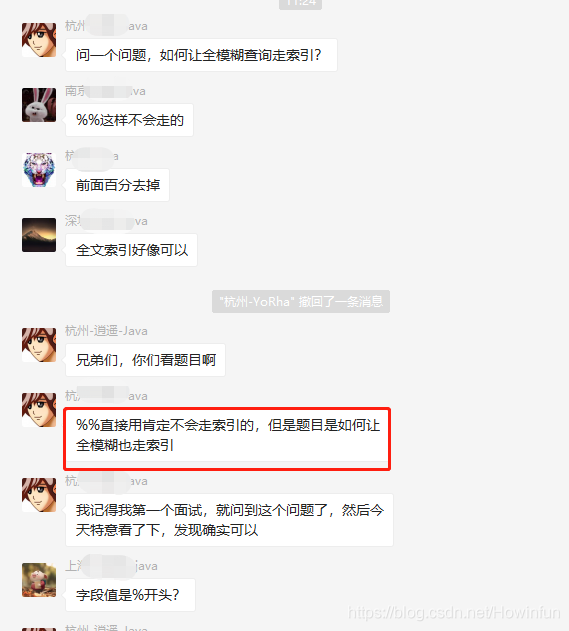
之后,这位同学确实也发了一个全模糊查询走索引的例子:
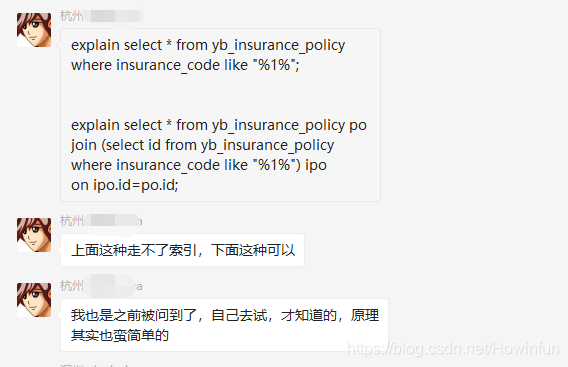
到这我们可以发现,这两个sql最大的区别是:一个是查询全字段(select *),而一个只查询主键(select id)。
此时,又有其他同学讲了其他方案:

全文索引这个不用说,那是能让全模糊查询走索引的。但是索引覆盖这个方案,我觉得才是符合背景的:
1、因为提问的背景就是模糊查询字段是普通索引,而普通索引只查询主键就能用上覆盖索引。
2、并且背景中,就是只查询主键(ID)就显示用上索引了。
二、数据准备和场景重现
1、准备表和数据:
创建 user 表,给 phone 字段加了个普通索引:
CREATE TABLE `user` (

  `id` int(10) unsigned NOT NULL AUTO_INCREMENT,

  `name` varchar(255) DEFAULT NULL,

  `age` int(11) DEFAULT NULL,

  `phone` varchar(11) DEFAULT NULL,

  PRIMARY KEY (`id`),

  KEY `index_phone` (`phone`) USING BTREE COMMENT 'phone索引'

) ENGINE=InnoDB AUTO_INCREMENT=200007 DEFAULT CHARSET=utf8;
准备10万条数据意思意思:
delimiter ;

CREATE DEFINER=`root`@`localhost` PROCEDURE `iniData`()

begin

  declare i int;

  set i=1;

  while(i<=100000)do

    insert into user(name,age,phone) values('测试', i, 15627230000+i);

    set i=i+1;

  end while;

end;;

delimiter ;

call iniData();
2、执行 SQL ,查看执行计划:
explain select * from user where phone like '%156%';

explain select id from user where phone like '%156%';
3、执行结果:
| id | select_type | table | partitions | type | possible_keys | key | key_len | ref | rows | filtered | Extra |
|---|---|---|---|---|---|---|---|---|---|---|---|
| 1 | SIMPLE | user | ALL | 99927 | 11.11 | Using where |
| id | select_type | table | partitions | type | possible_keys | key | key_len | ref | rows | filtered | Extra |
|---|---|---|---|---|---|---|---|---|---|---|---|
| 1 | SIMPLE | user | index | index_phone | 36 | 99927 | 11.11 | Using where; Using index |
我们可以发现,第二条 SQL 确实是显示用上了 index_phone 索引。
但是细心的同学可能会发现:possible_keys 竟然为空!有猫腻。。。
我这里先说一下 prossible_keys 和 key 的关系:
1、
possible_keys为可能使用的索引,而key是实际使用的索引;2、正常是:
key的索引,必然会包含在possible_keys中。
还有猫腻一点就是:使用索引和不使用索引读取的行数(rows)竟然是一样的!
三、验证和阶段性猜想
上面讲到,possible_keys 和 key 的关系,那么我们利用正常的走索引来验证一下。
下面的 SQL, 不是全模糊查询,而是右模糊查询,保证是一定走索引的,我们分别看看此时 possible_keys 和 key 的值:
explain select id from user where phone like '156%';
执行结果:
| id | select_type | table | partitions | type | possible_keys | key | key_len | ref | rows | filtered | Extra |
|---|---|---|---|---|---|---|---|---|---|---|---|
| 1 | SIMPLE | user | range | index_phone | index_phone | 36 | 49963 | 100 | Using where; Using index |
这里太明显了:
1、possible_keys 里确实包含了 key 里的索引。
2、 并且rows 瞬间降到 49963,整整降了一倍,并且 filtered 也达到了 100。
阶段猜想:
1、首先,select id from user where phone like '%156%'; 因为覆盖索引而用上了索引 index_phone。
2、possible_keys 为 null,证明用不上索引的树形查找。很明显,select id from user where phone like '%156%'; 即使显示走了索引,但是读取行数 rows 和 select * from user where phone like '%156%'; 没有走索引的 rows 是一样的。
3、那么,我们可以猜测到,select id from user where phone like '%156%'; 即使因为覆盖索引而用上了 index_phone 索引,但是却没用上树形查找,只是正常顺序遍历了索引树。所以说,其实这两条 SQL 在表字段不多的情况下,查询性能应该差不了多少。
四、通过 Trace 分析来验证
我们分别利用 Trace 分析对于这两个 SQL 优化器是如何选择的。
1、查询全字段:
-- 开启优化器跟踪

set session optimizer_trace='enabled=on';

select * from user where phone like '%156%';

-- 查看优化器追踪

select * from information_schema.optimizer_trace;
下面我们只看 TRACE 就行了:
{

  "steps": [

    {

      "join_preparation": {

        "select#": 1,

        "steps": [

          {

            "expanded_query": "/* select#1 */ select `user`.`id` AS `id`,`user`.`name` AS `name`,`user`.`age` AS `age`,`user`.`phone` AS `phone` from `user` where (`user`.`phone` like '%156%')"

          }

        ]

      }

    },

    {

      "join_optimization": {

        "select#": 1,

        "steps": [

          {

            "condition_processing": {

              "condition": "WHERE",

              "original_condition": "(`user`.`phone` like '%156%')",

              "steps": [

                {

                  "transformation": "equality_propagation",

                  "resulting_condition": "(`user`.`phone` like '%156%')"

                },

                {

                  "transformation": "constant_propagation",

                  "resulting_condition": "(`user`.`phone` like '%156%')"

                },

                {

                  "transformation": "trivial_condition_removal",

                  "resulting_condition": "(`user`.`phone` like '%156%')"

                }

              ]

            }

          },

          {

            "substitute_generated_columns": {

            }

          },

          {

            "table_dependencies": [

              {

                "table": "`user`",

                "row_may_be_null": false,

                "map_bit": 0,

                "depends_on_map_bits": [

                ]

              }

            ]

          },

          {

            "ref_optimizer_key_uses": [

            ]

          },

          {

            "rows_estimation": [

              {

                "table": "`user`",

                "table_scan": {

                  "rows": 99927,

                  "cost": 289

                }

              }

            ]

          },

          {

            "considered_execution_plans": [

              {

                "plan_prefix": [

                ],

                "table": "`user`",

                "best_access_path": {

                  "considered_access_paths": [

                    {

                      "rows_to_scan": 99927,

                      "access_type": "scan", // 顺序扫描

                      "resulting_rows": 99927,

                      "cost": 20274,

                      "chosen": true

                    }

                  ]

                },

                "condition_filtering_pct": 100,

                "rows_for_plan": 99927,

                "cost_for_plan": 20274,

                "chosen": true

              }

            ]

          },

          {

            "attaching_conditions_to_tables": {

              "original_condition": "(`user`.`phone` like '%156%')",

              "attached_conditions_computation": [

              ],

              "attached_conditions_summary": [

                {

                  "table": "`user`",

                  "attached": "(`user`.`phone` like '%156%')"

                }

              ]

            }

          },

          {

            "refine_plan": [

              {

                "table": "`user`"

              }

            ]

          }

        ]

      }

    },

    {

      "join_execution": {

        "select#": 1,

        "steps": [

        ]

      }

    }

  ]

}
2、只查询主键
set session optimizer_trace='enabled=on';

select id from user where phone like '%156%';

-- 查看优化器追踪

select * from information_schema.optimizer_trace;
下面我们继续只看 TRACE 就行了:
{

  "steps": [

    {

      "join_preparation": {

        "select#": 1,

        "steps": [

          {

            "expanded_query": "/* select#1 */ select `user`.`id` AS `id` from `user` where (`user`.`phone` like '%156%')"

          }

        ]

      }

    },

    {

      "join_optimization": {

        "select#": 1,

        "steps": [

          {

            "condition_processing": {

              "condition": "WHERE",

              "original_condition": "(`user`.`phone` like '%156%')",

              "steps": [

                {

                  "transformation": "equality_propagation",

                  "resulting_condition": "(`user`.`phone` like '%156%')"

                },

                {

                  "transformation": "constant_propagation",

                  "resulting_condition": "(`user`.`phone` like '%156%')"

                },

                {

                  "transformation": "trivial_condition_removal",

                  "resulting_condition": "(`user`.`phone` like '%156%')"

                }

              ]

            }

          },

          {

            "substitute_generated_columns": {

            }

          },

          {

            "table_dependencies": [

              {

                "table": "`user`",

                "row_may_be_null": false,

                "map_bit": 0,

                "depends_on_map_bits": [

                ]

              }

            ]

          },

          {

            "ref_optimizer_key_uses": [

            ]

          },

          {

            "rows_estimation": [

              {

                "table": "`user`",

                "table_scan": {

                  "rows": 99927,

                  "cost": 289

                }

              }

            ]

          },

          {

            "considered_execution_plans": [

              {

                "plan_prefix": [

                ],

                "table": "`user`",

                "best_access_path": {

                  "considered_access_paths": [

                    {

                      "rows_to_scan": 99927,

                      "access_type": "scan", // 顺序扫描

                      "resulting_rows": 99927,

                      "cost": 20274,

                      "chosen": true

                    }

                  ]

                },

                "condition_filtering_pct": 100,

                "rows_for_plan": 99927,

                "cost_for_plan": 20274,

                "chosen": true

              }

            ]

          },

          {

            "attaching_conditions_to_tables": {

              "original_condition": "(`user`.`phone` like '%156%')",

              "attached_conditions_computation": [

              ],

              "attached_conditions_summary": [

                {

                  "table": "`user`",

                  "attached": "(`user`.`phone` like '%156%')"

                }

              ]

            }

          },

          {

            "refine_plan": [

              {

                "table": "`user`"

              }

            ]

          }

        ]

      }

    },

    {

      "join_execution": {

        "select#": 1,

        "steps": [

        ]

      }

    }

  ]

}
好了,到这里我们可以发现,在 Trace 分析里面,都没显示优化器为这两个 SQL 实际选择了什么索引,而只是显示了都是用了 顺序扫描 的方式去查找数据。
可能唯一不同点就是:一个使用了主键索引的全表扫描,而另外一个是使用了普通索引的全表扫描;但是两个都没用上树形查找,也就是没用上 B+Tree 的特性来提升查询性能。
六、最后总结
1、当全模糊查询的 SQL 只查询主键作为结果集时,因为覆盖索引,会用上查询字段对应的索引。
2、即使用上了索引,但是却没用上树形查找的特性,只是正常的顺序遍历。
3、而正常的全表扫描也是主键索引的顺序遍历,所以说,其实这两者的性能其实是差不多的。
【MySQL 原理分析】之 Explain & Trace 深入分析全模糊查询走索引的原理的更多相关文章
- MySQL性能分析及explain的使用
MySQL性能分析及explain用法的知识 1.使用explain语句去查看分析结果 如explain select * from test1 where id=1;会出现:id selectty ...
- MySQL性能分析及explain的使用说明
1.使用explain语句去查看分析结果 如explain select * from test1 where id=1;会出现:id selecttype table type possible_k ...
- Mysql数据库表排序规则不一致导致联表查询,索引不起作用问题
Mysql数据库表排序规则不一致导致联表查询,索引不起作用问题 表更描述: 将mysql数据库中的worktask表添加ishaspic字段. 具体操作:(1)数据库worktask表新添是否有图片字 ...
- 【MySQL 原理分析】之 Trace 分析 order by 的索引原理
一.背景 昨天早上,交流群有一位同学提出了一个问题.看下图: 我不是大佬,而且当时我自己的想法也只是猜测,所以并没有回复那位同学,只是接下来自己做了一个测试验证一下. 他只简单了说了一句话,就是同样的 ...
- MySQL性能分析之Explain
目录 Explain基础 Explain进阶 Explain基础 关于explain命令相信大家并不陌生,具体用法和字段含义可以参考官网explain-output ,这里需要强调rows是核心指标, ...
- 神奇的 SQL 之 MySQL 性能分析神器 → EXPLAIN,SQL 起飞的基石!
前言 开心一刻 某人养了一头猪,烦了想放生,可是猪认识回家的路,放生几次它都自己回来了.一日,这个人想了个狠办法,开车带着猪转了好多路进山区放生,放生后又各种打转,然后掏出电话给家里人打了个电话,问道 ...
- MySQL实现强制查询走索引和强制查询不缓存
0.表结构如下:(包含两个索引) Create Table: CREATE TABLE `user` ( `userID` ) NOT NULL, `userCode` ) DEFAULT NULL, ...
- MySQL Index--NOT IN和不等于两类操作无法走索引?
经常被问,NOT IN和<>操作就无法走索引? 真想只有一个:具体问题具体分析,没有前提的问题都是耍流氓. 准备测试数据: ## 删除测试表 DROP TABLE IF EXISTS tb ...
- Oracle,Mysql ,SQL Server 三大数据库带参数的模糊查询, 拼接查询条件问题
最近项目开发一直在不断切换数据库,有时候一条sql 要同时考虑多种数据库中的兼容问题 , 先总结一条模糊查询拼接查询条件的问题,后续追加总结. 目前使用 mybatis: 1. Oracle 中使 ...
随机推荐
- 关于k8s资源类型和缩写
资源类型 缩写 描述 clusters componentstatuses cs configmaps cm daemonsets ds deployments deploy ...
- cnn可视化 感受野(receptive field)可视化
网址: https://befreeroad.github.io/#/editor 参考: http://ethereon.github.io/netscope/#/editor 在此基础上添加 感受 ...
- android基于MVP小说网络爬虫、宝贝社区APP、仿虎扑钉钉应用、滑动阴影效果等源码
Android精选源码 android宝贝社区app源码 android仿Tinder最漂亮的一个滑动效果 android仿滴滴打车开具发票页,ListView粘性Header Android基于MV ...
- EncryptUtils
package me.zhengjie.core.utils; import org.springframework.util.DigestUtils; import javax.crypto.Cip ...
- 吴裕雄--天生自然 HADOOP大数据分布式处理:使用XShell远程连接主机与服务器并配置它们之间SSH免密登录
- Hadoop伪分布式HDFS环境搭建和使用
1.环境要求 Java版本不低于Hadoop要求,并配置环境变量 2.安装 1)在网站hadoop.apache.org下载稳定版本的Hadoop包 2)解压压缩包 检查Hadoop是否可用 hado ...
- Ajax如何提交数据到springMVC后台
现在好多web项目实现前段和后端分离,实现前端和后端技术人员,使他们加快开发,减少沟通上的问题,后台只需要提供访问接口,而前天只需要调用提供的接口即可.减少前后端的沟通上的成本 本项目是开发中发现aj ...
- 3DSMAX安装失败,如何卸载修复重新安装3dmax 2017?
一些同学安装3dmax出错了,也有时候想重新安装3dmax的时候会出现这种本电脑已安装3dmax,你要是不留意直接安装,只会按装3dmax的附件,3dmax是不会按装上的.这种原因呢就是大家在之前卸载 ...
- MOOC(2)-Django开发get、post请求,返回json数据
1.对get请求直接返回参数 如果请求多个参数,也只能返回一个参数,这里只返回了username参数 如果想要返回多个参数值,可以返回json格式数据 2.对get请求返回json数据 # views ...
- JMeter之BeanShell断言---equals使用
判断变量是否为root if(!"${User}".equals("root")){ Failure=true; FailureMessage="ER ...