
WPF GDI+字符串绘制成图片(一)
版权声明:本文为博主原创文章,未经博主允许不得转载。 https://blog.csdn.net/BYH371256/article/details/83410269
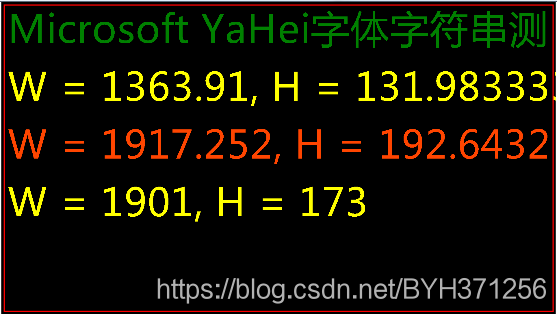
本章讲述:在WPF中,使用GDI+技术,把字符串数据,根据文本字体样式,大小绘制成字符串图片;
1、XAML前台代码
<Window x:Class="WPF_GDI_Test.MainWindow"

        xmlns="http://schemas.microsoft.com/winfx/2006/xaml/presentation"

        xmlns:x="http://schemas.microsoft.com/winfx/2006/xaml"

        Title="MainWindow" Height="350" Width="625">

    <Grid>

        <Image Name="img"/>

    </Grid>

</Window>
2、后台逻辑实现
using System;

using System.Collections.Generic;

using System.Linq;

using System.Text;

using System.Windows;

using System.Windows.Forms;

using System.Windows.Controls;

using System.Windows.Data;

using System.Windows.Documents;

using System.Windows.Input;

using System.Windows.Media;

using System.Windows.Media.Imaging;

using System.Windows.Navigation;

using System.Windows.Shapes;

using System.Drawing;

namespace WPF_GDI_Test

{

    /// <summary>

    /// MainWindow.xaml 的交互逻辑

    /// </summary>

    public partial class MainWindow : Window

    {

        public MainWindow()

        {

            InitializeComponent();

            Drawing();

        }

        private void Drawing()

        {

            string path = "C:\\WPF_GDI_Test.png";

            string fontFamily = "Microsoft YaHei";

            float fontSize = 100;

            string str1 = "Microsoft YaHei字体字符串测";

            Font font = new Font(fontFamily,fontSize);

            Bitmap map1 = new Bitmap(1920, 1080);

            Graphics gg = Graphics.FromImage(map1);

            SizeF sizeF = gg.MeasureString(str1, new Font(fontFamily, fontSize));

            var size = TextRenderer.MeasureText(gg, str1, font, new System.Drawing.Size(0, 0));

            FormattedText forma =  Get_StrWidth(str1,fontFamily,fontSize);

            string strszie = string.Format("W = {0}, H = {1}", forma.Width, forma.Height);

            string strszie1 = string.Format("W = {0}, H = {1}", sizeF.Width, sizeF.Height);

            string strszie2 = string.Format("W = {0}, H = {1}", size.Width, size.Height);

            Bitmap map = new Bitmap(1920, 1080);

            Graphics g = Graphics.FromImage(map);

            g.PageUnit = GraphicsUnit.Pixel;

            g.SmoothingMode = System.Drawing.Drawing2D.SmoothingMode.HighQuality;

            g.Clear(System.Drawing.Color.Black);

            g.DrawRectangle(new System.Drawing.Pen(System.Drawing.Color.Red, 4), 10, 10, 1900, 1060);

            g.DrawString(str1, font, System.Drawing.Brushes.Green, 0, 0);

            g.DrawString(strszie, font, System.Drawing.Brushes.Yellow, 0, 200);

            g.DrawString(strszie1, font, System.Drawing.Brushes.OrangeRed, 0, 400);

            g.DrawString(strszie2, font, System.Drawing.Brushes.Yellow, 0, 600);

            g.Dispose();

            map.Save(path, System.Drawing.Imaging.ImageFormat.Png);

            map.Dispose();

            BitmpToImageSource(path);

        }

        private FormattedText Get_StrWidth(string txt, string fontFamily, double fontSize)

        {

            FormattedText formattedText = new FormattedText(

                    txt,

                    System.Globalization.CultureInfo.InvariantCulture,

                   System.Windows.FlowDirection.LeftToRight,

                        new Typeface(fontFamily.ToString()),

                        fontSize,

                        System.Windows.Media.Brushes.Red

                );

            return formattedText;

        }

        private void BitmpToImageSource(string filepath)

        {

            System.IO.FileStream fs =new System.IO.FileStream(filepath,System.IO.FileMode.Open, System.IO.FileAccess.Read);

            byte[] buffer = new byte[fs.Length];

            fs.Read(buffer, 0, buffer.Length);

            fs.Close();

            fs.Dispose();

            System.IO.MemoryStream ms = new System.IO.MemoryStream(buffer);

            BitmapImage bitmapImage = new BitmapImage();

            bitmapImage.BeginInit();

            bitmapImage.StreamSource = ms;

            bitmapImage.EndInit();

            img.Source = bitmapImage;

        }

    }

}
3、效果图:
WPF GDI+字符串绘制成图片(一)的更多相关文章
- WPF GDI+字符串绘制成图片(二)
原文:WPF GDI+字符串绘制成图片(二) 版权声明:本文为博主原创文章,未经博主允许不得转载. https://blog.csdn.net/BYH371256/article/details/83 ...
- C# 在网页中将Base64编码的字符串显示成图片
在写一个接口,返回的json里面有图片,是Base64编码的字符串. 测试接口的时候,发现原来在html显示,是直接可以将Base64编码的字符串显示成图片的. 格式如下: <img src=d ...
- Gson字符串编码,字符串转换成图片保存,二进制转换成图片保存
import java.io.BufferedInputStream; import java.io.ByteArrayInputStream; import java.io.File; import ...
- base64字符串转化成图片
package com.dhht.wechat.util; import sun.misc.BASE64Decoder;import sun.misc.BASE64Encoder; import ja ...
- c# 图片转二进制/字符串 二进制/字符串反转成图片
protected void Button1_Click(object sender, EventArgs e) { //图片转二进制 byte[] imageByte = GetPictureDat ...
- C# Base64字符串转换成图片及图片转换为Base64
最近有朋友经常会问我一些问题,例如,如何把一个字符串转换成base64字符串,如何把一个二进制文件转换成Base64文件,以及如何转换回原有的文件,在此我把方法写一下 字符串与Base64相互转换 ...
- python 将base64字符串还原成图片保存
import os,base64 strs='''/9j/4AAQSkZJRgABAQAAAQABAAD/2wBDAAoHBwgHBgoICAgLCgoLDhgQDg0NDh0VFhEYIx8lJCI ...
- base64转换成图片
前端代码JS: 前端图片为canvsa绘图转base64格式 function putTextInfo() { var canvasImg = painting.canvas.toDataURL('i ...
- java 后台将base64字符串保存为图片
直接上代码: import java.io.FileOutputStream; import java.io.IOException; import java.io.InputStream; impo ...
随机推荐
- PyCharm创建虚拟环境 和 TVTK库的安装
注:示例系统环境:Windows10 64位 + Anaconda3: 昨天安装TVTK库遇到些麻烦,当时随便将库下到个文件夹安装后(没找到VENV文件夹...), 进行测试:from tvtk.to ...
- sed.md
SED sed是一种流编辑器,它是文本处理中非常中的工具,能够完美的配合正则表达式使用,功能不同凡响.处理时,把当前处理的行存储在临时缓冲区中,称为“模式空间”(pattern space),接着用s ...
- 关于C++学习笔记
以清华大学出版社<C++语言程序设计> 第四版,郑莉,董渊,何江舟 三位老师编著为蓝本. 写这学习笔记,是为了自己清晰梳理C++.重粘代码也是为了方便更容易认清结构.
- Django中模型(五)
Django中模型(五) 六.模型查询 1.概述 查询集,表示从数据库获取的对象集合. 过滤器就是一个函数,基于所给的参数限制查询集结果.查询集可以有多个过滤器. 从sql角度来说,查询集合等价于se ...
- 用c写一个小的聊天室程序
1.聊天室程序——客户端 客户端我也用了select进行I/O复用,同时监控是否有来自socket的消息和标准输入,近似可以完成对键盘的中断使用. 其中select的监控里,STDOUT和STDIN是 ...
- Vue04——vue自定义事件、Router、Vue-cli、发布上线
一.Vue的自定义事件 点击任何一个按钮,按钮本身计数累加,但是每点击三个按钮中的一个,totalCounter 都要累加. <body> <div id="app&quo ...
- Ubuntu操作系统(我的是ubuntu 18.04.3 LTS)
查看是否开启了ssh服务是否安装,使用命令: sudo ps -e |grep ssh 如果安装了的是会有sshd服务的,下面的图片是没有安装ssh服务 2 先更新资源列表,使用命令: sudo ap ...
- linux下启动和终止JAVA程序shell脚本
1.启动脚本start.sh #run application backgroud nohup java -jar chess-admin->& & #record the pr ...
- 给网页标签页添加logo
先把logo转换成后缀名是ico的图片,然后在网页头部,也就是<head></head>中间放上<link rel="shortcut icon"ty ...
- redis常用数据类型操作命令集锦
redis操作命令集锦 redis中五种数据类型 1) 字符串 String 特点: 存储所有的字符和字符串 应用场景: 做缓存使用 2) 哈希 hash 特点: 相当于java中hashMap集合 ...