
170622、springboot编程之JPA操作数据库
JPA操作数据库
什么事JAP?JPA全称Java Persistence API.JPA通过JDK 5.0注解或XML描述对象-关系表的映射关系,并将运行期的实体对象持久化到数据库中。
1、在pom中引用jpa
<dependency>

  <groupId>org.springframework.boot</groupId>

  <artifactId>spring-boot-starter-data-jpa</artifactId>

</dependency>
2、配置application.properties文件
###datasource 数据源配置

spring.datasource.driverClassName=com.mysql.jdbc.Driver

spring.datasource.url=jdbc:mysql://localhost:3306/test

spring.datasource.username=root

spring.datasource.password=root

spring.datasource.max-active=20

spring.datasource.max-idle=8

spring.datasource.min-idle=8

spring.datasource.initial-size=10

###Java Persistence Api

#指定的数据库

spring.jpa.database=MYSQL

#显示每个SQL

spring.jpa.show-sql=true

#Hibernate DDL自动(创建,创建-删除,更新)

spring.jpa.hibernate.ddl-auto=update

#命名策略

spring.jpa.hibernate.naming-strategy=org.hibernate.cfg.ImprovedNamingStrategy

#在将其添加到实体管理剥离

spring.jpa.properties.hibernate.dialect=org.hibernate.dialect.MySQL5Dialect
3、编写UserRepository.java文件
package com.rick.apps.repository;

import com.rick.apps.entity.User;

import org.springframework.data.repository.CrudRepository;

/**

 * Desc :  CrudRepository是springboot提供的封装方法

 * 里面封装了基本的增删改查的方法,方便调用

 * 方法如下:

 *       <S extends T> S save(S var1);

         <S extends T> Iterable<S> save(Iterable<S> var1);

         T findOne(ID var1);

         boolean exists(ID var1);

         Iterable<T> findAll();

         Iterable<T> findAll(Iterable<ID> var1);

         long count();

         void delete(ID var1);

         void delete(T var1);

         void delete(Iterable<? extends T> var1);

         void deleteAll();

 * User : RICK

 * Time : 2017/8/21 15:45

  */

public interface UserRepository extends CrudRepository<User,Integer> {

}
4、编写UserService.java
import com.rick.apps.entity.User;

import com.rick.apps.repository.UserRepository;

import org.springframework.beans.factory.annotation.Autowired;

import org.springframework.stereotype.Service;

import org.springframework.transaction.annotation.Transactional;

@Service

public class UserService {

    @Autowired

    private UserRepository userRepository;

    @Transactional

    public void save(User user){

        userRepository.save(user);

    }

}
注:我只写了一个保存方法,其他的调用方法雷同,再次不一一展示
5、编写HelloController.java
package com.rick.apps.controller;

import com.rick.apps.entity.User;

import com.rick.apps.service.UserService;

import com.rick.common.ResultJson;

import org.springframework.web.bind.annotation.GetMapping;

import org.springframework.web.bind.annotation.RequestMapping;

import org.springframework.web.bind.annotation.RestController;

import javax.annotation.Resource;

@RestController

public class HelloController {

    @Resource

    private UserService userService;

    @RequestMapping("/hello")

    public String hello(){

        System.out.println(1/0);

        return "Hello World!";

    }

    @GetMapping(value = "/save")

    public ResultJson saveDemo(){

        User user = new User();

        user.setUserName("rick");

        user.setPassWord("123456");

        userService.save(user);

        ResultJson resultJson = ResultJson.buildSuccessInstance();

        return resultJson;

    }

}
注:ResultJson是我自己封装的一个返回对象类,方便大家测试,我也把这个类的代码给贴出来
package com.rick.common;

import java.io.Serializable;

public class ResultJson implements Serializable{

    private static final long serialVersionUID = 1L;

    //返回码

    private String code;

    //返回提示

    private String msg;

    //返回内容

    private Object data;

    public ResultJson(){

    }

    public ResultJson(String msg){

        this.code = "1";

        this.msg = msg;

    }

    public ResultJson(Object data){

        this.code = "0";

        this.msg = "成功";

        this.data = data;

    }

    public ResultJson(String code, String msg){

        this.code = code;

        this.msg = msg;

    }

    public ResultJson(String code, String msg, Object data){

        this.code = code;

        this.msg = msg;

        this.data = data;

    }

    public String getCode() {

        return code;

    }

    public void setCode(String code) {

        this.code = code;

    }

    public String getMsg() {

        return msg;

    }

    public void setMsg(String msg) {

        this.msg = msg;

    }

    public Object getData() {

        return data;

    }

    public void setData(Object data) {

        this.data = data;

    }

    public static ResultJson buildSuccessInstance(){

        return new ResultJson("0", "操作成功!", null);

    }

    public static ResultJson buildSuccessInstance(String msg){

        return new ResultJson("0", msg, null);

    }

    public static ResultJson buildSuccessInstance(Object data){

        return new ResultJson("0", "操作成功!", data);

    }

    public static ResultJson buildSuccessInstance(String msg, Object data){

        return new ResultJson("0", msg, data);

    }

    public static ResultJson buildFailInstance(){

        return new ResultJson("1", "操作异常!", null);

    }

    public static ResultJson buildFailInstance(String msg){

        return new ResultJson("1", msg, null);

    }

    /**

     * TODO: 自定义返回异常信息

     * @Auhor: RICK

     * @Date : 2017年6月26日

     * @param code 99 表示没有获取到经纬度信息

     * @param msg

     * @return

     */

    public static ResultJson buildFailInstance(String code,String msg){

        return new ResultJson(code, msg, null);

    }

}
6、启动项目测试
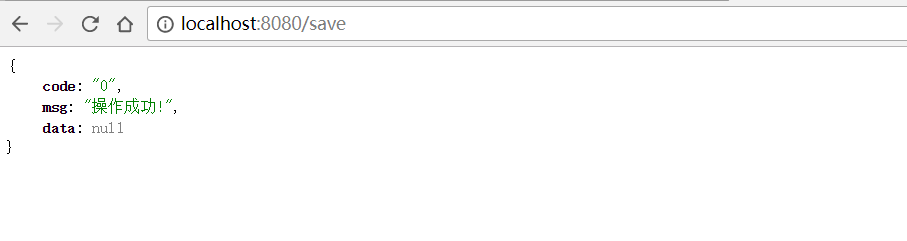
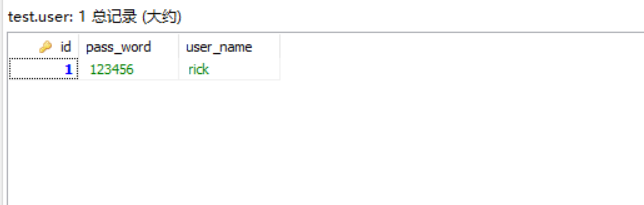
数据库添加数据成功:
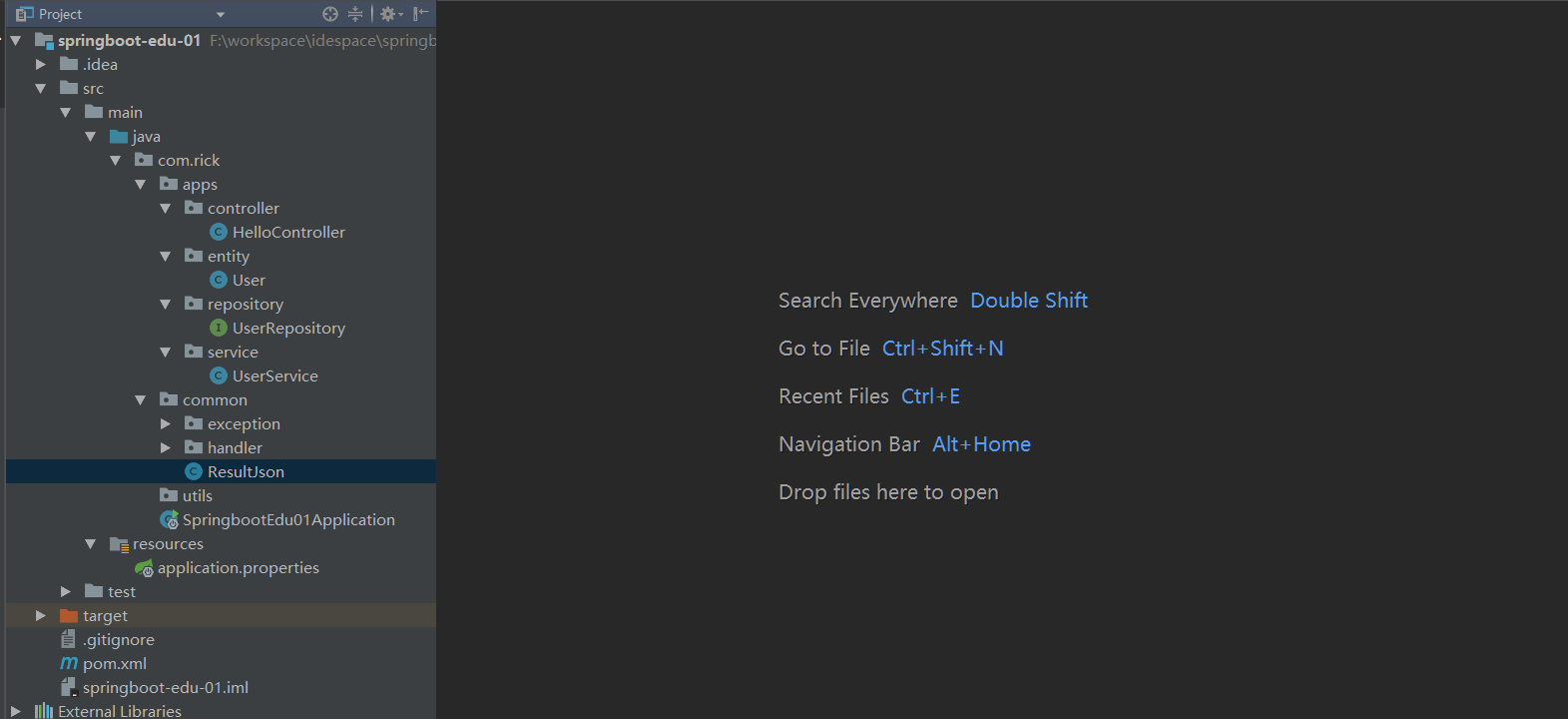
项目截图
170622、springboot编程之JPA操作数据库的更多相关文章
- 170623、springboot编程之JdbcTemplate操作数据库
使用JdbcTemplate操作mysql数据库! 1.在pom中引入jpa包 <dependency> <groupId>org.springframework.boot&l ...
- 第12章—使用NoSQL数据库—使用MongoDB+Jpa操作数据库
使用MongoDB+Jpa操作数据库 SpringData还提供了对多种NoSQL数据库的支持,包括MongoDB;neo4j和redis.他不仅支持自动化的repository,还支持基于模板的数据 ...
- JAVA - SpringBoot项目引用MyBatis操作数据库
JAVA - SpringBoot项目引用MyBatis操作数据库 1. 创建SpringBoot项目,参考:https://www.cnblogs.com/1285026182YUAN/p/1232 ...
- 界面编程之QT的数据库操作20180801
/*******************************************************************************************/ 一.数据库连 ...
- 一篇搞定spring Jpa操作数据库
开始之前你必须在项目配置好数据库,本文使用的spring boot,相比spring,spring boot省去了很多各种对以来组件复杂的配置,直接在pom配置组件,完后会自动帮我们导入组件 < ...
- 170717、springboot编程之mybatis数据库开发和aop拦截
一.springboot整合mybaits (1)新建maven project; 新建一个maven project,取名为:spring-boot-mybatis (2)在pom.xml文件中引入 ...
- 使用spring boot中的JPA操作数据库
前言 Spring boot中的JPA 使用的同学都会感觉到他的强大,简直就是神器一般,通俗的说,根本不需要你写sql,这就帮你节省了很多时间,那么下面我们来一起来体验下这款神器吧. 一.在pom中添 ...
- spring-boot-route(九)整合JPA操作数据库
单调的增删改查让越来越多的程序员感到乏味,这时候就出现了很多优秀的框架,完成了对增删改查操作的封装,只需要简单配置,无需书写任何sql,就可以完成增删改查.这里比较推荐的是Spring Data Jp ...
- 170720、springboot编程之properties文件讲解
但是在实际开发过程中有更复杂的需求,我们在对properties进一步的升华.在本篇博客中您将会学到如下知识(这节中有对之前的知识的温故,对之前的升华): (1) 在application.prope ...
随机推荐
- python + opencv: 解决不能读取视频的问题
博主一开始使用python2.7和Opencv2.4.10来获取摄像头图像,程序如下: cap = cv2.VideoCapture(0) ret, frame = cap.read() 使用这个程序 ...
- R语言boxplot绘图函数
boxplot 用于绘制箱线图,我们都知道boxplot 用于展示一组数据的总体分布,在R语言中,支持两种输入数据的方式 第一种:x , 这个参数指定用于绘制箱线图所用的数据,是一个向量 代码示例: ...
- VirtualBox 配置虚拟网卡(桥接),实现主机-虚拟机网络互通
记录下VirtualBox 配置虚拟网卡(桥接),实现主机-虚拟机网络互通过程,网上搜出来的比较乱,讲的不明不白,因此根据自己弄过一次,确认可行的方式,做个备份,方便日后查阅. 环境: 在Oracle ...
- Android v4包中的 SwipeRefreshLayout 官方的下拉刷新组件
SwipeRefreshLayout在v4包下,相应的v4Demo中也有相应的样例.假设没有请下载最新support-v4 SwipeRefreshLayout 仅仅能有一个直接子View,可能是一个 ...
- Loadrunner进行md5加密方法
本文主要介绍使用Loadrunner进行字符串md5加密的方法. 使用Loadrunner进行md5比较简单,首先是加载md5.h头文件,后使用头文件中的加密函数即可. 1. md5.h头文件内容如下 ...
- MathType只有你会的几个技巧
太阳的后裔终于结局了,我们的乔妹被宋仲基撩走了,其中的撩妹技能你学到了几招?没学会,不要紧,还有MathType!只要你会MathType这几个技巧,撩妹绝对杠杠的.这可是连宋仲基都不会的! Math ...
- System.Func<>与System.Action<>
使用并行编程可以同时操作多个委托,在介绍并行编程前先简单介绍一下两个泛型委托System.Func<>与System.Action<>. Func<>是一个能接受多 ...
- day01<计算机基础知识&Java语言基础>
计算机基础知识(计算机概述) 计算机基础知识(软件开发和计算机语言概述) 计算机基础知识(人机交互) 计算机基础知识(键盘功能键和快捷键) 计算机基础知识(如何打开DOS控制台) 计算机基础知识(常见 ...
- WebService远程调用(代码调用)
在做多个系统集成的时候,由于各系统厂商采用不同的架构,在项目实施前期,各业务对业务理解不够深入,系统接口可能会有较多变化, 在此背景下,动态调用webserivce就变得灵活了,降低了系统集成的耦合度 ...
- ios 判断GPS是否是在中国境内
博文转载至 http://blog.csdn.net/cuibo1123/article/details/45691631 ZCChinaLocation 基本思路是:把整个行政区域划分为几个小的矩形 ...