
WEB开发----springboot的登录拦截机制
如果是一个后台的管理项目的,有些东西是不能直接就可以访问的,必须要登录才可以进去,所以就需要进行登录拦截,只有登录过的用户才可以正常访问.
登录拦截是不会拦截jsp页面的方法,所以我们需要在Controller写方法进行页面的调用,而且需要把jsp页面从webapp文件夹下放到WEB-INF下面,因为webapp下的文件是可以直接访问到的:文件目录
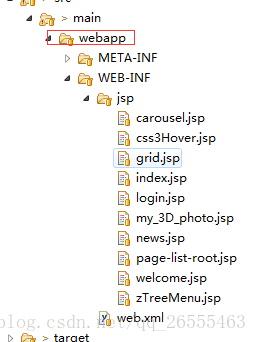
首先创建一个WebConfig.class文件,进行拦截器的创建,拦截器需要实现WebMvcConfigurerAdapter类,继承ApplicationContextAware类,
代码如下:
package com;

import org.springframework.beans.BeansException;

import org.springframework.context.ApplicationContext;

import org.springframework.context.ApplicationContextAware;

import org.springframework.context.annotation.Configuration;

import org.springframework.util.ResourceUtils;

import org.springframework.web.servlet.config.annotation.InterceptorRegistry;

import org.springframework.web.servlet.config.annotation.ResourceHandlerRegistry;

import org.springframework.web.servlet.config.annotation.WebMvcConfigurerAdapter;

import com.interceptor.LoginInterceptor;

@Configuration

public class WebConfig extends WebMvcConfigurerAdapter implements ApplicationContextAware {

    private ApplicationContext applicationContext;

    public WebConfig(){

        super();

    }

    @Override

    public void addResourceHandlers(ResourceHandlerRegistry registry) {

        System.out.println("1");

        registry.addResourceHandler("/static/**").addResourceLocations(ResourceUtils.CLASSPATH_URL_PREFIX+"/static/");

        registry.addResourceHandler("/templates/**").addResourceLocations(ResourceUtils.CLASSPATH_URL_PREFIX+"/templates/");

        super.addResourceHandlers(registry);

    }

    @Override

    public void setApplicationContext(ApplicationContext applicationContext) throws BeansException {

        System.out.println("11");

        this.applicationContext = applicationContext;

    }

    @Override

    public void addInterceptors(InterceptorRegistry registry) {

        System.out.println("111");

        //拦截规则:除了login,其他都拦截判断

        registry.addInterceptor(new LoginInterceptor()).addPathPatterns("/**").excludePathPatterns("/user/login","/user/gologin");

        super.addInterceptors(registry);

    }

}
上面的文件除了/user/login(登录信息验证方法),/user/gologin(返回登录页面方法)这两个方法不拦截,别的都拦截判断
然后编写自定义的验证规则,判断拦截到的请求是否通过
package com.interceptor;

import javax.servlet.http.HttpServletRequest;

import javax.servlet.http.HttpServletResponse;

import javax.servlet.http.HttpSession;

import org.slf4j.Logger;

import org.slf4j.LoggerFactory;

import org.springframework.web.servlet.HandlerInterceptor;

import org.springframework.web.servlet.ModelAndView;

public class LoginInterceptor implements HandlerInterceptor {

    private static final Logger log = LoggerFactory.getLogger(LoginInterceptor.class);

    @Override

    public boolean preHandle(HttpServletRequest request, HttpServletResponse response, Object handler)

            throws Exception {

        // TODO Auto-generated method stub

        log.info("------preHandle------");

        // 获取session

        HttpSession session = request.getSession(true);

        // 判断用户ID是否存在,不存在就跳转到登录界面

        if (session.getAttribute("userId") == null) {

            log.info("------:跳转到login页面!");

            System.out.println(request.getContextPath() + "/login");

            response.sendRedirect("/user/gologin");

            return false;

        } else {

            return true;

        }

    }

    @Override

    public void postHandle(HttpServletRequest request, HttpServletResponse response, Object handler,

            ModelAndView modelAndView) throws Exception {

        // TODO Auto-generated method stub

    }

    @Override

    public void afterCompletion(HttpServletRequest request, HttpServletResponse response, Object handler, Exception ex)

            throws Exception {

        // TODO Auto-generated method stub

    }

}
当用户登录成功,将用户的信息存到session中,之后的访问,就会去session中判断有没有用户信息,如果没有用户信息,则跳转到登录页面,进行用户登录
WEB开发----springboot的登录拦截机制的更多相关文章
- springboot的登录拦截机制
转自:https://blog.csdn.net/qq_26555463/article/details/78296103 如果是一个后台的管理项目的,有些东西是不能直接就可以访问的,必须要登录才可以 ...
- SpringBoot Web开发(5) 开发页面国际化+登录拦截
SpringBoot Web开发(5) 开发页面国际化+登录拦截 一.页面国际化 页面国际化目的:根据浏览器语言设置的信息对页面信息进行切换,或者用户点击链接自行对页面语言信息进行切换. **效果演示 ...
- Springboot 系列(七)Spring Boot web 开发之异常错误处理机制剖析
前言 相信大家在刚开始体验 Springboot 的时候一定会经常碰到这个页面,也就是访问一个不存在的页面的默认返回页面. 如果是其他客户端请求,如接口测试工具,会默认返回JSON数据. { &quo ...
- Android开发系列之事件拦截机制
对于Android开发者来说理解事件传递机制的重要性,我想应该是不言而喻的.在一个Activity里面,我们经常会重写onTouchEvent事件,可是重写结束之后,对于是返回true还是返回fals ...
- SpringBoot(四): SpringBoot web开发 SpringBoot使用jsp
1.在SpringBoot中使用jsp,需要在pom.xml文件中添加依赖 <!--引入Spring Boot内嵌的Tomcat对JSP的解析包--> <dependency> ...
- springboot深入学习(二)-----profile配置、运行原理、web开发
一.profile配置 通常企业级应用都会区分开发环境.测试环境以及生产环境等等.spring提供了全局profile配置的方式,使得在不同环境下使用不同的applicaiton.properties ...
- springboot全局异常拦截源码解读
在springboot中我们可以通过注解@ControllerAdvice来声明一个异常拦截类,通过@ExceptionHandler获取拦截类抛出来的具体异常类,我们可以通过阅读源码并debug去解 ...
- 4_4.springboot之Web开发登录和拦截器
1.登录处理 1).禁用模板引擎的缓存 # 禁用缓存 spring.thymeleaf.cache=false 2).页面修改完用ctrl+f9:重新编译: LoginController @Cont ...
- Springboot 系列(六)Spring Boot web 开发之拦截器和三大组件
1. 拦截器 Springboot 中的 Interceptor 拦截器也就是 mvc 中的拦截器,只是省去了 xml 配置部分.并没有本质的不同,都是通过实现 HandlerInterceptor ...
随机推荐
- No task executor bean found for async processing: no bean of type TaskExecut
使用springcloud,添加异步方法后,调用异步成功,但有个 No task executor bean found for async processing: no bean of type T ...
- jQuery——表单应用(1)
实现结果:聚焦表单的input部分时,input格式变更为CSS样式(获取和失去焦点改变样式) HTML: <!DOCTYPE html> <html> <head> ...
- [转]C++常用字符串分割方法实例汇总
本文实例汇总了C++常用字符串分割方法,分享给大家供大家参考.具体分析如下: 我们在编程的时候经常会碰到字符串分割的问题,这里总结下,也方便我们以后查询使用. 一.用strtok函数进行字符串分割 原 ...
- 思维题 HDOJ 5288 OO’s Sequence
题目传送门 /* 定义两个数组,l[i]和r[i]表示第i个数左侧右侧接近它且值是a[i]因子的位置, 第i个数被选择后贡献的值是(r[i]-i)*(i-l[i]),每个数都枚举它的因子,更新l[i] ...
- multiprocessing的进程通信Pipe和Queue
pipe管道,2个进程通信,允许单项或者双向,multiprocessing.Pipe(duplex=False)为单项,默认双向 示例: from multiprocessing import Pr ...
- RabbitMQ一:消息队列的认识
1异步处理 场景说明:用户注册后,需要发注册邮件和注册短信.传统的做法有两种1.串行的方式:2.并行方式. (1)串行方式:将注册信息写入数据库成功后,发送注册邮件,再发送注册短信.以上三个任务全部完 ...
- C#手机充值系统开发(基于聚合数据)
说是手机充值系统有点装了,其实就是调用了聚合数据的支付接口,其实挺简单的事 但是我发现博客园竟然没有类似文章,我就个出头鸟把我的代码贡献出来吧 首先说准备工作: 去聚合数据申请账号-添加手机支付的认证 ...
- opencv识别验证码的教程和资料
简书教程:https://www.jianshu.com/p/41127bf90ca9 博客园教程(较详细):https://www.cnblogs.com/qqandfqr/p/7866650.ht ...
- opencv3.31+vs2015终于配置成功了
风萧萧兮易水寒, 熬了几个夜晚,终于把opencv配好了, 来图一 唉试了很多方法,终于成功. 教程和资料会发在个人网站里. 测试 代码 #include <iostream> #incl ...
- Ajax异步刷新省市级联
省市级联在web前端用户注册使用非常广泛.Ajax异步刷新省市级联.如图:选择不同的区,自动加载相应的街. <TD class=field>位 置:</TD> <TD&g ...