
springboot的登录拦截机制
转自:https://blog.csdn.net/qq_26555463/article/details/78296103
如果是一个后台的管理项目的,有些东西是不能直接就可以访问的,必须要登录才可以进去,所以就需要进行登录拦截,只有登录过的用户才可以正常访问.
登录拦截是不会拦截jsp页面的方法,所以我们需要在Controller写方法进行页面的调用,而且需要把jsp页面从webapp文件夹下放到WEB-INF下面,因为webapp下的文件是可以直接访问到的:文件目录 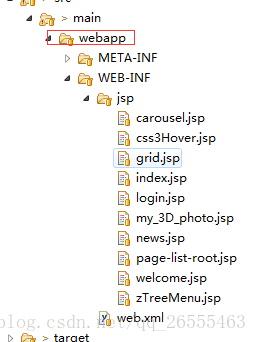
首先创建一个WebConfig.class文件,进行拦截器的创建,拦截器需要实现WebMvcConfigurerAdapter类,继承ApplicationContextAware类,
代码如下:
package com;

import org.springframework.beans.BeansException;

import org.springframework.context.ApplicationContext;

import org.springframework.context.ApplicationContextAware;

import org.springframework.context.annotation.Configuration;

import org.springframework.util.ResourceUtils;

import org.springframework.web.servlet.config.annotation.InterceptorRegistry;

import org.springframework.web.servlet.config.annotation.ResourceHandlerRegistry;

import org.springframework.web.servlet.config.annotation.WebMvcConfigurerAdapter;

import com.interceptor.LoginInterceptor;

@Configuration

public class WebConfig extends WebMvcConfigurerAdapter implements ApplicationContextAware {

    private ApplicationContext applicationContext;

    public WebConfig(){

        super();

    }

    @Override

    public void addResourceHandlers(ResourceHandlerRegistry registry) {

        System.out.println("1");

        registry.addResourceHandler("/static/**").addResourceLocations(ResourceUtils.CLASSPATH_URL_PREFIX+"/static/");

        registry.addResourceHandler("/templates/**").addResourceLocations(ResourceUtils.CLASSPATH_URL_PREFIX+"/templates/");

        super.addResourceHandlers(registry);

    }

    @Override

    public void setApplicationContext(ApplicationContext applicationContext) throws BeansException {

        System.out.println("11");

        this.applicationContext = applicationContext;

    }

    @Override

    public void addInterceptors(InterceptorRegistry registry) {

        System.out.println("111");

        //拦截规则:除了login,其他都拦截判断

        registry.addInterceptor(new LoginInterceptor()).addPathPatterns("/**").excludePathPatterns("/user/login","/user/gologin");

        super.addInterceptors(registry);

    }

}
上面的文件除了/user/login(登录信息验证方法),/user/gologin(返回登录页面方法)这两个方法不拦截,别的都拦截判断
然后编写自定义的验证规则,判断拦截到的请求是否通过
package com.interceptor;

import javax.servlet.http.HttpServletRequest;

import javax.servlet.http.HttpServletResponse;

import javax.servlet.http.HttpSession;

import org.slf4j.Logger;

import org.slf4j.LoggerFactory;

import org.springframework.web.servlet.HandlerInterceptor;

import org.springframework.web.servlet.ModelAndView;

public class LoginInterceptor implements HandlerInterceptor {

    private static final Logger log = LoggerFactory.getLogger(LoginInterceptor.class);

    @Override

    public boolean preHandle(HttpServletRequest request, HttpServletResponse response, Object handler)

            throws Exception {

        // TODO Auto-generated method stub

        log.info("------preHandle------");

        // 获取session

        HttpSession session = request.getSession(true);

        // 判断用户ID是否存在,不存在就跳转到登录界面

        if (session.getAttribute("userId") == null) {

            log.info("------:跳转到login页面!");

            System.out.println(request.getContextPath() + "/login");

            response.sendRedirect("/user/gologin");

            return false;

        } else {

            return true;

        }

    }

    @Override

    public void postHandle(HttpServletRequest request, HttpServletResponse response, Object handler,

            ModelAndView modelAndView) throws Exception {

        // TODO Auto-generated method stub

    }

    @Override

    public void afterCompletion(HttpServletRequest request, HttpServletResponse response, Object handler, Exception ex)

            throws Exception {

        // TODO Auto-generated method stub

    }

}
当用户登录成功,将用户的信息存到session中,之后的访问,就会去session中判断有没有用户信息,如果没有用户信息,则跳转到登录页面,进行用户登录
springboot的登录拦截机制的更多相关文章
- WEB开发----springboot的登录拦截机制
如果是一个后台的管理项目的,有些东西是不能直接就可以访问的,必须要登录才可以进去,所以就需要进行登录拦截,只有登录过的用户才可以正常访问. 登录拦截是不会拦截jsp页面的方法,所以我们需要在Contr ...
- springboot全局异常拦截源码解读
在springboot中我们可以通过注解@ControllerAdvice来声明一个异常拦截类,通过@ExceptionHandler获取拦截类抛出来的具体异常类,我们可以通过阅读源码并debug去解 ...
- SpringBoot Web开发(5) 开发页面国际化+登录拦截
SpringBoot Web开发(5) 开发页面国际化+登录拦截 一.页面国际化 页面国际化目的:根据浏览器语言设置的信息对页面信息进行切换,或者用户点击链接自行对页面语言信息进行切换. **效果演示 ...
- springboot+springmvc拦截器做登录拦截
springboot+springmvc拦截器做登录拦截 LoginInterceptor 实现 HandlerInterceptor 接口,自定义拦截器处理方法 LoginConfiguration ...
- Springboot 拦截器配置(登录拦截)
Springboot 拦截器配置(登录拦截) 注意这里环境为springboot为2.1版本 1.编写拦截器实现类,实现接口 HandlerInterceptor, 重写里面需要的三个比较常用的方 ...
- 小D课堂-SpringBoot 2.x微信支付在线教育网站项目实战_5-10.Springboot2.x用户登录拦截器开发实战
笔记 10.Springboot2.x用户登录拦截器开发实战 简介:实战开发用户登录拦截器拦截器 LoginInterceptor 1.实现接口 LoginI ...
- SpringBoot 之 实现登录功能及登录拦截器
增加登录退出控制器: # src/main/java/com/wu/controller/LoginController.java @Controller public class LoginCont ...
- SpringBoot注册登录(三):注册--验证账号密码是否符合格式及后台完成注册功能
SpringBoot注册登录(一):User表的设计点击打开链接SpringBoot注册登录(二):注册---验证码kaptcha的实现点击打开链接 SpringBoot注册登录(三):注册 ...
- 程序猿修仙之路--数据结构之你是否真的懂数组? c#socket TCP同步网络通信 用lambda表达式树替代反射 ASP.NET MVC如何做一个简单的非法登录拦截
程序猿修仙之路--数据结构之你是否真的懂数组? 数据结构 但凡IT江湖侠士,算法与数据结构为必修之课.早有前辈已经明确指出:程序=算法+数据结构 .要想在之后的江湖历练中通关,数据结构必不可少. ...
随机推荐
- python网络编程调用recv函数完整接收数据的三种方法
最近在使用python进行网络编程开发一个通用的tcpclient测试小工具.在使用socket进行网络编程中,如何判定对端发送一条报文是否接收完成,是进行socket网络开发必须要考虑的一个问题.这 ...
- 关联API
在类或者函数定义之前加上关联代码 API_XXX
- CAD设置图层亮度(com接口)
主要用到函数说明: MxDrawXCustomFunction::Mx_SetLayerBright 设置显示亮度,默认值为100%.详细说明如下: 参数 说明 LPCTSTR pszLayerNam ...
- IDEA 基本配置
idea使用基本配置 1配置JDK开发环境 File->project structure: 2取消自动更新 file->setting:Appearance &Behavior下 ...
- Light Oj - 1134 Be Efficient
题目传送门:Be Efficient 题意:输入n和m,然后输入有n个元素的一个序列,问有多少个子序列元素的和能整除m. 思路:求前缀和,利用一个前缀的一个定理求解. 前缀和的一个定理是:每次求的前缀 ...
- PHP服务搭建
一.PHP二进制安装(下载路径http://cn2.php.net/get/php-5.5.32.tar.gz/from/a/mirror) 1.解压: tar xf php-5.5.32.tar.g ...
- Codeforces 918D/917B - MADMAX
传送门:http://codeforces.com/contest/918/problem/D 本题是一个组合游戏问题——DAG上的动态规划问题. 有一张有向无环图(DAG).有两个玩家在这张图上进行 ...
- jdk8--十大新特性
https://www.cnblogs.com/dennyzhangdd/p/6722445.html 一.十大特性 1.Lambda表达式 2.Stream函数式操作流元素集合 3.接口新增:默认方 ...
- Ubuntu | Flask + Gunicorn + Nginx 部署服务器环境
现在我们手里有一个准备发布的项目,那么如何将他上传到你的服务器,并让外网访问呢? 前提: 1. 安装了Python环境 apt-get install python-dev 2. 安装Flask pi ...
- float在内存中的存放
一个float型实数在内存中占4个字节,即32个二进制bit,从低位到高位依次叫第0位到第31位.这32位可以分为3个部分:符号位(第31位),阶码(第30位到第23位共8位),尾数(最低23位). ...