
ASP.NET Core Web API + Angular 仿B站(二)后台模型创建以及数据库的初始化
前言:
本系列文章主要为对所学 Angular 框架的一次微小的实践,对 b站页面作简单的模仿。
本系列文章主要参考资料:
微软文档: https://docs.microsoft.com/zh-cn/aspnet/core/getting-started/?view=aspnetcore-2.1&tabs=windows
Angular 文档: https://angular.cn/tutorial
Typescript 文档: https://www.typescriptlang.org/docs/home.html
此系列皆使用 C#+Typescript+Angular+EF Core 作为开发环境,使用 VSCode 对 Angular 进行开发同时作为命令行启动器,使用 VS2017 对 ASP.NET Core 进行开发。如果有什么问题或者意见欢迎在留言区进行留言。
如果图片看不清的话请在新窗口打开图片或保存本地查看。
项目 github 地址:https://github.com/NanaseRuri/FakeBilibili
本章内容:后台模型创建以及数据库的初始化,ASP.NET Core,获取缩略图,获取视频某一帧图片,ffmpeg,Image,SHA256,加密,盐,EntityFramework 唯一性约束
一、模型分析
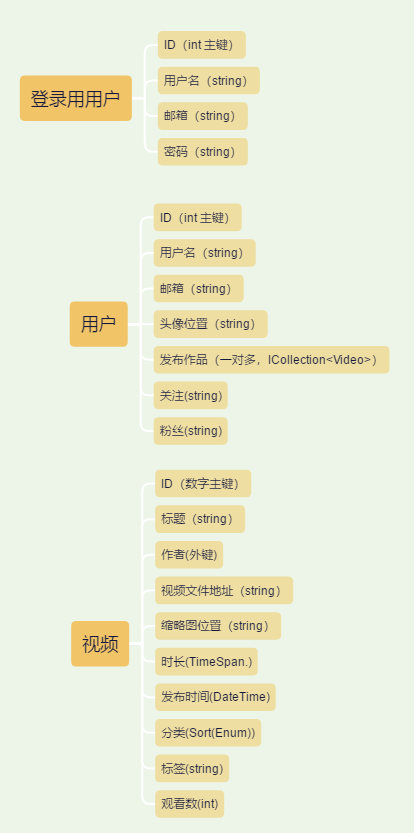
二、创建模型以及数据库
用户登录信息:
通过添加修饰 [DatabaseGenerated(System.ComponentModel.DataAnnotations.Schema.DatabaseGeneratedOption.None)] 可以手动设置 Id 属性插入数据库:
增加一个 salt 用来接受随机字符串以进行加密。
     public class UserIdentity
     {
         [Key]
         [DatabaseGenerated(System.ComponentModel.DataAnnotations.Schema.DatabaseGeneratedOption.None)]
         public int Id { get; set; }

         [Required]
         public string UserName { get; set; }

         [Required]
         [EmailAddress]
         public string Email { get; set; }

         [Required]
         public string Password { get; set; }

         [Required]
         public string Salt { get; set; }
     }
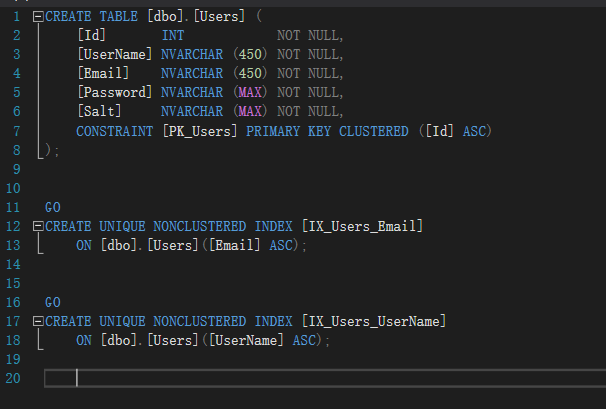
用户登录信息数据库,通过创建索引的方式为用户名和邮箱添加唯一约束:
     public class UserIdentityDbContext : DbContext
     {
         public UserIdentityDbContext(DbContextOptions<UserIdentityDbContext> options):base(options)
         { }

         public DbSet<UserIdentity> Users { get; set; }

         protected override void OnModelCreating(ModelBuilder modelBuilder)
         {
             modelBuilder.Entity<UserIdentity>().HasIndex(u => new { u.Email }).IsUnique(true);
             modelBuilder.Entity<UserIdentity>().HasIndex(u => new { u.UserName }).IsUnique(true);
         }
     }
在 appsetting.json 中添加数据库连接字符串:
   "ConnectionStrings": {
     "UserIdentityDbContext": "Server=(localdb)\\mssqllocaldb;Database=UserIdentityDbContext;Trusted_Connection=True;MultipleActiveResultSets=true",
     "UserAndVideoDbContext": "Server=(localdb)\\mssqllocaldb;Database=UserAndVideoDbContext;Trusted_Connection=True;MultipleActiveResultSets=true"
   },
VS2017 PM控制台中添加迁移:
add-migration UserIdentityDb -c FakeBilibili.Data.UserIdentityDbContext
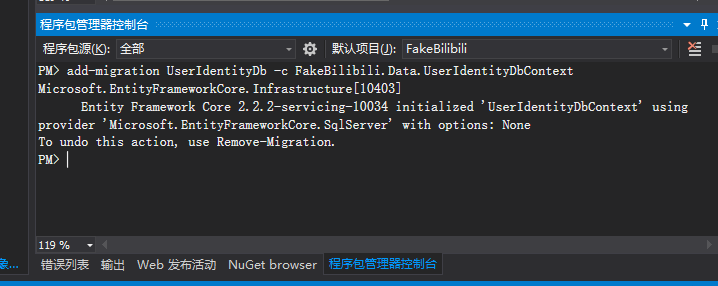
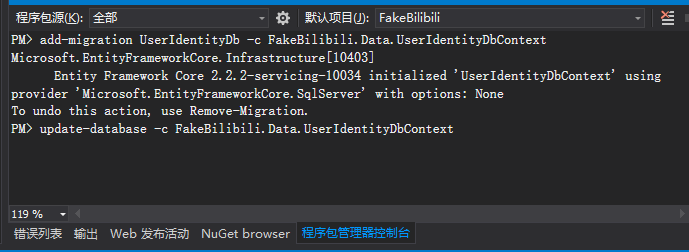
添加数据库:
update-database -c FakeBilibili.Data.UserIdentityDbContext
查看数据库中 User 表的定义,已添加唯一约束:
用户信息类:
     public class User
     {
         [Key]
         [DatabaseGenerated(System.ComponentModel.DataAnnotations.Schema.DatabaseGeneratedOption.None)]
         public int Id { get; set; }

         [EmailAddress]
         [Required]
         public string Email { get; set; }

         [Required]
         public string UserName { get; set; }

         public string AvatarLocation { get; set; }

         /// <summary>
         /// 作品
         /// </summary>
         public ICollection<Video> Works { get; set; }

         /// <summary>
         /// 关注,内部用 / 分隔
         /// </summary>
         public string Follows { get; set; }

         /// <summary>
         /// 粉丝
         /// </summary>
         public string Fans { get; set; }
     }
首先新建枚举用于确定视频分类:
     public enum Category
     {
         动画,
         番剧,
         音乐,
         数码,
         游戏,
         科技
     }
视频信息类:
     public class Video
     {
         [Key]
         public int Id { get; set; }

         [Required]
         public string Title { get; set; }

         [Required]
         public User Author { get; set; }

         [Required]
         public string VideoLocation { get; set; }

         [Required]
         public string ThumbnailLocation { get; set; }

         [Required]
         public TimeSpan Duration { get; set; }

         [Required]
         public DateTime PublishDateTime { get; set; }

         /// <summary>
         /// 类别
         /// </summary>
         [Required]
         public Category Category { get; set; }

         /// <summary>
         /// 标签
         /// </summary>
         public string Tag { get; set; }

         /// <summary>
         /// 观看数
         /// </summary>
         [Required]
         public int VideoView { get; set; }
     }
创建用户信息和视频的数据库,并通过创建索引的方式为用户名和邮箱添加唯一约束:
     public class UserAndVideoDbContext:DbContext
     {
         public UserAndVideoDbContext(DbContextOptions<UserAndVideoDbContext> options):base(options) { }

         public DbSet<User> Users { get; set; }
         public DbSet<Video> Videos { get; set; }

         protected override void OnModelCreating(ModelBuilder modelBuilder)
         {
             modelBuilder.Entity<User>().HasIndex(u => new { u.Email}).IsUnique(true);
             modelBuilder.Entity<User>().HasIndex(u => new { u.UserName }).IsUnique(true);
         }
     }
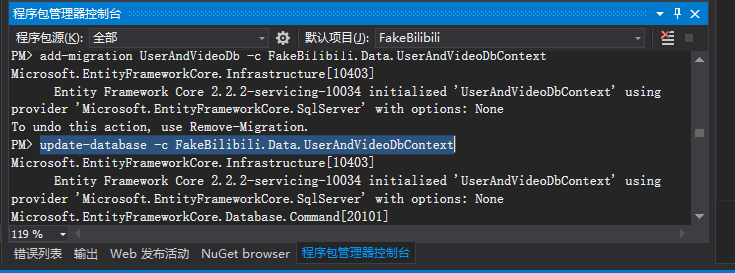
运行迁移和更新命令:
     add-migration UserAndVideoDb -c FakeBilibili.Data.UserAndVideoDbContext
     update-database -c FakeBilibili.Data.UserAndVideoDbContext
三、数据库初始化
为了方便添加盐值,添加一个 SaltGenerator 类:
默认生成一个 8 位的随机字符串:
     public class SaltGenerator
     {
         public static string GenerateSalt()
         {
             );
         }

         public static string GenerateSalt(int length)
         {
             )
             {
                 return String.Empty;
             }

             StringBuilder salt = new StringBuilder();
             Random random=new Random();
             StringBuilder saltCharList=new StringBuilder();
             //将小写字母加入到列表中
             ; i <= ; i++)
             {
                 saltCharList.Append((char) i);
             }
             //将大写字母加入到列表中
             ; i <=; i++)
             {
                 saltCharList.Append((char) i);
             }
             saltCharList.Append();

             ; saltIndex < length; saltIndex++)
             {
                 salt.Append(saltCharList[random.Next()]);
             }

             return salt.ToString();
         }
     }
为了方便对密码进行加密,在此创建一个 Encryptor 类:
     public class Encryptor : IEncrypt
     {
         private readonly SHA256 sha256;

         public Encryptor()
         {
             sha256 = SHA256.Create();
         }

         public string Encrypt(string password, string salt)
         {
             byte[] hashBytes = sha256.ComputeHash(Encoding.UTF8.GetBytes(password + salt));
             StringBuilder hashPassword = new StringBuilder();
             foreach (var hashByte in hashBytes)
             {
                 hashPassword.Append(hashByte);
             }
             return hashPassword.ToString();
         }
     }
分别创建三个类进行登录用用户,用户以及视频的初始化:
对登录用用户进行初始化,使用 SHA256 算法对密码进行加密:
     public class UserIdentityInitiator
     {
         public static async Task Initial(IServiceProvider provider)
         {
             UserIdentityDbContext context = provider.GetRequiredService<UserIdentityDbContext>();
             Encryptor encryptor = new Encryptor();
             if (!context.Users.Any())
             {
                 ; i < ; i++)
                 {
                     string salt = SaltGenerator.GenerateSalt();
                     UserIdentity user = new UserIdentity()
                     {
                         UserName = $"User{i+1}",
                         Password = encryptor.Encrypt($"User{i+1}",salt),
                         Salt = salt,
                         Id = i+,
                         Email = $"User{i + 1}@cnblog.com"
                     };
                     await context.Users.AddAsync(user);
                     await context.SaveChangesAsync();
                 }
             }
         }
     }
然后在 Configure 方法最后一行中添加代码:
UserIdentityInitiator.Initial(app.ApplicationServices).Wait();
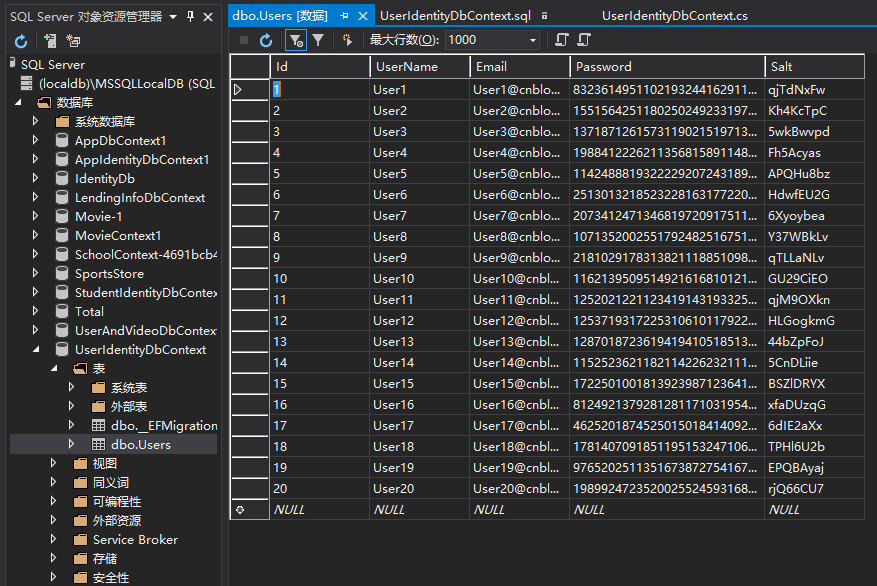
运行程序后查看本地数据库:
对用户进行初始化:
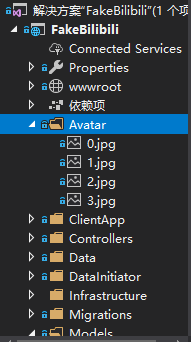
在此添加了一个 Avatar 文件夹并放入几张图片备用,对用户头像进行初始化:
     public class UserInitiator
     {
         public static async Task Initial(IServiceProvider serviceProvider)
         {
             UserAndVideoDbContext context = serviceProvider.GetRequiredService<UserAndVideoDbContext>();
             if (!context.Users.Any())
             {
                 string currentDirectory = Directory.GetCurrentDirectory();
                 ;

                 ; i < ; i++)
                 {
                     pictureSerial = i % ;
                     User user = new User()
                     {
                         AvatarLocation = Path.Combine(currentDirectory,"Avatar",$"{pictureSerial}.jpg"),
                         UserName = $"User{i+1}",
                         Id = i+,
                         Email = $"User{i+1}@cnblog.com"
                     };

                     await context.Users.AddAsync(user);
                     await context.SaveChangesAsync();
                 }
             }
         }
     }
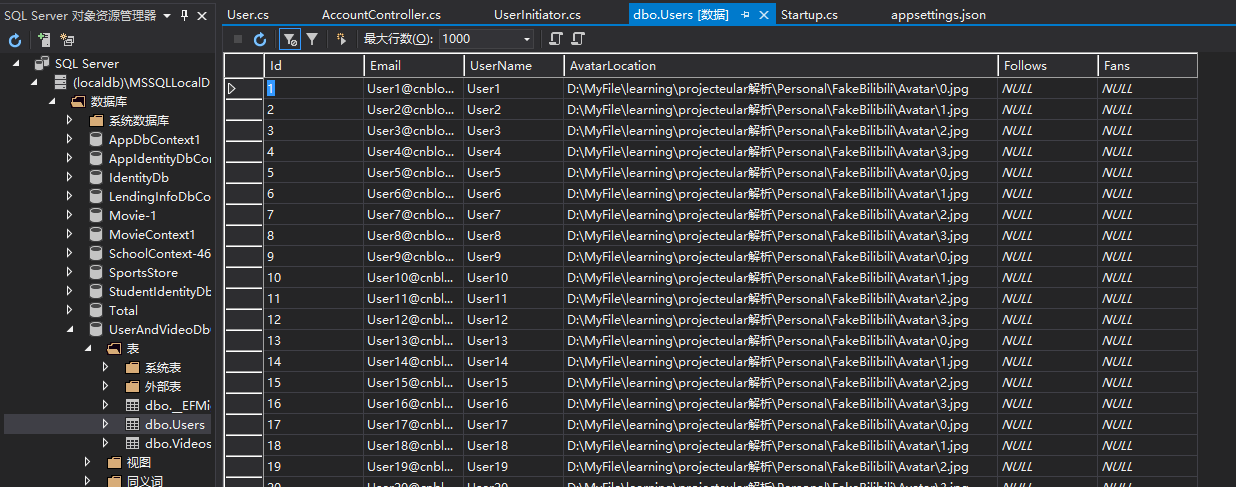
在 Configure 方法最后一行添加方法:
UserInitiator.InitialUsers(app.ApplicationServices).Wait();
对视频进行初始化:
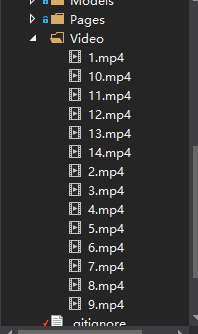
新建一个 Video 文件夹放置若干视频:
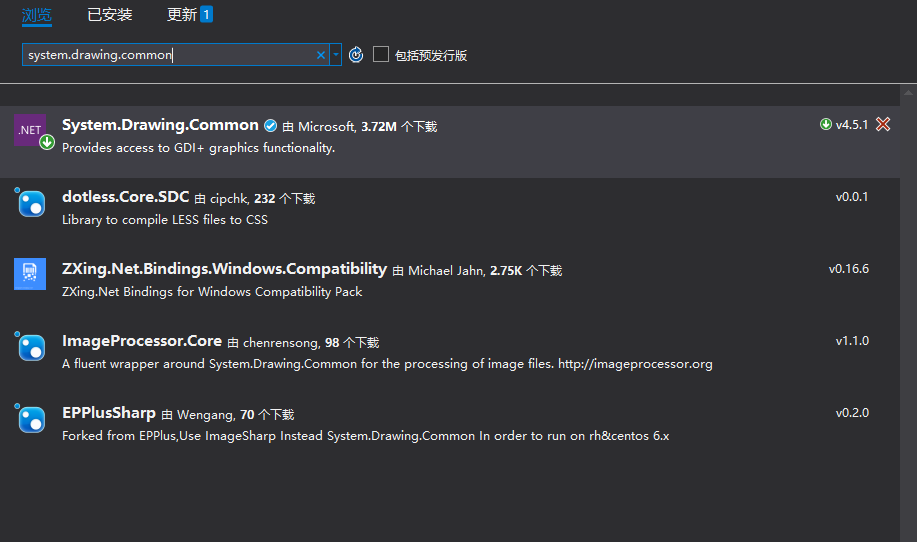
在.net core 中为了生成缩略图,需要引用 System.Drawing.Common 库:
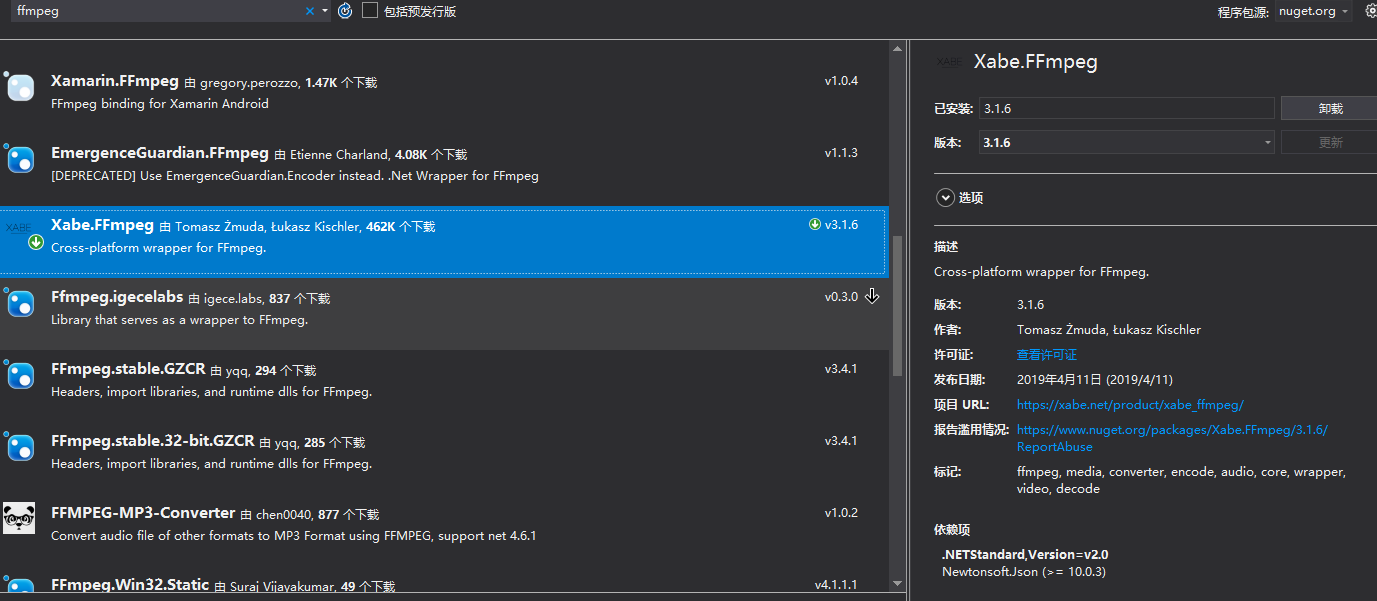
为了方便地获取视频封面,可以引用 Xabe.FFmpeg 库:
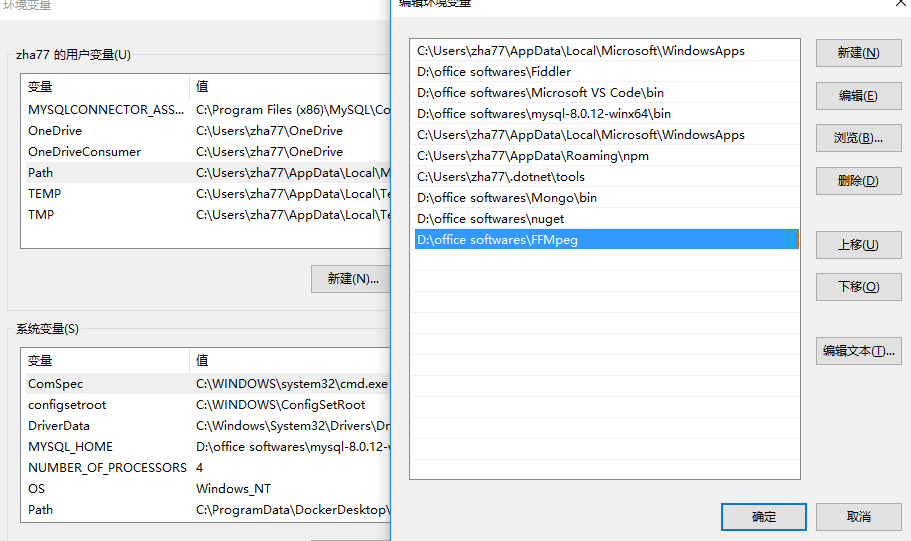
由于 Xabe.FFmpeg 是 .NET 平台上对 FFmpeg 封装,基本功能依靠于 FFmpeg 实现,因此需要下载 FFmpeg:https://ffmpeg.zeranoe.com/builds/
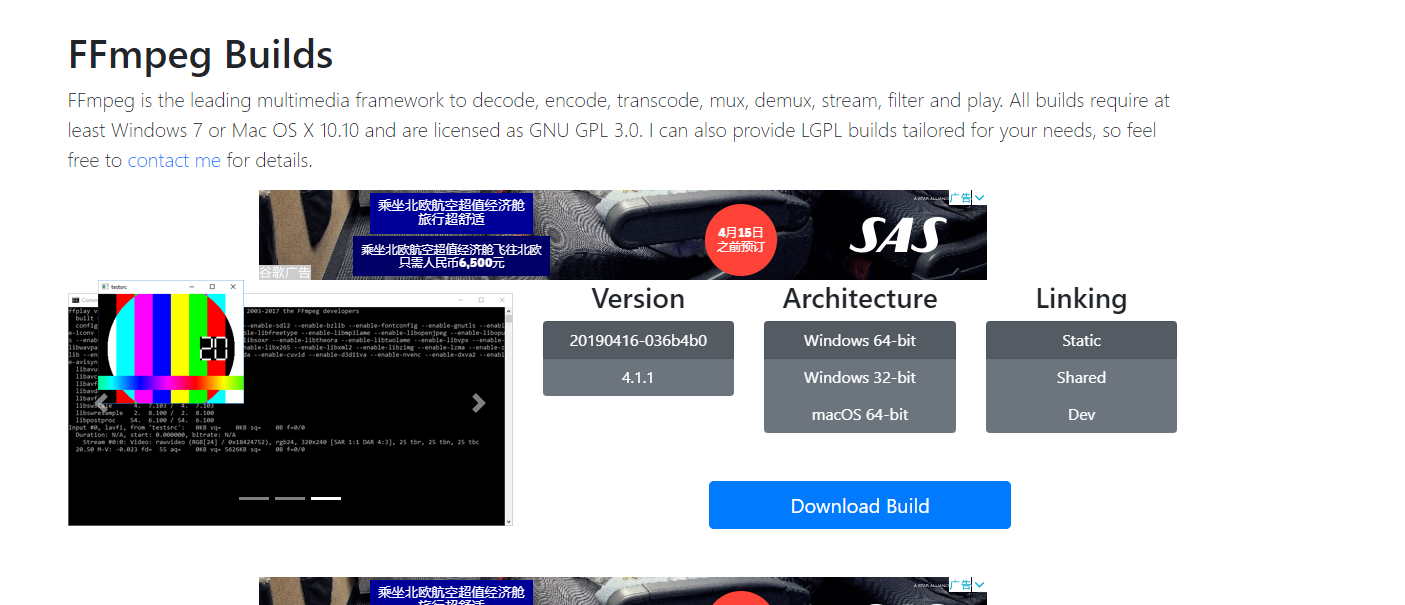
解压文件后将文件夹添加到环境变量中:
新建一个类用以在本地保存缩略图:
     public class PictureTrimmer
     {
         public static string GetLocalTrimmedPicture(string fileName)
         {
             , "min.");
             Image.FromFile(fileName).GetThumbnailImage(, , (() => false), IntPtr.Zero).Save(newLocation);
             return newLocation;
         }
     }
初始化视频:
为 FFmpeg.ExecutablesPath 赋值,设置成 FFmpeg 解压后的位置:
由于 Xabe.FFmpeg 创建图片时使用 FileStream 指定 FileMode 为 NewCreate,所以存在已有文件时会抛出异常,需保证创建的图片不与现有文件重名。
在此全部视频由 ID 为1的用户上传:
     public class VideoInitiator
     {
         public static async Task Initial(IServiceProvider provider)
         {
             FFmpeg.ExecutablesPath = @"D:\office softwares\FFMpeg";

             UserAndVideoDbContext context = provider.GetRequiredService<UserAndVideoDbContext>();
             string videoDirectory = Path.Combine(Directory.GetCurrentDirectory(), "Video");

             User author = context.Users.Include(u => u.Works).FirstOrDefault(u => u.Id == );

             if (!context.Videos.Any())
             {
                 ; i <= ; i++)
                 {
                     string videoPath = Path.Combine(videoDirectory, $"{i}.mp4");
                     string picPath = Path.Combine(videoDirectory, $"{i}.jpg");

                     if (File.Exists(picPath))
                     {
                         File.Delete(picPath);
                     }

                     //获取视频信息
                     IMediaInfo mediaInfo = await MediaInfo.Get(videoPath);
                     //以 0 秒时的画面作为封面图并保存在本地
                     Conversion.Snapshot(videoPath, picPath,
                         TimeSpan.FromSeconds()).Start().Wait();

                     Video video = new Video()
                     {
                         Title = $"轻音少女 第{i}集",
                         Author = context.Users.FirstOrDefault(u => u.Id == ),
                         Category = Category.番剧,
                         VideoLocation = videoPath,
                         Duration = mediaInfo.Duration,
                         PublishDateTime = DateTime.Now,
                         ThumbnailLocation = PictureTrimmer.GetLocalTrimmedPicture(picPath),
                         Tag = "轻音少女",
                         VideoView =
                     };
                     author.Works.Add(video);
                     await context.Videos.AddAsync(video);
                     await context.SaveChangesAsync();
                 }

             }
         }
     }
在 Configure 方法最后一行调用初始化方法:
VideoInitiator.Initial(app.ApplicationServices).Wait();
运行程序:
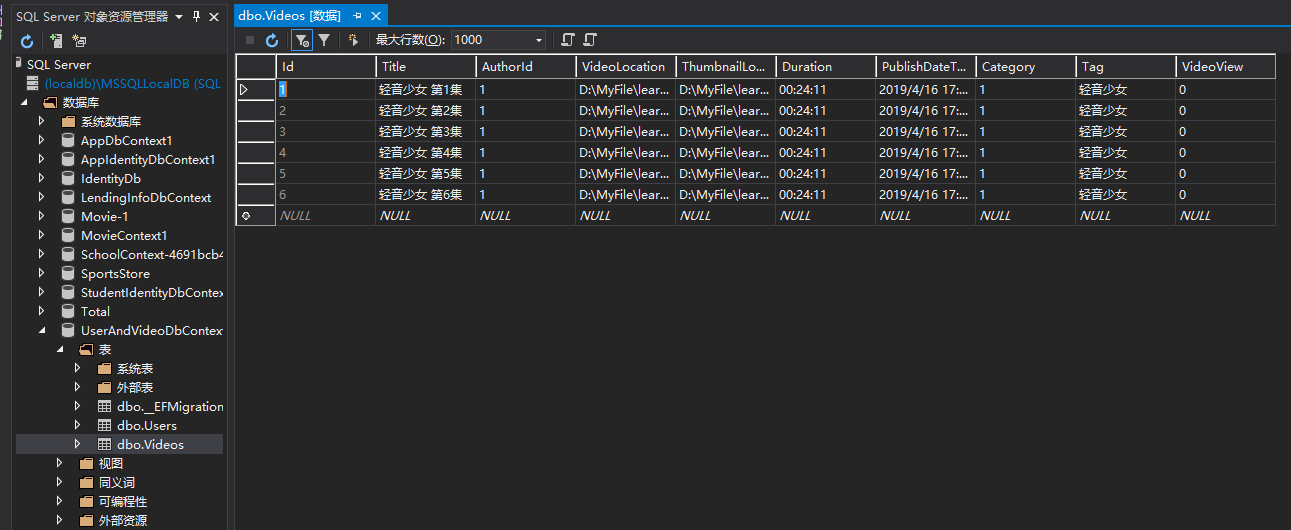
至此数据库初始化工作完成。
ASP.NET Core Web API + Angular 仿B站(二)后台模型创建以及数据库的初始化的更多相关文章
- ASP.NET Core Web API + Angular 仿B站(三)后台配置 JWT 的基于 token 的验证
前言: 本系列文章主要为对所学 Angular 框架的一次微小的实践,对 b站页面作简单的模仿. 本系列文章主要参考资料: 微软文档: https://docs.microsoft.com/zh-cn ...
- ASP.NET Core Web API + Angular 仿B站(一) 目的分析以及创建 WebAPI + Angular7 项目
前言: 本系列文章主要为对所学 Angular 框架的一次微小的实践,对 b站页面作简单的模仿. 本系列文章主要参考资料: 微软文档: https://docs.microsoft.com/zh-cn ...
- ASP.NET Core Web API下事件驱动型架构的实现(三):基于RabbitMQ的事件总线
在上文中,我们讨论了事件处理器中对象生命周期的问题,在进入新的讨论之前,首先让我们总结一下,我们已经实现了哪些内容.下面的类图描述了我们已经实现的组件及其之间的关系,貌似系统已经变得越来越复杂了. 其 ...
- 重温.NET下Assembly的加载过程 ASP.NET Core Web API下事件驱动型架构的实现(三):基于RabbitMQ的事件总线
重温.NET下Assembly的加载过程 最近在工作中牵涉到了.NET下的一个古老的问题:Assembly的加载过程.虽然网上有很多文章介绍这部分内容,很多文章也是很久以前就已经出现了,但阅读之后 ...
- 在ASP.NET Core Web API中为RESTful服务增加对HAL的支持
HAL(Hypertext Application Language,超文本应用语言)是一种RESTful API的数据格式风格,为RESTful API的设计提供了接口规范,同时也降低了客户端与服务 ...
- ASP.NET Core Web API 索引 (更新Identity Server 4 视频教程)
GraphQL 使用ASP.NET Core开发GraphQL服务器 -- 预备知识(上) 使用ASP.NET Core开发GraphQL服务器 -- 预备知识(下) [视频] 使用ASP.NET C ...
- asp.net core web api 生成 swagger 文档
asp.net core web api 生成 swagger 文档 Intro 在前后端分离的开发模式下,文档就显得比较重要,哪个接口要传哪些参数,如果一两个接口还好,口头上直接沟通好就可以了,如果 ...
- ASP.NET Core Web API中带有刷新令牌的JWT身份验证流程
ASP.NET Core Web API中带有刷新令牌的JWT身份验证流程 翻译自:地址 在今年年初,我整理了有关将JWT身份验证与ASP.NET Core Web API和Angular一起使用的详 ...
- 使用 Swagger 自动生成 ASP.NET Core Web API 的文档、在线帮助测试文档(ASP.NET Core Web API 自动生成文档)
对于开发人员来说,构建一个消费应用程序时去了解各种各样的 API 是一个巨大的挑战.在你的 Web API 项目中使用 Swagger 的 .NET Core 封装 Swashbuckle 可以帮助你 ...
随机推荐
- k-svd字典学习,稀疏编码
1. K-SVD usage: Design/Learn a dictionary adaptively to betterfit the model and achieve sparse s ...
- vs2010配置VL_FEAT库
VL_FEAT库是计算机视觉中的一个开源库,支持C/C++,Matlab,可以在http://www.vlfeat.org/下载. 本文主要讲一下VS2010中如何配置vl_feat库(算是对原文的一 ...
- stm32GPIO8种模式
stm32GPIO工作模式及用途 1.浮空输入GPIO_IN_FLOATING ——浮空输入,可以做KEY识别,RX1 2.带上拉输入GPIO_IPU——IO内部上拉电阻输入 ...
- vc++6.0中右键点击"转到定义"为什么是"未定义符号"呢?
VC的问题,需要生成一下浏览信息...然后rebuild
- HDU 6073 Matching In Multiplication dfs遍历环 + 拓扑
Matching In Multiplication Problem DescriptionIn the mathematical discipline of graph theory, a bipa ...
- ORACLE数据库忘记SYS和SYSTEM密码,SYSTEM被锁定怎么办?
本人忘性太大,竟然将ORACLE的Sys用户和system用户密码搞忘,而且多次尝试登录system后,造成system被锁定. 经过一番尝试,终于解决.过程如下: 首先,重建sys密码文件.重建方式 ...
- 更多的使用自定义元素(CustomElement)。
更多的使用自定义元素(CustomElement).
- 李雅普诺夫函数 LyapunovFunction 李雅普诺夫意义下的稳定性
https://zh.wikipedia.org/zh-hans/李亞普諾夫函數 李雅普诺夫函数(Lyapunov function)是用来证明一动力系统或自治微分方程稳定性的函数.其名称来自俄罗斯数 ...
- Duplicate Observed Data
在翻看<重构-改善既有代码的设计>这本经典的书,书中就介绍了一个重构方法--Duplicate Observed Data 复制被监视数据的重构方法,使用这种方法能够使界面和对数据的操作隔 ...
- POJ3273 Monthly Expense —— 二分
题目链接:http://poj.org/problem?id=3273 Monthly Expense Time Limit: 2000MS Memory Limit: 65536K Tota ...