
分布式文件系统之Glusterfs
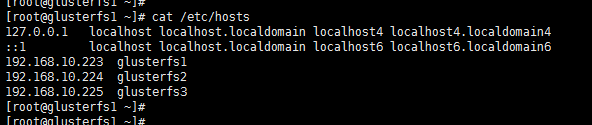
1、环境规划如下
centos7.4 三个节点一块 sdb 3G大小的测试硬盘
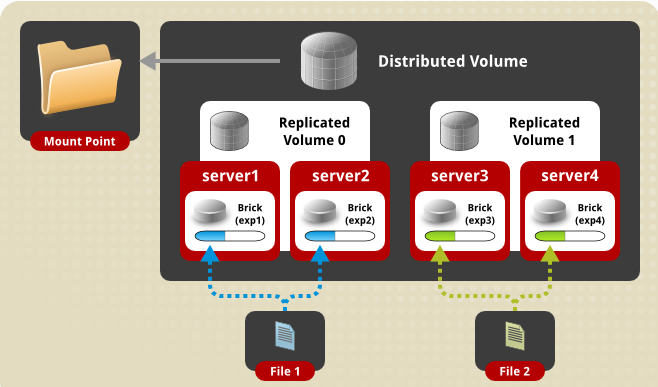
2、Glusterfs 卷的类型比较多,这里我们测试最常用的一种 Distributed Replicated Glusterfs Volume,架构如下
3、安装部署
、准备yum源

yum install centos-release-gluster -y

、Format and mount the bricks  三个节点操作

[root@glusterfs1 ~]# fdisk /dev/sdb

Welcome to fdisk (util-linux 2.23.).

Changes will remain in memory only, until you decide to write them.

Be careful before using the write command.

Device does not contain a recognized partition table

Building a new DOS disklabel with disk identifier 0x56ea90c1.

Command (m for help): n

Partition type:

   p   primary ( primary,  extended,  free)

   e   extended

Select (default p): p

Partition number (-, default ):

First sector (-, default ):

Using default value

Last sector, +sectors or +size{K,M,G} (-, default ):

Using default value

Partition  of type Linux and of size  GiB is set

Command (m for help): p

Disk /dev/sdb:  MB,  bytes,  sectors

Units = sectors of  *  =  bytes

Sector size (logical/physical):  bytes /  bytes

I/O size (minimum/optimal):  bytes /  bytes

Disk label type: dos

Disk identifier: 0x56ea90c1

   Device Boot      Start         End      Blocks   Id  System

/dev/sdb1                           Linux

Command (m for help): w

The partition table has been altered!

Calling ioctl() to re-read partition table.

Syncing disks.

[root@glusterfs1 ~]# mkfs.xfs -f /dev/sdb

meta-data=/dev/sdb               isize=    agcount=, agsize= blks

         =                       sectsz=   attr=, projid32bit=

         =                       crc=        finobt=, sparse=

data     =                       bsize=   blocks=, imaxpct=

         =                       sunit=      swidth= blks

naming   =version               bsize=   ascii-ci= ftype=

log      =internal log           bsize=   blocks=, version=

         =                       sectsz=   sunit= blks, lazy-count=

realtime =none                   extsz=   blocks=, rtextents=

[root@glusterfs1 ~]#

[root@glusterfs1 ~]# mkdir -p /storage/brick1    #建立挂载块设备的目录
yum -y install xfsprogs  安装xfs包
[root@glusterfs1 ~]# mount /dev/sdb /storage/brick1 [root@glusterfs1 ~]# echo "/dev/sdb /storage/brick1 xfs defaults 0 0" >> /etc/fstab
[root@glusterfs1 ~]# mount -a && mount
[root@glusterfs1 ~]# yum install glusterfs-server -y
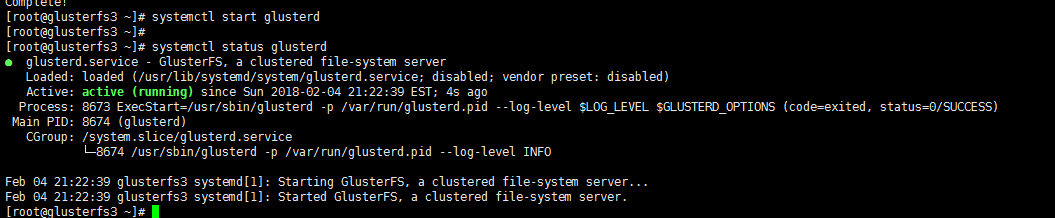
节点加入信任存储池

[root@glusterfs1 ~]# iptables -I INPUT -s 192.168.10.0/ -j ACCEPT

[root@glusterfs1 ~]#

[root@glusterfs1 ~]#

[root@glusterfs1 ~]# gluster peer probe glusterfs2

peer probe: success.

[root@glusterfs1 ~]# gluster peer probe glusterfs3

peer probe: success.

[root@glusterfs1 ~]# gluster peer status

Number of Peers:

Hostname: glusterfs2

Uuid: 6e7eb8e4-e4ec-4d60-8fa5-98f856759810

State: Peer in Cluster (Connected)

Hostname: glusterfs3

Uuid: 861d2297--4f64-99e2-c16d46de60d9

State: Peer in Cluster (Connected)

[root@glusterfs1 ~]#

[root@glusterfs1 ~]# glusterfs -V

glusterfs 3.12.

Repository revision: git://git.gluster.org/glusterfs.git

Copyright (c) - Red Hat, Inc. <https://www.gluster.org/>

GlusterFS comes with ABSOLUTELY NO WARRANTY.

It is licensed to you under your choice of the GNU Lesser

General Public License, version  or any later version (LGPLv3

or later), or the GNU General Public License, version  (GPLv2),

in all cases as published by the Free Software Foundation.

设置  GlusterFS volume
[root@glusterfs1 ~]# mkdir -p /storage/brick1 #每个节点都需要操作
[root@glusterfs1 ~]# gluster volume create gv0 replica 3 glusterfs1:/storage/brick1 glusterfs2:/storage/brick1 glusterfs3:/storage/brick1 force #创建分布式的复制卷
volume create: gv0: success: please start the volume to access data
[root@glusterfs1 ~]#
[root@glusterfs1 ~]# gluster volume start gv0
volume start: gv0: success
[root@glusterfs1 ~]# gluster volume info
Volume Name: gv0
Type: Replicate
Volume ID: 18bfd54d-43b0-4be8-85d6-2b385db61dc4
Status: Started
Snapshot Count: 0
Number of Bricks: 1 x 3 = 3
Transport-type: tcp
Bricks:
Brick1: glusterfs1:/storage/brick1
Brick2: glusterfs2:/storage/brick1
Brick3: glusterfs3:/storage/brick1
Options Reconfigured:
transport.address-family: inet
nfs.disable: on
performance.client-io-threads: off
Testing the GlusterFS volume
[root@glusterfs1 ~]# mount -t glusterfs glusterfs1:/gv0 /mnt
[root@glusterfs1 ~]# for i in `seq -w 1 100`; do cp -rp /var/log/messages /mnt/copy-test-$i; done
[root@glusterfs1 ~]# ls -lA /mnt/copy* | wc -l
100
在其他节点查看


分布式文件系统之Glusterfs的更多相关文章
- 分布式文件系统GlusterFS
转自于:http://www.cnblogs.com/zitjubiz/archive/2012/11/30/Distributed_File_System_glusterFS.html Gluste ...
- GlusterFS分布式文件系统的使用
glusterfs是一款开源的分布式文件系统. 它具备高扩展.高可用及高性能等特性,由于其无元数据服务器的设计,使其真正实现了线性的扩展能力,使存储总容量可轻松达到PB级别,支持数千客户端并发访问. ...
- GlusterFS 分布式文件系统的使用入门-管理GlusterFS卷
GlusterFS 分布式文件系统的使用入门-管理GlusterFS卷 作者:尹正杰 版权声明:原创作品,谢绝转载!否则将追究法律责任. 一.卷的扩容 您可以根据需要在群集联机且可用时扩展卷.例如,您 ...
- GlusterFS分布式文件系统部署及基本使用(CentOS 7.6)
GlusterFS分布式文件系统部署及基本使用(CentOS 7.6) 作者:尹正杰 版权声明:原创作品,谢绝转载!否则将追究法律责任. Gluster File System 是一款自由软件,主要由 ...
- 分布式文件系统---GlusterFS
1.1 分布式文件系统 1.1.1 什么是分布式文件系统 相对于本机端的文件系统而言,分布式文件系统(英语:Distributed file system, DFS),或是网络文件系统(英语:Netw ...
- GlusterFS分布式文件系统部署
GlusterFS是一个可伸缩的网络文件系统,使用常见的现成的硬件,您可以创建大型分布式存储流媒体解决方案.数据分析.和其他数据相关的任务.GlusterFS是自由和开源软件. 详细参考官网:http ...
- GlusterFS分布式文件系统高速管理
TaoCloud XDFS基于GlusterFS开源分布式文件系统,进行了系统优化.project化.定制化和产品化工作,五年以上的实践积累了大量实践经验,包含客户案例.最佳实践.定制开发.咨询服务和 ...
- GlusterFS 分布式文件系统
简介 官方文档:https://docs.gluster.org/en/latest/Quick-Start-Guide/Architecture/ Glusterfs是一个开源的分布式文件系统,是S ...
- 【架构设计】分布式文件系统 FastDFS的原理和安装使用
本文地址 分享提纲: 1.概述 2. 原理 3. 安装 4. 使用 5. 参考文档 1. 概述 1.1)[常见文件系统] Google了一下,流行的开源分布式文件系统有很多,介绍如下: -- mo ...
随机推荐
- 解决Mycat对自增表不支持(第一种已测试通过)
表 INSERT INTO news_class (`class_id`,`class_name`) VALUES (next VALUE FOR MYCATSEQ_GLOBAL,'1'); sequ ...
- HTML5中最看重的理念“语义化”相比HTML有什么区别?
这里搜集整理了一些语义化标签方面的问题和解答,以供大家参考. 语义化这个概念应该说是伴着HTML5应运而生,那么什么是HTML5中所谓的语义化? 简单来说就是:描述内容的含义(meaning) 比如说 ...
- DevOps - 配置管理 - Chef
#!/bin/sh # WARNING: REQUIRES /bin/sh # # - must run on /bin/sh on solaris 9 # - must run on /bin/sh ...
- ATM-interface-bank
from lib import commonfrom db import db_handler user_logger = common.get_logger('bank') def check_ba ...
- 数据结构-队列(Queue)
#include <stdio.h> #include <stdlib.h> #define LIST_INIT_SIZE 10 #define LISTINCREMENT 1 ...
- python之时间处理time模块
import time import datetime ''' print(time.time()) #返回当前系统时间戳 print(time.ctime()) #返回当前系统时间 print(ti ...
- 菜鸟学Linux - 文件/文件夹的隐藏属性
文件/文件夹居然还有隐藏属性?没错,隐藏属性对于文件/文件夹的安全很重要.好比如说,我们需要使用”鉴定符“来揭开装备的隐藏属性:在Linux中chattr/lsattr就是“鉴定符”. chattr基 ...
- Android拨打电话不弹出系统拨号界面总结
我在网上搜了一下,解决这个问题,有两种方式: 1.反射调用系统底层方法,并获取系统权限 反射调用的代码如下: Class phoneFactoryClass = Class.forName(" ...
- 第三模块 面向对象& 网络编程基础 实战考核
1.简述构造方法和析构方法. 构造方法(__init__):主要作用是实例化时给实例一些初始化参数,或执行一些其它的初始化工作,总之因为这个__init__只要一实例化, 就会自动执行,不管你在这个方 ...
- Nodejs-文件系统操作
1.相关模块 2.同步调用和异步调用 注意:他们的捕获异常的方式不一样 写入文件 语法 以下为异步模式下写入文件的语法格式: fs.writeFile(filename, data[, options ...