
分布式文件系统---GlusterFS
1.1 分布式文件系统
1.1.1 什么是分布式文件系统
相对于本机端的文件系统而言,分布式文件系统(英语:Distributed file system, DFS),或是网络文件系统(英语:Network File System),是一种允许文件通过网络在多台主机上分享的文件系统,可让多机器上的多用户分享文件和存储空间。
在这样的文件系统中,客户端并非直接访问底层的数据存储区块,而是通过网络,以特定的通信协议和服务器沟通。借由通信协议的设计,可以让客户端和服务器端都能根据访问控制清单或是授权,来限制对于文件系统的访问。
1.1.2 glusterfs是什么
Gluster是一个分布式文件系统。它是各种不同的存储服务器之上的组合,这些服务器由以太网或无限带宽技术Infiniband以及远程直接内存访问RDMA互相融汇,最终所形成的一个大的并行文件系统网络。

它有包括云计算在内的多重应用,诸如:生物医药科学,文档存储。Gluster是由GNU托管的自由软件,证书是AGPL。Gluster公司是Gluster的首要商业赞助商,且提供商业产品以及基于Gluster的解决方案。
1.2 快速部署GlusterFS
1.2.1 环境说明
注意:最少需要拥有两块硬盘
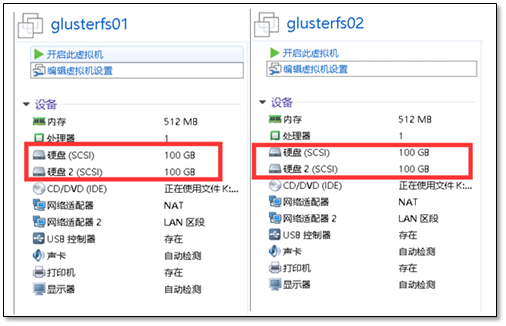
系统环境说明
glusterfs01信息
[root@glusterfs01 ~]# hostname

glusterfs01

[root@glusterfs01 ~]# uname -r

3.10.0-693.el7.x86_64

[root@glusterfs01 ~]# sestatus

SELinux status:                 disabled

[root@glusterfs01 ~]# systemctl status firewalld.service

● firewalld.service - firewalld - dynamic firewall daemon

   Loaded: loaded (/usr/lib/systemd/system/firewalld.service; disabled; vendor preset: enabled)

   Active: inactive (dead)

     Docs: man:firewalld(1)

[root@glusterfs01 ~]# hostname -I

10.0.0.120 172.16.1.120
glusterfs02信息
[root@glusterfs02 ~]# uname -r

3.10.0-693.el7.x86_64

[root@glusterfs02 ~]# sestatus

SELinux status:                 disabled

[root@glusterfs02 ~]# systemctl status firewalld.service

● firewalld.service - firewalld - dynamic firewall daemon

   Loaded: loaded (/usr/lib/systemd/system/firewalld.service; disabled; vendor preset: enabled)

   Active: inactive (dead)

     Docs: man:firewalld(1)

[root@glusterfs02 ~]# hostname -I

10.0.0.121 172.16.1.121
注意配置好hosts解析
1.2.2 前期准备
gluster01主机挂载磁盘
[root@glusterfs01 ~]# mkfs.xfs /dev/sdb

[root@glusterfs01 ~]# mkdir -p /data/brick1

[root@glusterfs01 ~]# echo '/dev/sdb /data/brick1 xfs defaults 0 0' >> /etc/fstab

[root@glusterfs01 ~]# mount -a && mount
gluster02主机挂载磁盘
[root@glusterfs02 ~]# mkfs.xfs /dev/sdb

[root@glusterfs02 ~]# mkdir -p /data/brick1

[root@glusterfs02 ~]# echo '/dev/sdb /data/brick1 xfs defaults 0 0' >> /etc/fstab

[root@glusterfs02 ~]# mount -a && mount
1.3 部署GlusterFS
1.3.1 安装软件
在两个节点上操作
yum install centos-release-gluster -y

# 修改镜像源加速

sed -i 's#http://mirror.centos.org#https://mirrors.shuosc.org#g' /etc/yum.repos.d/CentOS-Gluster-3.12.repo

yum install -y glusterfs glusterfs-server glusterfs-fuse glusterfs-rdma
软件版本
[root@glusterfs01 ~]#  rpm  -qa glusterfs

glusterfs-3.12.5-2.el7.x86_64
1.3.2 启动GlusterFS
在两个节点上都进行操作
[root@glusterfs01 ~]# systemctl start glusterd.service

[root@glusterfs01 ~]# systemctl status glusterd.service

● glusterd.service - GlusterFS, a clustered file-system server

   Loaded: loaded (/usr/lib/systemd/system/glusterd.service; disabled; vendor preset: disabled)

   Active: active (running) since 三 2018-02-07 21:02:44 CST; 2s ago

  Process: 1923 ExecStart=/usr/sbin/glusterd -p /var/run/glusterd.pid --log-level $LOG_LEVEL $GLUSTERD_OPTIONS (code=exited, status=0/SUCCESS)

 Main PID: 1924 (glusterd)

   CGroup: /system.slice/glusterd.service

           └─1924 /usr/sbin/glusterd -p /var/run/glusterd.pid --log-level INFO

2月 07 21:02:44 glusterfs01 systemd[1]: Starting GlusterFS, a clustered file-system server...

2月 07 21:02:44 glusterfs01 systemd[1]: Started GlusterFS, a clustered file-system server.

Hint: Some lines were ellipsized, use -l to show in full.
1.3.3 配置互信(可信池)
在glusterfs01上操作
[root@glusterfs01 ~]# gluster peer probe glusterfs02

peer probe: success.
在glusterfs02上操作
[root@glusterfs02 ~]# gluster peer probe glusterfs01

peer probe: success.
注意:一旦建立了这个池,只有受信任的成员可能会将新的服务器探测到池中。新服务器无法探测池,必须从池中探测。
1.3.4 检查对等状态
[root@glusterfs01 ~]#  gluster peer status

Number of Peers: 1

Hostname: 10.0.0.121

Uuid: 61d043b0-5582-4354-b475-2626c88bc576

State: Peer in Cluster (Connected)

Other names:

glusterfs02
注意:看到的UUID应不相同。
[root@glusterfs02 ~]#  gluster peer status

Number of Peers: 1

Hostname: glusterfs01

Uuid: e2a9367c-fe96-446d-a631-194970c18750

State: Peer in Cluster (Connected)
1.3.5 建立一个GlusterFS卷
在两个节点上操作
mkdir -p /data/brick1/gv0
在任意一个节点上执行
[root@glusterfs01 ~]# gluster volume create gv0 replica 2 glusterfs01:/data/brick1/gv0 glusterfs02:/data/brick1/gv0

Replica 2 volumes are prone to split-brain. Use Arbiter or Replica 3 to avoid this. See: http://docs.gluster.org/en/latest/Administrator%20Guide/Split%20brain%20and%20ways%20to%20deal%20with%20it/.

Do you still want to continue?

 (y/n) y

volume create: gv0: success: please start the volume to access data
启用存储卷
[root@glusterfs01 ~]# gluster volume start gv0

volume start: gv0: success
查看信息
[root@glusterfs01 ~]# gluster volume info

Volume Name: gv0

Type: Replicate

Volume ID: 865899b9-1e5a-416a-8374-63f7df93e4f5

Status: Started

Snapshot Count: 0

Number of Bricks: 1 x 2 = 2

Transport-type: tcp

Bricks:

Brick1: glusterfs01:/data/brick1/gv0

Brick2: glusterfs02:/data/brick1/gv0

Options Reconfigured:

transport.address-family: inet

nfs.disable: on

performance.client-io-threads: off
至此,服务端配置结束
1.4 客户端测试
1.4.1 安装客户端工具
挂载测试
[root@clsn6 ~]# yum install centos-release-gluster -y

[root@clsn6 ~]# yum install -y glusterfs glusterfs-fuse
注意:要配置好hosts文件,否则连接会出错
[root@clsn6 ~]# mount.glusterfs  glusterfs01:/gv0 /mnt

[root@clsn6 ~]# df -h

Filesystem        Size  Used Avail Use% Mounted on

/dev/sda3          19G  2.2G   16G  13% /

tmpfs             238M     0  238M   0% /dev/shm

/dev/sda1         190M   40M  141M  22% /boot

glusterfs01:/gv0  100G   33M  100G   1% /mnt
1.4.2 复制文件测试
[root@clsn6 ~]# for i in `seq -w 1 100`; do cp -rp /var/log/messages /mnt/copy-test-$i; done
客户端检查文件
[root@clsn6 ~]#  ls -lA /mnt/copy* | wc -l

10
服务节点检查文件
[root@glusterfs01 ~]#   ls -lA /data/brick1/gv0/copy* |wc -l

100
服务节点检查文件
[root@glusterfs02 ~]#   ls -lA /data/brick1/gv0/copy* |wc -l

100
至此Glusterfs简单配置完成
1.5 参考文献
分布式文件系统---GlusterFS的更多相关文章
- 分布式文件系统GlusterFS
转自于:http://www.cnblogs.com/zitjubiz/archive/2012/11/30/Distributed_File_System_glusterFS.html Gluste ...
- 分布式文件系统glusterfs安装步骤
我的系统是 RHEL5 , 可能环境不一样, 需要安装的第三方依赖不一样啊, 反正大家在安装的过程中缺少什么就去安装什么, 一般都会有提示的. 下载 glusterfs-3.2.0.tar.gz ...
- GlusterFS分布式文件系统的使用
glusterfs是一款开源的分布式文件系统. 它具备高扩展.高可用及高性能等特性,由于其无元数据服务器的设计,使其真正实现了线性的扩展能力,使存储总容量可轻松达到PB级别,支持数千客户端并发访问. ...
- GlusterFS 分布式文件系统的使用入门-管理GlusterFS卷
GlusterFS 分布式文件系统的使用入门-管理GlusterFS卷 作者:尹正杰 版权声明:原创作品,谢绝转载!否则将追究法律责任. 一.卷的扩容 您可以根据需要在群集联机且可用时扩展卷.例如,您 ...
- GlusterFS分布式文件系统部署及基本使用(CentOS 7.6)
GlusterFS分布式文件系统部署及基本使用(CentOS 7.6) 作者:尹正杰 版权声明:原创作品,谢绝转载!否则将追究法律责任. Gluster File System 是一款自由软件,主要由 ...
- GlusterFS分布式文件系统部署
GlusterFS是一个可伸缩的网络文件系统,使用常见的现成的硬件,您可以创建大型分布式存储流媒体解决方案.数据分析.和其他数据相关的任务.GlusterFS是自由和开源软件. 详细参考官网:http ...
- GlusterFS分布式文件系统高速管理
TaoCloud XDFS基于GlusterFS开源分布式文件系统,进行了系统优化.project化.定制化和产品化工作,五年以上的实践积累了大量实践经验,包含客户案例.最佳实践.定制开发.咨询服务和 ...
- GlusterFS 分布式文件系统
简介 官方文档:https://docs.gluster.org/en/latest/Quick-Start-Guide/Architecture/ Glusterfs是一个开源的分布式文件系统,是S ...
- glusterfs分布式文件系统
第一:安装依赖包: yum install libibverbs librdmacm xfsprogs nfs-utils rpcbind libaio liblvm2app lvm2-devel ...
随机推荐
- python3 + selenium 之窗口切换
窗口切换 此代码来源学习后对淘宝操作实践记录: 以下代码在Chrome61和IE11上正常运行,Firefox5.7上运行存在一些问题须改进,应该是火狐不兼容差link_text部分和循环经常报错,在 ...
- C# mongoDB Driver 使用对象方式查询语法大全
#region 查询方法 /// <summary> /// 获取单个对象 /// </summary> /// <typeparam name="T" ...
- JavaScript: 认识 Object、原型、原型链与继承。
目录 引用类型与对象 类与对象 成员组成 成员访问 实例方法 / 属性 引用类型与对象 JavaScript 存在着两种数据类型:"基本数据类型" 与 "引用数据类型&q ...
- [转]什么时候该用NoSQL?
NoSQL这两年越来越热,尤其是大型互联网公司非常热衷这门技术.根据笔者的经验,并不是任何场景,NoSQL都要优于关系型数据库.下面我们来具体聊聊,什么时候使用NoSQL比较给力: 1) 数据库表sc ...
- PLSQL程序设计(Oracle)
Hello World set serveroutput on; declare --说明部分 begin --程序 dbms_output.put_line('Hello World'); end; ...
- 002 Spark的编译
一:不编译 1.不编译的做法 在公司里可能需要编译,但是如果为了简单的学习就不必编译,直接在官方下载即可. 截图为: 二:编译\ 1.下载 http://archive.cloudera.com/cd ...
- 如何使用redis设计关系数据库
目录 redis设计关系数据库 前言 设计用户信息表结构 hash存储记录 set存储id 图示 索引/查询: 1.select 查询所有记录 : 类似sql的select from table_na ...
- 移动端Tap与滑屏实战技巧总结以及Vue混合开发自定义指令
最近在忙混合开发,因交互相对复杂,所以也踩了很多坑.在此做一下总结. 1.tap事件的实际应用 在使用tap事件时,老生常谈的肯定是点透问题,大多情况下,在有滑屏交互的页面时,我们会在根节点阻止默认行 ...
- Node.js之图片上传
本文用node进行图片上传主要借助formidable插件,具体使用步骤如下: 1.安装formidable插件 npm install formidable -g 2.引入依赖包 const for ...
- Nutch源码阅读进程4
前面依次看了nutch的准备工作inject和generate部分,抓取的fetch部分的代码,趁热打铁,我们下面来一睹parse即页面解析部分的代码,这块代码主要是集中在ParseSegment类里 ...