
分布式文件系统之Glusterfs
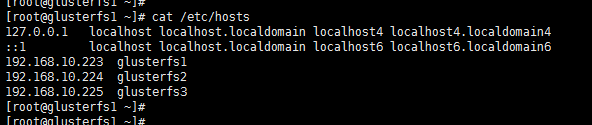
1、环境规划如下
centos7.4 三个节点一块 sdb 3G大小的测试硬盘
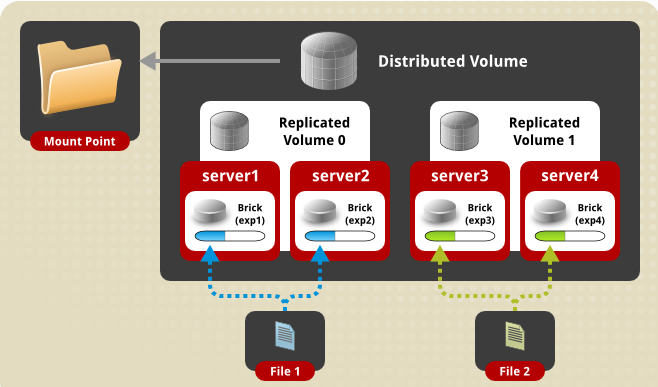
2、Glusterfs 卷的类型比较多,这里我们测试最常用的一种 Distributed Replicated Glusterfs Volume,架构如下
3、安装部署
、准备yum源

yum install centos-release-gluster -y

、Format and mount the bricks  三个节点操作

[root@glusterfs1 ~]# fdisk /dev/sdb

Welcome to fdisk (util-linux 2.23.).

Changes will remain in memory only, until you decide to write them.

Be careful before using the write command.

Device does not contain a recognized partition table

Building a new DOS disklabel with disk identifier 0x56ea90c1.

Command (m for help): n

Partition type:

   p   primary ( primary,  extended,  free)

   e   extended

Select (default p): p

Partition number (-, default ):

First sector (-, default ):

Using default value

Last sector, +sectors or +size{K,M,G} (-, default ):

Using default value

Partition  of type Linux and of size  GiB is set

Command (m for help): p

Disk /dev/sdb:  MB,  bytes,  sectors

Units = sectors of  *  =  bytes

Sector size (logical/physical):  bytes /  bytes

I/O size (minimum/optimal):  bytes /  bytes

Disk label type: dos

Disk identifier: 0x56ea90c1

   Device Boot      Start         End      Blocks   Id  System

/dev/sdb1                           Linux

Command (m for help): w

The partition table has been altered!

Calling ioctl() to re-read partition table.

Syncing disks.

[root@glusterfs1 ~]# mkfs.xfs -f /dev/sdb

meta-data=/dev/sdb               isize=    agcount=, agsize= blks

         =                       sectsz=   attr=, projid32bit=

         =                       crc=        finobt=, sparse=

data     =                       bsize=   blocks=, imaxpct=

         =                       sunit=      swidth= blks

naming   =version               bsize=   ascii-ci= ftype=

log      =internal log           bsize=   blocks=, version=

         =                       sectsz=   sunit= blks, lazy-count=

realtime =none                   extsz=   blocks=, rtextents=

[root@glusterfs1 ~]#

[root@glusterfs1 ~]# mkdir -p /storage/brick1    #建立挂载块设备的目录
yum -y install xfsprogs  安装xfs包
[root@glusterfs1 ~]# mount /dev/sdb /storage/brick1 [root@glusterfs1 ~]# echo "/dev/sdb /storage/brick1 xfs defaults 0 0" >> /etc/fstab
[root@glusterfs1 ~]# mount -a && mount
[root@glusterfs1 ~]# yum install glusterfs-server -y
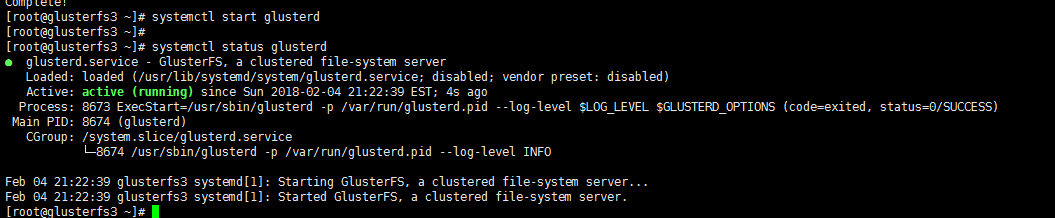
节点加入信任存储池

[root@glusterfs1 ~]# iptables -I INPUT -s 192.168.10.0/ -j ACCEPT

[root@glusterfs1 ~]#

[root@glusterfs1 ~]#

[root@glusterfs1 ~]# gluster peer probe glusterfs2

peer probe: success.

[root@glusterfs1 ~]# gluster peer probe glusterfs3

peer probe: success.

[root@glusterfs1 ~]# gluster peer status

Number of Peers:

Hostname: glusterfs2

Uuid: 6e7eb8e4-e4ec-4d60-8fa5-98f856759810

State: Peer in Cluster (Connected)

Hostname: glusterfs3

Uuid: 861d2297--4f64-99e2-c16d46de60d9

State: Peer in Cluster (Connected)

[root@glusterfs1 ~]#

[root@glusterfs1 ~]# glusterfs -V

glusterfs 3.12.

Repository revision: git://git.gluster.org/glusterfs.git

Copyright (c) - Red Hat, Inc. <https://www.gluster.org/>

GlusterFS comes with ABSOLUTELY NO WARRANTY.

It is licensed to you under your choice of the GNU Lesser

General Public License, version  or any later version (LGPLv3

or later), or the GNU General Public License, version  (GPLv2),

in all cases as published by the Free Software Foundation.

设置  GlusterFS volume
[root@glusterfs1 ~]# mkdir -p /storage/brick1 #每个节点都需要操作
[root@glusterfs1 ~]# gluster volume create gv0 replica 3 glusterfs1:/storage/brick1 glusterfs2:/storage/brick1 glusterfs3:/storage/brick1 force #创建分布式的复制卷
volume create: gv0: success: please start the volume to access data
[root@glusterfs1 ~]#
[root@glusterfs1 ~]# gluster volume start gv0
volume start: gv0: success
[root@glusterfs1 ~]# gluster volume info
Volume Name: gv0
Type: Replicate
Volume ID: 18bfd54d-43b0-4be8-85d6-2b385db61dc4
Status: Started
Snapshot Count: 0
Number of Bricks: 1 x 3 = 3
Transport-type: tcp
Bricks:
Brick1: glusterfs1:/storage/brick1
Brick2: glusterfs2:/storage/brick1
Brick3: glusterfs3:/storage/brick1
Options Reconfigured:
transport.address-family: inet
nfs.disable: on
performance.client-io-threads: off
Testing the GlusterFS volume
[root@glusterfs1 ~]# mount -t glusterfs glusterfs1:/gv0 /mnt
[root@glusterfs1 ~]# for i in `seq -w 1 100`; do cp -rp /var/log/messages /mnt/copy-test-$i; done
[root@glusterfs1 ~]# ls -lA /mnt/copy* | wc -l
100
在其他节点查看


分布式文件系统之Glusterfs的更多相关文章
- 分布式文件系统GlusterFS
转自于:http://www.cnblogs.com/zitjubiz/archive/2012/11/30/Distributed_File_System_glusterFS.html Gluste ...
- GlusterFS分布式文件系统的使用
glusterfs是一款开源的分布式文件系统. 它具备高扩展.高可用及高性能等特性,由于其无元数据服务器的设计,使其真正实现了线性的扩展能力,使存储总容量可轻松达到PB级别,支持数千客户端并发访问. ...
- GlusterFS 分布式文件系统的使用入门-管理GlusterFS卷
GlusterFS 分布式文件系统的使用入门-管理GlusterFS卷 作者:尹正杰 版权声明:原创作品,谢绝转载!否则将追究法律责任. 一.卷的扩容 您可以根据需要在群集联机且可用时扩展卷.例如,您 ...
- GlusterFS分布式文件系统部署及基本使用(CentOS 7.6)
GlusterFS分布式文件系统部署及基本使用(CentOS 7.6) 作者:尹正杰 版权声明:原创作品,谢绝转载!否则将追究法律责任. Gluster File System 是一款自由软件,主要由 ...
- 分布式文件系统---GlusterFS
1.1 分布式文件系统 1.1.1 什么是分布式文件系统 相对于本机端的文件系统而言,分布式文件系统(英语:Distributed file system, DFS),或是网络文件系统(英语:Netw ...
- GlusterFS分布式文件系统部署
GlusterFS是一个可伸缩的网络文件系统,使用常见的现成的硬件,您可以创建大型分布式存储流媒体解决方案.数据分析.和其他数据相关的任务.GlusterFS是自由和开源软件. 详细参考官网:http ...
- GlusterFS分布式文件系统高速管理
TaoCloud XDFS基于GlusterFS开源分布式文件系统,进行了系统优化.project化.定制化和产品化工作,五年以上的实践积累了大量实践经验,包含客户案例.最佳实践.定制开发.咨询服务和 ...
- GlusterFS 分布式文件系统
简介 官方文档:https://docs.gluster.org/en/latest/Quick-Start-Guide/Architecture/ Glusterfs是一个开源的分布式文件系统,是S ...
- 【架构设计】分布式文件系统 FastDFS的原理和安装使用
本文地址 分享提纲: 1.概述 2. 原理 3. 安装 4. 使用 5. 参考文档 1. 概述 1.1)[常见文件系统] Google了一下,流行的开源分布式文件系统有很多,介绍如下: -- mo ...
随机推荐
- SQL查询出每门课都大于80 分的学生姓名
Course表如下: 查询出每门课都大于80 分的学生姓名有两种方法. 1.select distinct name from Course where name not in (select di ...
- 爬虫学习(三)——get请求参数解析
get请求: 用户输入搜索的内容,发送请求,将请求的内容保存起来. get请求的本质是在地址栏中输入参数进行的一种请求方式. 解析参数使用urllib.parse impo ...
- js函数带括号和不带括号赋给对象属性的区别
注意: 1.js为对象添加函数时,不要在函数后面加().一旦加了括号是表示将函数的返回值赋给对象的属性. 例:function test(){ document.writeln("我是js函 ...
- 项目实战14.1—ELK 企业内部日志分析系统
本文收录在Linux运维企业架构实战系列 一.els.elk 的介绍 1.els,elk els:ElasticSearch,Logstash,Kibana,Beats elk:ElasticSear ...
- 五 python并发编程之IO模型
一 IO模型介绍 同步(synchronous) IO和异步(asynchronous) IO,阻塞(blocking) IO和非阻塞(non-blocking)IO分别是什么,到底有什么区别?这个问 ...
- tp5 使用paginate分页获取数据对象之后 如何对对象进行数据添加
tp5 使用paginate分页获取数据对象之后 如何对对象进行数据添加 大家都知道,在使用tp5的paginate获取分页数据之后,得到的是一个数据对象,但有时会碰到要对数据对象进行二次加工的情况, ...
- python模块之collections模块
计数器 Counter 计数元素迭代器 elements() 计数对象拷贝 copy() 计数对象清空 clear() from collections import Counter #import ...
- James Bach Rapid Test的感受
前阶段拜读过James大神的快速测试,英文水平有限,阅读起来有点吃力,虽然想亲自参加大神的培训,一直没有机会,不过阿里牛人参加大神的培训,并总结的不错,现在谈谈自己的感想和看法. 进入测试行业不少年了 ...
- 1250 Fibonacci数列(矩阵乘法快速幂)
1250 Fibonacci数列 时间限制: 1 s 空间限制: 128000 KB 题目等级 : 钻石 Diamond 题目描述 Description 定义:f0=f1=1, f ...
- 常用的一些api
发送手机短信 // 发送短信给安全号码 SmsManager smsManager = SmsManager.getDefault(); smsManager.sendTextMessage(phon ...