
DiskLruCache缓存bitmap
public class MainActivity extends AppCompatActivity  {
    private DiskLruCache diskLruCache;
    ImageView imageView;
    String key;
    String uri;
    public void onCreate(Bundle savedInstanceState) {
        super.onCreate(savedInstanceState);
        setContentView(R.layout.activity_main);
       imageView = findViewById(R.id.image);

        File file = getDiskCacheDir(this, "a");
        System.out.println(file.getAbsolutePath() + "缓存路径");
        initDiskLruCache();
        Bitmap bitmap = getCache();
        if (bitmap != null) {
            imageView.setImageBitmap(bitmap);
        } else {

            new Thread(runnable).start();
        }
    }

    public static File getDiskCacheDir(Context context, String uniqueName) {
        final String cachePath = Environment.MEDIA_MOUNTED.equals(Environment.getExternalStorageState()) ||!Environment.isExternalStorageRemovable()
                ? context.getExternalCacheDir().getPath()
                : context.getCacheDir().getPath();
        return new File(cachePath + File.separator + uniqueName);

    }
    private boolean downloadUrlToStream(String urlString, OutputStream outputStream) {
        HttpURLConnection urlConnection = null;
        BufferedOutputStream out = null;
        BufferedInputStream in = null;

        try {
            final URL url = new URL(urlString);
            urlConnection = (HttpURLConnection) url.openConnection();
            in = new BufferedInputStream(urlConnection.getInputStream());
            out = new BufferedOutputStream(outputStream);
            int b;
            while ((b = in.read()) != -1) {
                out.write(b);
            }

            return true;
        } catch (Exception e) {

        } finally {
            if (urlConnection != null) {
                urlConnection.disconnect();
            }
            try {
                if (out != null) {
                    out.close();
                }
                if (in != null) {
                    in.close();
                }
            } catch (final IOException e) {
            }
        }
        return false;
    }
    private static final int MAX_SIZE = 10 * 1024 * 1024;//最多缓存10MB,最小单位byte
    private void initDiskLruCache() {
        if (diskLruCache == null || diskLruCache.isClosed()) {
            try {
                File cacheDir =getDiskCacheDir(this, "mycache");
                if (!cacheDir.exists()) {
                    cacheDir.mkdirs();
                }
                //初始化DiskLruCache
                diskLruCache = DiskLruCache.open(cacheDir, 1, 1, MAX_SIZE);
            } catch (IOException e) {
                e.printStackTrace();
            }
        }
    }

  Runnable runnable=new Runnable() {
      @Override
      public void run() {

     try {

            //得到DiskLruCache.Editor
            DiskLruCache.Editor editor = diskLruCache.edit(key);
            if (editor != null) {
                OutputStream outputStream = editor.newOutputStream(0);
                if (downloadUrlToStream(uri, outputStream)) {
                    //写入缓存
                    editor.commit();
                } else {
                    //写入失败
                    editor.abort();
                }
            }
            diskLruCache.flush();
         handler.sendEmptyMessage(1);
        } catch (IOException e) {
            e.printStackTrace();

        }

    }
  };

    public static String hashKeyForDisk(String key) {
        String cacheKey;
        try {
            final MessageDigest mDigest = MessageDigest.getInstance("MD5");//把uri编译为MD5,防止网址有非法字符
            mDigest.update(key.getBytes());
            cacheKey = bytesToHexString(mDigest.digest());
        } catch (NoSuchAlgorithmException e) {
            cacheKey = String.valueOf(key.hashCode());
        }
        return cacheKey;
    }

    private static String bytesToHexString(byte[] bytes) {
        // http://stackoverflow.com/questions/332079
        StringBuilder sb = new StringBuilder();
        for (int i = 0; i < bytes.length; i++) {
            String hex = Integer.toHexString(0xFF & bytes[i]);
            if (hex.length() == 1) {
                sb.append('0');
            }
            sb.append(hex);
        }
        return sb.toString();
    }
    private Bitmap getCache() {
        try {
            uri = "https://ss3.bdstatic.com/70cFv8Sh_Q1YnxGkpoWK1HF6hhy/it/u=3166403788,4188649647&fm=115&gp=0.jpg";
            key = hashKeyForDisk(uri);
            DiskLruCache.Snapshot snapshot = diskLruCache.get(key);//通过key得到缓存
            if (snapshot != null) {
                InputStream in = snapshot.getInputStream(0);//得到一个输入流进行操作
                return BitmapFactory.decodeStream(in);
            }
        } catch (IOException e) {
            e.printStackTrace();
        }
        return null;
    }
@SuppressLint("HandlerLeak")
Handler handler=new Handler(){
    @Override
    public void handleMessage(Message msg) {
        super.handleMessage(msg);
        if (msg.what == 1) {
            Bitmap bitmap = getCache();
            if (bitmap != null) {
                imageView.setImageBitmap(bitmap);
            }
        }
    }
};

}
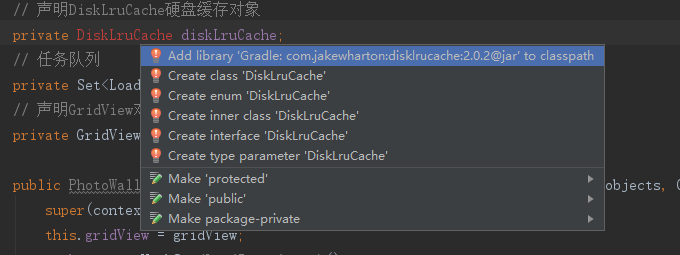
DiskLrucache是第二级缓存,缓存到外置sd卡,需要添加依赖,需要读取外置sd卡权限
implementation 'com.jakewharton:disklrucache:2.0.2'
按alt+enter会有提示
右键module打开module设置,依赖项搜索DiskLrucache会出来这个依赖项
DiskLruCache缓存bitmap的更多相关文章
- DiskLruCache和Lrucache缓存bitmap
三级缓存,先在内存Lrucache中查找缓存,没有就去外存DiskLrucache中查找,再没有就下载,Lru不会自动删除,所以要设置最大缓存内存,后台运行Lrucache不会消失,关闭程序Diskl ...
- android 缓存Bitmap - 开发文档翻译
由于本人英文能力实在有限,不足之初敬请谅解 本博客只要没有注明“转”,那么均为原创,转贴请注明本博客链接链接 Loading a single bitmap into your user interf ...
- LruCache DiskLruCache 缓存 简介 案例 MD
Markdown版本笔记 我的GitHub首页 我的博客 我的微信 我的邮箱 MyAndroidBlogs baiqiantao baiqiantao bqt20094 baiqiantao@sina ...
- 综合使用LruCache和DiskLruCache 缓存图片
Activity public class MainActivity extends Activity { private GridView mPhotoWall; private P ...
- android 缓存Bitmap 使用内存缓存
private LruCache<String, Bitmap> mMemoryCache; /** * 判断内存大小 设置位图的缓存空间 */ private void judgeMem ...
- LruCache缓存bitmap(二)
Lrucache缓存程序关闭缓存自动清除,所以要在onstart方法中调用,只要不关闭程序缓存就在,除以1024是以kb为单位 public class MainActivity extends Ap ...
- LruCache缓存bitmap(一)
Lrucache是把图片缓存到内置sd卡,设置缓存容量为系统分配容量的八分之一,单位byte,超过缓存容量gc会自动回收不长使用的缓存.觉得lrucache就先map一样,放入键值对就行了,比较方便, ...
- LruCache缓存bitmap(三)
应用在网络连接上,onrestart后不会重新联网获取图片,省去了流量, public class MainActivity extends AppCompatActivity { ImageView ...
- Android硬盘缓存技术DiskLruCache技术笔记
防止多图OOM的核心解决思路就是使用LruCache技术,但LruCache只是管理了内存中图片的存储与释放,如果图片从内存中被移除的话,那么又需要从网络上重新加载一次,这显然非常耗时.因此Googl ...
随机推荐
- hystrix文档翻译之插件
插件 可以通过实现插件来改变Hystrix的行为.可以通过HystrixPlugins来注册自定义插件,这些插件会被应用到HystrixCommand,HystrixObservableCommand ...
- Halcon使用骨架法处理激光条并拟合直线
dev_close_window () * 设置颜色 dev_set_color ('green') * 读取图像 read_image (Image, 'images3/1') * 获得图像尺寸 g ...
- js实现表单验证
<!DOCTYPE html> <html> <head lang="en"> <meta charset="UTF-8&quo ...
- 从一段 Dubbo 源码到 CPU 分支预测的一次探险之旅
每个时代,都不会亏待会学习的人. 大家好,我是 yes. 这次本来是打算写一篇 RocketMQ 相关文章的,但是被插队了,我也是没想到的. 说来也是巧最近在看 Dubbo 源码,然后发现了一处很奇怪 ...
- 自定义springboot - starter 实现日志打印,并支持动态可插拔
1. starter 命名规则: springboot项目有很多专一功能的starter组件,命名都是spring-boot-starter-xx,如spring-boot-starter-loggi ...
- 秋天的第一份“干货” I Referer 防盗链,为什么少了个字母 R?
Referer 为什么叫 Referer?它代表什么意思?在诸多防盗链竞争中它有什么优势? 今天,在聊 Referer 防盗链之前,先来聊聊我们在现实生活中常常碰到的推荐人(Referrer)信息. ...
- Solidity智能合约面向对象编程(一、类的创建)
Solidity编写智能合约 1 pragma solidity ^0.4.4;//版本声明 ^代表向上兼容 pragma代表版本声明 solidity 代表开发语言 2 //定义类 3 contra ...
- Lua 协同程序(coroutine)
什么是协同(coroutine)? Lua 协同程序(coroutine)与线程比较类似:拥有独立的堆栈,独立的局部变量,独立的指令指针,同时又与其它协同程序共享全局变量和其它大部分东西. 协同是非常 ...
- 【Linux】一些文件限制配置
linux资源限制配置文件是/etc/security/limits.conf:限制用户进程的数量对于linux系统的稳定性非常重要. limits.conf文件限制着用户可以使用的最大文件数,最大线 ...
- 045 01 Android 零基础入门 01 Java基础语法 05 Java流程控制之循环结构 07 for循环应用及局部变量作用范围
045 01 Android 零基础入门 01 Java基础语法 05 Java流程控制之循环结构 07 for循环应用及局部变量作用范围 本文知识点:for循环应用及局部变量作用范围 for循环 w ...