
Hadoop学习之第一个MapReduce程序
期望
通过这个mapreduce程序了解mapreduce程序执行的流程,着重从程序解执行的打印信息中提炼出有用信息。
执行前
程序代码
程序代码基本上是《hadoop权威指南》上原封不动搬下来的,目的为求出某一年份中最高气温,相关代码如下:
public class NcdcWeather {

    private String USAF_station_id;

    private String WBAN_station_id;

    private String date;

    private String time;

    private String latitude;

    private String longitude;

    /** 海拔*/

    private String elevation;

    /** 风向*/

    private String wind_direction;

    private String wind_direction_quality_code;

    private String sky_ceiling_height;

    private String sky_ceiling_height_quality_code;

    private String visibility_distance;

    private String visibility_distance_quality_code;

    private String air_temperature;

    private String air_temperature_quality_code;

    private String dew_point_temperature;

    private String dew_point_temperature_quality_code;

    private String atmospheric_pressure;

    private String atmospheric_pressure_quality_code;

    public NcdcWeather(String rowData) {

        if (StringUtils.isEmpty(rowData) || rowData.length() < 105) {

            return;

        }

        USAF_station_id = rowData.substring(4, 10);

        WBAN_station_id = rowData.substring(10, 15);

        date = rowData.substring(15, 23);

        time = rowData.substring(23, 27);

        latitude = rowData.substring(28, 34);

        longitude = rowData.substring(34, 41);

        elevation = rowData.substring(46, 51);

        wind_direction = rowData.substring(60, 63);

        wind_direction_quality_code = rowData.substring(63, 64);

        sky_ceiling_height = rowData.substring(70, 75);

        sky_ceiling_height_quality_code = rowData.substring(75, 76);

        visibility_distance = rowData.substring(78, 84);

        visibility_distance_quality_code = rowData.substring(84, 85);

        air_temperature = rowData.substring(87, 92);

        air_temperature_quality_code = rowData.substring(92, 93);

        dew_point_temperature = rowData.substring(93, 98);

        dew_point_temperature_quality_code = rowData.substring(98, 99);

        atmospheric_pressure = rowData.substring(99, 104);

        atmospheric_pressure_quality_code = rowData.substring(104, 105);

    }

    public String getUSAF_station_id() {

        return USAF_station_id;

    }

    public void setUSAF_station_id(String USAF_station_id) {

        this.USAF_station_id = USAF_station_id;

    }

    public String getWBAN_station_id() {

        return WBAN_station_id;

    }

    public void setWBAN_station_id(String WBAN_station_id) {

        this.WBAN_station_id = WBAN_station_id;

    }

    public String getDate() {

        return date;

    }

    public void setDate(String date) {

        this.date = date;

    }

    public String getTime() {

        return time;

    }

    public void setTime(String time) {

        this.time = time;

    }

    public String getLatitude() {

        return latitude;

    }

    public void setLatitude(String latitude) {

        this.latitude = latitude;

    }

    public String getLongitude() {

        return longitude;

    }

    public void setLongitude(String longitude) {

        this.longitude = longitude;

    }

    public String getElevation() {

        return elevation;

    }

    public void setElevation(String elevation) {

        this.elevation = elevation;

    }

    public String getWind_direction() {

        return wind_direction;

    }

    public void setWind_direction(String wind_direction) {

        this.wind_direction = wind_direction;

    }

    public String getWind_direction_quality_code() {

        return wind_direction_quality_code;

    }

    public void setWind_direction_quality_code(String wind_direction_quality_code) {

        this.wind_direction_quality_code = wind_direction_quality_code;

    }

    public String getSky_ceiling_height() {

        return sky_ceiling_height;

    }

    public void setSky_ceiling_height(String sky_ceiling_height) {

        this.sky_ceiling_height = sky_ceiling_height;

    }

    public String getSky_ceiling_height_quality_code() {

        return sky_ceiling_height_quality_code;

    }

    public void setSky_ceiling_height_quality_code(String sky_ceiling_height_quality_code) {

        this.sky_ceiling_height_quality_code = sky_ceiling_height_quality_code;

    }

    public String getVisibility_distance() {

        return visibility_distance;

    }

    public void setVisibility_distance(String visibility_distance) {

        this.visibility_distance = visibility_distance;

    }

    public String getVisibility_distance_quality_code() {

        return visibility_distance_quality_code;

    }

    public void setVisibility_distance_quality_code(String visibility_distance_quality_code) {

        this.visibility_distance_quality_code = visibility_distance_quality_code;

    }

    public String getAir_temperature() {

        return air_temperature;

    }

    public void setAir_temperature(String air_temperature) {

        this.air_temperature = air_temperature;

    }

    public String getAir_temperature_quality_code() {

        return air_temperature_quality_code;

    }

    public void setAir_temperature_quality_code(String air_temperature_quality_code) {

        this.air_temperature_quality_code = air_temperature_quality_code;

    }

    public String getDew_point_temperature() {

        return dew_point_temperature;

    }

    public void setDew_point_temperature(String dew_point_temperature) {

        this.dew_point_temperature = dew_point_temperature;

    }

    public String getDew_point_temperature_quality_code() {

        return dew_point_temperature_quality_code;

    }

    public void setDew_point_temperature_quality_code(String dew_point_temperature_quality_code) {

        this.dew_point_temperature_quality_code = dew_point_temperature_quality_code;

    }

    public String getAtmospheric_pressure() {

        return atmospheric_pressure;

    }

    public void setAtmospheric_pressure(String atmospheric_pressure) {

        this.atmospheric_pressure = atmospheric_pressure;

    }

    public String getAtmospheric_pressure_quality_code() {

        return atmospheric_pressure_quality_code;

    }

    public void setAtmospheric_pressure_quality_code(String atmospheric_pressure_quality_code) {

        this.atmospheric_pressure_quality_code = atmospheric_pressure_quality_code;

    }

    @Override

    public String toString() {

        return "NcdcWeather{" +

                "USAF_station_id='" + USAF_station_id + '\'' +

                ", WBAN_station_id='" + WBAN_station_id + '\'' +

                ", date='" + date + '\'' +

                ", time='" + time + '\'' +

                ", latitude='" + latitude + '\'' +

                ", longitude='" + longitude + '\'' +

                ", elevation='" + elevation + '\'' +

                ", wind_direction='" + wind_direction + '\'' +

                ", wind_direction_quality_code='" + wind_direction_quality_code + '\'' +

                ", sky_ceiling_height='" + sky_ceiling_height + '\'' +

                ", sky_ceiling_height_quality_code='" + sky_ceiling_height_quality_code + '\'' +

                ", visibility_distance='" + visibility_distance + '\'' +

                ", visibility_distance_quality_code='" + visibility_distance_quality_code + '\'' +

                ", air_temperature='" + air_temperature + '\'' +

                ", air_temperature_quality_code='" + air_temperature_quality_code + '\'' +

                ", dew_point_temperature='" + dew_point_temperature + '\'' +

                ", dew_point_temperature_quality_code='" + dew_point_temperature_quality_code + '\'' +

                ", atmospheric_pressure='" + atmospheric_pressure + '\'' +

                ", atmospheric_pressure_quality_code='" + atmospheric_pressure_quality_code + '\'' +

                '}';

    }

}
Weather Bean
public class MaxTemperatureMapper extends Mapper<LongWritable, Text, Text, IntWritable> {

    private static int MISS_CODE = 9999;

    @Override

    protected void map(LongWritable key, Text value, Context context) throws IOException, InterruptedException {

        String line = value.toString();

        NcdcWeather ncdcWeather = new NcdcWeather(line);

        String year = ncdcWeather.getDate().substring(0, 4);

        int temperature = 0;

        if (ncdcWeather.getAir_temperature().startsWith("+")) {

            temperature = Integer.parseInt(ncdcWeather.getAir_temperature().substring(1));

        } else {

            temperature = Integer.parseInt(ncdcWeather.getAir_temperature());

        }

        if (temperature != MISS_CODE && ncdcWeather.getAir_temperature_quality_code().matches("[01459]")) {

            context.write(new Text(year), new IntWritable(temperature));

        }

    }

}
Mapper
public class MaxTemperatureReducer extends Reducer<Text, IntWritable, Text, IntWritable> {

    @Override

    protected void reduce(Text key, Iterable<IntWritable> values, Context context) throws IOException, InterruptedException {

        int max = Integer.MIN_VALUE;

        for (IntWritable temp : values) {

            max = Math.max(max, temp.get());

        }

        context.write(key, new IntWritable(max));

    }

}
Reducer
public class MaxTemperature {

    public static void main(String[] args) throws IOException, ClassNotFoundException, InterruptedException {

        if (args.length != 2) {

            System.err.println("Usage: MaxTemperature <input path> <output path>");

            System.exit(-1);

        }

        Job job = Job.getInstance();

        job.setJarByClass(MaxTemperature.class);

        job.setJobName("Max Temperature");

        FileInputFormat.addInputPath(job, new Path(args[0]));

        FileOutputFormat.setOutputPath(job, new Path(args[1]));

        job.setMapperClass(MaxTemperatureMapper.class);

        job.setReducerClass(MaxTemperatureReducer.class);

        job.setOutputKeyClass(Text.class);

        job.setOutputValueClass(IntWritable.class);

        System.exit(job.waitForCompletion(true) ? 0 : 1);

    }

}
数据准备
提前往hdfs中放了1901、1902两个年份的天气数据如下图所示:
验证执行
将以上代码打成一个jar,push到我们的虚拟机Hadoop环境中,为防止程序bug也为了节省执行时间,我们先在一个小集群、小数据量中验证代码。为此,我已经提前准备好了一个伪分布式(所谓为分布式即只有一个节点的全分布式)集群环境,下面开始在该环境中执行以上程序:
yarn jar ~/max-temperature-1.0-SNAPSHOT-jar-with-dependencies.jar /ncdc/ /max_temperature_out/
成功执行时的日志打印:
 -- ::, INFO client.RMProxy: Connecting to ResourceManager at localhost/127.0.0.1:

 -- ::, WARN mapreduce.JobResourceUploader: Hadoop command-line option parsing not performed. Implement the Tool interface and execute your application with ToolRunner to remedy this.

 -- ::, INFO mapreduce.JobResourceUploader: Disabling Erasure Coding for path: /tmp/hadoop-yarn/staging/hadoopuser/.staging/job_1568096329203_0001

 -- ::, INFO input.FileInputFormat: Total input files to process :

 -- ::, INFO mapreduce.JobSubmitter: number of splits:

 -- ::, INFO Configuration.deprecation: yarn.resourcemanager.system-metrics-publisher.enabled is deprecated. Instead, use yarn.system-metrics-publisher.enabled

 -- ::, INFO mapreduce.JobSubmitter: Submitting tokens for job: job_1568096329203_0001

 -- ::, INFO mapreduce.JobSubmitter: Executing with tokens: []

 -- ::, INFO conf.Configuration: resource-types.xml not found

 -- ::, INFO resource.ResourceUtils: Unable to find 'resource-types.xml'.

 -- ::, INFO impl.YarnClientImpl: Submitted application application_1568096329203_0001

 -- ::, INFO mapreduce.Job: The url to track the job: http://slave1:8088/proxy/application_1568096329203_0001/

 -- ::, INFO mapreduce.Job: Running job: job_1568096329203_0001

 -- ::, INFO mapreduce.Job: Job job_1568096329203_0001 running in uber mode : false

 -- ::, INFO mapreduce.Job:  map % reduce %

 -- ::, INFO mapreduce.Job:  map % reduce %

 -- ::, INFO mapreduce.Job:  map % reduce %

 -- ::, INFO mapreduce.Job: Job job_1568096329203_0001 completed successfully

 -- ::, INFO mapreduce.Job: Counters:

         File System Counters

                 FILE: Number of bytes read=

                 FILE: Number of bytes written=

                 FILE: Number of read operations=

                 FILE: Number of large read operations=

                 FILE: Number of write operations=

                 HDFS: Number of bytes read=

                 HDFS: Number of bytes written=

                 HDFS: Number of read operations=

                 HDFS: Number of large read operations=

                 HDFS: Number of write operations=

                 HDFS: Number of bytes read erasure-coded=

         Job Counters

                 Launched map tasks=

                 Launched reduce tasks=

                 Data-local map tasks=

                 Total time spent by all maps in occupied slots (ms)=

                 Total time spent by all reduces in occupied slots (ms)=

                 Total time spent by all map tasks (ms)=

                 Total time spent by all reduce tasks (ms)=

                 Total vcore-milliseconds taken by all map tasks=

                 Total vcore-milliseconds taken by all reduce tasks=

                 Total megabyte-milliseconds taken by all map tasks=

                 Total megabyte-milliseconds taken by all reduce tasks=

         Map-Reduce Framework

                 Map input records=

                 Map output records=

                 Map output bytes=

                 Map output materialized bytes=

                 Input split bytes=

                 Combine input records=

                 Combine output records=

                 Reduce input groups=

                 Reduce shuffle bytes=

                 Reduce input records=

                 Reduce output records=

                 Spilled Records=

                 Shuffled Maps =

                 Failed Shuffles=

                 Merged Map outputs=

                 GC time elapsed (ms)=

                 CPU time spent (ms)=

                 Physical memory (bytes) snapshot=

                 Virtual memory (bytes) snapshot=

                 Total committed heap usage (bytes)=

                 Peak Map Physical memory (bytes)=

                 Peak Map Virtual memory (bytes)=

                 Peak Reduce Physical memory (bytes)=

                 Peak Reduce Virtual memory (bytes)=

         Shuffle Errors

                 BAD_ID=

                 CONNECTION=

                 IO_ERROR=

                 WRONG_LENGTH=

                 WRONG_MAP=

                 WRONG_REDUCE=

         File Input Format Counters

                 Bytes Read=

         File Output Format Counters

                 Bytes Written=
接下来逐行理解日志含义:
-- ::, INFO client.RMProxy: Connecting to ResourceManager at localhost/127.0.0.1:

#emm 我要先找到资源管理器

-- ::, WARN mapreduce.JobResourceUploader: Hadoop command-line option parsing not performed. Implement the Tool interface and execute your application with ToolRunner to remedy this.

#ohoh,代码里用的运行方式过时了,推荐使用继承Tool接口的方式来实现它

-- ::, INFO mapreduce.JobResourceUploader: Disabling Erasure Coding for path: /tmp/hadoop-yarn/staging/hadoopuser/.staging/job_1568096329203_0001

-- ::, INFO input.FileInputFormat: Total input files to process :

#输入文件数 2

-- ::, INFO mapreduce.JobSubmitter: number of splits:

#分片数2(与输入块数出奇的一致呢~)

-- ::, INFO Configuration.deprecation: yarn.resourcemanager.system-metrics-publisher.enabled is deprecated. Instead, use yarn.system-metrics-publisher.enabled

-- ::, INFO mapreduce.JobSubmitter: Submitting tokens for job: job_1568096329203_0001

#提交作业token,终于看到作业命名规则了,大概是job_<时间戳>_<4位数的递增序号>

-- ::, INFO mapreduce.JobSubmitter: Executing with tokens: []

-- ::, INFO conf.Configuration: resource-types.xml not found

-- ::, INFO resource.ResourceUtils: Unable to find 'resource-types.xml'.

-- ::, INFO impl.YarnClientImpl: Submitted application application_1568096329203_0001

#似乎是提交作业到Yarn了

-- ::, INFO mapreduce.Job: The url to track the job: http://slave1:8088/proxy/application_1568096329203_0001/

#em,提供了一个追踪作业执行进度的url

-- ::, INFO mapreduce.Job: Running job: job_1568096329203_0001

-- ::, INFO mapreduce.Job: Job job_1568096329203_0001 running in uber mode : false

#作业不满足uber作业的条件,将以非uber模式执行

-- ::, INFO mapreduce.Job:  map % reduce %

-- ::, INFO mapreduce.Job:  map % reduce %

-- ::, INFO mapreduce.Job:  map % reduce %

-- ::, INFO mapreduce.Job: Job job_1568096329203_0001 completed successfully

#em 作业执行成功了

-- ::, INFO mapreduce.Job: Counters:

#下面是作业的一些计数器数据

        File System Counters

                FILE: Number of bytes read=

                FILE: Number of bytes written=

                FILE: Number of read operations=

                FILE: Number of large read operations=

                FILE: Number of write operations=

                HDFS: Number of bytes read=

                HDFS: Number of bytes written=

                HDFS: Number of read operations=

                HDFS: Number of large read operations=

                HDFS: Number of write operations=

                HDFS: Number of bytes read erasure-coded=

        Job Counters

                Launched map tasks=

                Launched reduce tasks=

                Data-local map tasks=

                Total time spent by all maps in occupied slots (ms)=

                Total time spent by all reduces in occupied slots (ms)=

                Total time spent by all map tasks (ms)=

                Total time spent by all reduce tasks (ms)=

                Total vcore-milliseconds taken by all map tasks=

                Total vcore-milliseconds taken by all reduce tasks=

                Total megabyte-milliseconds taken by all map tasks=

                Total megabyte-milliseconds taken by all reduce tasks=

        Map-Reduce Framework

                Map input records=

                Map output records=

                Map output bytes=

                Map output materialized bytes=

                Input split bytes=

                Combine input records=

                Combine output records=

                Reduce input groups=

                Reduce shuffle bytes=

                Reduce input records=

                Reduce output records=

                Spilled Records=

                Shuffled Maps =

                Failed Shuffles=

                Merged Map outputs=

                GC time elapsed (ms)=

                CPU time spent (ms)=

                Physical memory (bytes) snapshot=

                Virtual memory (bytes) snapshot=

                Total committed heap usage (bytes)=

                Peak Map Physical memory (bytes)=

                Peak Map Virtual memory (bytes)=

                Peak Reduce Physical memory (bytes)=

                Peak Reduce Virtual memory (bytes)=

        Shuffle Errors

                BAD_ID=

                CONNECTION=

                IO_ERROR=

                WRONG_LENGTH=

                WRONG_MAP=

                WRONG_REDUCE=

        File Input Format Counters

                Bytes Read=

        File Output Format Counters

                Bytes Written=
再看看我们指定的输出目录下到底输出了什么:
可以看到,输出目录包含两个文件,其中名为_SUCCESS的空文件标识作业执行成功,名为part-r-00000的文件记录Reduce任务的输出。查看part-r-00000文件内容:
可以看到,顺利得出了1901年和1902年的最高气温分别是317和244。
这里我们可以通过非mapreduce的方式去计算一下最高气温,以验证这个mapred程序的气温计算是否正确,但由于这不是我们的重点,而且程序逻辑比较简单,姑且认为至结果可信。
猜想
基于输入输入和程序执行过程中的日志打印,我们做如下猜想:
猜想1、分片数等于输入的块数
猜想2、计数器中File Input Format Counters等于读入的文件总字节数
猜想3、计数器中File Output Format Counters等于写入输出目录的总字节数
验证猜想
在搭建的分布式环境中运行以上代码,以验证猜想。分布式环境中准备好的输入文件如下: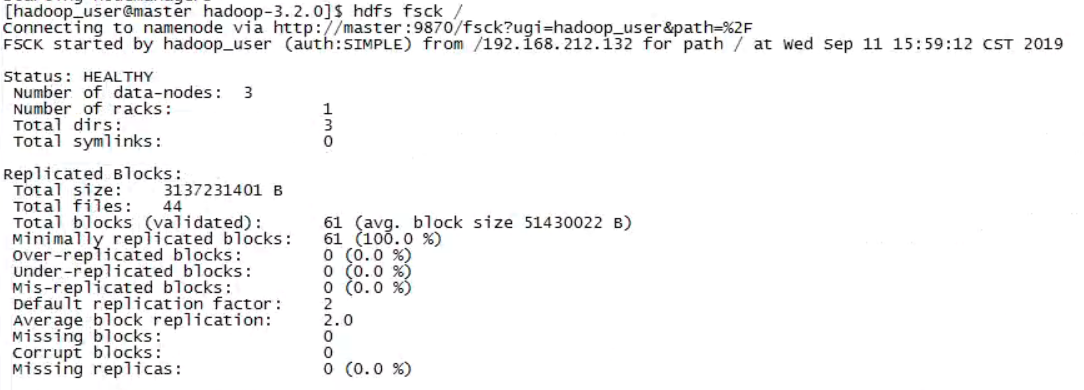
即这个集群中准备了44个年份的数据文件,总大小为3137231401字节,分成了61个数据块。
下面开始提交执行作业:
yarn jar ~/max-temperature-1.0-SNAPSHOT-jar-with-dependencies.jar /ncdc/raw/ /max_temperature_out/
作业提交和执行并非一帆风顺,期间遇到过很多问题,比较典型的是java.net.NoRouteToHostException,对这个错误的解决过程记录在《Hadoop学习问题记录之基础篇》的问题一。
解决遇到的问题后,成功运行的日志打印如下:
 [hadoop_user@master hadoop-3.2.]$ yarn jar ~/max-temperature-1.0-SNAPSHOT-jar-with-dependencies.jar /ncdc/raw/ /max_out

 -- ::, INFO client.RMProxy: Connecting to ResourceManager at master/192.168.212.132:

 -- ::, WARN mapreduce.JobResourceUploader: Hadoop command-line option parsing not performed. Implement the Tool interface and execute your application with ToolRunner to remedy this.

 -- ::, INFO mapreduce.JobResourceUploader: Disabling Erasure Coding for path: /tmp/hadoop-yarn/staging/hadoop_user/.staging/job_1568605271327_0002

 -- ::, INFO input.FileInputFormat: Total input files to process :

 -- ::, INFO mapreduce.JobSubmitter: number of splits:

 -- ::, INFO Configuration.deprecation: yarn.resourcemanager.system-metrics-publisher.enabled is deprecated. Instead, use yarn.system-metrics-publisher.enabled

 -- ::, INFO mapreduce.JobSubmitter: Submitting tokens for job: job_1568605271327_0002

 -- ::, INFO mapreduce.JobSubmitter: Executing with tokens: []

 -- ::, INFO conf.Configuration: resource-types.xml not found

 -- ::, INFO resource.ResourceUtils: Unable to find 'resource-types.xml'.

 -- ::, INFO impl.YarnClientImpl: Submitted application application_1568605271327_0002

 -- ::, INFO mapreduce.Job: The url to track the job: http://master:8088/proxy/application_1568605271327_0002/

 -- ::, INFO mapreduce.Job: Running job: job_1568605271327_0002

 -- ::, INFO mapreduce.Job: Job job_1568605271327_0002 running in uber mode : false

 -- ::, INFO mapreduce.Job:  map % reduce %

 -- ::, INFO mapreduce.Job:  map % reduce %

 -- ::, INFO mapreduce.Job:  map % reduce %

 -- ::, INFO mapreduce.Job:  map % reduce %

 -- ::, INFO mapreduce.Job:  map % reduce %

 -- ::, INFO mapreduce.Job:  map % reduce %

 -- ::, INFO mapreduce.Job:  map % reduce %

 -- ::, INFO mapreduce.Job:  map % reduce %

 -- ::, INFO mapreduce.Job:  map % reduce %

 -- ::, INFO mapreduce.Job:  map % reduce %

 -- ::, INFO mapreduce.Job:  map % reduce %

 -- ::, INFO mapreduce.Job:  map % reduce %

 -- ::, INFO mapreduce.Job:  map % reduce %

 -- ::, INFO mapreduce.Job:  map % reduce %

 -- ::, INFO mapreduce.Job:  map % reduce %

 -- ::, INFO mapreduce.Job:  map % reduce %

 -- ::, INFO mapreduce.Job:  map % reduce %

 -- ::, INFO mapreduce.Job:  map % reduce %

 -- ::, INFO mapreduce.Job:  map % reduce %

 -- ::, INFO mapreduce.Job:  map % reduce %

 -- ::, INFO mapreduce.Job:  map % reduce %

 -- ::, INFO mapreduce.Job:  map % reduce %

 -- ::, INFO mapreduce.Job:  map % reduce %

 -- ::, INFO mapreduce.Job:  map % reduce %

 -- ::, INFO mapreduce.Job:  map % reduce %

 -- ::, INFO mapreduce.Job:  map % reduce %

 -- ::, INFO mapreduce.Job:  map % reduce %

 -- ::, INFO mapreduce.Job:  map % reduce %

 -- ::, INFO mapreduce.Job:  map % reduce %

 -- ::, INFO mapreduce.Job:  map % reduce %

 -- ::, INFO mapreduce.Job:  map % reduce %

 -- ::, INFO mapreduce.Job:  map % reduce %

 -- ::, INFO mapreduce.Job:  map % reduce %

 -- ::, INFO mapreduce.Job:  map % reduce %

 -- ::, INFO mapreduce.Job:  map % reduce %

 -- ::, INFO mapreduce.Job:  map % reduce %

 -- ::, INFO mapreduce.Job:  map % reduce %

 -- ::, INFO mapreduce.Job:  map % reduce %

 -- ::, INFO mapreduce.Job:  map % reduce %

 -- ::, INFO mapreduce.Job:  map % reduce %

 -- ::, INFO mapreduce.Job:  map % reduce %

 -- ::, INFO mapreduce.Job:  map % reduce %

 -- ::, INFO mapreduce.Job:  map % reduce %

 -- ::, INFO mapreduce.Job:  map % reduce %

 -- ::, INFO mapreduce.Job:  map % reduce %

 -- ::, INFO mapreduce.Job:  map % reduce %

 -- ::, INFO mapreduce.Job:  map % reduce %

 -- ::, INFO mapreduce.Job:  map % reduce %

 -- ::, INFO mapreduce.Job:  map % reduce %

 -- ::, INFO mapreduce.Job:  map % reduce %

 -- ::, INFO mapreduce.Job:  map % reduce %

 -- ::, INFO mapreduce.Job:  map % reduce %

 -- ::, INFO mapreduce.Job:  map % reduce %

 -- ::, INFO mapreduce.Job:  map % reduce %

 -- ::, INFO mapreduce.Job:  map % reduce %

 -- ::, INFO mapreduce.Job:  map % reduce %

 -- ::, INFO mapreduce.Job:  map % reduce %

 -- ::, INFO mapreduce.Job:  map % reduce %

 -- ::, INFO mapreduce.Job:  map % reduce %

 -- ::, INFO mapreduce.Job:  map % reduce %

 -- ::, INFO mapreduce.Job:  map % reduce %

 -- ::, INFO mapreduce.Job:  map % reduce %

 -- ::, INFO mapreduce.Job:  map % reduce %

 -- ::, INFO mapreduce.Job:  map % reduce %

 -- ::, INFO mapreduce.Job:  map % reduce %

 -- ::, INFO mapreduce.Job:  map % reduce %

 -- ::, INFO mapreduce.Job:  map % reduce %

 -- ::, INFO mapreduce.Job:  map % reduce %

 -- ::, INFO mapreduce.Job:  map % reduce %

 -- ::, INFO mapreduce.Job:  map % reduce %

 -- ::, INFO mapreduce.Job:  map % reduce %

 -- ::, INFO mapreduce.Job:  map % reduce %

 -- ::, INFO mapreduce.Job:  map % reduce %

 -- ::, INFO mapreduce.Job:  map % reduce %

 -- ::, INFO mapreduce.Job:  map % reduce %

 -- ::, INFO mapreduce.Job:  map % reduce %

 -- ::, INFO mapreduce.Job:  map % reduce %

 -- ::, INFO mapreduce.Job:  map % reduce %

 -- ::, INFO mapreduce.Job:  map % reduce %

 -- ::, INFO mapreduce.Job:  map % reduce %

 -- ::, INFO mapreduce.Job:  map % reduce %

 -- ::, INFO mapreduce.Job:  map % reduce %

 -- ::, INFO mapreduce.Job:  map % reduce %

 -- ::, INFO mapreduce.Job:  map % reduce %

 -- ::, INFO mapreduce.Job:  map % reduce %

 -- ::, INFO mapreduce.Job:  map % reduce %

 -- ::, INFO mapreduce.Job:  map % reduce %

 -- ::, INFO mapreduce.Job:  map % reduce %

 -- ::, INFO mapreduce.Job:  map % reduce %

 -- ::, INFO mapreduce.Job:  map % reduce %

 -- ::, INFO mapreduce.Job:  map % reduce %

 -- ::, INFO mapreduce.Job:  map % reduce %

 -- ::, INFO mapreduce.Job:  map % reduce %

 -- ::, INFO mapreduce.Job:  map % reduce %

 -- ::, INFO mapreduce.Job:  map % reduce %

 -- ::, INFO mapreduce.Job:  map % reduce %

 -- ::, INFO mapreduce.Job:  map % reduce %

 -- ::, INFO mapreduce.Job:  map % reduce %

 -- ::, INFO mapreduce.Job:  map % reduce %

 -- ::, INFO mapreduce.Job:  map % reduce %

 -- ::, INFO mapreduce.Job:  map % reduce %

 -- ::, INFO mapreduce.Job:  map % reduce %

 -- ::, INFO mapreduce.Job:  map % reduce %

 -- ::, INFO mapreduce.Job:  map % reduce %

 -- ::, INFO mapreduce.Job: Job job_1568605271327_0002 completed successfully

 -- ::, INFO mapreduce.Job: Counters:

         File System Counters

                 FILE: Number of bytes read=

                 FILE: Number of bytes written=

                 FILE: Number of read operations=

                 FILE: Number of large read operations=

                 FILE: Number of write operations=

                 HDFS: Number of bytes read=

                 HDFS: Number of bytes written=

                 HDFS: Number of read operations=

                 HDFS: Number of large read operations=

                 HDFS: Number of write operations=

                 HDFS: Number of bytes read erasure-coded=

         Job Counters

                 Killed map tasks=

                 Launched map tasks=

                 Launched reduce tasks=

                 Data-local map tasks=

                 Rack-local map tasks=

                 Total time spent by all maps in occupied slots (ms)=

                 Total time spent by all reduces in occupied slots (ms)=

                 Total time spent by all map tasks (ms)=

                 Total time spent by all reduce tasks (ms)=

                 Total vcore-milliseconds taken by all map tasks=

                 Total vcore-milliseconds taken by all reduce tasks=

                 Total megabyte-milliseconds taken by all map tasks=

                 Total megabyte-milliseconds taken by all reduce tasks=

         Map-Reduce Framework

                 Map input records=

                 Map output records=

                 Map output bytes=

                 Map output materialized bytes=

                 Input split bytes=

                 Combine input records=

                 Combine output records=

                 Reduce input groups=

                 Reduce shuffle bytes=

                 Reduce input records=

                 Reduce output records=

                 Spilled Records=

                 Shuffled Maps =

                 Failed Shuffles=

                 Merged Map outputs=

                 GC time elapsed (ms)=

                 CPU time spent (ms)=

                 Physical memory (bytes) snapshot=

                 Virtual memory (bytes) snapshot=

                 Total committed heap usage (bytes)=

                 Peak Map Physical memory (bytes)=

                 Peak Map Virtual memory (bytes)=

                 Peak Reduce Physical memory (bytes)=

                 Peak Reduce Virtual memory (bytes)=

         Shuffle Errors

                 BAD_ID=

                 CONNECTION=

                 IO_ERROR=

                 WRONG_LENGTH=

                 WRONG_MAP=

                 WRONG_REDUCE=

         File Input Format Counters

                 Bytes Read=

         File Output Format Counters

                 Bytes Written=
通过日志可以得出
猜想1错误,输入分片数是58,并不等于输入文件的块数61。
猜想2错误,File Input Format Counters并不总是等于实际输入文件字节数,这里mapred任务统计的读入字节数为3137288745,略大于fsck工具检测出的字节数3137231401。
猜想3正确,File Output Format Counters等于实际输出的part-r-*的文件总字节数。
结论
- 分片数不会一定等于输入块数。
- File Input Format Conters并不总等于fsck工具检测出的输入文件总字节数。
- File Output Format Conters会等于实际输出的所有part-r-*文件总字节数
ps1:以上结论只是在处理文本输入的情况下得出的,对于其它类型的InputFormat是否会违背上述结论,这里先打个问号。
ps2:关于分片数的问题,将另起篇幅叙述,这里暂且不话。见这里。
Hadoop学习之第一个MapReduce程序的更多相关文章
- Hadoop 6、第一个mapreduce程序 WordCount
1.程序代码 Map: import java.io.IOException; import org.apache.hadoop.io.IntWritable; import org.apache.h ...
- Hadoop学习之路(5)Mapreduce程序完成wordcount
程序使用的测试文本数据: Dear River Dear River Bear Spark Car Dear Car Bear Car Dear Car River Car Spark Spark D ...
- 一起学Hadoop——使用IDEA编写第一个MapReduce程序(Java和Python)
上一篇我们学习了MapReduce的原理,今天我们使用代码来加深对MapReduce原理的理解. wordcount是Hadoop入门的经典例子,我们也不能免俗,也使用这个例子作为学习Hadoop的第 ...
- Hadoop学习基础之三:MapReduce
现在是讨论这个问题的不错的时机,因为最近媒体上到处充斥着新的革命所谓“云计算”的信息.这种模式需要利用大量的(低端)处理器并行工作来解决计算问题.实际上,这建议利用大量的低端处理器来构建数据中心,而不 ...
- 编写自已的第一个MapReduce程序
从进入系统学习到现在,貌似我们还没有真正开始动手写程序,估计有些立志成为Hadoop攻城狮的小伙伴们已经有些急了.环境已经搭好,小讲也有些按捺不住了.今天,小讲就和大家一起来动手编写我们的第一个Map ...
- Hadoop学习笔记—4.初识MapReduce
一.神马是高大上的MapReduce MapReduce是Google的一项重要技术,它首先是一个编程模型,用以进行大数据量的计算.对于大数据量的计算,通常采用的处理手法就是并行计算.但对许多开发者来 ...
- Hadoop(十三)分析MapReduce程序
前言 刚才发生了悲伤的一幕,本来这篇博客马上就要写好的,花了我一晚上的时间.但是刚才电脑没有插电源就没有了.很难受!想哭,但是没有办法继续站起来. 前面的一篇博文中介绍了什么是MapReduce,这一 ...
- HDFS设计思路,HDFS使用,查看集群状态,HDFS,HDFS上传文件,HDFS下载文件,yarn web管理界面信息查看,运行一个mapreduce程序,mapreduce的demo
26 集群使用初步 HDFS的设计思路 l 设计思想 分而治之:将大文件.大批量文件,分布式存放在大量服务器上,以便于采取分而治之的方式对海量数据进行运算分析: l 在大数据系统中作用: 为各类分布式 ...
- swift学习:第一个swift程序
原文:swift学习:第一个swift程序 最近swift有点火,赶紧跟上学习.于是,个人第一个swift程序诞生了... 新建项目
随机推荐
- Mariadb之复制过滤器
mariadb的主从复制集群,默认情况下是把主库上的所有库进行复制,只要在主库上产生写操作,从库基于主库的二进制日志做重放,从而实现把主库的上的库表复制到从库:复制过滤器指的是我们仅复制一个或几个数据 ...
- activiti6基础01-如何数据库操作及相关表
官网文档:https://www.activiti.org/userguide/#queryAPI 1. Activit的简单源码解读 activiti的官方文档讲解详细很详细,也很范.按着 ...
- POJ 3263 Tallest Cow 题解
题目 FJ's \(N (1 ≤ N ≤ 10,000)\) cows conveniently indexed 1..N are standing in a line. Each cow has a ...
- ssh安全远程管理
1.什么是ssh SSH 为 Secure Shell 的缩写,SSH 为建立在应用层基础上的安全协议.SSH 是目前较可靠,专为远程登录会话和其他网络服务提供安全性的协议.利用 SSH 协议可以有效 ...
- 题解:2018级算法第六次上机 C6-危机合约
题目描述 样例: 实现解释: 没想到你也是个刀客塔之二维DP 知识点: 动态规划,多条流水线调度?可以看做一种流水线调度 坑点: 输入内容的调整(*的特殊判定),开头结尾的调整策略 从题意可知,要做的 ...
- 数据可视化之DAX篇(二)Power BI中的度量值和计算列,你搞清楚了吗?
https://zhuanlan.zhihu.com/p/75462046 对于初学者,总是会把度量值和计算列搞混,我也经常碰到这样的问题,有些星友用文章中的代码总是报错,发给我一看,才知道TA把本来 ...
- bzoj3367[Usaco2004 Feb]The Big Game 球赛*
bzoj3367[Usaco2004 Feb]The Big Game 球赛 题意: n只奶牛,每只支持两个球队中的一个,它们依次上车,上到一定程度可以开走这辆车并换下一辆继续上.要求一辆车上支持不同 ...
- [Qt2D绘图]-06QPainter的复合模式&&双缓冲绘图&&绘图中的其他问题
本篇读书笔记主要记录QPainter的复合模式&&双缓冲绘图&&绘图中的其他问题 大纲: 复合模式 双缓冲绘图 绘图中的其他问题 ...
- Ethical Hacking - GAINING ACCESS(2)
Server Side Attacks - INFORMATION GATHERING Need an IP address. Very simple if target is on the same ...
- 时间序列知识图谱-《利用Python进行数据分析》
所有内容整理自<利用Python进行数据分析>,使用MindMaster Pro 7.3制作,emmx格式,源文件已经上传Github,需要的同学转左上角自行下载或者右击保存图片. 其他章 ...