
MapReduce之自定义OutputFormat
@
OutputFormat接口实现类
OutputFormat是MapReduce输出的基类,所有实现MapReduce输出都实现了OutputFormat接口。下面介绍几种常见的OutputFormat实现类。
文本输出
TextoutputFormat
默认的输出格式是TextOutputFormat,它把每条记录写为文本行。它的键和值可以是任意类型,因为TextOutputFormat调用toString()方法把它们转换为字符串。SequenceFileOutputFormat
将SecquenceFileOutputFormat输出作为后续MapReduce任务的输入,这便是一种好的输出格式,因为它的格式紧凑,很容易被压缩。自定义OutputFormat
根据用户需求,自定义实现输出。
自定义OutputFormat使用场景及步骤
使用场景
- 为了实现控制最终文件的输出路径和输出格式,可以自定义OutputFormat。
例如:要在一个MapReduce程序中根据数据的不同输出两类结果到不同目录,这类灵活的输出需求可以通过自定义OutputFormat来实现。 - 自定义OutputFormat步骤
(1)自定义一个类继承FileOutputFormat。
(2)改写RecordWriter,具体改写输出数据的方法write()。
自定义OutputFormat 案例实操
需求
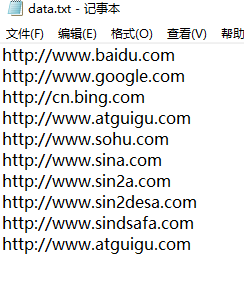
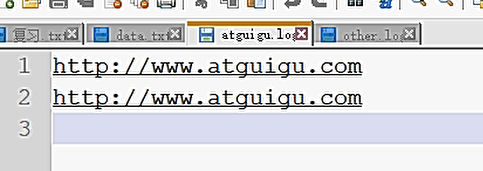
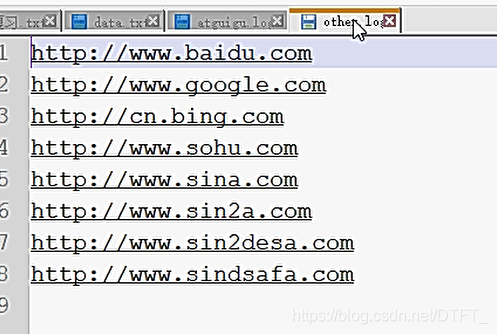
过滤输入的log日志,包含atguigu的网站输出到e:/atguigu.log,不包含atguigu的网站输出到e:/other.log。
输入数据
什么时候需要Reduce
①合并
②需要对数据排序
所以本案例不需要Reduce阶段,key-value不需要实现序列化
CustomOFMapper.java
public class CustomOFMapper extends Mapper<LongWritable, Text, String, NullWritable>{

	@Override

	protected void map(LongWritable key, Text value, Mapper<LongWritable, Text, String, NullWritable>.Context context) throws IOException, InterruptedException {

		String content = value.toString();

		//value不需要,但是不能用Null这个关键字,要使用NullWritable对象

		context.write(content+"\r\n", NullWritable.get());

	}

}
MyOutPutFormat.java
public class MyOutPutFormat extends FileOutputFormat<String, NullWritable>{

	@Override

	public RecordWriter<String, NullWritable> getRecordWriter(TaskAttemptContext job)

			throws IOException, InterruptedException {

		return new MyRecordWriter(job);//传递job对象,才能在RecordWriter中获取配置

	}

}
MyRecordWriter.java
public class MyRecordWriter extends RecordWriter<String, NullWritable> {

	private Path atguiguPath=new Path("e:/atguigu.log");

	private Path otherPath=new Path("e:/other.log");

	private FSDataOutputStream atguguOS ;

	private FSDataOutputStream otherOS ;

	private FileSystem fs;

	private TaskAttemptContext context;

	public MyRecordWriter(TaskAttemptContext job) throws IOException {

			context=job;

			Configuration conf = job.getConfiguration();

			fs=FileSystem.get(conf);

			atguiguOS = fs.create(atguiguPath);

			otherOS = fs.create(otherPath);

	}

	// 将key-value写出到文件

	@Override

	public void write(String key, NullWritable value) throws IOException, InterruptedException {

		if (key.contains("atguigu")) {

			atguguOS.write(key.getBytes());//写到atguigu.log

			//统计输出的含有atguigu字符串的key-value个数

			context.getCounter("MyCounter", "atguiguCounter").increment(1);

		}else {

			otherOS.write(key.getBytes());//写到other.log

			context.getCounter("MyCounter", "otherCounter").increment(1);

		}

	}

	// 关闭流

	@Override

	public void close(TaskAttemptContext context) throws IOException, InterruptedException {

		if (atguguOS != null) {

			IOUtils.closeStream(atguguOS);

		}

		if (otherOS != null) {

			IOUtils.closeStream(otherOS);

		}

		if (fs != null) {

			fs.close();

		}

	}

}
CustomOFDriver.java
public class CustomOFDriver {

	public static void main(String[] args) throws Exception {

		Path inputPath=new Path("e:/mrinput/outputformat");

		Path outputPath=new Path("e:/mroutput/outputformat");

		//作为整个Job的配置

		Configuration conf = new Configuration();

		//保证输出目录不存在

		FileSystem fs=FileSystem.get(conf);

		if (fs.exists(outputPath)) {

			fs.delete(outputPath, true);

		}

		// ①创建Job

		Job job = Job.getInstance(conf);

		//重点,设置为自定义的输出格式

		job.setJarByClass(CustomOFDriver.class);

		// ②设置Job

		// 设置Job运行的Mapper,Reducer类型,Mapper,Reducer输出的key-value类型

		job.setMapperClass(CustomOFMapper.class);

		// 设置输入目录和输出目录

		FileInputFormat.setInputPaths(job, inputPath);

		FileOutputFormat.setOutputPath(job, outputPath);

		// 设置输入和输出格式

		job.setOutputFormatClass(MyOutPutFormat.class);

		// 取消reduce阶段。设置为0,默认为1

		job.setNumReduceTasks(0);

		// ③运行Job

		job.waitForCompletion(true);

	}

}
输出文件:
MapReduce之自定义OutputFormat的更多相关文章
- 第3节 mapreduce高级:7、自定义outputformat实现输出到不同的文件夹下面
2.1 需求 现在有一些订单的评论数据,需求,将订单的好评与差评进行区分开来,将最终的数据分开到不同的文件夹下面去,数据内容参见资料文件夹,其中数据第九个字段表示好评,中评,差评.0:好评,1:中评, ...
- Hadoop案例(五)过滤日志及自定义日志输出路径(自定义OutputFormat)
过滤日志及自定义日志输出路径(自定义OutputFormat) 1.需求分析 过滤输入的log日志中是否包含xyg (1)包含xyg的网站输出到e:/xyg.log (2)不包含xyg的网站输出到e: ...
- Hadoop_27_MapReduce_运营商原始日志增强(自定义OutputFormat)
1.需求: 现有一些原始日志需要做增强解析处理,流程: 1. 从原始日志文件中读取数据(日志文件:https://pan.baidu.com/s/12hbDvP7jMu9yE-oLZXvM_g) 2. ...
- hadoop 自定义OutputFormat
1.继承FileOutputFormat,复写getRecordWriter方法 /** * @Description:自定义outputFormat,输出数据到不同的文件 */ public cla ...
- 关于spark写入文件至文件系统并制定文件名之自定义outputFormat
引言: spark项目中通常我们需要将我们处理之后数据保存到文件中,比如将处理之后的RDD保存到hdfs上指定的目录中,亦或是保存在本地 spark保存文件: 1.rdd.saveAsTextFile ...
- 关于MapReduce中自定义分区类(四)
MapTask类 在MapTask类中找到run函数 if(useNewApi){ runNewMapper(job, splitMetaInfo, umbilical, reporter ...
- 关于MapReduce中自定义分组类(三)
Job类 /** * Define the comparator that controls which keys are grouped together * for a single ...
- 关于MapReduce中自定义带比较key类、比较器类(二)——初学者从源码查看其原理
Job类 /** * Define the comparator that controls * how the keys are sorted before they * are pa ...
- 关于MapReduce中自定义Combine类(一)
MRJobConfig public static fina COMBINE_CLASS_ATTR 属性COMBINE_CLASS_ATTR = "mapreduce.j ...
随机推荐
- CMDB01 /paramiko模块、项目概述、项目架构、项目实现
CMDB01 /paramiko模块.项目概述.项目架构.项目实现 目录 CMDB01 /paramiko模块.项目概述.项目架构.项目实现 1. paramiko 2. 基于xshell连接服务器 ...
- Activiti工作流--分布式实现方案
一.运行环境 以下所有的描述都是基于Activiti的5.20.0.1版本 public interface ProcessEngine extends EngineServices { /** th ...
- POJ 1046 Color Me Less 最详细的解题报告
题目来源:POJ 1046 Color Me Less 题目大意:每一个颜色由R.G.B三部分组成,D=Math.sqrt(Math.pow((left.red - right.red), 2)+ M ...
- Serverless的概念&定义-无服务计算详解
过去几年间,Serverless 发展迅猛,与其相伴的还有从小程序.移动端等到前后端一体化的演进与实践,也正因如此,从云计算到前端,众多开发者都极为关注 Serverless到底是什么? 在国内,Se ...
- java 之 实例方法和类方法
类方法:使用static修饰(静态方法),属于整个类的,不是属于某个实例的,只能处理static域或调用static方法: 实例方法:属于对象的方法,由对象来调用. 判断类方法,类方法的前面有stat ...
- 第五章:理解RemoteViews
RemoteView应该是一种远程View,表示的是一个View结构,他可以在其它进程中显示. 在android中使用场景有两种:通知栏和桌面小部件 5.1 RemoteView的应用 5.1.1 R ...
- Web Security Academy ___XXE injection___Lab
实验网站:https://portswigger.net/web-security/xxe XXE学习看一参考下面这篇文章,讲得很全: https://xz.aliyun.com/t/3357#toc ...
- WEB控件及HTML服务端控件能否调用客户端方法?如果能,请解释如何调用
例如:<asp:TextBox id="TextBox1" runat="server"></asp:TextBox> <INPU ...
- 谁能告诉我如何通过Jenkins完成分布式环境搭建并执行自动化脚本
今天我们接着昨天的内容,看一看如何完成Jenkins分布式环境的搭建和使用,因为我之前也是自己一个人摸索的,如果有不对的地方,请各位看官私信指出. 新增分布式部署节点 在系统管理/节点管理中点击新建 ...
- python 99乘法表
先把代码贴上 for i in range(1,10): for j in range(1,i+1): s="%d X %d = %d"%(j,i,i*j) print(s,end ...