
IdentityServer4 (2) 密码授权(Resource Owner Password)
写在前面
1、源码(.Net Core 2.2)
git地址:https://github.com/yizhaoxian/CoreIdentityServer4Demo.git
2、相关章节
2.1、《IdentityServer4 (1) 客户端授权模式(Client Credentials)》
2.2、《IdentityServer4 (2) 密码授权(Resource Owner Password)》
2.3、《IdentityServer4 (3) 授权码模式(Authorization Code)》
2.4、《IdentityServer4 (4) 静默刷新(Implicit)》
2.5、《IdentityServer4 (5) 混合模式(Hybrid)》
3、参考资料
IdentityServer4 中文文档 http://www.identityserver.com.cn/
IdentityServer4 英文文档 https://identityserver4.readthedocs.io/en/latest/
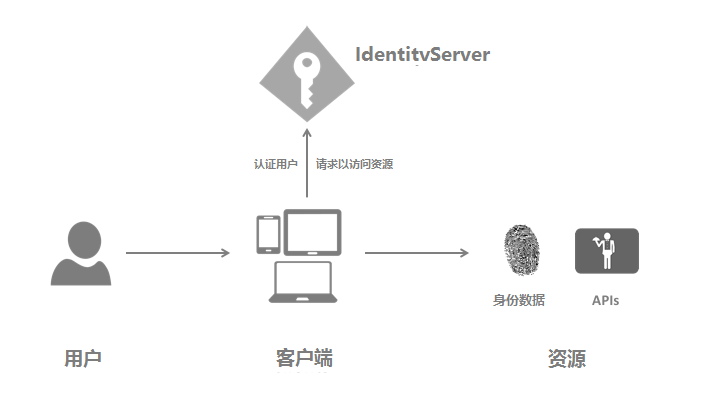
4、流程图
此文章是在上一篇文章的基础上继续修改的,基础代码请查看上一篇文章《IdentityServer4(1)客户端授权模式》
密码授权模式,允许一个客户端发送用户名和密码到令牌服务并获得一个表示该用户的访问令牌(AccessToken),这里多了一个概念就是【用户】,账号密码需要用户提供给客户端
一、IdentityServer修改
1、添加一个新的客户端,IdpConfig.GetClients()
       new Client

       {

           // 客户端ID 这个很重要

           ClientId = "client pwd",

           //资源所有者密码授权客户端定义

           AllowedGrantTypes = GrantTypes.ResourceOwnerPassword,

           // 用于认证的密码

           ClientSecrets =

           {

               new Secret("secret".Sha256())

           },

           // 客户端有权访问的范围(Scopes)

           AllowedScopes = {

               "api1",

               IdentityServerConstants.StandardScopes.OpenId,

               IdentityServerConstants.StandardScopes.Profile,

               IdentityServerConstants.StandardScopes.Address,

               IdentityServerConstants.StandardScopes.Email,

               IdentityServerConstants.StandardScopes.Phone

           }

       }
2、添加测试用户
新建一个类 TestUsers.cs
    public class TestUsers

    {

        public static List<TestUser> Users

        {

            get

            {

                var address = new

                {

                    street_address = "ChaoYang",

                    locality = "BeiJing",

                    postal_code = ,

                    country = "China"

                };

                return new List<TestUser>

                {

                    new TestUser

                    {

                        SubjectId = "",

                        Username = "alice",

                        Password = "alice",

                        Claims =

                        {

                            new Claim(JwtClaimTypes.Name, "TestUser.Alice Smith"),

                            new Claim(JwtClaimTypes.GivenName, "TestUser.Alice"),

                            new Claim(JwtClaimTypes.FamilyName, "TestUser.Smith"),

                            new Claim(JwtClaimTypes.PhoneNumber, "TestUser.13812345678"),

                            new Claim(JwtClaimTypes.Email, "TestUser.AliceSmith@email.com"),

                            new Claim(JwtClaimTypes.EmailVerified, "true", ClaimValueTypes.Boolean),

                            new Claim(JwtClaimTypes.WebSite, "TestUser.http://alice.com"),

                            new Claim(JwtClaimTypes.Address,

                            JsonConvert.SerializeObject(address), IdentityServerConstants.ClaimValueTypes.Json)

                        }

                    },

                    new TestUser

                    {

                        SubjectId = "",

                        Username = "bob",

                        Password = "bob",

                        Claims =

                        {

                            new Claim(JwtClaimTypes.Name, "Bob Smith"),

                            new Claim(JwtClaimTypes.GivenName, "Bob"),

                            new Claim(JwtClaimTypes.FamilyName, "Smith"),

                            new Claim(JwtClaimTypes.Email, "BobSmith@email.com"),

                            new Claim(JwtClaimTypes.EmailVerified, "true", ClaimValueTypes.Boolean),

                            new Claim(JwtClaimTypes.WebSite, "http://bob.com"),

                            new Claim(JwtClaimTypes.Address,    JsonConvert.SerializeObject(address), IdentityServerConstants.ClaimValueTypes.Json)

                        }

                    }

                };

            }

        }

    }
3、注册相关信息
StartUp.cs 添加测试用户和用户认证信息
        public void ConfigureServices(IServiceCollection services)

        {

            services.AddIdentityServer()

                    .AddDeveloperSigningCredential()

                    //添加测试用户

                    .AddTestUsers(TestUsers.Users)

                    //添加用户认证信息

                    .AddInMemoryIdentityResources(IdpConfig.GetApiResources())

                    .AddInMemoryApiResources(IdpConfig.GetApis())

                    .AddInMemoryClients(IdpConfig.GetClients());

            services.AddMvc().SetCompatibilityVersion(CompatibilityVersion.Version_2_2);

        }
二、API修改
1、修改 SuiBianController Get() 返回内容
随意这里改不改无所谓,因为我下面截图,和上一篇对不上 所以在这里说明一下
   [HttpGet]

   public IActionResult Get()

   {

       return new JsonResult(from c in User.Claims select new { c.Type, c.Value });

   }
三、客户端修改
1、添加一个 Action 请求 AccessToken
   public async Task<IActionResult> TokenPwd()

   {

       var client = new HttpClient();

       var disco = await client.GetDiscoveryDocumentAsync(_idpBaseUrl);

       if (disco.IsError)

       {

           return Content("获取发现文档失败。error:" + disco.Error);

       }

       #region 第一种方式请求 token

            //var tokenclient = new TokenClient(client, new TokenClientOptions

            //{

            //    ClientId = "client pwd",

            //    ClientSecret = "secret",

            //    Address = disco.TokenEndpoint,

            //});

            //var token = await tokenclient.RequestPasswordTokenAsync("alice", "alice", "api1");

       #endregion

       var token = await client.RequestPasswordTokenAsync(new PasswordTokenRequest

       {

           Address = disco.TokenEndpoint,

           //下面2个属性对应的是 IdentityServer定义的测试用户,这里应是 Action 参数传递进来的,为了方便直接写死的

           UserName = "alice",

           Password = "alice",

           //下面3个属性对应的是 IdentityServer定义的客户端

           ClientId = "client pwd",

           ClientSecret = "secret",

           Scope = "api1 openid profile email phone address"

       });

       if (token.IsError)

       {

           return Content("获取 AccessToken 失败。error:" + token.Error);

       }

       //将token 临时存储到 缓存中

       _memoryCache.Set("AccessToken_Pwd", token.AccessToken);

       return Content("获取 AccessToken 成功。Token:" + token.AccessToken);

   }
2、添加一个Action 测试请求 api1
 public async Task<IActionResult> SuiBianPwd()

        {

            string token, apiurl = GetApiUrl("suibian");

            _memoryCache.TryGetValue("AccessToken_Pwd", out token);

            if (string.IsNullOrEmpty(token))

            {

                return Content("token is null");

            }

            var client = new HttpClient();

            client.SetBearerToken(token);

            var response = await client.GetAsync(apiurl);

            var result = await response.Content.ReadAsStringAsync();

            if (!response.IsSuccessStatusCode)

            {

                _memoryCache.Remove("AccessToken");

                return Content($"获取 {apiurl} 失败。StatusCode:{response.StatusCode} \r\n Token:{token} \r\n result:{result}");

            }

            return Json(JsonConvert.DeserializeObject(result));

        }
3、添加一个Action 测试获取用户认证信息
    public async Task<IActionResult> IdentityInfoPwd()

    {

        string token;

        _memoryCache.TryGetValue("AccessToken_Pwd", out token);

        if (string.IsNullOrEmpty(token))

        {

            return Content("token is null");

        }

        var client = new HttpClient();

        var disco = await client.GetDiscoveryDocumentAsync(_idpBaseUrl);

        if (disco.IsError)

        {

            return Content("获取发现文档失败。error:" + disco.Error);

        }

        client.SetBearerToken(token);

        var response = await client.GetAsync(disco.UserInfoEndpoint);

        var result = await response.Content.ReadAsStringAsync();

        if (!response.IsSuccessStatusCode)

        {

            _memoryCache.Remove("AccessToken");

            return Content($"获取 UserInfo 失败。StatusCode:{response.StatusCode} \r\n Token:{token} \r\n result:{result}");

        }

        return Json(JsonConvert.DeserializeObject(result));

    }
三、客户端测试
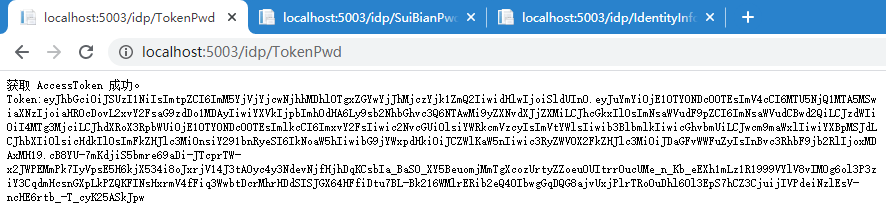
1、获取 token
访问 http://localhost:5003/Idp/tokenpwd 获取token成功
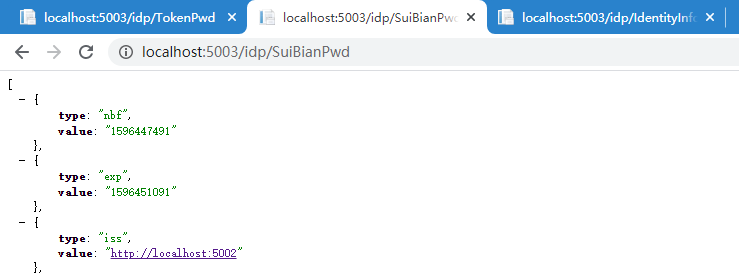
2、请求 api1
访问 http://localhost:5003/Idp/suibianpwd 获取api信息成功
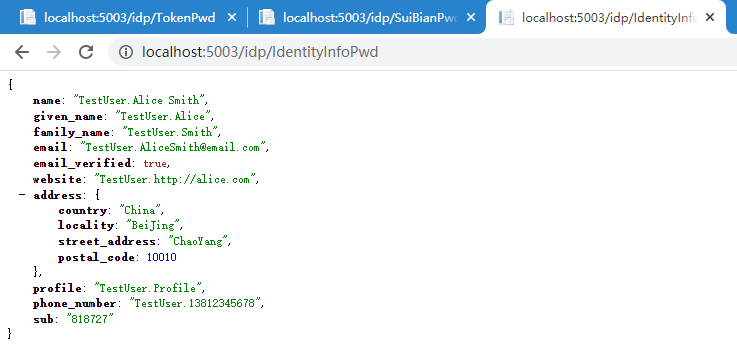
3、获取用户认证信息
访问 http://localhost:5003/Idp/identityinfopwd 获取成功
IdentityServer4 (2) 密码授权(Resource Owner Password)的更多相关文章
- 基于 IdentityServer3 实现 OAuth 2.0 授权服务【密码模式(Resource Owner Password Credentials)】
密码模式(Resource Owner Password Credentials Grant)中,用户向客户端提供自己的用户名和密码.客户端使用这些信息,向"服务商提供商"索要授权 ...
- 基于OWIN WebAPI 使用OAuth授权服务【客户端验证授权(Resource Owner Password Credentials Grant)】
适用范围 前面介绍了Client Credentials Grant ,只适合客户端的模式来使用,不涉及用户相关.而Resource Owner Password Credentials Grant模 ...
- 第37章 资源所有者密码验证(Resource Owner Password Validation) - Identity Server 4 中文文档(v1.0.0)
如果要使用OAuth 2.0资源所有者密码凭据授权(aka password),则需要实现并注册IResourceOwnerPasswordValidator接口: public interface ...
- IdentityServer4专题之六:Resource Owner Password Credentials
实现代码: (1)IdentityServer4授权服务器代码: public static class Config { public static IEnumerable<Identity ...
- asp.net core IdentityServer4 实现 resource owner password credentials(密码凭证)
前言 OAuth 2.0默认四种授权模式(GrantType) 授权码模式(authorization_code) 简化模式(implicit) 密码模式(resource owner passwor ...
- IdentityServer4之Resource Owner Password Credentials(资源拥有者密码凭据许可)
IdentityServer4之Resource Owner Password Credentials(资源拥有者密码凭据许可) 参考 官方文档:2_resource_owner_passwords ...
- IdentityServer4 之 Resource Owner Password Credentials 其实有点尴尬
前言 接着IdentityServer4的授权模式继续聊,这篇来说说 Resource Owner Password Credentials授权模式,这种模式在实际应用场景中使用的并不多,只怪其太开放 ...
- 使用Resource Owner Password Credentials Grant授权发放Token
对应的应用场景是:为自家的网站开发手机 App(非第三方 App),只需用户在 App 上登录,无需用户对 App 所能访问的数据进行授权. 客户端获取Token: public string Get ...
- asp.net权限认证:OWIN实现OAuth 2.0 之密码模式(Resource Owner Password Credential)
asp.net权限认证系列 asp.net权限认证:Forms认证 asp.net权限认证:HTTP基本认证(http basic) asp.net权限认证:Windows认证 asp.net权限认证 ...
随机推荐
- [Mybatis]Mybatis常用操作
Mybatis是目前国内比较流行的ORM框架,特点是可以写灵活的SQL语句,非常适合中小企业的面向数据库开发. 本文总结自己开发过程中常用的Mybatis操作. 一.插入操作 主键自增插入单条 < ...
- day69 cookie与session
目录 一.forms源码解析 二.cookie与session发展史 三.cookie操作 四.session操作 五.CBV如何添加装饰器 一.forms源码解析 # from组件的切入点是is_v ...
- Scala 基础(二):sbt介绍与构建Scala项目
一.sbt简介 sbt是类似ANT.MAVEN的构建工具,全称为Simple build tool,是Scala事实上的标准构建工具. 主要特性: 原生支持编译Scala代码和与诸多Scala测试框架 ...
- python 并发专题(四):yield以及 yield from
一.yield python中yield的用法很像return,都是提供一个返回值,但是yield和return的最大区别在于,return一旦返回,则代码段执行结束,但是yield在返回值以后,会交 ...
- python小游戏-水文
脚本不会,全都白费.所以就去学习了简单的python,结果不慎学了python中的pygame,浪费了不少时间,没啥用如果不做游戏个人觉得最好别学,学爬虫她不香吗?不过也有一点收获,打飞机小游戏,源码 ...
- 02-Python运算符
一.简介 以10 - 5为例,‘10 - 5’叫做表达式,表达式可以分解成运算符和操作数.整数10和5被称为操作数.‘-’称为运算符. 二.算术运算符 运算符 描述 示例 结果 + 加 - 两个对象相 ...
- Python numpy 浮点数精度问题
Python numpy 浮点数精度问题 在复现FP(fictitious play, Iterative solution of games by fictitious play-page393)算 ...
- 学习 bypass csp记录
最近看到一篇bypas csp的记录复现学习下 配置csp 这里直接设置html头达到配置csp的效果. Content-Security-Policy: script-src 'self' 'uns ...
- git的核心命令使用和底层原理解析
文章目录: GIT体系概述 GIT 核心命令使用 GIT 底层原理 一.GIT体系概述 GIT 与 svn 主要区别: 存储方式不一样 使用方式不一样 管理模式不一样 1.存储方式区别 GIT把内容按 ...
- Java事务解析(事务的基本操作+隔离的等级+事务的四大特性+事务的概念)
Java事务解析(事务的基本操作+隔离的等级+事务的四大特性+事务的概念) 什么是事务? 如果一个包含多个步骤的业务操作,这些操作被事务管理,那么这些操作要么同时成功要么同时失败 事务的四大特性(必须 ...