
WPF文字排列方式解析zz
WPF文字的处理是一个比较基础的技能。在使用WPF开发工具时,对于各种文字的处理时经常会遇到的情况。希望大家可以通过实践经验的积累,牢固掌握这一方面知识。
WPF文字在处理的过程中可以实现许多种方式来满足我们开发人员在实际编程中的需求。在这里将会为大家呈现一种WPF文字作为标题时的竖排方式。
有时Expande 控件的标题文字需要竖排,例如 Expande的FlowDirection属性为"RightToLeft",即左右方向的收。
WPF文字的处理相关代码示例:
- < Grid x:Name="gridTemplate">
- < Grid.Resources>
- < !--模板数据的Expender标题竖排-->
- < DataTemplate x:Key=
"ExpanderHeaderTextV"> - < TextBlock Text="{Binding}"
- Width="30"
- Foreground="Green"
- FontSize="20"
- FontWeight="Normal"
- TextWrapping="Wrap">
- < TextBlock.RenderTransform>
- < TransformGroup>
- < MatrixTransform/>
- < /TransformGroup>
- < /TextBlock.RenderTransform>
- < Run Text="模"/>
- < LineBreak/>
- < Run Text="版"/>
- < LineBreak/>
- < Run Text="内"/>
- < LineBreak/>
- < Run Text="容"/>
- < LineBreak/>
- < /TextBlock>
- < /DataTemplate>
- < /Grid.Resources>
- < Expander HorizontalAlignment=
"Stretch" Header="" HeaderTemplate=
"{StaticResource ExpanderHeaderTextV}
" ExpandDirection="Left"
FlowDirection="RightToLeft"
VerticalAlignment="Stretch"
AllowDrop="False"> - < TabControl IsSynchronizedWith
CurrentItem="True" Margin=
"0,0,0,0" FontSize="14"> - < TabItem Header="模板数据"
x:Name="tabTemplate"> - < Grid/>
- < /TabItem>
- < /TabControl>
- < /Expander>
- < /Grid>
WPF文字的基本处理方法就为大家介绍到这里。
--------------------------------------------------------------------------------------------------------------------------------------
Silverlight提供的TextBlock 用于基本的文本显示. 通常状态下,TextBlock文本都是横排状态.但是,有的时候,我们需要文本竖排以满足我们的需求. 下面介绍一下两种方法:
方法一: 使用TextWrapping = Wrap
TextBlock的TextWrapping属性用于获取或设置TextBlock对文本的换行方式,它有两个枚举值:NoWrap和Wrap.Wrap表示允许TextBlock当文本的长度超过TextBlock的ActualWith时,文本自动换行.这个属性给我们一点启示:我们可以设置TextWrapping = Wrap,并设定TextBlock的With来实现我们的效果.
例如:
<TextBlock TextAlignment="Center" TextWrapping="Wrap" Text="好友列表" Width="12" Foreground="Red"/>
效果:
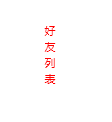
但是,这个方法有一个缺点,就是你需要设置好TextBlock.的with属性和文本字体大小的比例. 例如,我们将依旧设置成width = 12, FontSize =20,即:
<TextBlock TextAlignment="Center" TextWrapping="Wrap" Text="好友列表" Width="12" Foreground="Red" FontSize="20" />
得到的效果:
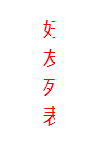
很明显文字有被遮挡,因此,如果再给字体添加一个粗体的属性,那遮挡效果更明显.于是,寻求另一中方法.
方法二:自定义一个继承与Control的类,命名为VerticalTextBlock.
该类公布一个TextProperty属性,并自定义控件模板,在模板中添加一个TextBlock,TextBlock的Text内容由一系列带有换行符的字符组成.该类也重写模板应用方法.代码如下:


public class VerticalTextBlock:Control
{
public VerticalTextBlock()
{
IsTabStop = false;
var templateXaml =
@"<ControlTemplate " +
#if SILVERLIGHT
"xmlns='http://schemas.microsoft.com/client/2007' " +
#else
"xmlns='http://schemas.microsoft.com/winfx/2006/xaml/presentation' " +
#endif
"xmlns:x='http://schemas.microsoft.com/winfx/2006/xaml'>" +
"<Grid Background=\"{TemplateBinding Background}\">" +
"<TextBlock x:Name=\"TextBlock\" TextAlignment=\"Center\"/>" +
"</Grid>" +
"</ControlTemplate>";
#if SILVERLIGHT
Template = (ControlTemplate)XamlReader.Load(templateXaml);
#else
using(var stream = new MemoryStream(Encoding.UTF8.GetBytes(templateXaml)))
{
Template = (ControlTemplate)XamlReader.Load(stream);
}
#endif
}
public override void OnApplyTemplate()
{
base.OnApplyTemplate();
_textBlock = GetTemplateChild("TextBlock") as TextBlock;
CreateVerticalText(_text);
}
private string _text { get; set; }
private TextBlock _textBlock { get; set; }
public string Text
{
get { return (string)GetValue(TextProperty); }
set { SetValue(TextProperty, value); }
}
public static readonly DependencyProperty TextProperty = DependencyProperty.Register(
"Text", typeof(string), typeof(VerticalTextBlock), new PropertyMetadata(OnTextChanged));
private static void OnTextChanged(DependencyObject o, DependencyPropertyChangedEventArgs e)
{
((VerticalTextBlock)o).OnTextChanged((string)(e.NewValue));
}
private void OnTextChanged(string newValue)
{
CreateVerticalText(newValue);
}
private void CreateVerticalText(string text)
{
_text = text;
if (null != _textBlock)
{
bool first = true;
foreach (var c in _text)
{
if (!first)
{
_textBlock.Inlines.Add(new LineBreak());
}
_textBlock.Inlines.Add(new Run { Text = c.ToString() });
first = false;
}
}
}
}
如何应用?
很简单,添加控件所在的命名空间,然后再xaml里像添加控件一样加载即可.
<mcl:VerticalTextBlock Text="功能列表" FontWeight="bold" Foreground="Red" FontSize="20"/>
效果:
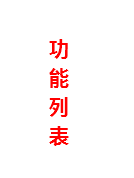
第二种方法比较好,就像正常使用TextBlock控件一样使用,不需要考虑到字体大小和控件大小间的关系.
WPF文字排列方式解析zz的更多相关文章
- Android 4.2原生支持从右到左的文字排列格式
Android 4.1(Jelly Bean) 在TextView和EditText 元素里对“双向文字顺序”提供了有限的功能支持,允许应用程序在编辑和显示字符的时候,能够同时支持从左到右(LTR) ...
- OLED屏幕那些次像素有趣的排列方式
http://www.dzsc.com/data/2016-6-2/109856.html 我们今天的重点内容为倒数第二列内容的上半部分,也就是RGB排列和Pentile排列.在介绍OLED屏幕时候我 ...
- WPS Office for Mac如何修改Word文档文字排列?WPS office修改Word文档文字排列方向教程
Word文档如何改变文字的排列方向?最新版WPS Office for Mac修复了文字排版相关的细节问题,可以更快捷的进行Word编辑,WPS Office在苹果电脑中如何修改Word文档文字排列方 ...
- OpenGL 像素在内存中的排列方式
在OpenGL中所有和图像像素有关的API(包括glTexImage2D, glReadPixels等)第一个像素从左下角开始,从左到又一次排列,满了从下到上排列. 这个和Windows 下惯用的左上 ...
- Android网络之数据解析----SAX方式解析XML数据
[声明] 欢迎转载,但请保留文章原始出处→_→ 生命壹号:http://www.cnblogs.com/smyhvae/ 文章来源:http://www.cnblogs.com/smyhvae/p/ ...
- 用JAXP的dom方式解析XML文件
用JAXP的dom方式解析XML文件,实现增删改查操作 dom方式解析XML原理 XML文件 <?xml version="1.0" encoding="UTF-8 ...
- Dom方式解析XML
public class TestXML { public static void main(String[] args) throws SAXException, IOException { //D ...
- Linux下的Source命令及脚本的执行方式解析
Linux Source命令及脚本的执行方式解析 http://blog.csdn.net/wangyangkobe/article/details/6595143 当我修改了/etc/profile ...
- css考核点整理(九)-有几种文字替换方式,之间的优缺点
有几种文字替换方式,之间的优缺点
随机推荐
- XStream xml to bean
<!-- pom.xml --> <dependency> <groupId>com.thoughtworks.xstream</groupId> &l ...
- sqlplus 设置
set heading offset line 40001.设置页面显示总行数show pagesize; //首先查看目前的pagesize,默认是14set pagesize 100; //将pa ...
- Mac与iPhone屏幕录制
1. Mac电脑屏幕录制 1.1 文件->新建屏幕录制 1.2 点击红色按钮 1.3 截取需要录制的屏幕部分,点击开始录制 1.4 点击工具栏的停止按钮,停止录制 1.5 然后会 ...
- Swift - 开源框架总结
苹果官方Swift文档<The Swift Programming Language> 苹果开发者Swift文档及介绍 网友整理的Swift中文文档< Apple Swift编程语言 ...
- 直接放个DB2 SQL STATEMENT大全好了!
SQL statements This topic contains tables that list the SQL statements classified by type. SQL sch ...
- DB2 嵌入式应用中定义游标(开放平台上)
DECLARE CURSOR statement The DECLARE CURSOR statement defines a cursor. Invocation Although an inter ...
- RabbitMQ驱动简单例子
using RabbitMQ.Client; using RabbitMQ.Client.Events; using System; using System.Collections.Generic; ...
- 重温WCF之数据契约中使用枚举(转载)(十一)
转载地址:http://www.zhuli8.com/wcf/EnumMember.html 枚举类型的定义总是支持序列化的.当我们定义一个新的枚举时,不必应用DataContract特性,就可以在数 ...
- Unreal Engine4 学习笔记2 动画蒙太奇
动画蒙太奇出现的位置是在动画蓝图的动画图表和事件图表中,如下图 事件图表,可以看出在主线执行的结尾,如果is Punching 为true,则会执行一个我们自定义的Punch Event,用来播放动画 ...
- WPF MVVM初体验
首先MVVM设计模式的结构, Views: 由Window/Page/UserControl等构成,通过DataBinding与ViewModels建立关联: ViewModels:由一组命令,可以绑 ...