
WPF:在ControlTemplate中使用TemplateBinding
A bit on TemplateBinding and how to use it inside a ControlTemplate.
Introductio
Today I'll try to write a bit on TemplateBinding and how to use it inside a ControlTemplate.TemplateBinding is a type of binding used mainly for template scenarios. Here I am not going to write more on its theoretical aspect as what is TemplateBinding, when to use, blah blah blah, as lot of content is readily available on the net. So, let's start quickly with the coding part:
First of all, let's create a new project using WPF template and place a button in it as below:
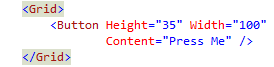
Now, what I am going to do is, I am going to replace this content template for this button. So, in order to do this, open up the Button tag and add Button.Template markup tag with a new ControlTemplate as:
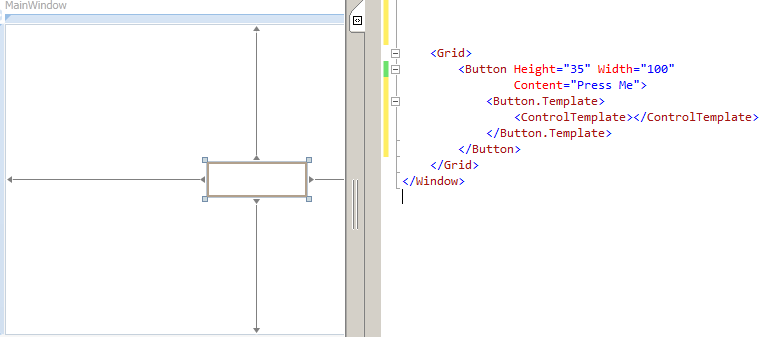
Now as soon as you will add ControlTemplate tag, you will notice that the content of the button is gone and button is shown as a transparent rectangle. This has happened because here I told WPF to replace the defaultControlTemplate with the one which I defined. But at this point, our ControlTemplate is blank, so there is no visualization and we can see only a transparent rectangle.
Now go ahead and customize our ControlTemplate by putting Ellipse inside it as:
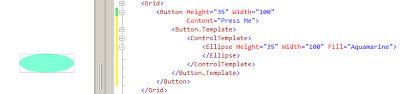
Now we can see that we get a visualization for a button in the form of ellipse. At this point of time, it works OK, but there are scenarios where this struct breaks down.
For example, let's increase the height of button, from 35 to 105 as:
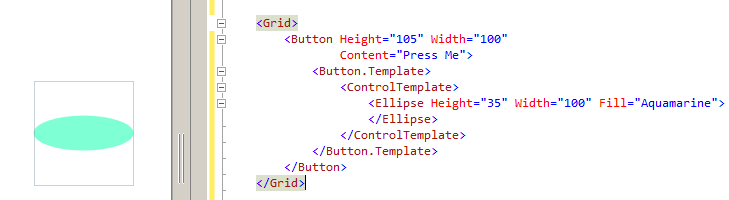
In the above image, you will notice that button height is increased but the ellipse size is still the same, which is a bad UI design. And the reason this is happening is, inside a ControlTemplate, the height of an ellipse is hard coded. So, no matter, whatever height is set at parent (i.e., Button), it will not get inherited to child control (i.e.Ellipse).
So, now we have to fix this problem by using a special type of binding called TemplateBinding insideControlTemplate. So, instead of hard coding the height, we will use TemplateBinding as shown below:
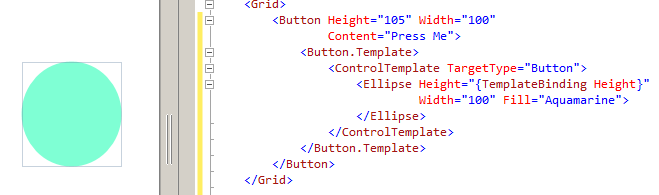
By setting the TargetType property of ControlTemplate, we are telling Ellipse that, any property of Button can be set to ellipse. Now, whatever the height of button will be, it will automatically be the height of ellipse also. Isn't it interesting?
Moving forward, let's do something more interesting with Fill property of ellipse.
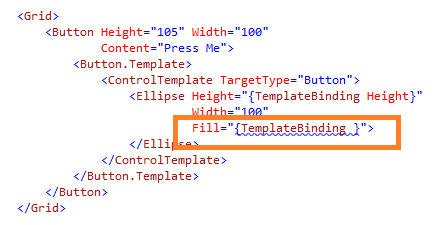
In the above snippet, I am trying to set the Fill property of an ellipse using TemplateBinding. But now the problem here is, a button doesn't have a Fill property. So, there is no one-to-one mapping for Fillproperty. Now, what to do?
No need to worry that much because button does have a Background property as:
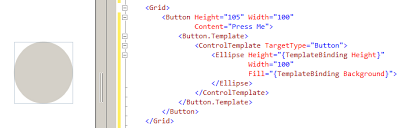
In the above image, you might have noticed that as soon as ellipse's Fill property is set to Background,ellipse becomes transparent as button's background. Now if we set button's Background property to Red, the same will be applied to ellipse too.
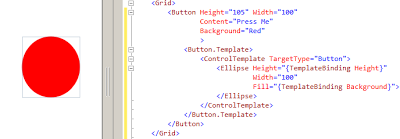
So, one can understand how much magic we can do with TemplateBinding.
Now, let's work a little bit on code cleanup.
ControlTemplate Inside Resource Dictionary
For better code readability, we will move out our ControlTemplate code and put it inside a resource dictionary as:
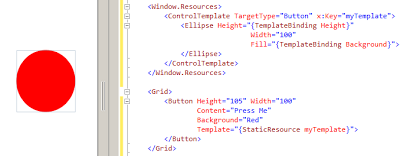
So, now we can see as earlier that whatever visual property for button is set, all get applied to ellipse as well.
Hope this tip was useful and gave you the basic idea on how to use TemplateBinding.
WPF:在ControlTemplate中使用TemplateBinding的更多相关文章
- 年度巨献-WPF项目开发过程中WPF小知识点汇总(原创+摘抄)
WPF中Style的使用 Styel在英文中解释为”样式“,在Web开发中,css为层叠样式表,自从.net3.0推出WPF以来,WPF也有样式一说,通过设置样式,使其WPF控件外观更加美化同时减少了 ...
- WPF Prism MVVM 中 弹出新窗体. 放入用户控件
原文:WPF Prism MVVM 中 弹出新窗体. 放入用户控件 版权声明:本文为博主原创文章,未经博主允许不得转载. https://blog.csdn.net/qq_37214567/artic ...
- WPF实现窗体中的悬浮按钮
WPF实现窗体中的悬浮按钮,按钮可拖动,吸附停靠在窗体边缘. 控件XAML代码: <Button x:Class="SunCreate.Common.Controls.FloatBut ...
- 模板中的 TemplateBinding 问题
昨天一个朋友向我求助一个自定义水印控件绑定的问题,问题出在文本框中输入的文本,不能绑定到 相应的依赖属性上(自定义的依赖属性 PassText),他纠结了很久找不出问题所在.问题帮他解决后,这里稍 做 ...
- WPF 显示文件列表中使用 ListBox 变到ListView 最后使用DataGrid
WPF 显示文件列表中使用 ListBox 变到ListView 最后使用DataGrid 故事背景: 需要检索某目录下文件,并列出来,提供选择和其他功能. 第一版需求: 列出文件供选择即可,代码如下 ...
- 如何在WPF应用程序中使用视频处理控件TVideoGrabber
要在WPF 中使用 TVideoGrabber 组件,需要像下面的方法来使用 VS.NET(DLL) 版本的组件: ——复制TVideoGrabber_x.x.x.x_x86.dll到c:/windo ...
- WPF窗体视图中绑定Resources文件中字符串时,抛出:System.Windows.Markup.StaticExtension
问题描述: 在Resources.resx定义了一个静态字符串字段Title,并在WPF窗体视图中绑定为窗体的标题: Title="{x:Static local:Resources.Tit ...
- wpf将表中数据显示到datagrid示例(转)
原文:http://www.jb51.net/article/47120.htm 这篇文章主要介绍了wpf将表中数据显示到datagrid示例,需要的朋友可以参考下 a.在.xaml文件中拖入一个da ...
- 在WPF的DATAGRID中快速点击出现在ADDNEW或EDITITEM事务过程不允许DEFERREFRESH
原文 在WPF的DATAGRID中快速点击出现在ADDNEW或EDITITEM事务过程不允许DEFERREFRESH 在项目中关于DataGrid的遇到过一些问题,其中是关于迁入CheckBox的双向 ...
随机推荐
- hdu 5018 Revenge of Fibonacci
大水题 #include<time.h> #include <cstdio> #include <iostream> #include<algorithm&g ...
- Sphinx的介绍和原理探索
What/Sphinx是什么 定义 Sphinx是一个全文检索引擎. 特性 索引和性能优异 易于集成SQL和XML数据源,并可使用SphinxAPI.SphinxQL或者SphinxSE搜索接口 易于 ...
- 微软MSMQ消息队列的使用
首先在windows系统中安装MSMQ 一.MSMQ交互 开发基于消息的应用程序从队列开始.MSMQ包含四种队列类型: 外发队列:消息发送到目的地之前,用它来临时存储消息. 公共队列:在主动目录中公布 ...
- Jquery 自定义弹窗等待
(function ($) { $.extend({ //弹窗蒙层 ShowLoadDialog : function () { ) { var cusrtxt = $("<div i ...
- bootstrap表单带验证
<!DOCTYPE html> <html lang="zh-CN"> <head> <meta charset="utf-8& ...
- AIX RAC ORA-27504 ORA-27300 ORA-27301 ORA-27302 ORA-27303
操作系统:AIX6.1 数据库:Oracle10.2.0.5 RAC 2个节点.其中一个节点正常,另外一个节点的instance的状态是offline的,手工去启动的时候报错: ORA: IPC e ...
- Unity3d 提示 "The scripts file name does not match the name of the class defined in the script!"的解决办法
有两个原因,一个是文件的名称和类名不一致 第二个原因是有命名空间, 排除应该是可以修复的
- 通过SharePoint Designer对SharePoint 2010的Master Page进行自定制
1:需要在对应的SiteCollection 和 Site 中开启Publishing的服务 2:在Designer中创建自己的Master Page,进行对原始v4.master代码进行复制,和修改 ...
- Apache Tomcat配置
- C# Stream 和 byte[] 之间的转换(文件流的应用)
一. 二进制转换成图片 MemoryStream ms = new MemoryStream(bytes); ms.Position = ; Image img = Image.FromStream( ...