
loopback 04
数据库相关
关系定义
定义关系之后的使用
relations: {

      "images": {

      "type": "hasMany",

      "model": "image",

      "polymorphic": "imageable"

    }

}

//

Item.create(itemData).then((item)=> {

  item.image.create().then(){

  }

})
继承默认User表
- 已经继承了
username,password属性;
//一般表的结构

{

  "name": "other",

  "base": "PersistedModel",

  ....

}

//继承User表的结构

{

  "name": "user",

  "base": "User",

  ...

}
修改数据类型为指定数据库类型
"details": {

     "type": [

        "object"

      ],

      "postgresql": {

        "dataType": "text"

      }

}
使用mixins
- 对于定义表中大部分都会定义的相同属性提取出来定义
server/model-config.js:
{

  ...

  "mixins": [

      "loopback/common/mixins",

      "loopback/server/mixins",

      "../common/mixins",

      "./mixins"

    ]

  ...

}
common/models/*.json
{

  ...

  "mixins": {"Timestamp": {"myOption": 1}},

  ...

}
common/mixins/timestamp.js
module.exports = function(Model, options) {

  // Model is the model class

  // options is an object containing the config properties from model definition

  Model.defineProperty('created', {type: Date, default: '$now'});

  Model.defineProperty('modified', {type: Date, default: '$now'});

}
使用正则表达式
Item.find({

  where: {

   or: [

     {

     a: {regexp: ...},      //{like: '%%'}

     b: {regexp: ...}

     }

   ]

  }

}).then(items=> callback(null, items)).catch(callback);
测试辅助
- 定义测试时自动更新的数据库
  app.datasources.pg.autoupdate([

    'user',.....

  ]);
测试时使用:以chai为例
describe('Item Model definition', ()=> {

  let db = app.datasources.pg;

  let item = db.getModelDefinition('item');

  it('has the following properties', ()=> {

    expect(item.properties.content.type).to.eql(String);

    expect(item.properties.thumbsup.type).to.eql(Number);

    expect(item.properties.userId.type).to.eql(Number);

    .....

  });

});
测试前删除数据:
beforeEach(done=> {

    app.dataSources.pg.automigrate(['item','tag','image'], ()=> {

      Item.create(itemData).then((item)=> {

        itemOne = item;

        itemId = item.id;

        done();

      })

    })

  });

.....

});
继承loopback自定义的数据库
{

  "name": "user",

  "base": "User",

...

}
debug运行
DEBUG=* npm start
数据库关系
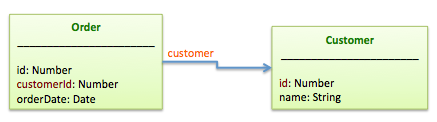
BelongsTo
- 一对多,一对一关系;
- 对面是
hasMany,hasOne
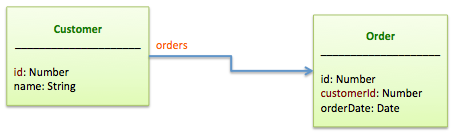
HasMany
- 一对多关系:
- 对面是
belongsTo
HasOne
- 一对一关系;
- 对面是
belongsTo
HasManyThrough
- 多对多关系;
- 第三方表是两个
belongsTo
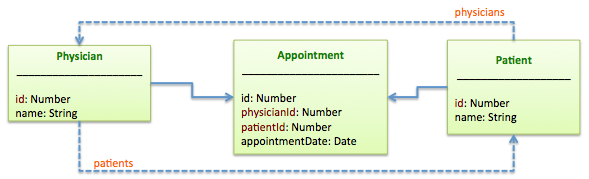
- 自己与自己表多对多关系,需要新增
keyThrough属性
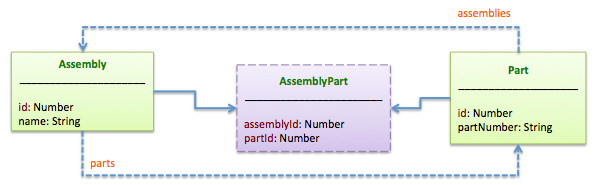
HasAndBelongsToMany
- 多对多关系, 在第三张表不保存
id外其他属性时使用,简化版的HasManyThrough; - 对面也是
hasAndBelongsToMany
Polymorphic relations
loopback常用命令
slc loopback:model: 创建数据表slc loopback:acl: 数据表权限设置
常用数据库操作
创建
PersistedModel.create(data, callback): 创建PersistedModel.upsert(data, callback): 更新或插入PersistedModel.findOrCreate([where], data, callback): 不存在创建,存在则返回persistedModel.save([options], callback): 更新,如果没有id字段,则创建
更新
PersistedModel.updateAll([where], data, callback)更新persistedModel.updateAttribute(name, value, callback)更新属性persistedModel.updateAttributes(data, callback)更新属性PersistedModel.createUpdates(deltas, callback)PersistedModel.bulkUpdate(updates, callback): 按数组更新;
销毁
PersistedModel.destroyAll([where], callback): 销毁PersistedModel.destroyById(id, callback): 根据id销毁
debug检查
DEBUG=loopback:connector:postgresql npm start
使用loopback自带的数据验证;
使用loopback-console直接操作数据;
关于hook
before|afterRemote();observe();- 例子
- 获取其他数据表:
loopback.getModel('xxx');
添加方法
- 整个模型的方法
  Item.search = function(filter, keyword, callback) {

    filter = filter || {};

    let query = {regexp: `/${keyword}/i`};

    delete filter.where;

    if (keyword) {

      filter.where = {

        or: [

          {content: query, deleted: false, visible: true},

          {tagString: query, deleted: false, visible: true}

        ]

      };

    }

    Item.find(filter).then(items=> callback(null, items)).catch(callback);

  };
- 单个模型实例的方法
  Activity.prototype.increaseViews = function(nums, callback) {

    callback(null, {views: this.views});

  };

  Activity.beforeRemote('prototype.increaseViews', (ctx, instance, next)=> {

    const nums = ctx.req.query.nums || 1;

    instance && instance.updateAttribute('views', instance.views + Number(nums))

      .then(()=> next()).catch(next);

  });
- 设置权限(如果开启了的话)
- 添加远程说明
  Item.remoteMethod('search', {

    description: '',

    accepts: [

      { arg: 'filter', type: 'object', http: {source: 'query|object'} },

    ],

    http: {verb: 'get|post|put...'},

    returns: { root: true, type: '' }

  });
去掉explore
- 分别删除
root/explore.js,components.config
数据筛选
- 只返回特定的属性:
{ fields: {id: true, make: true, model: true} }, 例子- 注意
id必须有,同时用include的话,相关的id也必须有;
- 注意
include数据:- 单用的话可以是数组或字符串;
- 扩展的话可以是数组或对象; 例子;
loopback 04的更多相关文章
- win8.1硬盘安装ubuntu14.04双系统
在网上找了很多方法都失败了,原因是大多数方法都是用mbr方式安装的,如grub4dos,easybcd.以至于连自己都怀疑win8能不能用硬盘安装,差点就去买个u盘来安装了,就在打算放弃的时候在ubu ...
- VMWare虚拟机下为Ubuntu 12.04.1配置静态IP(NAT连接方式)
背景 在虚拟机下运行操作系统,尤其是Linux系统已经是非常常见的做法.有时你想在虚拟机下搭建一个(模拟)服务器来供主机访问,比如搭建一个telnet/ssh.此时你会发现,每次启动虚拟机,VMWar ...
- windows10 下访问 virtualbox 虚拟机的linux15.10/16.04 系统 及 用 putty 访问虚拟机的配置
参考: http://www.doc88.com/p-915707596190.html --- 安装samba http://my.oschina.net/u/2260265/blog/405598 ...
- VMware8.0虚拟机中安装Ubuntu12.04使用NAT设置连接网络
之前一直尝试使用“桥接”的方法,但是一打开虚拟机,本机windows就断网.最后不得不换种方法,还好尝试了很多遍终于使用NAT设置成功的联网了. 说明:本机windows连接的是无线网. 1.检查自己 ...
- Ubuntu14.04+RabbitMQ3.6.3+Golang的最佳实践
目录 [TOC] 1.RabbitMQ介绍 1.1.什么是RabbitMQ? RabbitMQ 是由 LShift 提供的一个 Advanced Message Queuing Protocol ...
- 服务器Ubuntu16.04下连接锐捷
最近搞深度学习,老师买了一台服务器.双系统,win7和Ubuntu16.04,但是联网是遇到了问题. 输入ifconfig时,发现根本就找不到eth0和eth1,只有evp0s25和evp0s90,o ...
- Ubuntu 14.04 配置静态IP
命令行手工配置静态IP比较麻烦,记录于此备查. 1,ubuntu的网络配置文件在: # /etc/network/interfaces //这个文件里 2,默认安装时,网络配置是使用DHCP自动分配I ...
- 在 Ubuntu 14.04 中配置 PXE 服务器
PXE(预启动执行环境Preboot Execution Environment)服务器允许用户从网络中启动 Linux 发行版并且可以不需要 Linux ISO 镜像就能同时在数百台 PC 中安装. ...
- VMWare虚拟机下为Ubuntu 12.04.1配置静态IP_转
转自:http://www.cnblogs.com/objectorl/archive/2012/09/27/vmware-ubuntu-nat-static-ip-settings.html 背景在 ...
随机推荐
- POJ 1753 Flip game ( 高斯消元枚举自由变量)
题目链接 题意:给定一个4*4的矩阵,有两种颜色,每次反转一个颜色会反转他自身以及上下左右的颜色,问把他们全变成一种颜色的最少步数. 题解:4*4的矩阵打表可知一共有四个自由变元,枚举变元求最小解即可 ...
- Quartz结合SPRING多任务定时调用
定义两个被调度的类 public class QuartzJob { public void work() { System.out.println(Spring Quartz的任务调度1被调用!&q ...
- September 23rd 2016 Week 39th Friday
Even a small star shines in the darkness. 星星再小,也会发光. In the darkness, even a small star can shine. N ...
- Java ANT build.xml
详情请参考:http://www.cnblogs.com/xionghui/archive/2012/03/13/2393679.html
- spring中scope作用域(转)
今天研究了一下scope的作用域.默认是单例模式,即scope="singleton".另外scope还有prototype.request.session.global sess ...
- Runtime.getRuntime().exec()
Runtime.getRuntime()返回当前应用程序的Runtime对象,该对象 的exec()方法指示Java虚拟机创建一个子进程执行指定的可执行程序,并返回与该子进程对应的Process对象实 ...
- java 中的一个项目如何做到访问另一个项目的一个方法 或者 页面
两种方法:1.将一个项目打成jar包,第二个项目进行导入该jar包,就可以使用第一个项目里的类方法属性等2.将第一个项目发布出去,然后第二个项目调用,所谓发布出去就是开发远程接口,允许其他人调用.
- MVC学习笔记--跟小静学MVC相关语法特性小补习
http://www.cnblogs.com/janes/archive/2012/10/15/2721101.html http://www.cnblogs.com/h82258652/p/4795 ...
- 【网络资料】如何优雅地使用Sublime Text3
如何优雅地使用Sublime Text3 Sublime Text:一款具有代码高亮.语法提示.自动完成且反应快速的编辑器软件,不仅具有华丽的界面,还支持插件扩展机制,用她来写代码,绝对是一种享受.相 ...
- html5 Canvas绘制图形入门详解
html5,这个应该就不需要多作介绍了,只要是开发人员应该都不会陌生.html5是「新兴」的网页技术标准,目前,除IE8及其以下版本的IE浏览器之外,几乎所有主流浏览器(FireFox.Chrome. ...