
IOS之计算器实现
本文利用ios实现计算器app,后期将用mvc结构重构
import UIKit

class CalculViewController: UIViewController {

    @IBOutlet weak var display: UILabel!

    var userIsInTheMiddleOFTypingANumber:Bool=false

    @IBAction func appendDigit(sender: UIButton) {

        let digit=sender.currentTitle!

        if userIsInTheMiddleOFTypingANumber {

        display.text=display.text!+digit

        }else{

            display.text=digit

            userIsInTheMiddleOFTypingANumber=true

        }

    }

    var operandstack:Array<Double>=Array<Double>()

    @IBAction func operate(sender: UIButton) {

        let operation=sender.currentTitle!;

        if userIsInTheMiddleOFTypingANumber {

            enter()

        }

        switch operation {

        case "×":performeOperation{$0*$1}

        case "÷":performeOperation{$1/$0}

        case "+":performeOperation{$0+$1}

        case "-":performeOperation{$1-$0}

        case "√":performeOperation{sqrt($0)}

        default:

            break

        }

    }

//    func multiply(op1:Double,op2:Double) -> Double {

//        return op1*op2;

//    }

    func performeOperation(operation:(Double,Double)->Double){

        if operandstack.count>=2 {

            displayValue=operation(operandstack.removeLast(),operandstack.removeLast())

            enter()

        }

    }

     private func performeOperation(operation:Double->Double){

        if operandstack.count>=1 {

            displayValue=operation(operandstack.removeLast())

            enter()

        }

    }

    @IBAction func enter() {

        userIsInTheMiddleOFTypingANumber=false

        operandstack.append(displayValue)

        print("operandstack=\(operandstack)")

    }

    var displayValue:Double{

        get{

            return NSNumberFormatter().numberFromString(display.text!)!.doubleValue

        }

        set{

            display.text="\(newValue)"

            userIsInTheMiddleOFTypingANumber=false

        }

    }
知识点如下
- 计算型属性的setter与getter
- swift利用函数作为参数
- swift的重载,详情参见:swift override
效果如下
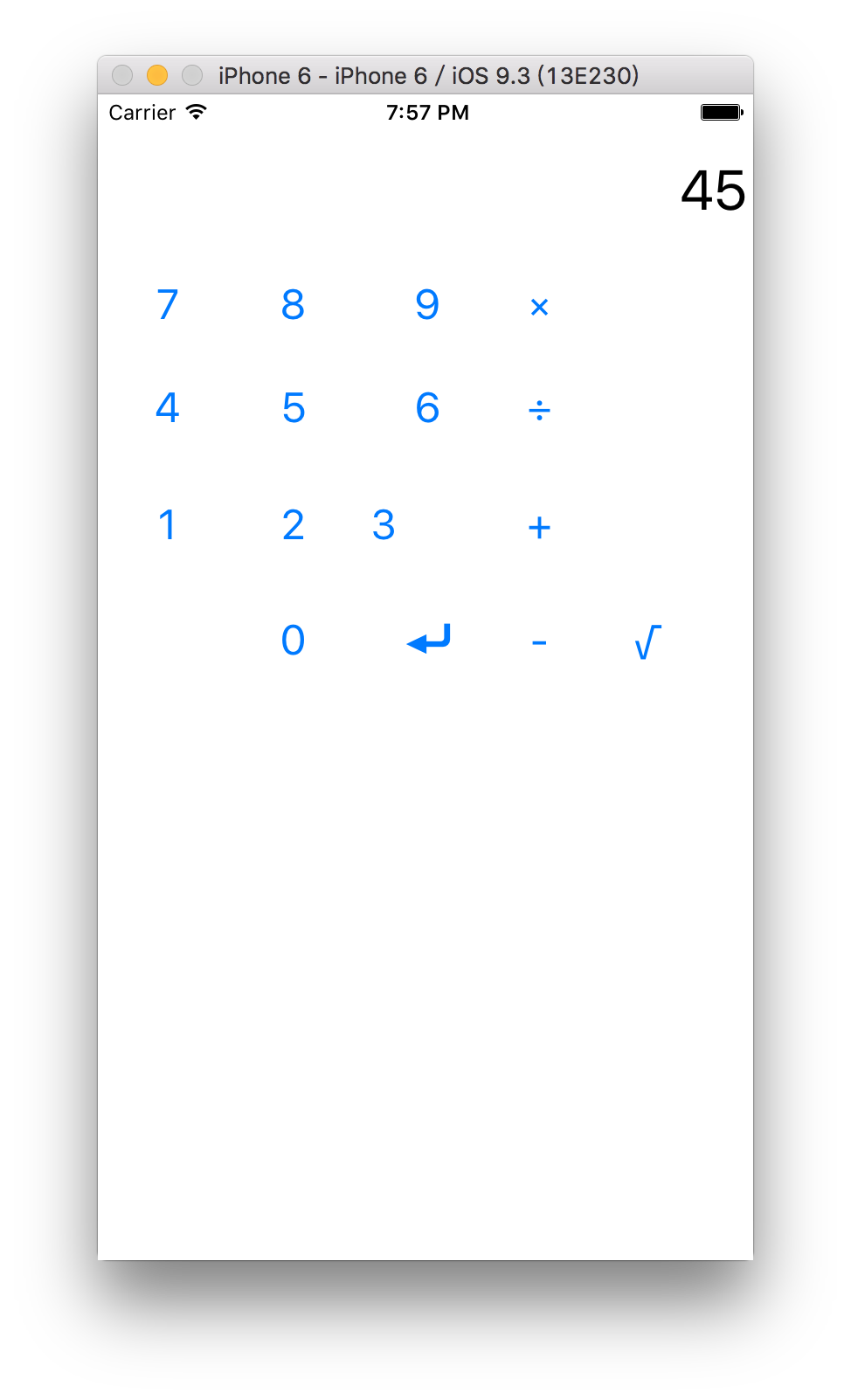
增加model文件
import Foundation

class CalculatorBrain {

    private enum Op : CustomStringConvertible{

        case operand(Double)

        case UnaryOperation(String,Double->Double)

        case BinaryOperation(String,(Double,Double)->Double)

        var description:String{

            get{

                switch self {

                case .operand(let operand):

                    return "\(operand)"

                case .BinaryOperation(let symbol,_):

                    return symbol

                case .UnaryOperation(let symbol, _):

                    return symbol

                }

            }

        }

    }

    private var opstack=[Op]()

    private var knowOps=[String:Op]()

    init(){

        func learnOp(op:Op){

            knowOps[op.description]=op

        }

        learnOp(Op.BinaryOperation("×"){$0*$1})

        learnOp(Op.BinaryOperation("÷"){$1/$0})

        learnOp(Op.BinaryOperation("+"){$0+$1})

        learnOp(Op.BinaryOperation("-"){$1-$0})

        learnOp(Op.UnaryOperation("√"){sqrt($0)})

//        knowOps["×"]=Op.BinaryOperation("×"){$0*$1}

//        knowOps["÷"]=Op.BinaryOperation("÷"){$1/$0}

//        knowOps["+"]=Op.BinaryOperation("+"){$0+$1}

//        knowOps["-"]=Op.BinaryOperation("-"){$1-$0}

//        knowOps["√"]=Op.UnaryOperation("√"){sqrt($0)}

    }

    private func evaluate(ops:[Op])->(result:Double?,remainOps:[Op]){

        if !ops.isEmpty {

            var remainOps=ops;

            let op=remainOps.removeLast()

            switch op {

            case Op.operand(let operand):

                return(operand,remainOps)

            case Op.UnaryOperation(_, let operation):

                let operandEvalution=evaluate(remainOps)

                if let operand=operandEvalution.result{

                    return(operation(operand),operandEvalution.remainOps)

                }

            case Op.BinaryOperation(_, let operation):

                let operandEvlution1=evaluate(remainOps)

                if let operand1=operandEvlution1.result {

                    let operandEvlution2=evaluate(operandEvlution1.remainOps)

                    if let operand2=operandEvlution2.result {

                        return (operation(operand1,operand2),operandEvlution2.remainOps)

                    }

                }

            }

        }

        return (nil,ops)

    }

    func evaluate()->Double?{

        let (result,remainder)=evaluate(opstack)

        print("\(opstack)=\(result)with\(remainder)left over")

        return result

    }

    func pushOperand(operand:Double)->Double?{

        opstack.append(Op.operand(operand))

        return evaluate()

    }

    func performOperation(symbol:String)->Double?{

        if let operation=knowOps[symbol]{

            opstack.append(operation)

        }

        return evaluate()

    }

}
controll修改为
import UIKit

class CalculViewController: UIViewController {

    @IBOutlet weak var display: UILabel!

    var userIsInTheMiddleOFTypingANumber:Bool=false

    var brain=CalculatorBrain()

    @IBAction func appendDigit(sender: UIButton) {

        let digit=sender.currentTitle!

        if userIsInTheMiddleOFTypingANumber {

        display.text=display.text!+digit

        }else{

            display.text=digit

            userIsInTheMiddleOFTypingANumber=true

        }

    }

    //var operandstack:Array<Double>=Array<Double>()

    @IBAction func operate(sender: UIButton) {

        if userIsInTheMiddleOFTypingANumber {

            enter()

        }

        if let operation=sender.currentTitle{

            if let result=brain.performOperation(operation) {

                displayValue=result

            }else{

                displayValue=0

            }

        }

    }

    @IBAction func enter() {

        userIsInTheMiddleOFTypingANumber=false

        if let result=brain.pushOperand(displayValue){

            displayValue=result

        }else{

            displayValue=0

        }

    }

    var displayValue:Double{

        get{

            return NSNumberFormatter().numberFromString(display.text!)!.doubleValue

        }

        set{

            display.text="\(newValue)"

            userIsInTheMiddleOFTypingANumber=false

        }

    }

}
IOS之计算器实现的更多相关文章
- iOS小型计算器
// // ViewController.m // 计算器 //屏幕的宽和高 #define SCREEN_W self.view.frame.size.width #define SCREEN_ ...
- IOS OC 计算器算法(不考虑优先级)
个人见解:为还在计算器算法方面迷惑的同学一个数据处理解决方案:定义一个可变数组array,一个可变字符串str,使字符通过[array addObject:str];方法添加到可变数组,每当触发运算符 ...
- iOS 收款计算器算法
一个收款计算器算法,从之前高仿有赞Demo里面抽离的一个界面 demo 在这里 https://github.com/L-vinCent/calculView_function 显示计算记录 不能连续 ...
- iOS 减法计算器
一: 在界面上拖入相应的控件 二: 给每个控件设置关联 //监听按钮的点击 - (IBAction)compute:(id)sender; //第一个文本输入框的值 @property (weak, ...
- c 语言简单计算器源码
// main.c // 计算器 // Created by qianfeng on 14-7-15. // Copyright (c) 2014年 ___FGY___. All rights ...
- 使用Olami SDK 语音控制一个支持HomeKit的智能家居的iOS程序
前言 HomeKit是苹果发布的智能家居平台.通过HomeKit组件,用户可以通过iphone.iPad和ipod Touch来控制智能灯泡,风扇.空调等支持HomeKit的智能家居,尤其是可以通过S ...
- 【IOS开发笔记03-视图相关】简单计算器的实现
UIView 经过前几天的快速学习,我们初步了解的IOS开发的一些知识,中间因为拉的太急,忽略了很多基础知识点,这些知识点单独拿出来学习太过枯燥,我们在今后的项目中再逐步补齐,今天我们来学习APP视图 ...
- 李洪强漫谈iOS开发[C语言-042]-简单计算器
李洪强漫谈iOS开发[C语言-042]-简单计算器
- IOS实现小型计算器
作为一名初学者,编辑一款能够在IOS操作系统上运行的计算器是一件很值得自豪的事情,网络上虽然后很多相关的文章和代码,功能也很强大但是我感觉相关的计算器比加复杂,晦涩难懂,所以我想通过这个小小的计算器, ...
随机推荐
- QQ空间个人中心的广告
http://qzonestyle.gtimg.cn/qzone/space_item/boss_pic/*.jpghttp://img*.paipaiimg.com/*.jpghttp://cn.q ...
- Git秘籍:在 Git 中进行版本回退
导读 在这篇文章中,你将学到如何查看项目中的历史版本,如何进行版本回退,以及如何创建 Git 分支以便你可以大胆尝试而不会出现问题.快来试试吧. 在你的 Git 项目的历史中,你的位置就像是摇滚专辑中 ...
- 给UIView添加手势
对于不能addTarget的UI对象,添加手势为他们带来了“福音”,以为UIView添加手势为例,揭开手势的面目. 1,创建一个view先, UIView * jrView=[[UIViewalloc ...
- 两款基于Jquery的图表插件
一.EasyPieChart 页面加载时,运行initPieChart()函数,调用easyPieChart()函数,显示出图表. 代码: var initPieChart = function() ...
- BZOJ 1462: Superkmp
Description 匹配字符串A,B,匹配条件是在A长度为=B的子串中,排名顺序相同. Sol KMP+树状数组. KMP匹配的时候计算排名就可以了啊...这个东西可以用树状数组维护. 这题是个双 ...
- fastx_toolkit软件使用说明
高通量测序数据下机后的原始fastq文件,包含4行,其中一行为质量值,另外一行则为对应序列,我们都了解高通量的数据处理首先要进行质量控制,这些过程包括去接头.过滤低质量reads.去除低质量的3'和5 ...
- backbone模型层浅析
Model层有两个类: Model, Collection 1.Model 不翻文档,我们用代码说话. 首先分析下类. var myM = Backbone.Model.extend({})//构造一 ...
- python 随笔(property & __class__)
1. 属性装饰器: property @property def errors(self): """ Returns a list of form.errors for ...
- devstack meaning of: n-cond, n-novnc and n-xvnc
devstack has shortened names for a number of services, e.g. g-api = glance api g-reg = glance regist ...
- 【leetcode】Surrounded Regions
Surrounded Regions Given a 2D board containing 'X' and 'O', capture all regions surrounded by 'X'. A ...