
OpenCv实现两幅图像的拼接
直接贴上源码
来源:http://www.myexception.cn/image/1498389.html
实验效果
Left.jpg
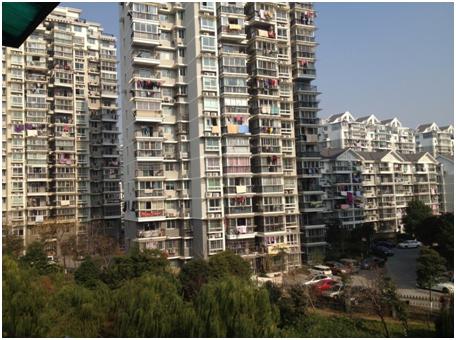
right.jpg

ImageMatch.jpg
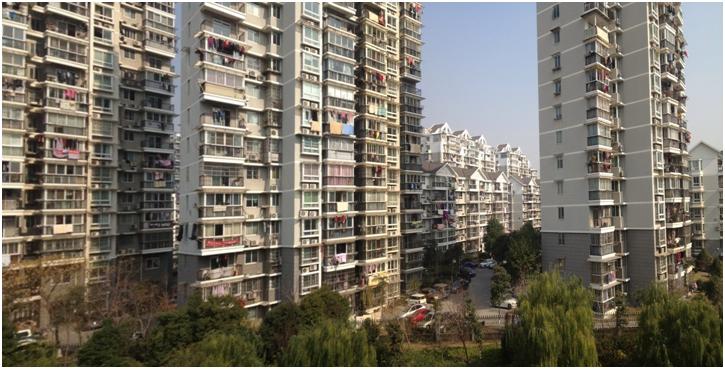
#include <iostream>

#include <iomanip>

#include "opencv2/core/core.hpp"

#include "opencv2/objdetect/objdetect.hpp"

#include "opencv2/features2d/features2d.hpp"

#include "opencv2/highgui/highgui.hpp"

#include "opencv2/calib3d/calib3d.hpp"

#include "opencv2/nonfree/nonfree.hpp"

#include "opencv2/imgproc/imgproc_c.h"

#include "opencv2/legacy/legacy.hpp"

#include "opencv2/legacy/compat.hpp"

using namespace cv;

using namespace std;

int main()

{

    Mat leftImg=imread("left.jpg");

    Mat rightImg=imread("right.jpg");

    if(leftImg.data==NULL||rightImg.data==NULL)

        return ;

    //转化成灰度图

    Mat leftGray;

    Mat rightGray;

    cvtColor(leftImg,leftGray,CV_BGR2GRAY);

    cvtColor(rightImg,rightGray,CV_BGR2GRAY);

    //获取两幅图像的共同特征点

    int minHessian=;

    SurfFeatureDetector detector(minHessian);

    vector<KeyPoint> leftKeyPoints,rightKeyPoints;

    detector.detect(leftGray,leftKeyPoints);

    detector.detect(rightGray,rightKeyPoints);

    SurfDescriptorExtractor extractor;

    Mat leftDescriptor,rightDescriptor;

    extractor.compute(leftGray,leftKeyPoints,leftDescriptor);

    extractor.compute(rightGray,rightKeyPoints,rightDescriptor);

    FlannBasedMatcher matcher;

    vector<DMatch> matches;

    matcher.match(leftDescriptor,rightDescriptor,matches);

    int matchCount=leftDescriptor.rows;

    if(matchCount>)

    {

        matchCount=;

        //sort(matches.begin(),matches.begin()+leftDescriptor.rows,DistanceLessThan);

        sort(matches.begin(),matches.begin()+leftDescriptor.rows);

    }

    vector<Point2f> leftPoints;

    vector<Point2f> rightPoints;

    for(int i=; i<matchCount; i++)

    {

        leftPoints.push_back(leftKeyPoints[matches[i].queryIdx].pt);

        rightPoints.push_back(rightKeyPoints[matches[i].trainIdx].pt);

    }

    //获取左边图像到右边图像的投影映射关系

    Mat homo=findHomography(leftPoints,rightPoints);

    Mat shftMat=(Mat_<double>(,)<<1.0,,leftImg.cols, ,1.0,, ,,1.0);

    //拼接图像

    Mat tiledImg;

    warpPerspective(leftImg,tiledImg,shftMat*homo,Size(leftImg.cols+rightImg.cols,rightImg.rows));

    rightImg.copyTo(Mat(tiledImg,Rect(leftImg.cols,,rightImg.cols,rightImg.rows)));

    //保存图像

    imwrite("tiled.jpg",tiledImg);

    //显示拼接的图像

    imshow("tiled image",tiledImg);

    waitKey();

    return ;

}
OpenCv实现两幅图像的拼接的更多相关文章
- Opencv实现两幅图像融合
实现两幅图像线性(不同系数下)的融合涉及到Opencv中两个关键的方法,addWeighted()和createTrackbar() addWeighted方法: 函数原型: void addWeig ...
- OpenCV --- 实现两幅图像并排合并(ROI)
Mat img1 = imread("1.png"); Mat img2 = imread("2.png"); int height = img1.rows; ...
- OpenCV 对两幅图像求和(求混合(blending))
#include <cv.h> #include <highgui.h> #include <iostream> using namespace cv; int m ...
- OpenCV,计算两幅图像的单应矩阵
平面射影变换是关于其次3维矢量的一种线性变换,可以使用一个非奇异的$3 \times 3$矩阵H表示,$X' = HX$,射影变换也叫做单应(Homography).计算出两幅图像之间的单应矩阵H,那 ...
- 【OpenCV学习】计算两幅图像的重叠区域
问题描述:已知两幅图像Image1和Image2,计算出两幅图像的重叠区域,并在Image1和Image2标识出重叠区域. 算法思想: 若两幅图像存在重叠区域,则进行图像匹配后,会得到一张完整的全景图 ...
- CV 两幅图像配准
http://www.cnblogs.com/Lemon-Li/p/3504717.html 图像配准算法一般可分为: 一.基于图像灰度统计特性配准算法:二.基于图像特征配准算法:三.基于图像理解的配 ...
- opencv::将两幅图像合并后,在同一个窗口显示;并将合并的图像流保存成视频文件
/** * @file main-opencv.cpp * @date July 2014 * @brief An exemplative main file for the use of ViBe ...
- OpenCV 学习笔记(0)两幅图像标定配准
参考教程 依赖opencv扩展库,使用sifi匹配 保存配准信息 "./config/calibratedPara.yaml" #include <iostream> ...
- 在Opencv中将一幅图像均分成M* N个小图像
std::vector<std::vector<Mat> > partitionImage(Mat&src,int rows,int cols) 函数中有三个输入参数, ...
随机推荐
- mongoengine
http://docs.mongodb.org/ecosystem/drivers/python/ http://www.cnblogs.com/holbrook/archive/2012/03/11 ...
- MyBatis <if>标签的一些问题
1.常见错误: There is no getter for property named 'parentId' in 'class java.lang.Long'(或者String) org.myb ...
- Windows下查看局域网内某台计算机的MAC地址
我们知道在局域网中,在Windows下,查看局域网内其他主机的ip和对应mac地址的命令是: arp -a 这样可以看到ip和mac地址的对应关系,还是比较方便的 但是有些时候使用arp命令并不能列出 ...
- 关于定时器 setTimeout
1.这里不考虑线程问题.把javascript想象成在时间线上运行,页面载入时,首先执行的是<script>标签中的代码,之后,将执行更多代码,当进程空闲时,下个代码就被触发并执行 如图: ...
- JSON 数据格式
JSON(JavaScript Object Notation) 是一种轻量级的数据交换格式.JSON采用完全独立于语言的文本格式,这些特性使JSON成为理想的数据交换语言.易于人阅读和编写,同时也易 ...
- Spring mvc 文件上传到文件夹(转载+心得)
spring mvc(注解)上传文件的简单例子,这有几个需要注意的地方1.form的enctype=”multipart/form-data” 这个是上传文件必须的2.applicationConte ...
- ExpandableListView的用法
ExpandableListView组件是android中一个比较常用的组件,当点击一个父item的时候可以将它的子item显示出来,像手机QQ中的好友列表就是实现的类型效果.使用Expandable ...
- 【leetcode】 Unique Binary Search Trees II (middle)☆
Given n, generate all structurally unique BST's (binary search trees) that store values 1...n. For e ...
- 【XLL 文档翻译】【第1部分】 Add-in 管理器 和 XLL 接口函数
xlAddInManagerInfo/xlAddInManagerInfo12 在 Excel 会话中,每一次调用 Add-In 管理器时,系统会调用这两个函数.此函数可以在 Add-In 管理器中提 ...
- C#封装C++DLL
1.新建一个C#-Windows-类库(用于创建C#类库(.dll)的项目)类型的工程 2.对于普通C++函数 XXXX_API void cppFun(int i); 在cs代码中添加 [DllIm ...