
不同gdb,相同数据集合并
众所周知,数据处理是GIS中一项重要且繁琐的工作,处理数据的工具和方法也太多了,在做数据处理的时候,经常会遇到这样的问题:对存储在不同gdb中、并且数据集名称相同的数据进行合并处理:
如图:数据组织如下,每个gdb中都存储了一些列FeatureClass,(但gdb中的FeatureClass数量并不相同)
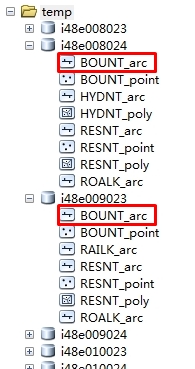
思路是:
1.先对每个gdb中的数据进行处理,使得每个gdb中的featureclass数量和名称相同。由于对Engine比较熟悉,这里我是用Engine进行处理的,具体代码如下:
private function Execute(){  //初始执行函数:

     string templatePath = @"F:\testout";

     DirectoryInfo directoryInfo = new DirectoryInfo(templatePath);

     DirectoryInfo[] dirInfo = directoryInfo.GetDirectories();

     string yy = dirInfo[].Name;

     string FeatureClassName = "ROALK_arc";  //FeatureClass名称,这里可以设置一个数组,存储所有的FeatureClass

     for (int i = ; i < dirInfo.Length; i++)

     {

         string gdbName = dirInfo[i].Name;

         //打开filegdb

         bool value = oper(@"F:\testout\" + gdbName, FeatureClassName);//判断FeatureClass是否存在

         string path = @"F:\testout\" + gdbName;

         if (value == false)

         {

             copyFeatureClass(path, FeatureClassName);

          }

    }

}
public bool oper(string filename,string featureClassName) //判断FeatureClass是否存在

        {

            IWorkspace2 workspace = null;

            IWorkspaceFactory2 workspaceFactory = new FileGDBWorkspaceFactoryClass();

            workspace = workspaceFactory.OpenFromFile(filename, ) as IWorkspace2;

            IFeatureWorkspace featureWorkspace = workspace as IFeatureWorkspace;

            bool flag = workspace.get_NameExists(ESRI.ArcGIS.Geodatabase.esriDatasetType.esriDTFeatureClass, featureClassName);

            return flag;

        }
public bool oper(string filename,string featureClassName) //判断是gdb中是否存在某个FeatureClass

        {

            IWorkspace2 workspace = null;

            IWorkspaceFactory2 workspaceFactory = new FileGDBWorkspaceFactoryClass();

            workspace = workspaceFactory.OpenFromFile(filename, ) as IWorkspace2;

            IFeatureWorkspace featureWorkspace = workspace as IFeatureWorkspace;

            bool flag = workspace.get_NameExists(ESRI.ArcGIS.Geodatabase.esriDatasetType.esriDTFeatureClass, featureClassName);

            return flag;

        }
//拷贝所有的FeatureClass到gdb,并删除里面的数据,保证每个featureclass为空,注:D:\Data\Shapefiles存储了所有的要合并的FeatureClass的空图层,便于拷贝。
 private void convert()

        {

                 IWorkspaceName sourceWorkspaceName = new WorkspaceNameClass

                 {

                     WorkspaceFactoryProgID = "esriDataSourcesFile.ShapefileWorkspaceFactory",

                     PathName = @"D:\Data\Shapefiles"

                 };

                 IName sourceWorkspaceIName = (IName)sourceWorkspaceName;

                 IWorkspace sourceWorkspace = (IWorkspace)sourceWorkspaceIName.Open();

                 // Create a name object for the target (file GDB) workspace and open it.

                 IWorkspaceName targetWorkspaceName = new WorkspaceNameClass

                 {

                     WorkspaceFactoryProgID = "esriDataSourcesGDB.FileGDBWorkspaceFactory",

                     PathName = @"D:\Data\Public.gdb"

                 };

                 IName targetWorkspaceIName = (IName)targetWorkspaceName;

                 IWorkspace targetWorkspace = (IWorkspace)targetWorkspaceIName.Open();

                 // Create a name object for the source dataset.

                 IFeatureClassName sourceFeatureClassName = new FeatureClassNameClass();

                 IDatasetName sourceDatasetName = (IDatasetName)sourceFeatureClassName;

                 sourceDatasetName.Name = "BOUNT_arc";

                 sourceDatasetName.WorkspaceName = sourceWorkspaceName;

                 // Create a name object for the target dataset.

                 IFeatureClassName targetFeatureClassName = new FeatureClassNameClass();

                 IDatasetName targetDatasetName = (IDatasetName)targetFeatureClassName;

                 targetDatasetName.Name = "BOUNT_arc";

                 targetDatasetName.WorkspaceName = targetWorkspaceName;

                 // Open source feature class to get field definitions.

                 IName sourceName = (IName)sourceFeatureClassName;

                 IFeatureClass sourceFeatureClass = (IFeatureClass)sourceName.Open();

                 // Create the objects and references necessary for field validation.

                 IFieldChecker fieldChecker = new FieldCheckerClass();

                 IFields sourceFields = sourceFeatureClass.Fields;

                 IFields targetFields = null;

                 IEnumFieldError enumFieldError = null;

                 // Set the required properties for the IFieldChecker interface.

                 fieldChecker.InputWorkspace = sourceWorkspace;

                 fieldChecker.ValidateWorkspace = targetWorkspace;

                 // Validate the fields and check for errors.

                 fieldChecker.Validate(sourceFields, out enumFieldError, out targetFields);

                 if (enumFieldError != null)

                 {

                     // Handle the errors in a way appropriate to your application.

                     MessageBox.Show("Errors were encountered during field validation.");

                 }    // Find the shape field.

                 String shapeFieldName = sourceFeatureClass.ShapeFieldName;

                 int shapeFieldIndex = sourceFeatureClass.FindField(shapeFieldName);

                 IField shapeField = sourceFields.get_Field(shapeFieldIndex);

                 // Get the geometry definition from the shape field and clone it.

                 IGeometryDef geometryDef = shapeField.GeometryDef;

                 IClone geometryDefClone = (IClone)geometryDef;

                 IClone targetGeometryDefClone = geometryDefClone.Clone();

                 IGeometryDef targetGeometryDef = (IGeometryDef)targetGeometryDefClone;

                 // Cast the IGeometryDef to the IGeometryDefEdit interface.

                 IGeometryDefEdit targetGeometryDefEdit = (IGeometryDefEdit)targetGeometryDef;

                 // Set the IGeometryDefEdit properties.

                 targetGeometryDefEdit.GridCount_2 = ;

                 targetGeometryDefEdit.set_GridSize(, 0.75);

                 IFeatureDataConverter featureDataConverter = new FeatureDataConverterClass();

                 IEnumInvalidObject enumInvalidObject = featureDataConverter.ConvertFeatureClass

                     (sourceFeatureClassName, null, null, targetFeatureClassName,

                     targetGeometryDef, targetFields, "", , );    // Check for errors.

                 IInvalidObjectInfo invalidObjectInfo = null; enumInvalidObject.Reset();

        }
2.合并,在ArcGIS中采用Python:
可以参考http://blog.csdn.net/esrichinacd/article/details/14146653
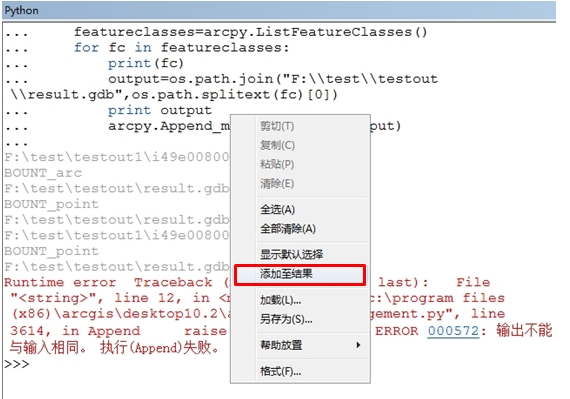
最后需要注意的地方是:在10.2的ArcMap中执行时会如下错误

我也是检查了好长时间,原因是10.2的ArcMap中执行结果会自动添加到ArcMap中,即使右键取消“添加至结果”也不行。(导致了第二次循环的时候合并的数据是结果集相同的数据的合并,所以会报上面错误)
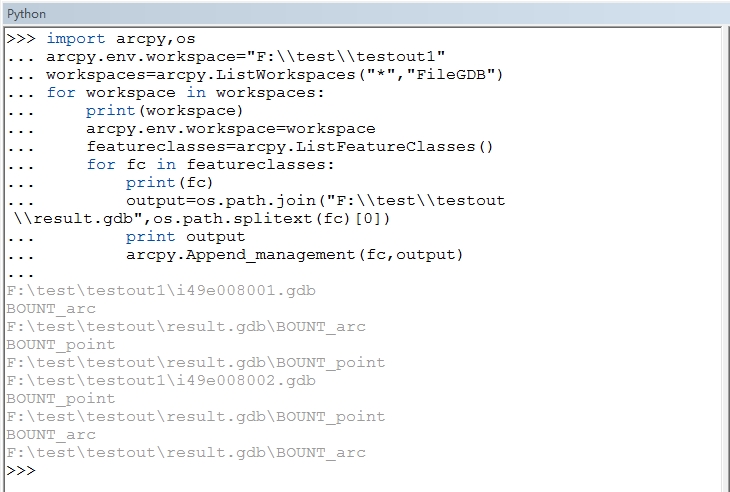
所以这里,我们执行的时候可以到ArcCatalog中执行python脚本:
不同gdb,相同数据集合并的更多相关文章
- R语言数据集合并、数据增减、不等长合并
每每以为攀得众山小,可.每每又切实来到起点,大牛们,缓缓脚步来俺笔记葩分享一下吧,please~ --------------------------- 数据选取与简单操作: which 返回一个向量 ...
- hadoop小文件合并
1.背景 在实际项目中,输入数据往往是由许多小文件组成,这里的小文件是指小于HDFS系统Block大小的文件(默认128M), 然而每一个存储在HDFS中的文件.目录和块都映射为一个对象,存储在Nam ...
- R︱高效数据操作——data.table包(实战心得、dplyr对比、key灵活用法、数据合并)
每每以为攀得众山小,可.每每又切实来到起点,大牛们,缓缓脚步来俺笔记葩分享一下吧,please~ --------------------------- 由于业务中接触的数据量很大,于是不得不转战开始 ...
- SAS︱数据索引、数据集常用操作(set、where、merge、append)
代码部分大多来源于姚志勇老师的<SAS编程与数据挖掘商业案例>. 每每以为攀得众山小,可.每每又切实来到起点,大牛们,缓缓脚步来俺笔记葩分享一下吧,please~ ------------ ...
- Hadoop实战项目:小文件合并
项目背景 在实际项目中,输入数据往往是由许多小文件组成,这里的小文件是指小于HDFS系统Block大小的文件(默认128M),早期的版本所定义的小文件是64M,这里的hadoop-2.2.0所定义的小 ...
- spark系列-2、Spark 核心数据结构:弹性分布式数据集 RDD
一.RDD(弹性分布式数据集) RDD 是 Spark 最核心的数据结构,RDD(Resilient Distributed Dataset)全称为弹性分布式数据集,是 Spark 对数据的核心抽象, ...
- Atitit 数据存储视图的最佳实际best practice attilax总结
Atitit 数据存储视图的最佳实际best practice attilax总结 1.1. 视图优点:可读性的提升1 1.2. 结论 本着可读性优先于性能的原则,面向人类编程优先于面向机器编程,应 ...
- Webform Application传值 ViewState
Application:所有的会话共享一个Application空间,任何一个人改变Application的内容,其他人都会发现被改变了.Application中的内容不会被自动释放 存放位置:服务端 ...
- ASP.Net WebForm温故知新学习笔记:二、ViewState与UpdatePanel探秘
开篇:经历了上一篇<aspx与服务器控件探秘>后,我们了解了aspx和服务器控件背后的故事.这篇我们开始走进WebForm状态保持的一大法宝—ViewState,对其刨根究底一下.然后,再 ...
随机推荐
- Solr5之Schema.xml详解
schema.xml 是用来定义索引数据中的域的,包括域名称,域类型,域是否索引,是否分词,是否存储,是否标准化即 Norms ,是否存储项向量等等. schema.xml 配置文件的根元素就是 sc ...
- Oracle的sqlnet.ora与password文件试验
先看有没有sqlnet.ora [oracle@localhost ~]$ cd $ORACLE_HOME[oracle@localhost dbhome_1]$ cd network[oracle@ ...
- 用DOS批处理实现FTP自动上传、下载、清理文件
用DOS批处理实现FTP自动上传.下载.清理文件 最近好像特别的忙,好久没来写点东西了,今天写了一个利用批处理程序完成FTP自动上传.下载.清理文件的程序.赶紧 记录下来,以备日后之用.功能介绍:自动 ...
- 小白学数据分析----->学习注册转化率
你的注册转化率及格了吗? 注册转化率,一个基本上可以忽略的指标,虽然简单,但是却真实反映渠道,发行商,开发者的实力,以及对待产品的态度. 所谓的注册转化率,其实指的是玩家从下载游戏后,打开激活游戏,注 ...
- Python小游戏之猜数字
最近师兄师姐毕业,各种酒席,酒席上最常玩的一个游戏就是猜数字,游戏规则如下: 出题人在手机上输入一个0-100之间的数字,其它人轮流猜这个数字,如果你不幸猜中则要罚酒一杯.每次猜数字,出题人都要缩小范 ...
- object-c学习1
因为公司需要,开始看object-c,虽然还没ios系统,但现学下语法. 第一个例子不应该是helloWorld吗?但<Learn Objective-C on the Mac>书上不是. ...
- TNSNAMES.ORA 配置
上面的sqlnet.ora文件说明:SQLNET.AUTHENTICATION_SERVICES= (NTS)——这个表示采用os认证,在数据库服务器上,可以利用sqlplus “/ as sysdb ...
- SSH在Jenkins中的使用
我们今天在迁移Jenkins的时候又出现无法调用私钥来获取oschina的git代码和使用scp拷贝无法验证的问题.我发现主要的问题实际上是关于ssh的问题,因为git和scp都是通过ssh来实现与远 ...
- 消息中间件的技术选型心得-RabbitMQ、ActiveMQ和ZeroMQ
消息中间件的技术选型心得-RabbitMQ.ActiveMQ和ZeroMQ 作者:chszs,转载需注明.博客主页:http://blog.csdn.net/chszs RabbitMQ.Active ...
- 读Java 804 - Quick refresher
Upcast永远是成功的,但Downcast不是,记得做instanceof判断 仅抛不同异常,而返回值相同的重载是不可以的 static import只会import静态类 static metho ...