
c++之Linux获取可用串口
1.关于
这份代码来自: stackoverflow
2. 测试
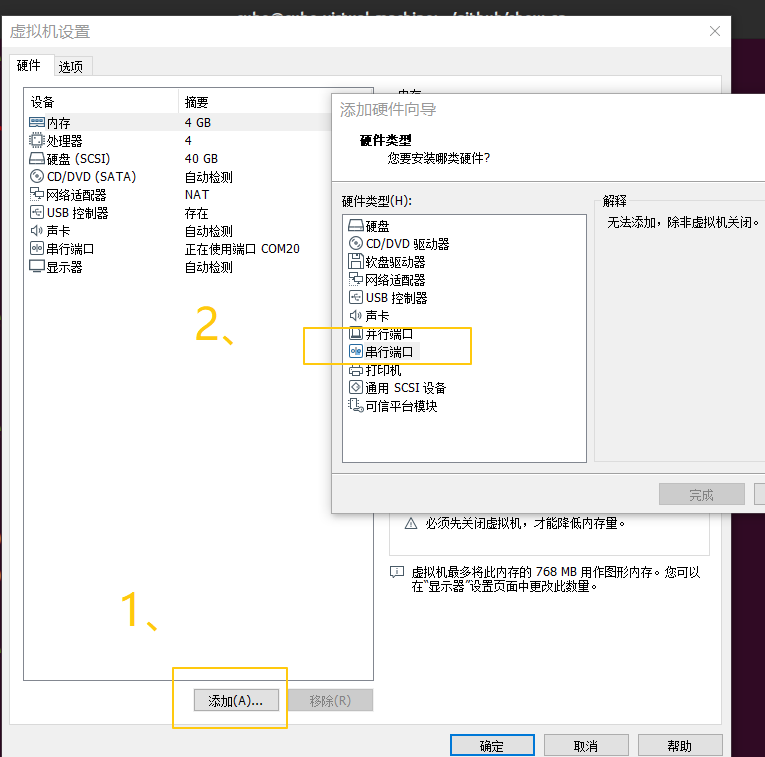
- 2.1 测试环境: vmware + ubuntu, vmware添加串口(虚拟机关机后再添加)
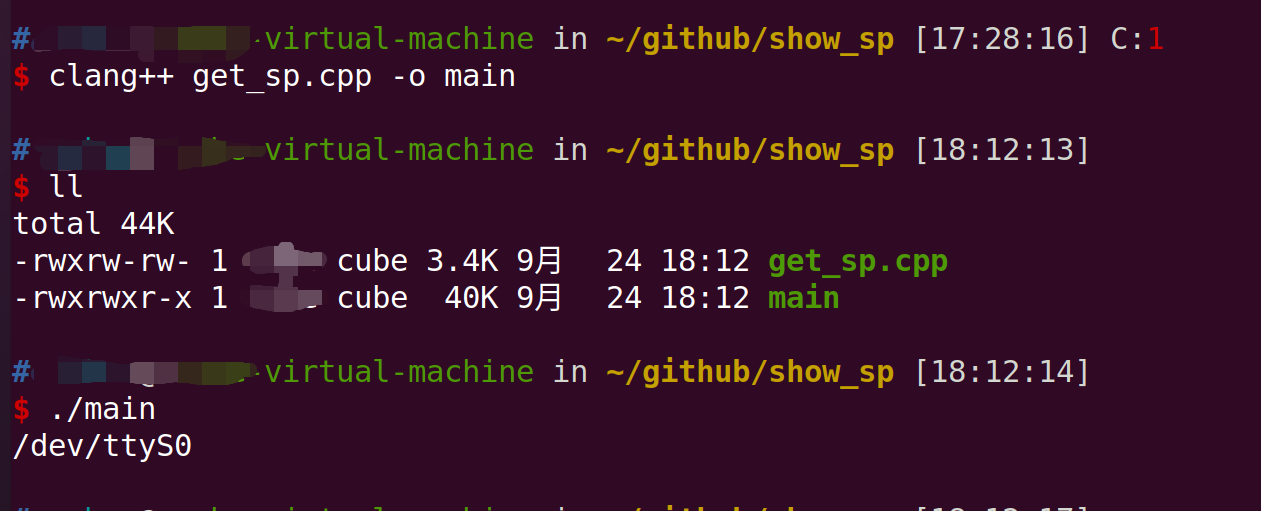
- 2.2 测试输出
3. 源码
#include <stdlib.h>

#include <dirent.h>

#include <stdio.h>

#include <sys/types.h>

#include <sys/stat.h>

#include <unistd.h>

#include <string.h>

#include <fcntl.h>

#include <termios.h>

#include <sys/ioctl.h>

#include <linux/serial.h>

#include <iostream>

#include <list>

using namespace std;

static string get_driver(const string& tty) {

    struct stat st;

    string devicedir = tty;

    // Append '/device' to the tty-path

    devicedir += "/device";

    // Stat the devicedir and handle it if it is a symlink

    if (lstat(devicedir.c_str(), &st)==0 && S_ISLNK(st.st_mode)) {

        char buffer[1024];

        memset(buffer, 0, sizeof(buffer));

        // Append '/driver' and return basename of the target

        devicedir += "/driver";

        if (readlink(devicedir.c_str(), buffer, sizeof(buffer)) > 0)

            return basename(buffer);

    }

    return "";

}

static void register_comport( list<string>& comList, list<string>& comList8250, const string& dir) {

    // Get the driver the device is using

    string driver = get_driver(dir);

    // Skip devices without a driver

    if (driver.size() > 0) {

        string devfile = string("/dev/") + basename(dir.c_str());

        // Put serial8250-devices in a seperate list

        if (driver == "serial8250") {

            comList8250.push_back(devfile);

        } else

            comList.push_back(devfile);

    }

}

static void probe_serial8250_comports(list<string>& comList, list<string> comList8250) {

    struct serial_struct serinfo;

    list<string>::iterator it = comList8250.begin();

    // Iterate over all serial8250-devices

    while (it != comList8250.end()) {

        // Try to open the device

        int fd = open((*it).c_str(), O_RDWR | O_NONBLOCK | O_NOCTTY);

        if (fd >= 0) {

            // Get serial_info

            if (ioctl(fd, TIOCGSERIAL, &serinfo)==0) {

                // If device type is no PORT_UNKNOWN we accept the port

                if (serinfo.type != PORT_UNKNOWN)

                    comList.push_back(*it);

            }

            close(fd);

        }

        it ++;

    }

}

list<string> getComList() {

    int n;

    struct dirent **namelist;

    list<string> comList;

    list<string> comList8250;

    const char* sysdir = "/sys/class/tty/";

    // Scan through /sys/class/tty - it contains all tty-devices in the system

    n = scandir(sysdir, &namelist, NULL, NULL);

    if (n < 0)

        perror("scandir");

    else {

        while (n--) {

            if (strcmp(namelist[n]->d_name,"..") && strcmp(namelist[n]->d_name,".")) {

                // Construct full absolute file path

                string devicedir = sysdir;

                devicedir += namelist[n]->d_name;

                // Register the device

                register_comport(comList, comList8250, devicedir);

            }

            free(namelist[n]);

        }

        free(namelist);

    }

    // Only non-serial8250 has been added to comList without any further testing

    // serial8250-devices must be probe to check for validity

    probe_serial8250_comports(comList, comList8250);

    // Return the lsit of detected comports

    return comList;

}

int main() {

    list<string> l = getComList();

    list<string>::iterator it = l.begin();

    while (it != l.end()) {

        cout << *it << endl;

        it++;

    }

    return 0;

}
c++之Linux获取可用串口的更多相关文章
- QT 自动获取可用串口
本来想直接用Settings来获取的,但是串口信息类似 "\Device\Serial0",死活获取不了,用了转义.反斜杠还是获取不到,所以就放弃了,网上好像也没有获取成功的. 所 ...
- Qt5获取可用串口
概述 本文将介绍Qt5使用类QSerialPortInfo获取可以用串口号 效果 机器上配置的虚拟串口 程序获取结果 源码开始 .pro文件中添加下面的代码 QT += serialport 然后,执 ...
- 详解linux下的串口通讯开发
串行口是计算机一种常用的接口,具有连接线少,通讯简单,得到广泛的使用.常用的串口是RS-232-C接口(又称EIA RS-232-C)它是在1970年由美国电子工业协会(EIA)联合贝尔系统.调制解调 ...
- 【转载】详解linux下的串口通讯开发
来源:https://www.cnblogs.com/sunyubo/archive/2010/09/26/2282116.html 串行口是计算机一种常用的接口,具有连接线少,通讯简单,得到广泛的使 ...
- Linux 获取设备树源文件(DTS)里描述的资源
Linux 获取设备树源文件(DTS)里的资源 韩大卫@吉林师范大学 在linux使用platform_driver_register() 注册 platform_driver 时, 需要在 plat ...
- linux下查看串口信息
rs232串口通信接口:当通信距离较近时(<12m),可以使用电缆线直接连接,若距离较远,需附加调制解调器. 9个脚针的定义: CDC数据载波检测,RXD接收数据,TXD发送数据,DTR数据中断 ...
- Linux与Windows串口通信
串口是常用的计算机与外部串行设备之间的数据传输通道,由于串行通信方便易行,所以应用广泛.现在国际上不断有串口新技术及新规格推出,结合社会各方面需要,串口通信发展的空间庞大.串口通讯技术因其自身的优势和 ...
- 获取可用的处理器(CPU)核数【转】
linux下获取cpu核数,sysconf(_SC_NPROCESSORS_CONF),,, from:红黑联盟,https://www.2cto.com/kf/201210/164480.html ...
- 具体解释linux下的串口通讯开发
串行口是计算机一种经常使用的接口,具有连接线少.通讯简单,得到广泛的使用.经常使用的串口是RS-232-C接口(又称EIA RS-232-C)它是在1970年由美国电子工业协会(EIA)联合贝尔系统. ...
随机推荐
- 监听浏览器tab切换
监听浏览器切屏 为了完成验证用户在切换浏览器tab时进行登录再次认证需求需要监听浏览器切换窗口 if (document.hidden !== undefined) { document.addEve ...
- Vue 中使用 TypeScript axios 使用方式
Vue 中使用 TypeScript axios 使用方式 方式一 import axios from 'axios'; Vue.prototype.$axios = axios; // 在 .vue ...
- char *p、char p[]、字符串的几个题目
总结一下遇到的关于char *p.char p[]和字符串的题目: 例一:(指针的指针) 1 void getmemory(char **p) 2 { 3 p = (char *)malloc(100 ...
- 25-ZigZag Conversion
The string "PAYPALISHIRING" is written in a zigzag pattern on a given number of rows like ...
- mac系统升级导致VirtualBox报Kernel driver not installed (rc=-1908)
一.背景 最近将我的Mac升级成了Monterey版本,结果发现之前的安装的VirtualBox虚拟机无法启动,报了如下错误. Kernel driver not installed (rc=-190 ...
- Mybatis逆向工程简单介绍
转自:https://blog.csdn.net/yerenyuan_pku/article/details/71909325 什么是逆向工程 MyBatis的一个主要的特点就是需要程序员自己编写sq ...
- GPU随机采样速度比较
技术背景 随机采样问题,不仅仅只是一个统计学/离散数学上的概念,其实在工业领域也都有非常重要的应用价值/潜在应用价值,具体应用场景我们这里就不做赘述.本文重点在于在不同平台上的采样速率,至于另外一个重 ...
- 【Linux】【Shell】【Basic】流程控制
1. 选择执行: 1.1. if 单分支的if语句: if 测试条件 then 代码分支 fi 双分支的if语句: if 测试条件; then 条件为真时执行的分支 else 条件为假时执行的分支 f ...
- java面试--(生成随机数,获取重复次数最多,并且数是最大的一个,打印出来)
import java.util.*; public class MaxRandom { public static void main(String[] args){ int[] num = new ...
- 6、Redis五大数据类型---列表(List)
一.列表(List)简介 单键多值:Redis 列表是简单的字符串列表,按照插入顺序排序.你可以添加一个元素到列表的头部(左边)或者尾部(右边). 它的底层实际是个双向链表,对两端的操作性能很高,通过 ...