
Python+unittest+excel
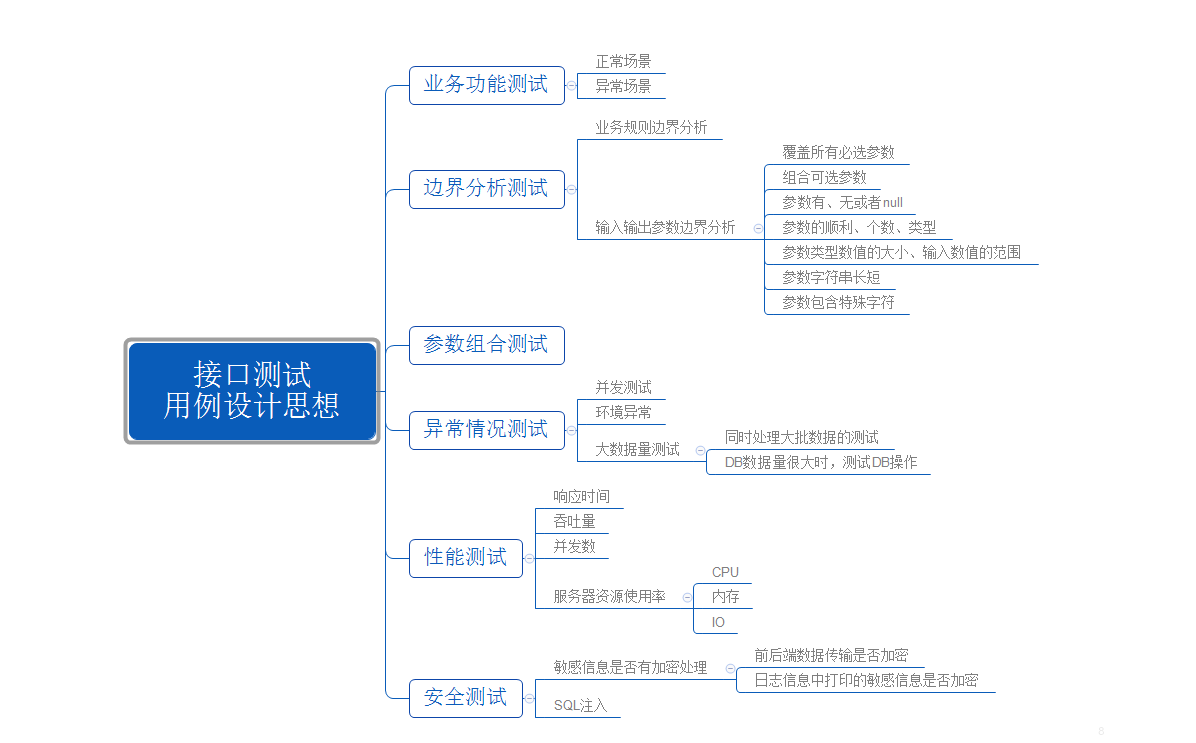
接口测试设计思想:
框架结构如下:
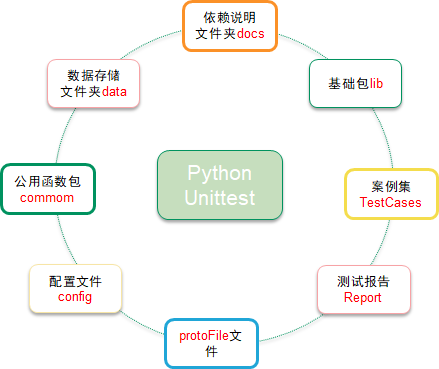
目录如下:

readme:
config下的run_case_config.ini 文件说明:

run_mode: 0:获取所有sheet页   1: if case_list=="":运行指定sheet页的所有用例 else 运行指定测试用例

python -m  grpc_tools.protoc -I ./protoFile --python_out=./protoFile --grpc_python_out=./protoFile ./protoFile/ads_strategy.proto

python -m grpc_tools.protoc -I. --python_out=./protoFile  ./protoFile/ads_voice.proto

protoc -I=$SRC_DIR descriptor_set_out=$DST_DIR/***.desc $SRC_DIR/***.proto
程序:
HTMLTestRunner.py文件:
"""
A TestRunner for use with the Python unit testing framework. It
generates a HTML report to show the result at a glance. The simplest way to use this is to invoke its main method. E.g. import unittest
import HTMLTestRunner ... define your tests ... if __name__ == '__main__':
HTMLTestRunner.main() For more customization options, instantiates a HTMLTestRunner object.
HTMLTestRunner is a counterpart to unittest's TextTestRunner. E.g. # output to a file
fp = file('my_report.html', 'wb')
runner = HTMLTestRunner.HTMLTestRunner(
stream=fp,
title='My unit test',
description='This demonstrates the report output by HTMLTestRunner.'
) # Use an external stylesheet.
# See the Template_mixin class for more customizable options
runner.STYLESHEET_TMPL = '<link rel="stylesheet" href="my_stylesheet.css" type="text/css">' # run the test
runner.run(my_test_suite) ------------------------------------------------------------------------
Copyright (c) 2004-2007, Wai Yip Tung
All rights reserved. Redistribution and use in source and binary forms, with or without
modification, are permitted provided that the following conditions are
met: * Redistributions of source code must retain the above copyright notice,
this list of conditions and the following disclaimer.
* Redistributions in binary form must reproduce the above copyright
notice, this list of conditions and the following disclaimer in the
documentation and/or other materials provided with the distribution.
* Neither the name Wai Yip Tung nor the names of its contributors may be
used to endorse or promote products derived from this software without
specific prior written permission. THIS SOFTWARE IS PROVIDED BY THE COPYRIGHT HOLDERS AND CONTRIBUTORS "AS
IS" AND ANY EXPRESS OR IMPLIED WARRANTIES, INCLUDING, BUT NOT LIMITED
TO, THE IMPLIED WARRANTIES OF MERCHANTABILITY AND FITNESS FOR A
PARTICULAR PURPOSE ARE DISCLAIMED. IN NO EVENT SHALL THE COPYRIGHT OWNER
OR CONTRIBUTORS BE LIABLE FOR ANY DIRECT, INDIRECT, INCIDENTAL, SPECIAL,
EXEMPLARY, OR CONSEQUENTIAL DAMAGES (INCLUDING, BUT NOT LIMITED TO,
PROCUREMENT OF SUBSTITUTE GOODS OR SERVICES; LOSS OF USE, DATA, OR
PROFITS; OR BUSINESS INTERRUPTION) HOWEVER CAUSED AND ON ANY THEORY OF
LIABILITY, WHETHER IN CONTRACT, STRICT LIABILITY, OR TORT (INCLUDING
NEGLIGENCE OR OTHERWISE) ARISING IN ANY WAY OUT OF THE USE OF THIS
SOFTWARE, EVEN IF ADVISED OF THE POSSIBILITY OF SUCH DAMAGE.
""" # URL: http://tungwaiyip.info/software/HTMLTestRunner.html __author__ = "Wai Yip Tung"
__version__ = "0.8.2" """
Change History Version 0.8.2
* Show output inline instead of popup window (Viorel Lupu). Version in 0.8.1
* Validated XHTML (Wolfgang Borgert).
* Added description of test classes and test cases. Version in 0.8.0
* Define Template_mixin class for customization.
* Workaround a IE 6 bug that it does not treat <script> block as CDATA. Version in 0.7.1
* Back port to Python 2.3 (Frank Horowitz).
* Fix missing scroll bars in detail log (Podi).
""" # TODO: color stderr
# TODO: simplify javascript using ,ore than 1 class in the class attribute? import datetime
import StringIO
import sys
import time
import unittest
from xml.sax import saxutils reload(sys)
sys.setdefaultencoding('utf8') # ------------------------------------------------------------------------
# The redirectors below are used to capture output during testing. Output
# sent to sys.stdout and sys.stderr are automatically captured. However
# in some cases sys.stdout is already cached before HTMLTestRunner is
# invoked (e.g. calling logging.basicConfig). In order to capture those
# output, use the redirectors for the cached stream.
#
# e.g.
# >>> logging.basicConfig(stream=HTMLTestRunner.stdout_redirector)
# >>> class OutputRedirector(object):
""" Wrapper to redirect stdout or stderr """
def __init__(self, fp):
self.fp = fp def write(self, s):
self.fp.write(s) def writelines(self, lines):
self.fp.writelines(lines) def flush(self):
self.fp.flush() stdout_redirector = OutputRedirector(sys.stdout)
stderr_redirector = OutputRedirector(sys.stderr) # ----------------------------------------------------------------------
# Template class Template_mixin(object):
"""
Define a HTML template for report customerization and generation. Overall structure of an HTML report HTML
+------------------------+
|<html> |
| <head> |
| |
| STYLESHEET |
| +----------------+ |
| | | |
| +----------------+ |
| |
| </head> |
| |
| <body> |
| |
| HEADING |
| +----------------+ |
| | | |
| +----------------+ |
| |
| REPORT |
| +----------------+ |
| | | |
| +----------------+ |
| |
| ENDING |
| +----------------+ |
| | | |
| +----------------+ |
| |
| </body> |
|</html> |
+------------------------+
""" STATUS = {
0: 'Pass',
1: 'Fail',
2: 'Error',
} DEFAULT_TITLE = 'Unit Test Report'
DEFAULT_DESCRIPTION = '' # ------------------------------------------------------------------------
# HTML Template HTML_TMPL = r"""<?xml version="1.0" encoding="UTF-8"?>
<!DOCTYPE html PUBLIC "-//W3C//DTD XHTML 1.0 Strict//EN" "http://www.w3.org/TR/xhtml1/DTD/xhtml1-strict.dtd">
<html xmlns="http://www.w3.org/1999/xhtml">
<head>
<title>%(title)s</title>
<meta name="generator" content="%(generator)s"/>
<meta http-equiv="Content-Type" content="text/html; charset=UTF-8"/>
%(stylesheet)s
</head>
<body>
<script language="javascript" type="text/javascript"><!--
output_list = Array(); /* level - 0:Summary; 1:Failed; 2:All */
function showCase(level) {
trs = document.getElementsByTagName("tr");
for (var i = 0; i < trs.length; i++) {
tr = trs[i];
id = tr.id;
if (id.substr(0,2) == 'ft') {
if (level < 1) {
tr.className = 'hiddenRow';
}
else {
tr.className = '';
}
}
if (id.substr(0,2) == 'pt') {
if (level > 1) {
tr.className = '';
}
else {
tr.className = 'hiddenRow';
}
}
}
} function showClassDetail(cid, count) {
var id_list = Array(count);
var toHide = 1;
for (var i = 0; i < count; i++) {
tid0 = 't' + cid.substr(1) + '.' + (i+1);
tid = 'f' + tid0;
tr = document.getElementById(tid);
if (!tr) {
tid = 'p' + tid0;
tr = document.getElementById(tid);
}
id_list[i] = tid;
if (tr.className) {
toHide = 0;
}
}
for (var i = 0; i < count; i++) {
tid = id_list[i];
if (toHide) {
document.getElementById('div_'+tid).style.display = 'none'
document.getElementById(tid).className = 'hiddenRow';
}
else {
document.getElementById(tid).className = '';
}
}
} function showTestDetail(div_id){
var details_div = document.getElementById(div_id)
var displayState = details_div.style.display
// alert(displayState)
if (displayState != 'block' ) {
displayState = 'block'
details_div.style.display = 'block'
}
else {
details_div.style.display = 'none'
}
} function html_escape(s) {
s = s.replace(/&/g,'&');
s = s.replace(/</g,'<');
s = s.replace(/>/g,'>');
return s;
} /* obsoleted by detail in <div>
function showOutput(id, name) {
var w = window.open("", //url
name,
"resizable,scrollbars,status,width=800,height=450");
d = w.document;
d.write("<pre>");
d.write(html_escape(output_list[id]));
d.write("\n");
d.write("<a href='javascript:window.close()'>close</a>\n");
d.write("</pre>\n");
d.close();
}
*/
--></script> %(heading)s
%(report)s
%(ending)s </body>
</html>
"""
# variables: (title, generator, stylesheet, heading, report, ending) # ------------------------------------------------------------------------
# Stylesheet
#
# alternatively use a <link> for external style sheet, e.g.
# <link rel="stylesheet" href="$url" type="text/css"> STYLESHEET_TMPL = """
<style type="text/css" media="screen">
body { font-family: verdana, arial, helvetica, sans-serif; font-size: 80%; }
table { font-size: 100%; }
pre { } /* -- heading ---------------------------------------------------------------------- */
h1 {
font-size: 16pt;
color: gray;
}
.heading {
margin-top: 0ex;
margin-bottom: 1ex;
} .heading .attribute {
margin-top: 1ex;
margin-bottom: 0;
} .heading .description {
margin-top: 4ex;
margin-bottom: 6ex;
} /* -- css div popup ------------------------------------------------------------------------ */
a.popup_link {
} a.popup_link:hover {
color: red;
} .popup_window {
display: none;
position: relative;
left: 0px;
top: 0px;
/*border: solid #627173 1px; */
padding: 10px;
background-color: #E6E6D6;
font-family: "Lucida Console", "Courier New", Courier, monospace;
text-align: left;
font-size: 8pt;
width: 500px;
} }
/* -- report ------------------------------------------------------------------------ */
#show_detail_line {
margin-top: 3ex;
margin-bottom: 1ex;
}
#result_table {
width: 80%;
border-collapse: collapse;
border: 1px solid #777;
}
#header_row {
font-weight: bold;
color: white;
background-color: #777;
}
#result_table td {
border: 1px solid #777;
padding: 2px;
}
#total_row { font-weight: bold; }
.passClass { background-color: #6c6; }
.failClass { background-color: #c60; }
.errorClass { background-color: #c00; }
.passCase { color: #6c6; }
.failCase { color: #c60; font-weight: bold; }
.errorCase { color: #c00; font-weight: bold; }
.hiddenRow { display: none; }
.testcase { margin-left: 2em; } /* -- ending ---------------------------------------------------------------------- */
#ending {
} </style>
""" # ------------------------------------------------------------------------
# Heading
# HEADING_TMPL = """<div class='heading'>
<h1>%(title)s</h1>
%(parameters)s
<p class='description'>%(description)s</p>
</div> """ # variables: (title, parameters, description) HEADING_ATTRIBUTE_TMPL = """<p class='attribute'><strong>%(name)s:</strong> %(value)s</p>
""" # variables: (name, value) # ------------------------------------------------------------------------
# Report
# REPORT_TMPL = """
<p id='show_detail_line'>Show
<a href='javascript:showCase(0)'>Summary</a>
<a href='javascript:showCase(1)'>Failed</a>
<a href='javascript:showCase(2)'>All</a>
</p>
<table id='result_table'>
<colgroup>
<col align='left' />
<col align='right' />
<col align='right' />
<col align='right' />
<col align='right' />
<col align='right' />
</colgroup>
<tr id='header_row'>
<td>Test Group/Test case</td>
<td>Count</td>
<td>Pass</td>
<td>Fail</td>
<td>Error</td>
<td>View</td>
</tr>
%(test_list)s
<tr id='total_row'>
<td>Total</td>
<td>%(count)s</td>
<td>%(Pass)s</td>
<td>%(fail)s</td>
<td>%(error)s</td>
<td> </td>
</tr>
</table>
""" # variables: (test_list, count, Pass, fail, error) REPORT_CLASS_TMPL = r"""
<tr class='%(style)s'>
<td>%(desc)s</td>
<td>%(count)s</td>
<td>%(Pass)s</td>
<td>%(fail)s</td>
<td>%(error)s</td>
<td><a href="javascript:showClassDetail('%(cid)s',%(count)s)">Detail</a></td>
</tr>
""" # variables: (style, desc, count, Pass, fail, error, cid) REPORT_TEST_WITH_OUTPUT_TMPL = r"""
<tr id='%(tid)s' class='%(Class)s'>
<td class='%(style)s'><div class='testcase'>%(desc)s</div></td>
<td colspan='5' align='center'> <!--css div popup start-->
<a class="popup_link" onfocus='this.blur();' href="javascript:showTestDetail('div_%(tid)s')" >
%(status)s</a> <div id='div_%(tid)s' class="popup_window">
<div style='text-align: right; color:red;cursor:pointer'>
<a onfocus='this.blur();' onclick="document.getElementById('div_%(tid)s').style.display = 'none' " >
[x]</a>
</div>
<pre>
%(script)s
</pre>
</div>
<!--css div popup end--> </td>
</tr>
""" # variables: (tid, Class, style, desc, status) REPORT_TEST_NO_OUTPUT_TMPL = r"""
<tr id='%(tid)s' class='%(Class)s'>
<td class='%(style)s'><div class='testcase'>%(desc)s</div></td>
<td colspan='5' align='center'>%(status)s</td>
</tr>
""" # variables: (tid, Class, style, desc, status) REPORT_TEST_OUTPUT_TMPL = r"""
%(id)s: %(output)s
""" # variables: (id, output) # ------------------------------------------------------------------------
# ENDING
# ENDING_TMPL = """<div id='ending'> </div>""" # -------------------- The end of the Template class ------------------- TestResult = unittest.TestResult class _TestResult(TestResult):
# note: _TestResult is a pure representation of results.
# It lacks the output and reporting ability compares to unittest._TextTestResult. def __init__(self, verbosity=1):
TestResult.__init__(self)
self.stdout0 = None
self.stderr0 = None
self.success_count = 0
self.failure_count = 0
self.error_count = 0
self.verbosity = verbosity # result is a list of result in 4 tuple
# (
# result code (0: success; 1: fail; 2: error),
# TestCase object,
# Test output (byte string),
# stack trace,
# )
self.result = [] def startTest(self, test):
TestResult.startTest(self, test)
# just one buffer for both stdout and stderr
self.outputBuffer = StringIO.StringIO()
stdout_redirector.fp = self.outputBuffer
stderr_redirector.fp = self.outputBuffer
self.stdout0 = sys.stdout
self.stderr0 = sys.stderr
sys.stdout = stdout_redirector
sys.stderr = stderr_redirector def complete_output(self):
"""
Disconnect output redirection and return buffer.
Safe to call multiple times.
"""
if self.stdout0:
sys.stdout = self.stdout0
sys.stderr = self.stderr0
self.stdout0 = None
self.stderr0 = None
return self.outputBuffer.getvalue() def stopTest(self, test):
# Usually one of addSuccess, addError or addFailure would have been called.
# But there are some path in unittest that would bypass this.
# We must disconnect stdout in stopTest(), which is guaranteed to be called.
self.complete_output() def addSuccess(self, test):
self.success_count += 1
TestResult.addSuccess(self, test)
output = self.complete_output()
self.result.append((0, test, output, ''))
if self.verbosity > 1:
sys.stderr.write('ok ')
sys.stderr.write(str(test))
sys.stderr.write('\n')
else:
sys.stderr.write('.') def addError(self, test, err):
self.error_count += 1
TestResult.addError(self, test, err)
_, _exc_str = self.errors[-1]
output = self.complete_output()
self.result.append((2, test, output, _exc_str))
if self.verbosity > 1:
sys.stderr.write('E ')
sys.stderr.write(str(test))
sys.stderr.write('\n')
else:
sys.stderr.write('E') def addFailure(self, test, err):
self.failure_count += 1
TestResult.addFailure(self, test, err)
_, _exc_str = self.failures[-1]
output = self.complete_output()
self.result.append((1, test, output, _exc_str))
if self.verbosity > 1:
sys.stderr.write('F ')
sys.stderr.write(str(test))
sys.stderr.write('\n')
else:
sys.stderr.write('F') class HTMLTestRunner(Template_mixin):
"""
"""
def __init__(self, stream=sys.stdout, verbosity=1, title=None, description=None):
self.stream = stream
self.verbosity = verbosity
if title is None:
self.title = self.DEFAULT_TITLE
else:
self.title = title
if description is None:
self.description = self.DEFAULT_DESCRIPTION
else:
self.description = description self.startTime = datetime.datetime.now() def run(self, test):
"Run the given test case or test suite."
result = _TestResult(self.verbosity)
test(result)
self.stopTime = datetime.datetime.now()
self.generateReport(test, result)
print >>sys.stderr, '\nTime Elapsed: %s' % (self.stopTime-self.startTime)
return result def sortResult(self, result_list):
# unittest does not seems to run in any particular order.
# Here at least we want to group them together by class.
rmap = {}
classes = []
for n,t,o,e in result_list:
cls = t.__class__
if not rmap.has_key(cls):
rmap[cls] = []
classes.append(cls)
rmap[cls].append((n,t,o,e))
r = [(cls, rmap[cls]) for cls in classes]
return r def getReportAttributes(self, result):
"""
Return report attributes as a list of (name, value).
Override this to add custom attributes.
"""
startTime = str(self.startTime)[:19]
duration = str(self.stopTime - self.startTime)
status = []
if result.success_count: status.append('Pass %s' % result.success_count)
if result.failure_count: status.append('Failure %s' % result.failure_count)
if result.error_count: status.append('Error %s' % result.error_count )
if status:
status = ' '.join(status)
else:
status = 'none'
return [
('Start Time', startTime),
('Duration', duration),
('Status', status),
] def generateReport(self, test, result):
report_attrs = self.getReportAttributes(result)
generator = 'HTMLTestRunner %s' % __version__
stylesheet = self._generate_stylesheet()
heading = self._generate_heading(report_attrs)
report = self._generate_report(result)
ending = self._generate_ending()
output = self.HTML_TMPL % dict(
title = saxutils.escape(self.title),
generator = generator,
stylesheet = stylesheet,
heading = heading,
report = report,
ending = ending,
)
self.stream.write(output.encode('utf8')) def _generate_stylesheet(self):
return self.STYLESHEET_TMPL def _generate_heading(self, report_attrs):
a_lines = []
for name, value in report_attrs:
line = self.HEADING_ATTRIBUTE_TMPL % dict(
name = saxutils.escape(name),
value = saxutils.escape(value),
)
a_lines.append(line)
heading = self.HEADING_TMPL % dict(
title = saxutils.escape(self.title),
parameters = ''.join(a_lines),
description = saxutils.escape(self.description),
)
return heading def _generate_report(self, result):
rows = []
sortedResult = self.sortResult(result.result)
for cid, (cls, cls_results) in enumerate(sortedResult):
# subtotal for a class
np = nf = ne = 0
for n,t,o,e in cls_results:
if n == 0: np += 1
elif n == 1: nf += 1
else: ne += 1 # format class description
if cls.__module__ == "__main__":
name = cls.__name__
else:
name = "%s.%s" % (cls.__module__, cls.__name__)
doc = cls.__doc__ and cls.__doc__.split("\n")[0] or ""
desc = doc and '%s: %s' % (name, doc) or name row = self.REPORT_CLASS_TMPL % dict(
style = ne > 0 and 'errorClass' or nf > 0 and 'failClass' or 'passClass',
desc = desc,
count = np+nf+ne,
Pass = np,
fail = nf,
error = ne,
cid = 'c%s' % (cid+1),
)
rows.append(row) for tid, (n,t,o,e) in enumerate(cls_results):
self._generate_report_test(rows, cid, tid, n, t, o, e) report = self.REPORT_TMPL % dict(
test_list = ''.join(rows),
count = str(result.success_count+result.failure_count+result.error_count),
Pass = str(result.success_count),
fail = str(result.failure_count),
error = str(result.error_count),
)
return report def _generate_report_test(self, rows, cid, tid, n, t, o, e):
# e.g. 'pt1.1', 'ft1.1', etc
has_output = bool(o or e)
tid = (n == 0 and 'p' or 'f') + 't%s.%s' % (cid+1,tid+1)
name = t.id().split('.')[-1]
doc = t.shortDescription() or ""
desc = doc and ('%s: %s' % (name, doc)) or name
tmpl = has_output and self.REPORT_TEST_WITH_OUTPUT_TMPL or self.REPORT_TEST_NO_OUTPUT_TMPL # o and e should be byte string because they are collected from stdout and stderr?
if isinstance(o,str):
# TODO: some problem with 'string_escape': it escape \n and mess up formating
# uo = unicode(o.encode('string_escape'))
uo = o.decode('latin-1')
else:
uo = o
if isinstance(e,str):
# TODO: some problem with 'string_escape': it escape \n and mess up formating
# ue = unicode(e.encode('string_escape'))
ue = e.decode('latin-1')
else:
ue = e script = self.REPORT_TEST_OUTPUT_TMPL % dict(
id = tid,
output = saxutils.escape(uo+ue),
) row = tmpl % dict(
tid = tid,
Class = (n == 0 and 'hiddenRow' or 'none'),
style = n == 2 and 'errorCase' or (n == 1 and 'failCase' or 'none'),
desc = desc,
script = script,
status = self.STATUS[n],
)
rows.append(row)
if not has_output:
return def _generate_ending(self):
return self.ENDING_TMPL ##############################################################################
# Facilities for running tests from the command line
############################################################################## # Note: Reuse unittest.TestProgram to launch test. In the future we may
# build our own launcher to support more specific command line
# parameters like test title, CSS, etc.
class TestProgram(unittest.TestProgram):
"""
A variation of the unittest.TestProgram. Please refer to the base
class for command line parameters.
"""
def runTests(self):
# Pick HTMLTestRunner as the default test runner.
# base class's testRunner parameter is not useful because it means
# we have to instantiate HTMLTestRunner before we know self.verbosity.
if self.testRunner is None:
self.testRunner = HTMLTestRunner(verbosity=self.verbosity)
unittest.TestProgram.runTests(self) main = TestProgram ##############################################################################
# Executing this module from the command line
############################################################################## if __name__ == "__main__":
main(module=None)
configrunmode.py
# -*- coding:utf-8 -*-

import configparser

class ConfigRunMode:

    def __init__(self, run_case_config_file):

        config = configparser.ConfigParser()

        # 从配置文件中读取运行模式

        config.read(run_case_config_file)

        try:

            self.run_mode = config['RUNCASECONFIG']['run_mode']

            self.run_mode = int(self.run_mode)

            self.excel_name = config['RUNCASECONFIG']['excel_name']

            self.sheet_list = config['RUNCASECONFIG']['sheet_list']

            self.case_list = config['RUNCASECONFIG']['case_list']

            self.case_list = eval(self.case_list)  # 把字符串类型的list转换为list

            self.sheet_list = eval(self.sheet_list)  # 同上

        except Exception as e:

            print('%s', e)

    def get_run_mode(self):

        return self.run_mode

    def get_case_list(self):

        return self.case_list

    def get_sheet_list(self):

        return self.sheet_list

    def get_excel_name(self):

        return self.excel_name
utf-8递归编码:
# -*- coding:utf-8 -*-

def unicode_convert(input):

    if isinstance(input, dict):

        return {unicode_convert(key): unicode_convert(value) for key, value in input.iteritems()}

    elif isinstance(input, list):

        return [unicode_convert(element) for element in input]

    elif isinstance(input, unicode):

        return input.encode('utf-8')

    else:

        return input

if __name__=="__main__":

    input = ['\\u6355\\u9c7c\\u6bd4\\u8d5b', '\\u8109\\u8109', '\\u7f8e\\u7f8e\\u7bb1', '\\u9b54buy\\u5546\\u57ce',

     '\\u9b54\\u7b1b\\u6298\\u4e0a\\u6298', '\\u53ef\\u5f97\\u773c\\u955c', '\\u5c48\\u81e3\\u6c0f', '\\u4f18\\u9009',

     '\\u5168\\u6c11\\u4f18\\u60e0', '\\u5c1a\\u54c1\\u7f51', '\\u826f\\u4ed3', '\\u624b\\u673a\\u5929\\u732b',

     '\\u60e0\\u55b5', '\\u60e0\\u54c1\\u6298', '\\u62cd\\u56fe\\u8d2d']

    result = unicode_convert(input)

    print result
globalconfig.py
# -*- coding:utf-8 -*-

from configrunmode import ConfigRunMode

class Global(object):

    def __init__(self):

        # 读取运行模式配置

        self.run_mode_config = ConfigRunMode(r'E:\NewSearchApiTest\NewSearch\config\run_case_config.ini')

    # 获取运行模式配置

    def get_run_mode(self):

        return self.run_mode_config.get_run_mode()

    # 获取需要运行的excel

    def get_run_excel_name(self):

        return self.run_mode_config.get_excel_name()

    # 获取需要单独运行的用例列表

    def get_run_case_list(self):

        return self.run_mode_config.get_case_list()

    # 获取需要单独运行的sheet列表

    def get_run_sheet_list(self):

        return self.run_mode_config.get_sheet_list()
parse_excel.py
# -*- coding:utf-8 -*-

"""从excel中获取请求参数,并返回结果"""

import xlrd

import os

from collections import namedtuple

from request_method import *

from file_actions import *

import json

from element_encode import unicode_convert

col_name = ["CaseName", "API_Protocol", "Request_URL", "Request_Method", "Request_Data_Type", "Request_Data", "Check_Point", "Note", "Steps", "Action"]

col_obj = namedtuple("col", col_name)

col = col_obj(*(i for i in range(len(col_name))))

class ParseExcel(object):

    """从excel中获取请求参数"""

    def __init__(self, flag, excelName, tableName = None, caseName = None):

        self.excel_path = os.path.normpath(

            os.path.join(os.path.join(r'E:\NewSearchApiTest\data'), str(excelName)))

        self.excel_name = excelName

        self.table_name = tableName

        self.case_name = caseName

        self.flag = flag

    def _get_table(self):

        """flag=1: 获取指定sheet页;flag=0: 获取所有sheet页"""

        excel = xlrd.open_workbook(self.excel_path)

        sheet_names = excel.sheet_names()

        if self.flag:

            if self.table_name in sheet_names:

                return self.table_name.split()

            else:

                raise ValueError("sheet {} not found in {}".format(self.table_name, self.excel_path))

        else:

            return sheet_names

    def get_content(self):

        sheets = self._get_table()

        excel = xlrd.open_workbook(self.excel_path)

        for sheet in sheets:

            table = excel.sheet_by_name(sheet)

            line_num = table.nrows

            if line_num < 2:

                print ("The content of %s is null ! ")

                raise ValueError("the sheet content is null!")

            else:

                for i in range(1, line_num):

                    line = table.row_values(i)

                    if line == "":

                        pass

                    else:

                        url = eval(json.dumps(line[col.Request_URL]).strip())

                        pre_body = json.loads(line[col.Request_Data])

                        request_method = line[col.Request_Method]

                        data_type = line[col.Request_Data_Type]

                        if self.flag == 0 or (self.flag and self.case_name == []): #获取所有用例数据 或者指定sheet页中的所有用例

                            print "\n用例名称:", line[col.CaseName]

                            print "用例说明:", line[col.Note]

                            print "请求URL:", url

                            resp_result = unicode_convert(request_methods(url, data_type, request_method, pre_body))

                            print "返回结果:" , json.dumps(resp_result)

                            check_point = line[col.Check_Point]

                            write_data('checkfile.txt', line[col.CaseName], check_point)

                            write_data('result.txt', line[col.CaseName], str(resp_result))

                            continue

                        elif self.flag:

                            for case in self.case_name:

                                if line[col.CaseName] == case: #获取指定用例的数据

                                    print "\n用例名称:", line[col.CaseName]

                                    print "用例说明:", line[col.Note]

                                    print "请求URL:", url

                                    resp_result = unicode_convert(request_methods(url, data_type, request_method, pre_body))

                                    print "返回结果:", json.dumps(resp_result)

                                    check_point = line[col.Check_Point]

                                    write_data('checkfile.txt', line[col.CaseName], check_point)

                                    write_data('result.txt', line[col.CaseName], str(resp_result))

                                    break

                                # else:

                                #     if i == (line_num - 1):

                                #         raise ValueError("caseName: {} not found!".format(self.case_name))

if __name__ == '__main__':

    # 指定sheet页中指定case

    excel_object = ParseExcel(1, "test_case_excel.xlsx", tableName="Sheet1", caseName="card_recom_01")

    #运行指定sheet页中的所有cases

    # excel_object = ParseExcel("test_case_excel.xlsx", tableName="Sheet1", flag=1)

    # 运行所有sheet中的所有用例

    # excel_object = ParseExcel("test_case_excel.xlsx", flag=0)

    resp_list = excel_object.get_content()

    # print resp_list
parse_response.py
# -*- coding:utf-8 -*-

from parse_excel import ParseExcel

import json

import collections

import re

def adid_appid_list(case_name):

    tree = lambda: collections.defaultdict(tree)

    appid_adid_list = tree()

    with open(r'E:\NewSearchApiTest\NewSearch\tmp\result.txt', 'r') as f:

        for line in f.readlines():

            if line.split(":")[0] == case_name:

                appid_list = re.findall('\d+', str(re.findall("'appId': '\d+'", line)))

                adid_list = re.findall('\d+', str(re.findall("'adId': '\d+'", line)))

                appid_adid_list[case_name]['appid'] = appid_list

                appid_adid_list[case_name]['adid'] = adid_list

    # print json.dumps(appid_adid_list)

    return json.dumps(appid_adid_list), appid_list, adid_list

# if __name__=="__main__":

#     a, b, c = adid_appid_list('card_recom_05')

#     print a
request_method.py
# -*- coding:utf-8 -*-

# 请求并返回结果

import json

import requests

import time

from ads_merge_pb2 import *

from google.protobuf.json_format import MessageToDict, ParseDict

def pbToBody(pre_body):

    req_body = json.dumps(pre_body)

    print '请求Body:' + req_body

    pbmsg = AdsRequest()

    ParseDict(js_dict=pre_body, message=pbmsg)

    boby = pbmsg.SerializeToString()

    return boby

def covertrespb2dict(res):

    respb = AdsResponse()

    respb.ParseFromString(res)

    return MessageToDict(respb)

def request_methods(url, data_type, request_method, pre_body):

    body = pre_body

    if data_type == "json":

        header = {

            'Content-Type': 'application/json;charset=utf-8 '

        }

    elif data_type == "pb":

        header = {

            'Content-Type': 'application/x-protostuff;charset=UTF-8'

        }

        body = pbToBody(pre_body)

    elif data_type == "x-java":

        header = {

            'Content-Type': 'application/x-java-serialized-object'

        }

    if request_method == "post":

        resp = requests.post(url, data=body, headers=header, verify=False)

    else:

        resp = requests.get(url, data=json.dumps(body), headers=header, verify=False)

    time.sleep(0.2)

    result2 = resp.content

    print resp.status_code

    if data_type == "pb":

        resp = covertrespb2dict(result2)

    if data_type == "Json":

        resp = json.loads(json.dumps(result2, ensure_ascii=False, indent=4))

    return resp
run_cases.py
# -*- coding:utf-8 -*-

from Search.common.parse_excel import ParseExcel

class RunCase(object):

    """# run_mode: 1: 获取指定sheet页;0: 获取所有sheet页"""

    def __init__(self, run_mode, run_excel_name, run_sheet_list, run_case_list):

        self.run_mode = run_mode

        self.run_excel_name = run_excel_name

        self.run_sheet_list = run_sheet_list

        self.run_case_list = run_case_list

    def run_case(self):

        if self.run_mode == 0:  # 获取所有sheet页

            excel_object = ParseExcel(self.run_mode, self.run_excel_name)

        if self.run_mode == 1:

            if self.run_case_list == "":  # 运行指定sheet页的所有用例

                excel_object = ParseExcel(self.run_mode, self.run_excel_name, self.run_sheet_list)

            else:

                excel_object = ParseExcel(self.run_mode, self.run_excel_name, self.run_sheet_list, self.run_case_list)

        excel_object.get_content()
zookeeper.py
# -*- coding: utf-8 -*-

import json

import sys

import time

from kazoo.client import KazooClient,KazooState

import logging

logging.basicConfig(

    level=logging.DEBUG

    ,stream=sys.stdout

    ,format='%(asctime)s %(pathname)s %(funcName)s%(lineno)d %(levelname)s: %(message)s')

biz_config_path='${路经}'

def get_full_config_path(app,config_item):

    return biz_config_path+'/'+app+'/'+config_item

class Ads_Zk_Config_Client(object):

    def __init__(self, zk_connect_str='11.73.31.132:2181'):

        self.zk=KazooClient(hosts=zk_connect_str)

    def getConfig(self,app=None,config_item=None):

        if ( app ) and (config_item):

            if not self.zk.connected:

                self.zk.start()

            data, stat = self.zk.get(get_full_config_path(app,config_item))

            return data

        else:

            print 'app or config_tiem is none'

            return None

    def setConfig(self, app=None, config_item=None,value=None):

        if ( app ) and (config_item) and ( value):

            if not self.zk.connected:

                self.zk.start()

            self.zk.set(path=get_full_config_path(app,config_item),value=value)

        else:

            print 'app or config_tiem  or value is none'

    def close(self):

        if not self.zk.connected:

            self.zk.close();

def get_zk_config(host='11.73.31.132:2181',app=None,config_item=None):

    zk_client = Ads_Zk_Config_Client(zk_connect_str=host)

    data = zk_client.getConfig(app=app,config_item=config_item);

    zk_client.close()

    return data

def set_zk_config(host='11.73.31.132:2181',app=None,config_item=None,value=None):

    zk_client = Ads_Zk_Config_Client(zk_connect_str=host)

    data=zk_client.setConfig(app=app,config_item=config_item,value=value);

    zk_client.close()

    return data

def update_zk_config(app='sbid',configdict=None):

    if configdict:

        logging.debug(json.dumps(configdict))

        for k, v in configdict.items():

            if get_zk_config(app=app, config_item=k) != v:

                logging.debug(msg='before change config ' + get_zk_config(app=app,config_item=k))

                if type(v) == dict:

                    v = json.dumps(v)

                set_zk_config(app=app, config_item=k, value=v)

                logging.debug(msg='set config ' + v)

                time.sleep(1)

                logging.debug(msg='final config ' + get_zk_config(app=app, config_item=k))

    else:

        logging.warn("config dice is None ,do not need change config")

if __name__ == '__main__':

    # print json.dumps(get_full_config_path(app='sbid',config_item='sbid-bs-default-h5-btn    '))

    config_value = get_zk_config(app='sbid',config_item='sbid-bs-default-h5-btn')

    # print json.dumps(config_value)
run_case_config.ini
[RUNCASECONFIG]

run_mode = 1

excel_name = test_case_excel.xlsx

sheet_list ="Sheet1"

case_list = ['card_recom_03']
main.py
# -*- coding:utf-8 -*-

# 案例执行main脚本

import os

from Search.common.test_suit import *

from Search.common.run_cases import RunCase

from Search.common.globalconfig import Global

from lib.HTMLTestRunner import *

import unittest

if __name__=="__main__":

    # 全局配置

    global_config = Global()

    run_mode = global_config.get_run_mode()  # 运行模式

    run_excel_name = global_config.get_run_excel_name()  # 获取 excel文件名

    run_sheet_list = global_config.get_run_sheet_list()  # 获取需要运行的sheet页列表

    run_case_list = global_config.get_run_case_list()  # 需要运行的用例列表

    # 删除临时文件

    if os.path.isfile(r'E:\NewSearchApiTest\NewSearch\tmp\result.txt') and os.path.isfile(r'E:\NewSearchApiTest\NewSearch\tmp\checkfile.txt'):

        os.remove(r'E:\NewSearchApiTest\NewSearch\tmp\result.txt')

        os.remove(r'E:\NewSearchApiTest\NewSearch\tmp\checkfile.txt')

    #运行测试用例

    case_runner = RunCase(run_mode, run_excel_name, run_sheet_list, run_case_list)

    case_runner.run_case()

    suite = unittest.makeSuite(CheckPoint)

    path = r'E:\NewSearchApiTest\report'

    filename = os.path.join(path, 'CheckPoint.html')

    fp = file(filename, 'wb')

    runner = HTMLTestRunner(stream=fp, title=u'XXXXX', description=u'模块:XXXXX')

    runner.run(suite)

    fp.close()
Python+unittest+excel的更多相关文章
- Python unittest excel数据驱动
安装xlrd 下载地址:https://pypi.python.org/pypi/xlrd 安装ddt 下载地址:https://pypi.python.org/pypi/ddt/1.1.0 clas ...
- python Unittest+excel+ddt数据驱动测试
#!user/bin/env python # coding=utf- # @Author : Dang # @Time : // : # @Email : @qq.com # @File : # @ ...
- Python unittest excel数据驱动 写入
之前写过一篇关于获取excel数据进行迭代的方法,今天补充上写入的方法.由于我用的是Python3,不兼容xlutils,所以无法使用copy excel的方式来写入.这里使用xlwt3创建excel ...
- Python导出Excel为Lua/Json/Xml实例教程(三):终极需求
相关链接: Python导出Excel为Lua/Json/Xml实例教程(一):初识Python Python导出Excel为Lua/Json/Xml实例教程(二):xlrd初体验 Python导出E ...
- Python导出Excel为Lua/Json/Xml实例教程(二):xlrd初体验
Python导出Excel为Lua/Json/Xml实例教程(二):xlrd初体验 相关链接: Python导出Excel为Lua/Json/Xml实例教程(一):初识Python Python导出E ...
- Python导出Excel为Lua/Json/Xml实例教程(一):初识Python
Python导出Excel为Lua/Json/Xml实例教程(一):初识Python 相关链接: Python导出Excel为Lua/Json/Xml实例教程(一):初识Python Python导出 ...
- python读取excel一例-------从工资表逐行提取信息
在工作中经常要用到python操作excel,比如笔者公司中一个人事MM在发工资单的时候,需要从几百行的excel表中逐条的粘出信息,然后逐个的发送到员工的邮箱中.人事MM对此事不胜其烦,终于在某天请 ...
- 使用Python将Excel中的数据导入到MySQL
使用Python将Excel中的数据导入到MySQL 工具 Python 2.7 xlrd MySQLdb 安装 Python 对于不同的系统安装方式不同,Windows平台有exe安装包,Ubunt ...
- 使用Python对Excel表格进行简单的读写操作(xlrd/xlwt)
算是一个小技巧吧,只是进行一些简单的读写操作.让人不爽的是xlrd和xlwt是相对独立的,两个模块的对象不能通用,读写无法连贯操作,只能单独读.单独写,尚不知道如何解决. #①xlrd(读) #cod ...
随机推荐
- 国内镜像源 sources
Ubuntu18.04源 cat > /etc/apt/sources.list <<eof # 默认注释了源码镜像以提高 apt update 速度,如有需要可自行取消注释 deb ...
- ASP.NET Core文件上传IFormFile于Request.Body的羁绊
前言 在上篇文章深入探究ASP.NET Core读取Request.Body的正确方式中我们探讨了很多人在日常开发中经常遇到的也是最基础的问题,那就是关于Request.Body的读取方式问题,看是简 ...
- GO学习-(30) Go语言操作kafka
go操作kafka Kafka是一种高吞吐量的分布式发布订阅消息系统,它可以处理消费者规模的网站中的所有动作流数据,具有高性能.持久化.多副本备份.横向扩展等特点.本文介绍了如何使用Go语言发送和接收 ...
- 插件 ExcelWrite 导出Excel格式数据/获取图层
使用ExcelWrite 插件可以导出Excel格式的数据: ExcelFile端口接 文件数据路径 最后面的是文件名,不用写格式 如果存储树形数据,需要 勾选 List To Row 选项: 附: ...
- TVM性能评估分析(一)
TVM性能评估分析(一) System Overview AutoTVM vs Auto-scheduler Table 1. Workflow Comparision Figure 1. Searc ...
- 3层-CNN卷积神经网络预测MNIST数字
3层-CNN卷积神经网络预测MNIST数字 本文创建一个简单的三层卷积网络来预测 MNIST 数字.这个深层网络由两个带有 ReLU 和 maxpool 的卷积层以及两个全连接层组成. MNIST 由 ...
- 语义分割:基于openCV和深度学习(二)
语义分割:基于openCV和深度学习(二) Semantic segmentation in images with OpenCV 开始吧-打开segment.py归档并插入以下代码: Semanti ...
- video视频标签自定义显示隐藏播放控件&Shadow DOM
方法一:controlslist属性 controlslist="nodownload nofullscreen noremoteplayback" controlslist仅三种 ...
- Java8 中使用Stream 让List 转 Map使用总结
在使用 Java 的新特性 Collectors.toMap() 将 List 转换为 Map 时存在一些不容易发现的问题,这里总结一下备查. 空指针风险 java.lang.NullPointerE ...
- fiddler概念及原理
一.什么是fiddler? fiddler是位于客户端与服务器端的HTTP代理,它能够记录客户端与服务器之间所有的HTTP请求,可以针对特定的HTTP请求,分析请求数据,设置断点,调试WEB应用,修改 ...