
Python实现Thrift Server
近期在项目中存在跨编程语言协作的需求,使用到了Thrift。本文将记录用python实现Thrift服务端的方法。
环境准备
- 根据自身实际情况下载对应的Thrift编译器,比如我在Windows系统上使用的是thrift-0.9.3.exe 。下载地址:http://archive.apache.org/dist/thrift/
- python安装thrift库:pip install thrift
编写.thrift文件
.thrift文件定义了Thrift服务端和Thrift客户端的通信接口,在该文件中定义的接口需由服务端实现,并可被客户端调用。Thrift编译器会调用.thrift文件生成不同语言的thrift代码,用于之后实现thrift服务端或thrift客户端。
.thrift文件的编写规则可参考Thrift白皮书。下面将以demo.thrift文件举例
service DemoService{

    string ping(1:string param)

    map<i32,string> get_int_string_mapping_result(1:i32 key, 2:string value)

    bool get_bool_result()

}
在DemoService服务中分别定义了三个接口,说明了接口的入参与出参。
生成python对应的thrift代码
使用以下命令可以生成不同语言的thrift代码:
thrift --gen <language> <Thrift filename>
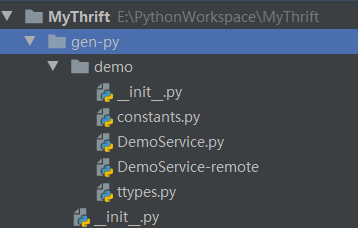
通过thrift-0.9.3.exe --gen py demo.thrift 命令生成python版本的thrift文件,文件夹为gen-py,如下所示:
编写服务端
编写服务端server.py,用于实现在demo.thrift文件中定义的接口功能。
from thrift.transport import TSocket

from thrift.transport import TTransport

from thrift.protocol import TBinaryProtocol

from thrift.server import TServer

import sys

sys.path.append("./gen-py/")

from demo import DemoService

import random

class DemoServer:

    def __init__(self):

        self.log = {}

    def ping(self, param):

        return "echo:" + param

    def get_int_string_mapping_result(self, key, value):

        return {key: value}

    def get_bool_result(self):

        return random.choice([True, False])

if __name__ == '__main__':

    # 创建处理器

    handler = DemoServer()

    processor = DemoService.Processor(handler)

    # 监听端口

    transport = TSocket.TServerSocket(host="0.0.0.0", port=9999)

    # 选择传输层

    tfactory = TTransport.TBufferedTransportFactory()

    # 选择传输协议

    pfactory = TBinaryProtocol.TBinaryProtocolFactory()

    # 创建服务端

    server = TServer.TThreadPoolServer(processor, transport, tfactory, pfactory)

    # 设置连接线程池数量

    server.setNumThreads(5)

    # 启动服务

    server.serve()
编写客户端用于测试
编写客户端client.py,用于测试服务端功能是否可用。
from thrift import Thrift

from thrift.transport import TSocket

from thrift.transport import TTransport

from thrift.protocol import TBinaryProtocol

import sys

sys.path.append("./gen-py/")

from demo import DemoService

if __name__ == '__main__':

    transport = TSocket.TSocket('127.0.0.1', 9999)

    transport = TTransport.TBufferedTransport(transport)

    protocol = TBinaryProtocol.TBinaryProtocol(transport)

    client = DemoService.Client(protocol)

    # 连接服务端

    transport.open()

    recv = client.ping("test")

    print(recv)

    recv = client.get_int_string_mapping_result(10, "MyThrift")

    print(recv)

    recv = client.get_bool_result()

    print(recv)

    # 断连服务端

    transport.close()
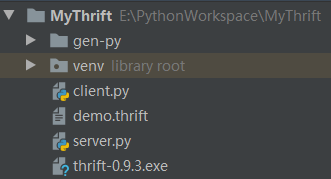
编写完成后,整个项目结构如下图所示:
测试服务端
运行服务端server.py后,运行客户端client.py,打印的内容如下:
echo:test

{10: 'MyThrift'}

True
此时客户端能够正常调用服务端所提供的接口。(PS:在调试过程中,也许需要修改gen-py文件夹中Thrift编译器生成的python代码)
参考文档
Python实现Thrift Server的更多相关文章
- 【原创】用python连接thrift Server 去执行sql的问题总汇
场景:python和现有产品的结合和应用——python的前瞻性调研 环境:centos7 0.首先确保安装了python和pyhive,下面是连接代码: #!/usr/bin/env python ...
- python 使用 thrift 教程
一.前言: Thrift 是一种接口描述语言和二进制通信协议.以前也没接触过,最近有个项目需要建立自动化测试,这个项目之间的微服务都是通过 Thrift 进行通信的,然后写自动化脚本之前研究了一下. ...
- Golang&Python测试thrift
接上篇,安装好之后,就开始编写IDL生成然后测试. 一.生成运行 参考 http://www.aboutyun.com/thread-8916-1-1.html 来个添加,查询. namespace ...
- Python使用Thrift
2019年07月30日 14:59:29 Shower稻草人 阅读数 25更多 分类专栏: Python 版权声明:本文为博主原创文章,遵循CC 4.0 BY-SA版权协议,转载请附上原文出处链接 ...
- 走进 thrift server
thrift的使用介绍 thriftthrift clientthrift serverthrift 0.7.0 一.About thrift 二.什么是thrift,怎么工作? 三.Thri ...
- python 连接sql server
linux 下pymssql模块的安装 所需压缩包:pymssql-2.1.0.tar.bz2freetds-patched.tar.gz 安装: tar -xvf pymssql-2.1.0.tar ...
- Spark SQL Thrift Server 配置 Kerberos身份认证和权限管理
转载请注明出处:http://www.cnblogs.com/xiaodf/ 之前的博客介绍了通过Kerberos + Sentry的方式实现了hive server2的身份认证和权限管理功能,本文主 ...
- python Hbase Thrift pycharm 及引入包
cp -r hbase/ /usr/lib/python2.7/site-packages/ 官方示例子http://code.google.com/p/hbase-thrift/source/bro ...
- Python和SQL Server 2017的强大功能
Python和SQL Server 2017的强大功能 摘要: 源:https://www.red-gate.com/simple-talk/sql/sql-development/power-pyt ...
随机推荐
- maven 标签 关于<import>标签
标签用途:在dependecyManagement元素下用,合并此import标签上级dependency的groupId和artid中指向依赖的dependecyManagement内容 标 ...
- 利用postman进行api接口开发
场景: api接口开发时,经常使用一些工具来帮助设计开发.Yapi主要是在设计阶段进行api接口设计,统一前后端参数请求和返回体:swagger主要在开发阶段,用来显示实际上后端开发进度和接口情况:p ...
- jquery版本更新后无live函数的处理.TypeError: $(...).live is not a function
jquery live函数语法 jquery版本更新, 发现一个问题: jq自带的live没有了.控制台下会有如下的提示:火狐: TypeError: $(...).live is not a fun ...
- Adaptive AUTOSAR 学习笔记 12 - 通信管理
本系列学习笔记基于 AUTOSAR Adaptive Platform 官方文档 R20-11 版本 AUTOSAR_EXP_PlatformDesign.pdf 缩写 CM:Communicatio ...
- fastboot刷机小脚本
在Windows系统下,一般刷机命令是在cmd路径下执行如下命令: 1.adb reboot bootloader2.fastboot flash boot +boot路径3.fastboot fla ...
- 小白学习vue第五天(理解使用组件开发,组件第一弹)
组件怎么从创建到使用? 第一步创建组件构造器对象 感觉个人理解就是创建一个模板,和创建MongoDB数据模板相似 const cpnC = Vue.extend({ template: ` <d ...
- 有赞Android实习五面都挂了,复习半月再战,转拿腾讯offer!
缘起 为了有赞的面试准备了半个月的样子,当时还投了美团.字节.滴滴.京东,目的只有一个,就是要进大厂,但是只有有赞扛过了一面,其他都是一面就挂了. 前三面都自我感觉良好,以为能稳拿offer的,没想到 ...
- 我所学的c语言
c语言结构 #include <stdio.h> int main(){ /* 我的第一个 C 程序 */ printf("Hello, World! \n" ...
- HandlerInterceptor与WebRequestInterceptor的异同
相同点 两个接口都可用于Contrller层请求拦截,接口中定义的方法作用也是一样的. //HandlerInterceptor boolean preHandle(HttpServletReques ...
- Tomcat进程意外退出的问题分析
http://ifeve.com/why-kill-2-cannot-stop-tomcat/?tdsourcetag=s_pctim_aiomsg tail后关掉客户端 正常执行shutdown.s ...