
重新整理 .net core 实践篇—————文件系统[二十二]
前言
简单介绍一下文件系统。
正文
文件系统,主要是下面3个接口组成:
IFileProvider
IFileInfo
IDirectoryContents
那么他们的实现是:
physicalFileProvider 物理文件提供程序
enbeddedFileProvider 嵌入式文件提供程序
compositeFileProvider 组合文件提供程序
/// <summary>A read-only file provider abstraction.</summary>

public interface IFileProvider

{

/// <summary>Locate a file at the given path.</summary>

/// <param name="subpath">Relative path that identifies the file.</param>

/// <returns>The file information. Caller must check Exists property.</returns>

IFileInfo GetFileInfo(string subpath);

/// <summary>Enumerate a directory at the given path, if any.</summary>

/// <param name="subpath">Relative path that identifies the directory.</param>

/// <returns>Returns the contents of the directory.</returns>

IDirectoryContents GetDirectoryContents(string subpath);

/// <summary>

/// Creates a <see cref="T:Microsoft.Extensions.Primitives.IChangeToken" /> for the specified <paramref name="filter" />.

/// </summary>

/// <param name="filter">Filter string used to determine what files or folders to monitor. Example: **/*.cs, *.*, subFolder/**/*.cshtml.</param>

/// <returns>An <see cref="T:Microsoft.Extensions.Primitives.IChangeToken" /> that is notified when a file matching <paramref name="filter" /> is added, modified or deleted.</returns>

IChangeToken Watch(string filter);

}
IFileProvider A read-only file provider abstraction
只读文件提供程序抽象。
那么这个三个方法分别是:
GetFileInfo 获取指定文件
GetDirectoryContents 获取指定目录,subpath是相对路径
看下其返回值IDirectoryContents:
  public interface IDirectoryContents : IEnumerable<IFileInfo>, IEnumerable

  {

    /// <summary>True if a directory was located at the given path.</summary>

    bool Exists { get; }

  }
其继承IEnumerable说明其实可以遍历文件的,同时有一个Exists 方法,判断这个目录是否存在
IFileInfo 可以获取的信息如下:
  public interface IFileInfo

  {

    /// <summary>

    /// True if resource exists in the underlying storage system.

    /// </summary>

    bool Exists { get; }

    /// <summary>

    /// The length of the file in bytes, or -1 for a directory or non-existing files.

    /// </summary>

    long Length { get; }

    /// <summary>

    /// The path to the file, including the file name. Return null if the file is not directly accessible.

    /// </summary>

    string PhysicalPath { get; }

    /// <summary>

    /// The name of the file or directory, not including any path.

    /// </summary>

    string Name { get; }

    /// <summary>When the file was last modified</summary>

    DateTimeOffset LastModified { get; }

    /// <summary>

    /// True for the case TryGetDirectoryContents has enumerated a sub-directory

    /// </summary>

    bool IsDirectory { get; }

    /// <summary>

    /// Return file contents as readonly stream. Caller should dispose stream when complete.

    /// </summary>

    /// <returns>The file stream</returns>

    Stream CreateReadStream();

  }
这里面有一个IsDirectory 属性,看来目录也是当成了文件的,这样设计可能是兼容linux的原因吧,一切皆文件。
- 第三个 Watch,看到IChangeToken 就知道肯定是搞监听的。
测试:
static void Main(string[] args)

{

	IFileProvider provider = new PhysicalFileProvider(AppDomain.CurrentDomain.BaseDirectory);

	var contents = provider.GetDirectoryContents("/");

	foreach (var item in contents)

	{

		Console.WriteLine(item.Name);

	}

	Console.ReadLine();

}
打印根目录全部文件。

查看内嵌文件:
在根目录创建emb.html,设置为内嵌。
里面为:
<!DOCTYPE html>

<html lang="en" xmlns="http://www.w3.org/1999/xhtml">

<head>

    <meta charset="utf-8" />

    <title></title>

</head>

<body>

    这个是一个内嵌文件

</body>

</html>
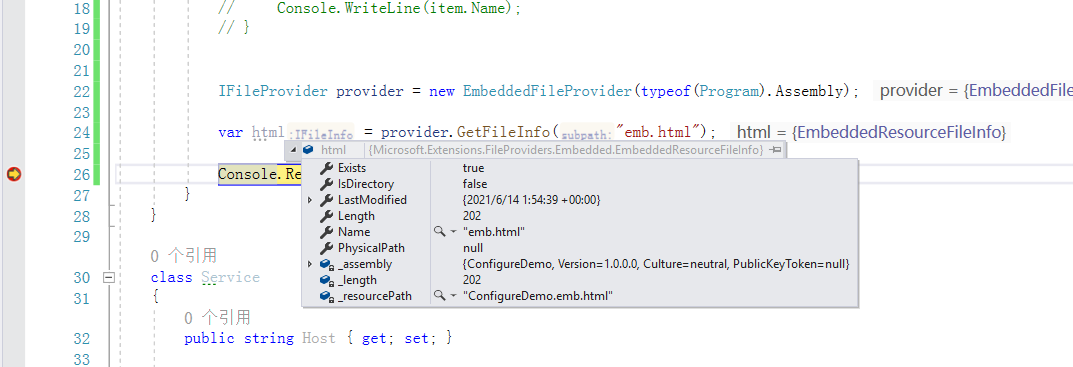
测试代码:
IFileProvider provider = new EmbeddedFileProvider(typeof(Program).Assembly);

var html = provider.GetFileInfo("emb.html");

Console.ReadLine();
结果:
下面看下组合文件提供程序:
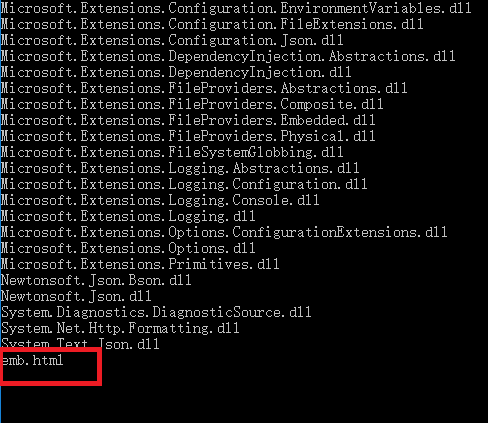
static void Main(string[] args)

{

	IFileProvider provider1 = new PhysicalFileProvider(AppDomain.CurrentDomain.BaseDirectory);

	IFileProvider provider2 = new EmbeddedFileProvider(typeof(Program).Assembly);

	IFileProvider providerSum = new CompositeFileProvider(provider1, provider2);

	var contents = providerSum.GetDirectoryContents("/");

	foreach (var item in contents)

	{

		Console.WriteLine(item.Name);

	}

	Console.ReadLine();

}
简单看下这个组合是如何实现的。
public CompositeFileProvider(params IFileProvider[] fileProviders)

{

  this._fileProviders = fileProviders ?? Array.Empty<IFileProvider>();

}
先是放置在一个数组中,名为_fileProviders 。
看下GetDirectoryContents:
public IDirectoryContents GetDirectoryContents(string subpath)

{

  return (IDirectoryContents) new CompositeDirectoryContents((IList<IFileProvider>) this._fileProviders, subpath);

}
看下CompositeDirectoryContents:
public CompositeDirectoryContents(IList<IFileProvider> fileProviders, string subpath)

{

  if (fileProviders == null)

	throw new ArgumentNullException(nameof (fileProviders));

  this._fileProviders = fileProviders;

  this._subPath = subpath;

}
然后遍历的时候调用:
/// <summary>Creates an enumerator for all files in all providers given.

/// Ensures each item in the collection is distinct.</summary>

/// <returns>An enumerator over all files in all given providers</returns>

public IEnumerator<IFileInfo> GetEnumerator()

{

  this.EnsureFilesAreInitialized();

  return (IEnumerator<IFileInfo>) this._files.GetEnumerator();

}
查看EnsureFilesAreInitialized:
private void EnsureFilesAreInitialized()

{

  this.EnsureDirectoriesAreInitialized();

  if (this._files != null)

	return;

  this._files = new List<IFileInfo>();

  HashSet<string> stringSet = new HashSet<string>();

  for (int index = 0; index < this._directories.Count; ++index)

  {

	foreach (IFileInfo fileInfo in (IEnumerable<IFileInfo>) this._directories[index])

	{

	  if (stringSet.Add(fileInfo.Name))

		this._files.Add(fileInfo);

	}

  }

}
继续查看EnsureDirectoriesAreInitialized:
private void EnsureDirectoriesAreInitialized()

{

  if (this._directories != null)

	return;

  this._directories = new List<IDirectoryContents>();

  foreach (IFileProvider fileProvider in (IEnumerable<IFileProvider>) this._fileProviders)

  {

	IDirectoryContents directoryContents = fileProvider.GetDirectoryContents(this._subPath);

	if (directoryContents != null && directoryContents.Exists)

	{

	  this._exists = true;

	  this._directories.Add(directoryContents);

	}

  }

}
这样看来就是每隔文件的provider 调用GetDirectoryContents,然后再次遍历套娃把文件信息都放入List _files,然后遍历的时候遍历的就是_files。
功能挺少的,这样看来必须是同一个subpath,只能在外面根目录做文章。
结
以上只是个人整理,如有错误,望请指点。
下一节路由与终结点。
重新整理 .net core 实践篇—————文件系统[二十二]的更多相关文章
- 重新整理 .net core 实践篇—————HttpClientFactory[三十二]
前言 简单整理一下HttpClientFactory . 正文 这个HttpFactory 主要有下面的功能: 管理内部HttpMessageHandler 的生命周期,灵活应对资源问题和DNS刷新问 ...
- 重新整理 .net core 实践篇————依赖注入应用[二]
前言 这里介绍一下.net core的依赖注入框架,其中其代码原理在我的另一个整理<<重新整理 1400篇>>中已经写了,故而专门整理应用这一块. 以下只是个人整理,如有问题, ...
- 重新整理 .net core 实践篇—————工作单元模式[二十六]
前言 简单整理一下工作单元模式. 正文 工作单元模式有3个特性,也算是其功能: 使用同一上下文 跟踪实体的状态 保障事务一致性 工作单元模式 主要关注事务,所以重点在事务上. 在共享层的基础建设类库中 ...
- 重新整理 .net core 实践篇————网关[三十六]
前言 简单整理一下网关. 正文 在介绍网关之前,介绍一下BFF,BFF全称是Backend For Frontend,它负责认证授权,服务聚合,目标是为前端提供服务. 说的通透一点,就是有没有见过这种 ...
- 重新整理 .net core 实践篇—————路由和终结点[二十三]
前言 简单整理一下路由和终节点. 正文 路由方式主要有两种: 1.路由模板方式 2.RouteAttribute 方式 路由约束: 1.类型约束 2.范围约束 3.正则表达式 4.是否必选 5.自定义 ...
- 重新整理 .net core 实践篇——— filter[四十四]
前言 简单介绍一下filter 正文 filter 的种类,微软文档中写道: 每种筛选器类型都在筛选器管道中的不同阶段执行: 授权筛选器最先运行,用于确定是否已针对请求为用户授权. 如果请求未获授权, ...
- 重新整理 .net core 实践篇————配置应用[一]
前言 本来想整理到<<重新整理.net core 计1400篇>>里面去,但是后来一想,整理 .net core 实践篇 是偏于实践,故而分开. 因为是重新整理,那么就从配置开 ...
- Web 前端开发精华文章推荐(HTML5、CSS3、jQuery)【系列二十二】
<Web 前端开发精华文章推荐>2014年第一期(总第二十二期)和大家见面了.梦想天空博客关注 前端开发 技术,分享各类能够提升网站用户体验的优秀 jQuery 插件,展示前沿的 HTML ...
- VMware vSphere 服务器虚拟化之二十二桌面虚拟化之创建View Composer链接克隆的虚拟桌面池
VMware vSphere 服务器虚拟化之二十二桌面虚拟化之创建View Composer链接克隆的虚拟桌面池 在上一节我们创建了完整克隆的自动专有桌面池,在创建过程比较缓慢,这次我们将学习创建Vi ...
随机推荐
- jquery里面.length和.size()有什么区别
区别: 1.针对标签对象元素,比如数html页面有多少个段落元素<p></p>,那么此时的$("p").size()==$("p").l ...
- 【DB宝51】CentOS7修改网卡名称
目录 1.修改/etc/default/grub文件 2.修改/etc/udev/rules.d/70-persistent-net.rules文件 3.修改网卡配置文件 4.重启服务器 需求:原来的 ...
- ElasticSearch7.10.0入门学习
ElasticSearch完成最关键的一个功能就是 大数据搜索 官网:https://www.elastic.co/cn/elasticsearch/ 简介 Elasticsearch 是一个分布式全 ...
- Docker安装ElasticSearch和Kibana
创建容器elasticsearch docker run --name elasticsearch -p 9200:9200 -p 9300:9300 -e "discovery.type= ...
- 微服务架构开发电商系统需要用Redis、ES和MQ吗?
如果不用什么很高大上的东西,就是有多个微服务就行这种技术架构会很难吗? 我看了一些视频,他们都用到了es.mq.redis的东西,我想不用这些东西,就简单的有多个服务,这样可行吗? 01 使用微服务你 ...
- (转)解决c#自带的HttpClient(Http.GetFromJsonAsync Http.GetStringAsync等)返回中文乱码问题
Encoding.RegisterProvider(CodePagesEncodingProvider.Instance); var aa = await Http.GetByteArrayAsync ...
- 发布声明$\beta$
一.新功能 \(\beta\)阶段集中开发了3大核心功能:支持模块的嵌套.模型市场.模型推理,这三项基本上都是从零开始.徒手开发的功能,没有轮子可以参照,因此也不具有可以对比的先前版本. 除此之外,开 ...
- vscode 取消 eslint everywhere
vscode装了eslint插件,一不小心点了eslint everywhere 然后任务栏就变成这样了 eslint前面是双钩 不管你打开什么项目,什么工作空间,永远都是默认开启ESlint!!! ...
- javaWeb——jsp
JavaBean 提供一个默认的无参构造函数 需要被序列化并且实现了 Serializable 接口 可能有一系列可读写属性 可能有一系列的 getter 或 setter 方法
- 源码安装Python3
源码安装Python3 一.安装Python3需要的依赖包 [root@localhost ~]# yum install -y gcc make wget openssl openssl-devel ...