
pytest文档18-配置文件pytest.ini
前言
pytest配置文件可以改变pytest的运行方式,它是一个固定的文件pytest.ini文件,读取配置信息,按指定的方式去运行。
ini配置文件
pytest里面有些文件是非test文件
- pytest.ini pytest的主配置文件,可以改变pytest的默认行为
- conftest.py 测试用例的一些fixture配置
- _init_.py 识别该文件夹为python的package包
- tox.ini 与pytest.ini类似,用tox工具时候才有用
- setup.cfg 也是ini格式文件,影响setup.py的行为
ini文件基本格式
# 保存为pytest.ini文件

[pytest]

addopts = -rsxX

xfail_strict = true
使用pytest --help指令可以查看pytest.ini的设置选项
[pytest] ini-options in the first pytest.ini|tox.ini|setup.cfg file found:

  markers (linelist)       markers for test functions

  empty_parameter_set_mark (string) default marker for empty parametersets

  norecursedirs (args)     directory patterns to avoid for recursion

  testpaths (args)         directories to search for tests when no files or dire

  console_output_style (string) console output: classic or with additional progr

  usefixtures (args)       list of default fixtures to be used with this project

  python_files (args)      glob-style file patterns for Python test module disco

  python_classes (args)    prefixes or glob names for Python test class discover

  python_functions (args)  prefixes or glob names for Python test function and m

  xfail_strict (bool)      default for the strict parameter of

  addopts (args)           extra command line options

  minversion (string)      minimally required pytest version
--rsxX 表示pytest报告所有测试用例被跳过、预计失败、预计失败但实际被通过的原因
mark标记
如下案例,使用了2个标签:webtest和hello,使用mark标记功能对于以后分类测试非常有用处
# content of test_mark.py

import pytest

@pytest.mark.webtest

def test_send_http():

    print("mark web test")

def test_something_quick():

    pass

def test_another():

    pass

@pytest.mark.hello

class TestClass:

    def test_01(self):

        print("hello :")

    def test_02(self):

        print("hello world!")

if __name__ == "__main__":

    pytest.main(["-v", "test_mark.py", "-m=hello"])
运行结果
============================= test session starts =============================

platform win32 -- Python 3.6.0, pytest-3.6.3, py-1.5.4, pluggy-0.6.0 -- D:\soft\python3.6\python.exe

cachedir: .pytest_cache

metadata: {'Python': '3.6.0', 'Platform': 'Windows-7-6.1.7601-SP1', 'Packages': {'pytest': '3.6.3', 'py': '1.5.4', 'pluggy': '0.6.0'}, 'Plugins': {'metadata': '1.7.0', 'html': '1.19.0', 'allure-adaptor': '1.7.10'}, 'JAVA_HOME': 'D:\\soft\\jdk18\\jdk18v'}

rootdir: D:\YOYO, inifile:

plugins: metadata-1.7.0, html-1.19.0, allure-adaptor-1.7.10

collecting ... collected 5 items / 3 deselected

test_mark.py::TestClass::test_01 PASSED                                  [ 50%]

test_mark.py::TestClass::test_02 PASSED                                  [100%]

=================== 2 passed, 3 deselected in 0.11 seconds ====================
有时候标签多了,不容易记住,为了方便后续执行指令的时候能准确使用mark的标签,可以写入到pytest.ini文件
# pytest.ini

[pytest]

markers =

  webtest:  Run the webtest case

  hello: Run the hello case
标记好之后,可以使用pytest --markers查看到
$ pytest --markers
D:\YOYO>pytest --markers

@pytest.mark.webtest:  Run the webtest case

@pytest.mark.hello: Run the hello case

@pytest.mark.skip(reason=None): skip the given test function with an optional re

ason. Example: skip(reason="no way of currently testing this") skips the test.

@pytest.mark.skipif(condition): skip the given test function if eval(condition)

results in a True value.  Evaluation happens within the module global context. E

xample: skipif('sys.platform == "win32"') skips the test if we are on the win32

platform. see http://pytest.org/latest/skipping.html

@pytest.mark.xfail(condition, reason=None, run=True, raises=None, strict=False):

 mark the test function as an expected failure if eval(condition) has a True val

ue. Optionally specify a reason for better reporting and run=False if you don't

even want to execute the test function. If only specific exception(s) are expect

ed, you can list them in raises, and if the test fails in other ways, it will be

 reported as a true failure. See http://pytest.org/latest/skipping.html

@pytest.mark.parametrize(argnames, argvalues): call a test function multiple tim

es passing in different arguments in turn. argvalues generally needs to be a lis

t of values if argnames specifies only one name or a list of tuples of values if

 argnames specifies multiple names. Example: @parametrize('arg1', [1,2]) would l

ead to two calls of the decorated test function, one with arg1=1 and another wit

h arg1=2.see http://pytest.org/latest/parametrize.html for more info and example

s.

@pytest.mark.usefixtures(fixturename1, fixturename2, ...): mark tests as needing

 all of the specified fixtures. see http://pytest.org/latest/fixture.html#usefix

tures

@pytest.mark.tryfirst: mark a hook implementation function such that the plugin

machinery will try to call it first/as early as possible.

@pytest.mark.trylast: mark a hook implementation function such that the plugin m

achinery will try to call it last/as late as possible.
最上面两个就是刚才写入到pytest.ini的配置了
禁用xpass
设置xfail_strict = true可以让那些标记为@pytest.mark.xfail但实际通过的测试用例被报告为失败
什么叫标记为@pytest.mark.xfail但实际通过,这个比较绕脑,看以下案例
# content of test_xpass.py

import pytest

** 作者:上海-悠悠 QQ交流群:588402570**

def test_hello():

    print("hello world!")

    assert 1

@pytest.mark.xfail()

def test_yoyo1():

    a = "hello"

    b = "hello world"

    assert a == b

@pytest.mark.xfail()

def test_yoyo2():

    a = "hello"

    b = "hello world"

    assert a != b

if __name__ == "__main__":

    pytest.main(["-v", "test_xpass.py"])
测试结果
collecting ... collected 3 items

test_xpass.py::test_hello PASSED    [ 33%]

test_xpass.py::test_yoyo1 xfail     [ 66%]

test_xpass.py::test_yoyo2 XPASS     [100%]

=============== 1 passed, 1 xfailed, 1 xpassed in 0.27 seconds ================
test_yoyo1和test_yoyo2这2个用例一个是a == b一个是a != b,两个都标记失败了,我们希望两个用例不用执行全部显示xfail。实际上最后一个却显示xpass.为了让两个都显示xfail,那就加个配置
xfail_strict = true
# pytest.ini

[pytest]

markers =

  webtest:  Run the webtest case

  hello: Run the hello case

xfail_strict = true
再次运行,结果就变成
collecting ... collected 3 items

test_xpass.py::test_hello PASSED        [ 33%]

test_xpass.py::test_yoyo1 xfail         [ 66%]

test_xpass.py::test_yoyo2 FAILED        [100%]

================================== FAILURES ===================================

_________________________________ test_yoyo2 __________________________________

[XPASS(strict)]

================ 1 failed, 1 passed, 1 xfailed in 0.05 seconds ================
这样标记为xpass的就被强制性变成failed的结果
配置文件如何放
一般一个工程下方一个pytest.ini文件(不要瞎jb拍脑袋乱命名,瞎jb命名是找不到的)就可以了,放到顶层文件夹下
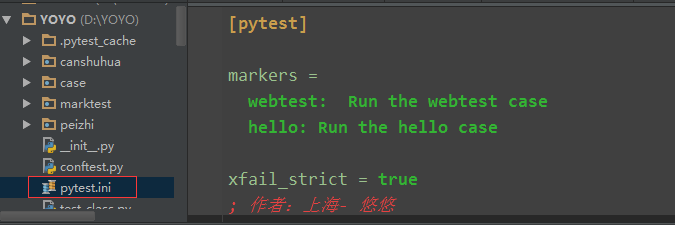
addopts
addopts参数可以更改默认命令行选项,这个当我们在cmd输入指令去执行用例的时候,会用到,比如我想测试完生成报告,指令比较长
$ pytest -v --rerun 1 --html=report.html --self-contained-html
每次输入这么多,不太好记住,于是可以加到pytest.ini里
# pytest.ini

[pytest]

markers =

  webtest:  Run the webtest case

  hello: Run the hello case

 xfail_strict = true

 addopts = -v --rerun 1 --html=report.html --self-contained-html
这样我下次打开cmd,直接输入pytest,它就能默认带上这些参数了
---------------------------------pytest结合selenium自动化完整版-------------------------
全书购买地址 https://yuedu.baidu.com/ebook/902224ab27fff705cc1755270722192e4536582b
作者:上海-悠悠 QQ交流群:874033608
也可以关注下我的个人公众号:yoyoketang

pytest文档18-配置文件pytest.ini的更多相关文章
- pytest文档3-pycharm运行pytest
前言 上一篇pytest文档2-用例运行规则已经介绍了如何在cmd执行pytest用例,平常我们写代码在pycharm比较多 写完用例之后,需要调试看看,是不是能正常运行,如果每次跑去cmd执行,太麻 ...
- pytest文档7-pytest-html生成html报告
前言 pytest-HTML是一个插件,pytest用于生成测试结果的HTML报告.兼容Python 2.7,3.6 pytest-html 1.github上源码地址[https://github. ...
- pytest文档51-内置fixture之cache使用
前言 pytest 运行完用例之后会生成一个 .pytest_cache 的缓存文件夹,用于记录用例的ids和上一次失败的用例. 方便我们在运行用例的时候加上--lf 和 --ff 参数,快速运行上一 ...
- 【转】Python之xml文档及配置文件处理(ElementTree模块、ConfigParser模块)
[转]Python之xml文档及配置文件处理(ElementTree模块.ConfigParser模块) 本节内容 前言 XML处理模块 ConfigParser/configparser模块 总结 ...
- pytest文档40-pytest.ini配置用例查找规则(面试题)
前言 面试题:pytest如何执行不是test开头的用例?如执行 xxx_*.py这种文件的用例. pytest.ini 配置文件可以修改用例的匹配规则. pytest命令行参数 cmd打开输入pyt ...
- pytest文档55-plugins插件开发
前言 前面一篇已经学会了使用hook函数改变pytest运行的结果,代码写在conftest.py文件,实际上就是本地的插件了. 当有一天你公司的小伙伴觉得你写的还不错,或者更多的小伙伴想要你这个功能 ...
- pytest文档46-关于https请求警告问题(InsecureRequestWarning: Unverified HTTPS request is being made)
前言 使用 pytest 执行 https 请求用例的时候,控制台会出现警告:InsecureRequestWarning: Unverified HTTPS request is being mad ...
- pytest文档43-元数据使用(pytest-metadata)
前言 什么是元数据?元数据是关于数据的描述,存储着关于数据的信息,为人们更方便地检索信息提供了帮助. pytest 框架里面的元数据可以使用 pytest-metadata 插件实现.文档地址http ...
- pytest文档19-doctest测试框架
前言 doctest从字面意思上看,那就是文档测试.doctest是python里面自带的一个模块,它实际上是单元测试的一种. 官方解释:doctest 模块会搜索那些看起来像交互式会话的 Pytho ...
随机推荐
- LANMPS 一键PHP环境安装包(转)
转:http://www.lanmps.com/ LANMPS 一键安装包,php绿色环境套件包: https://github.com/foxiswho/lanmps 安装 Mar 17, 2017 ...
- bms_output.put_line使用方法
https://blog.csdn.net/sxww321/article/details/4020300
- 拥抱 Android Studio 之一:从 ADT 到 Android Studio
http://kvh.io/cn/embrace-android-studio-migration.html 1. 拥抱变化,拥抱新事物 Android Studio(IntelliJ IDEA)vs ...
- CCF CSP 201503-2 数字排序
CCF计算机职业资格认证考试题解系列文章为meelo原创,请务必以链接形式注明本文地址 CCF CSP 201503-2 数字排序 问题描述 给定n个整数,请统计出每个整数出现的次数,按出现次数从多到 ...
- 开始Hibernate介绍
1.介绍 一个框架 一个Java领域内的持久化框架 一个ORM框架 2.持久化 和数据库相关的各种操作 保存 更新 删除 查询 加载:根据特定的OID,把一个对象从数据库加载到你内存中. OID:为了 ...
- HTML Input 表单校验之datatype
凡要验证格式的元素均需绑定datatype属性,datatype可选值内置有10类,用来指定不同的验证格式. 如果还不能满足您的验证需求,可以传入自定义datatype,自定义datatype是一个非 ...
- HTML 模板继承
网站模板的设计,一般的,我们做网站有一些通用的部分,比如 导航,底部,访问统计代码等.合理的规划模板往往会减少工作量,同时也使得罗乱.难以阅读的静态页面布局变得优雅. 假设,我们的网站主页面除了正文是 ...
- 洛谷.4512.[模板]多项式除法(NTT)
题目链接 多项式除法 & 取模 很神奇,记录一下. 只是主要部分,更详细的和其它内容看这吧. 给定一个\(n\)次多项式\(A(x)\)和\(m\)次多项式\(D(x)\),求\(deg(Q) ...
- 【差分约束系统/SPFA】POJ3169-Layout
[题目大意] n头牛从小到大排,它们之间某些距离不能大于一个值,某些距离不能小于一个值,求第一头牛和第N头牛之间距离的最大值. [思路] 由题意可以得到以下不等式d[AL]+DL≥d[BL]:d[BD ...
- bzoj 1337 最小圆覆盖
/************************************************************** Problem: 1337 User: idy002 Language: ...