
iOS开发-简单的图片查看器
现在你只要拿着手机,不管你Android还是iOS,新闻类的App不可避免都有一个功能就是图片查看,做个专题,查看一下内容,App Store中也有专门针对图片浏览的App,鉴于目前所知有限,无法做到那么高大上的App,简单的做个美女查看的Demo。没有太多的功能,上一张,下一张,标签,图片,简简单的,深刻的感觉到知识就是力量,目前知识有限的结果就是Demo简单,且学且珍惜吧。
1.新建项目(如果不会可以参考本人之前的文章),然后在StoryBoard中进行布局,将Girl文件夹中的图片拖入项目中;
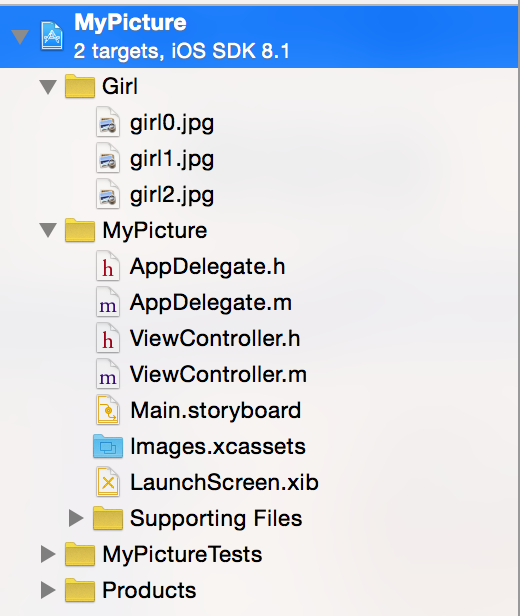
2.将UIImageView,UILabel,UIButton拖入StoryBoard中,并且设置背景图片;

设置背景图片:
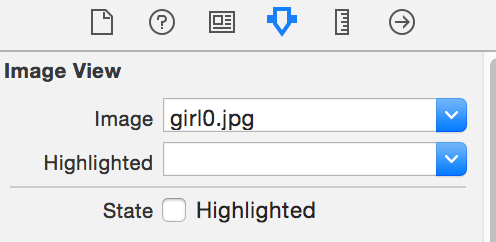
3.ViewController.h中定义成员变量:
#import <UIKit/UIKit.h>

@interface ViewController : UIViewController

@property (weak, nonatomic) IBOutlet UIImageView *imageView;

@property (weak, nonatomic) IBOutlet UILabel *pageLabel;

@end
4.上一张和下一张的事件代码:
定义一个图片数组:
@interface ViewController ()

@property NSArray *imageArr;

@end

@implementation ViewController

- (void)viewDidLoad {

    [super viewDidLoad];

    // Do any additional setup after loading the view, typically from a nib.

     _imageArr=@[@"girl0.jpg",@"girl1.jpg",@"girl2.jpg"];

}
上一张的代码:
//显示上一张

- (IBAction)preview:(id)sender {

    NSInteger currentIndex=[[[_pageLabel text] substringToIndex:1] integerValue];

    NSInteger allCount=[_imageArr count];

    if (currentIndex==1) {

        currentIndex=allCount;

    }else{

        currentIndex=currentIndex-1;

    }

    //设置标签

    [_pageLabel setText:[NSString stringWithFormat:@"%ld/%ld",currentIndex,(long)allCount]];

    //获取图片的名称

    NSString *imageName=[NSString stringWithFormat:@"girl%ld.jpg",(long)currentIndex-1];

    UIImage *image=[UIImage imageNamed:imageName];

    [_imageView setImage:image];

}
下一张代码:
//显示下一张

- (IBAction)nextView:(id)sender {

    //截取标签上面的数字

    NSInteger currentIndex=[[[_pageLabel text] substringToIndex:1] integerValue];

    NSInteger allCount=[_imageArr count];

    if (currentIndex==allCount) {

        currentIndex=0;

    }

    NSString *imageName=[NSString stringWithFormat:@"girl%ld.jpg",(long)currentIndex];

    [_pageLabel setText:[NSString stringWithFormat:@"%ld/%ld",currentIndex+1,(long)allCount]];

    UIImage *image=[UIImage imageNamed:imageName];

    [_imageView setImage:image];

}
以上的代码基本上都是OC基础,UIImage设置图片的时候只需要传递一下图片名称即可,不需要传递路径;
5.最终效果如下:

效果很简单,就是在上一张和下一张到临界点的时候判断一下,两者的代码类似,其实可以封装一下,周末愉快;
ViewController.m中的代码:
//

//  ViewController.m

//  MyPicture

//

//  Created by keso on 15/1/17.

//  Copyright (c) 2015年 keso. All rights reserved.

//

#import "ViewController.h"

@interface ViewController ()

@property NSArray *imageArr;

@end

@implementation ViewController

- (void)viewDidLoad {

    [super viewDidLoad];

    // Do any additional setup after loading the view, typically from a nib.

     _imageArr=@[@"girl0.jpg",@"girl1.jpg",@"girl2.jpg"];

}

- (void)didReceiveMemoryWarning {

    [super didReceiveMemoryWarning];

    // Dispose of any resources that can be recreated.

}

//显示上一张

- (IBAction)preview:(id)sender {

    NSInteger currentIndex=[[[_pageLabel text] substringToIndex:1] integerValue];

    NSInteger allCount=[_imageArr count];

    if (currentIndex==1) {

        currentIndex=allCount;

    }else{

        currentIndex=currentIndex-1;

    }

    //设置标签

    [_pageLabel setText:[NSString stringWithFormat:@"%ld/%ld",currentIndex,(long)allCount]];

    //获取图片的名称

    NSString *imageName=[NSString stringWithFormat:@"girl%ld.jpg",(long)currentIndex-1];

    UIImage *image=[UIImage imageNamed:imageName];

    [_imageView setImage:image];

}

//显示下一张

- (IBAction)nextView:(id)sender {

    //截取标签上面的数字

    NSInteger currentIndex=[[[_pageLabel text] substringToIndex:1] integerValue];

    NSInteger allCount=[_imageArr count];

    if (currentIndex==allCount) {

        currentIndex=0;

    }

    NSString *imageName=[NSString stringWithFormat:@"girl%ld.jpg",(long)currentIndex];

    [_pageLabel setText:[NSString stringWithFormat:@"%ld/%ld",currentIndex+1,(long)allCount]];

    UIImage *image=[UIImage imageNamed:imageName];

    [_imageView setImage:image];

}

@end
iOS开发-简单的图片查看器的更多相关文章
- Objective-C ,ios,iphone开发基础:快速实现一个简单的图片查看器
新建一个single view 工程: 关闭ARC , 在.xib视图文件上拖放一个UIImageView 两个UIButton ,一个UISlider ,布局如图. 并为他们连线, UIImage ...
- 基于jQuery的一个简单的图片查看器
项目中自己diy了一个图片查看器.因为初始代码不是自己的,只是在上面改了一下也没有弄的很漂亮.等以后有时间了在重写一下样式和封装,作为备用的只是积累吧.如果有童鞋有用到,完全可以在此基础上改,比较容易 ...
- wpf图片查看器,支持鼠标滚动缩放拖拽
最近项目需要,要用到一个图片查看器,类似于windows自带的图片查看器那样,鼠标滚动可以缩放,可以拖拽图片,于是就写了这个简单的图片查看器. 前台代码: <Window x:Class=&qu ...
- js手写图片查看器(图片的缩放、旋转、拖拽)
在做一次代码编辑任务中,要查看图片器.在时间允许的条件下,放弃了已经封装好的图片jq插件,现在自己手写js实现图片的缩放.旋转.推拽功能! 具体代码如下: <!DOCTYPE html> ...
- js实现图片查看器(图片的缩放、旋转、拖拽)
一.关于图片查看器. 目前网络上能找到的图片查看器很多,谁便一搜就能出来.如:jquery.iviewer.js.Viewer.js这两个js文件,其中功能也足够满足大部分开发需求.但是单纯的就想实现 ...
- 发布两款JQ小插件(图片查看器 + 分类选择器),开源
图片查看器,github地址:https://github.com/VaJoy/imgViewer 效果如下: 这款当初大概写了2小时,有点匆忙地赶出来的,使用的接口很简单: $.bindViewer ...
- linux上的图片查看器FEH_image_view
Linux上的图片查看器, 简单,没有多余功能,打开快速,体积小 在终端用feh # 直接执行feh显示当前目录所有图片 feh # 或者指定图片名 feh pic1 pic2 pic3 # 显示一个 ...
- 网页中的图片查看器viewjs使用
需求分析: 对于网页中的图片进行连续放大(便于用户清晰查看内容).缩小,旋转等操作,可以使用viewjs图片查看器插件实现. viewjs官方网址:https://github.com/fengyua ...
- Android中的图片查看器
本案例,使用Eclipse来开发Android2.1版本号的图片查看器. 1)首先,打开Eclipse.新建一个Android2.1版本号的项目ShowTu,打开res/values中文件夹下的str ...
随机推荐
- 1011 World Cup Betting (20)(20 point(s))
problem With the 2010 FIFA World Cup running, football fans the world over were becoming increasingl ...
- Python如何将RGB图像转换为Pytho灰度图像?
我正尝试使用matplotlib读取RGB图像并将其转换为灰度.在matlab中,我使用这个: 1 img = rgb2gray(imread('image.png')); 在matplotlib t ...
- HTTP首部字段
HTTP首部由首部字段名和首部字段值组成,以逗号隔开.如果首部出现重复,有些浏览器优先处理第一个出现的首部,有些优先处理后者. 主要分为四大类 通用首部字段 请求首部字段 响应首部字段 实体首部字段 ...
- 【HDU】3401:Trade【单调队列优化DP】
Trade Time Limit: 2000/1000 MS (Java/Others) Memory Limit: 32768/32768 K (Java/Others)Total Submi ...
- 20172319 2018.04.11 《Java程序设计教程》第7周课堂测验(补写博客)
20172319 2018.04.11 <Java程序设计教程>第7周课堂测验 课程:<程序设计与数据结构> 班级:1723 学生:唐才铭 学号:20172319 指导老师:王 ...
- C#高级编程9 第11章 Linq
Linq 1.Linq概述 列表和实体 准备数据: public class Championship { public int Year { get; set; } public string Fi ...
- C#高级编程9-第3章 对象与类型
类与结构 类和结构都是对象的模板 类定义了处理和访问数据的方法,通过类的实例化进行逻辑处理 类与结构的区别是类是引用类型,存储在托管堆上:结构是值类型,存储在栈上的: 类使用class进行修饰,结构使 ...
- Toast信息框
Toast组件的功能和对话框有些相似,可是使用上更简单,使用Toast组件的目的仅仅有一个,就是在屏幕上弹出一个消息窗体告知用户某个信息,并且这个窗体没有不论什么button,经过几秒钟后就会消失.假 ...
- SQLite 一款轻型的数据库
SQLite,是一款轻型的数据库,是遵守ACID的关系型数据库管理系统,它包含在一个相对小的C库中.它是D.RichardHipp建立的公有领域项目.它的设计目标是嵌入式的,而且目前已经在很多嵌入式产 ...
- PWM DAC vs. Standalone
http://analogtalk.com/?p=534 http://analogtalk.com/?p=551 Posted by AnalogAdvocate on April 09, 2010 ...