
Entity Framework 6.X实现记录执行的SQL功能
Entity Framework在使用时,很多时间操纵的是Model,并没有写sql语句,有时候为了调试或优化等,又需要追踪Entity framework自动生成的sql(最好还能记录起来,方便出错时排查)
方式一:
通过System.Data.Entity.DataBase.Log属性指定一个无返回值的委托,来实现记录日志的功能
public partial class EFContext<T> : DbContext where T : class

    {

        public EFContext(): base("name=MyConnectionString")

        {

        }

        protected override void OnModelCreating(DbModelBuilder modelBuilder)

        {

            Database.SetInitializer<EFContext<T>> (null);

            Database.Log = log => File.AppendAllText("ef.log",string.Format("{0}{1}{2}", DateTime.Now, Environment.NewLine, log));

            modelBuilder.Configurations.Add(new MemberMap());

            modelBuilder.Configurations.Add(new RoleMap());

            base.OnModelCreating(modelBuilder);

        }

        public DbSet<T> Table { get; set; }

        public IQueryable<T> GetList(Expression<Func<T,bool>> where)

        {

            return this.Table.Where(where);

        }

    }
其中:Database.Log = log => File.AppendAllText("ef.log",string.Format("{0}{1}{2}", DateTime.Now, Environment.NewLine, log)); 设置写入日志
控制台代码:
EFContext<Member> efMemberContext = new EFContext<Member>();

var memberSet = efMemberContext.Set<Member>().Include("Role");

var memberList = memberSet.OrderBy(m => new { m.RoleId, m.Name });

foreach (Member item in memberList)

{

    Console.WriteLine("{0},Role:{1}",item.Name,item.Role.Name);

}
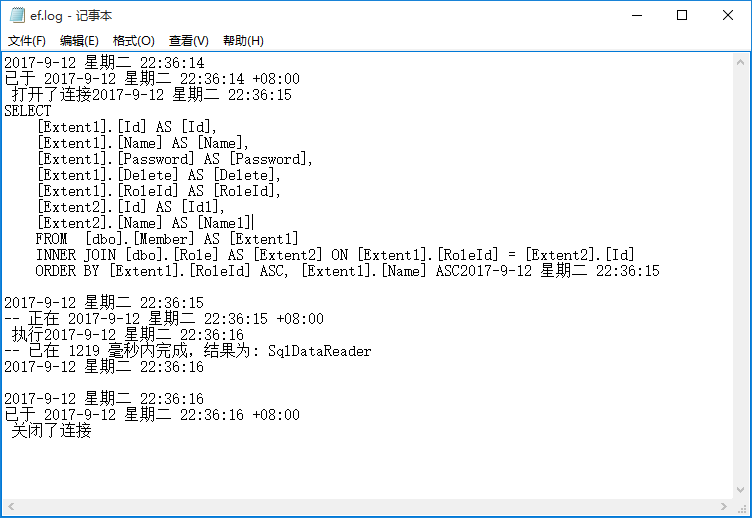
运行程序后,打开ef.log文件,发现记录了日志
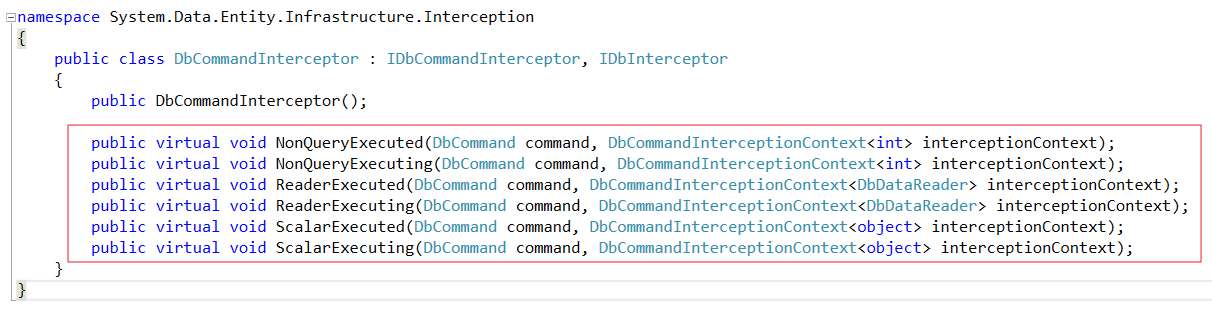
方式二:自定义一个类,继承于DbCommandInterceptor,重写下面几个方法
public class EFDbCommandInterceptor : DbCommandInterceptor

    {

        /// <summary>

        /// 计时器

        /// </summary>

        public volatile Stopwatch watch = new Stopwatch();

        public override void NonQueryExecuting(DbCommand command, DbCommandInterceptionContext<int> interceptionContext)

        {

            base.NonQueryExecuting(command, interceptionContext);

            watch.Restart();

        }

        public override void NonQueryExecuted(DbCommand command, DbCommandInterceptionContext<int> interceptionContext)

        {

            watch.Stop();

            if (interceptionContext.Exception != null)

            {

                WriteLog(string.Format("Exception:{1} \r\n --> Error executing command: {0}", command.CommandText, interceptionContext.Exception.ToString()));

            }

            else

            {

                WriteLog(string.Format("\r\n执行时间:{0} 毫秒\r\n-->ScalarExecuted.Command:{1}\r\n", watch.ElapsedMilliseconds, command.CommandText));

            }

            base.NonQueryExecuted(command, interceptionContext);

        }

        public override void ScalarExecuting(DbCommand command, DbCommandInterceptionContext<object> interceptionContext)

        {

            base.ScalarExecuting(command, interceptionContext);

            watch.Restart();

        }

        public override void ScalarExecuted(DbCommand command, DbCommandInterceptionContext<object> interceptionContext)

        {

            watch.Stop();

            if (interceptionContext.Exception != null)

            {

                WriteLog(string.Format("Exception:{1} \r\n --> Error executing command: {0}", command.CommandText, interceptionContext.Exception.ToString()));

            }

            else

            {

                WriteLog(string.Format("\r\n执行时间:{0} 毫秒\r\n-->ScalarExecuted.Command:{1}\r\n", watch.ElapsedMilliseconds, command.CommandText));

            }

            base.ScalarExecuted(command, interceptionContext);

        }

        public override void ReaderExecuting(DbCommand command, DbCommandInterceptionContext<DbDataReader> interceptionContext)

        {

            base.ReaderExecuting(command, interceptionContext);

            watch.Restart();

        }

        public override void ReaderExecuted(DbCommand command, DbCommandInterceptionContext<DbDataReader> interceptionContext)

        {

            watch.Stop();

            if (interceptionContext.Exception != null)

            {

                WriteLog(string.Format("Exception:{1} \r\n --> Error executing command: {0}", command.CommandText, interceptionContext.Exception.ToString()));

            }

            else

            {

                WriteLog(string.Format("\r\n执行时间:{0} 毫秒\r\n-->ScalarExecuted.Command:{1}\r\n", watch.ElapsedMilliseconds, command.CommandText));

            }

            base.ReaderExecuted(command, interceptionContext);

        }

        /// <summary>

        /// 记录日志

        /// </summary>

        /// <param name="msg">消息</param>

        private void WriteLog(string msg)

        {

            //指定true表示追加

            using (TextWriter writer = new StreamWriter("Db.log",true))

            {

                writer.WriteLine(msg);

            }

        }

    }
public partial class EFContext<T> : DbContext where T : class

    {

        public EFContext(): base("name=MyConnectionString")

        {

        }

        protected override void OnModelCreating(DbModelBuilder modelBuilder)

        {

            Database.SetInitializer<EFContext<T>> (null);

            //Database.Log = log => File.AppendAllText("ef.log",string.Format("{0}{1}{2}", DateTime.Now, Environment.NewLine, log));

            DbInterception.Add(new EFDbCommandInterceptor());

            modelBuilder.Configurations.Add(new MemberMap());

            modelBuilder.Configurations.Add(new RoleMap());

            base.OnModelCreating(modelBuilder);

        }

        public DbSet<T> Table { get; set; }

        public IQueryable<T> GetList(Expression<Func<T,bool>> where)

        {

            return this.Table.Where(where);

        }

    }
其中DbInterception.Add(new EFDbCommandInterceptor()); 设置日志记录
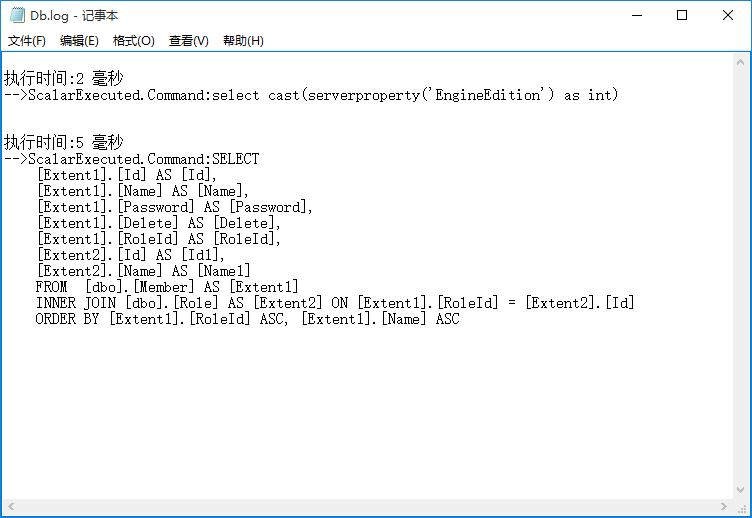
还是刚才的控制台代码,运行程序,打开Db.log
另外还有其它方法获取Entity Framework 执行的sql代码,比如SQL Server Profiler工具,不过这个不属于通过Entity Framework代码去配置,所以在此就不再赘述
Entity Framework 6.X实现记录执行的SQL功能的更多相关文章
- 【Entity Framework】disable automatic migration, 执行update-migration仍然会显示有automatic migration
本文涉及的相关问题,如果你的问题或需求有与下面所述相似之处,请阅读本文 [Entity Framework] disable automatic migration, 执行update-migrati ...
- 转:Entity FrameWork利用Database.SqlQuery<T>执行存储过程并返回参数
public IEnumerable<Statistic> GetStatistics(IEnumerable<Guid> itemIds) { var ctx = new D ...
- [转]Entity FrameWork利用Database.SqlQuery<T>执行存储过程并返回参数
本文转自:http://www.cnblogs.com/xchit/p/3334782.html 目前,EF对存储过程的支持并不完善.存在以下问题: EF不支持存储过程返回多表联合查询的 ...
- Entity FrameWork利用Database.SqlQuery<T>执行存储过程并返回参数
目前,EF对存储过程的支持并不完善.存在以下问题: EF不支持存储过程返回多表联合查询的结果集. EF仅支持返回返回某个表的全部字段,以便转换成对应的实体.无法支持返回部分字段的情况. 虽然可以正常导 ...
- MVC5 Entity Framework学习参加排序、筛选和排序功能
上一篇文章实现Student 基本的实体CRUD操作.本文将展示如何Students Index页添加排序.筛选和分页功能. 以下是排序完成时.经过筛选和分页功能截图,您可以在列标题点击排序. 1.为 ...
- EF 记录执行的sql语句
最近做了个中等的项目,数据不会很多,开发时间比较紧迫,所以用了EF的框架. 在使用过程中,发现有时候执行的结果不如预期,想看看执行的sql语句为何,遍查找资料,在网上找到了相关辅助类,拿来使用,部署到 ...
- Entity FrameWork 5 增删改查 & 直接调用sql语句 ?
#region 1.0 新增 -void Add() /// <summary> /// 1.0 新增 /// </summary> static void Add() { / ...
- Entity Framework 利用 Database.SqlQuery<T> 执行存储过程,并返回Output参数值
做个记录: var pCount = this._dataProvider.GetParameter(); pCount.ParameterName = "totalCount"; ...
- Entity Framework学习 - 5.DB First执行时提示model没有key
原因:自动生成的类中有关联主键,没有自动生成Key及Column 解决方法:在xxx.tt的66行左右修改为 var simpleProperties = typeMapper.GetSimplePr ...
随机推荐
- Scope及其子类介绍
之前写的文章: 关于作用域范围Scope Scope及相关的子类如下: 同时有些Scope还继承了Scope.ScopeListener类,如下: 1.StarImportScope及ImportSc ...
- docker-compose管理daocker
Docker-compose管理docker服务 1.安装docker-compose @首先确保服务器上已经安装docker环境,如果没有安装使用如下命令进行安装: # yum -y insta ...
- rails 过滤掉所有的html标签 strip_tags
strip_tags(html) Strips all HTML tags from the html, including comments. This usesthe html-scanner ...
- 在PHP中使用MySQL Mysqli操作数据库 ,以及类操作方法
先来操作函数部分,普遍的MySQL 函数方法,但随着PHP5的发展,有些函数使用的要求加重了,有些则将废弃不用,有些则参数必填... ================================= ...
- 从Qt到PyQt
Hello World PyQt与Qt具有极其相似的类族和API,而且不再使用qmake系统和Q_OBJECT宏使得PyQt在没有编译链接时频繁的错误而且代码更加友好. from PyQt4 impo ...
- 网页3D效果库Three.js学习[二]-了解照相机
camera 上篇大致了解了three.js ,并可以创建一个简单的可动的立方体.下来我们着重了解下camera (照相机),照相机其实就是视角,就像你的眼睛.Three.js有两种不同的相机模式:直 ...
- Angular2入门教程-2 实现TodoList App
最近在学习<Angular从零到一>(机械工业出版社) 遇到一些问题,书中讲的不明白,在网上找了一些,资源很多,也有很多前人的经验 https://blog.csdn.net/ztguan ...
- 008.在C#中,显式接口VS隐式接口
原文http://www.codeproject.com/Articles/1000374/Explicit-Interface-VS-Implicit-Interface-in-Csharp (At ...
- 解决部分小程序无法获取UnionId的问题
问题背景 通过观察数据,发现有一部分用户是无法获取到UnionId的 也就是接口返回的参数中不包含UnionId参数 看了微信文档的解释,只要小程序在开放平台绑定,就一定会分配UnionId 网上也有 ...
- 使用Spring自定义注解实现任务路由的方法
在Spring mvc的开发中,我们可以通过RequestMapping来配,当前方法用于处理哪一个URL的请求.同样我们现在有一个需求,有一个任务调度器,可以按照不同的任务类型路由到不同的任务执行器 ...