
python perlin noise
python 利用 noise 生成纹理。
# -*- coding: utf-8 -*-

"""

Created on Mon Apr 23 20:04:41 2018

@author: shiyi

"""

import random, math

import cv2

import numpy as np

"""

Texture generation using Perlin noise

"""

class NoiseUtils:

    def __init__(self, imageSize):

        self.imageSize = imageSize

        self.gradientNumber = 256

        self.grid = [[]]

        self.gradients = []

        self.permutations = []

        self.img = {}

        self.__generateGradientVectors()

        self.__normalizeGradientVectors()

        self.__generatePermutationsTable()

    def __generateGradientVectors(self):

        for i in range(self.gradientNumber):

            while True:

                x, y = random.uniform(-1, 1), random.uniform(-1, 1)

                if x * x + y * y < 1:

                    self.gradients.append([x, y])

                    break

    def __normalizeGradientVectors(self):

        for i in range(self.gradientNumber):

            x, y = self.gradients[i][0], self.gradients[i][1]

            length = math.sqrt(x * x + y * y)

            self.gradients[i] = [x / length, y / length]

    # The modern version of the Fisher-Yates shuffle

    def __generatePermutationsTable(self):

        self.permutations = [i for i in range(self.gradientNumber)]

        for i in reversed(range(self.gradientNumber)):

            j = random.randint(0, i)

            self.permutations[i], self.permutations[j] = \

                self.permutations[j], self.permutations[i]

    def getGradientIndex(self, x, y):

        return self.permutations[(x + self.permutations[y % self.gradientNumber]) % self.gradientNumber]

    def perlinNoise(self, x, y):

        qx0 = int(math.floor(x))

        qx1 = qx0 + 1

        qy0 = int(math.floor(y))

        qy1 = qy0 + 1

        q00 = self.getGradientIndex(qx0, qy0)

        q01 = self.getGradientIndex(qx1, qy0)

        q10 = self.getGradientIndex(qx0, qy1)

        q11 = self.getGradientIndex(qx1, qy1)

        tx0 = x - math.floor(x)

        tx1 = tx0 - 1

        ty0 = y - math.floor(y)

        ty1 = ty0 - 1

        v00 = self.gradients[q00][0] * tx0 + self.gradients[q00][1] * ty0

        v01 = self.gradients[q01][0] * tx1 + self.gradients[q01][1] * ty0

        v10 = self.gradients[q10][0] * tx0 + self.gradients[q10][1] * ty1

        v11 = self.gradients[q11][0] * tx1 + self.gradients[q11][1] * ty1

        wx = tx0 * tx0 * (3 - 2 * tx0)

        v0 = v00 + wx * (v01 - v00)

        v1 = v10 + wx * (v11 - v10)

        wy = ty0 * ty0 * (3 - 2 * ty0)

        return (v0 + wy * (v1 - v0)) * 0.5 + 1

    def makeTexture(self, texture = None):

        if texture is None:

            texture = self.cloud

        noise = {}

        max = min = None

        for i in range(self.imageSize):

            for j in range(self.imageSize):

                value = texture(i, j)

                noise[i, j] = value

                if max is None or max < value:

                    max = value

                if min is None or min > value:

                    min = value

        for i in range(self.imageSize):

            for j in range(self.imageSize):

                self.img[i, j] = (int) ((noise[i, j] - min) / (max - min) * 255 )

    def fractalBrownianMotion(self, x, y, func):

        octaves = 12

        amplitude = 1.0

        frequency = 1.0 / self.imageSize

        persistence = 0.5

        value = 0.0

        for k in range(octaves):

            value += func(x * frequency, y * frequency) * amplitude

            frequency *= 2

            amplitude *= persistence

        return value

    def cloud(self, x, y, func = None):

        if func is None:

            func = self.perlinNoise

        return self.fractalBrownianMotion(8 * x, 8 * y, func)

    def wood(self, x, y, noise = None):

        if noise is None:

            noise = self.perlinNoise

        frequency = 1.0 / self.imageSize

        n = noise(4 * x * frequency, 4 * y * frequency) * 10

        return n - int(n)

    def marble(self, x, y, noise = None):

        if noise is None:

            noise = self.perlinNoise

        frequency = 1.0 / self.imageSize

        n = self.fractalBrownianMotion(8 * x, 8 * y, self.perlinNoise)

        return (math.sin(16 * x * frequency + 4 * (n - 0.5)) + 1) * 0.5

if __name__ == "__main__":

    imageSize = 512

    noise = NoiseUtils(imageSize)

    noise.makeTexture(texture = noise.cloud)

    img = np.zeros((512, 512))

    pixels = img.copy()

    for i in range(0, imageSize):

       for j in range(0, imageSize):

            c = noise.img[i, j]

            pixels[i, j] = c

    pixels = pixels.astype('uint8')

    cv2.imwrite('Noise.png', pixels)

    # cv2.imshow("Noise", pixels)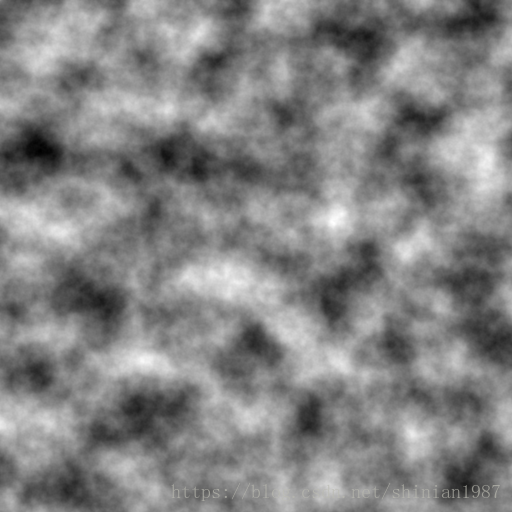
python perlin noise的更多相关文章
- Perlin Noise 及其应用
Perlin Noise 可以用来表现自然界中无法用简单形状来表达的物体的形态,比如火焰.烟雾.表面纹路等.要生成 Perlin Noise 可以使用工具离线生成,也可以使用代码运行时生成.最简单常用 ...
- 【Ray Tracing The Next Week 超详解】 光线追踪2-4 Perlin noise
Preface 为了得到更好的纹理,很多人采用各种形式的柏林噪声(该命名来自于发明人 Ken Perlin) 柏林噪声是一种比较模糊的白噪声的东西:(引用书中一张图) 柏林噪声是用来生成一些看似杂乱 ...
- 利用perlin noise 生成 wood texture
%%% Perlin Noise %%% Wood_texture clc; clear all; close all; addpath('E:\PhotoShop Algortihm\Image P ...
- OpenCV——Perlin Noise
// define head function #ifndef PS_ALGORITHM_H_INCLUDED #define PS_ALGORITHM_H_INCLUDED #include < ...
- python 不同版本下载资源
Unofficial Windows Binaries for Python Extension Packages by Christoph Gohlke, Laboratory for Fluore ...
- 利用Perlin nosie 完毕(PS 滤镜—— 分成云彩)
%%%% Cloud %%%% 利用perlin noise生成云彩 clc; clear all; close all; addpath('E:\PhotoShop Algortihm\Image ...
- 利用Perlin nosie 完成(PS 滤镜—— 分成云彩)
%%%% Cloud %%%% 利用perlin noise生成云彩 clc; clear all; close all; addpath('E:\PhotoShop Algortihm\Image ...
- GraphicsLab Project 之 Curl Noise
作者:i_dovelemon 日期:2020-04-25 主题:Perlin Noise, Curl Noise, Finite Difference Method 引言 最近在研究流体效果相关的模拟 ...
- 翻译: 星球生成 II
翻译: 星球生成 II 本文翻译自Planet Generation - Part II 译者: FreeBlues 以下为译文: 概述 在前一章 我解释了如何为星球创建一个几何球体. 在本文中, 我 ...
随机推荐
- SQLServer随机取记录
SQLServer本身并没有提供随机读取记录的功能,但我们可以通过一些方法来实现这个目的.本文介绍了其中几种方法并比较了各自的优劣. 方法一:直接通过Sql语句实现,如: SELECT TOP 100 ...
- 安装gcc4.8.5
安装gcc4.8.51. g++ --version, 4.4.7不支持c++112. 升级gcc-c++, 下载gcc https://gcc.gnu.org/ 官网,镜像下载地址https: ...
- NGUI中 鼠标划出屏幕后,停止对 UIDragScrollView 的 press
using UnityEngine; /// <summary> /// NGUI中 鼠标划出屏幕后,停止对 UIDragScrollView 的 press /// </summa ...
- Go开发环境安装配置
访问下载地址:https://golang.org/dl/ 32位系统下载go1.8.1.linux-386.tar.gz,64位系统下载go1.8.1.linux-amd64.tar.gz, 假定你 ...
- axios构建请求池处理全局loading状态&&axios避免重复请求
很多时候我们能够看到类似进度条一样的东西在页面顶部进行加载,代表页面是否加载完成,或者其他的loading效果,我们当然不可能通过promise.all来讲所有的请求合并到一起然后进行处理,这个时候我 ...
- PC端,移动端分离,如何结合??
<script type="text/javascript"> function mobile_device_detect(url) { var thisOS = na ...
- Jamie and Binary Sequence (changed after round) CodeForces - 916B (贪心)
链接 大意: 求将n划分为k个2的幂的和, 且最大幂最小,字典序尽量大 比较简单的贪心练习题, 但放在div2的B题感觉偏难了..... 先只考虑最大幂最小, 首先注意到直接按n的二进制划分即可得到最 ...
- 微信access_token全局缓存,处理过期
//PHP创建access_token.json文件,将access_token 和 生成时间expires 保存在其中, //{"access_token":"xxxx ...
- html <frame>标签使用
标签定义 frameset 中的一个特定的窗口(框架) frameset中的每个框架都可以设置不同的属性,比如border,scrolling,noresize等 frame的常用属性 width: ...
- Awk 从入门到放弃(2)– 分隔符 学习笔记
转:http://www.zsythink.net/archives/1336 学习输入分隔符FS及输出分隔符OFS 通过-v 修改内置的变量,在$1 $2 之间不指定 ‘,’, 会做合并输出.