
Spring系列之访问数据库
一、概述
Spring的数据访问层是以统一的数据访问异常层体系为核心,结合JDBC API的最佳实践和统一集成各种ORM方案,完成Java平台的数据访问。
二、JDBC API的最佳实践
Spring提供两种JDBC API的最佳实践,一种是以JDBCTemplate为核心的基于Template的JDBC使用方式,另一种则是在JdbcTemplate基础之上构建的基于操作对象的JDBC使用方式。
1、基于Template的JDBC使用方式
Spring框架提出了org.springframework.jdbc.core.JdbcTemplate作为数据访问的Helper类,JDBCTemplate是整个Spring数据抽象层提供的所有JDBC API最佳实践的基础。
jdbcTemplate主要关注以下事情:
- 封装所有基于JDBC的数据访问代码,以统一格式和规范来使用JDBC API。
- 对SQLException所提供的异常信息在框架内进行统一转译,统一了数据接口的定义,简化了客户端代码对数据访问异常的处理。
下面简单介绍JdbcTemplate的使用示例。
首先是在Spring的IoC容器中配置数据源和JdbcTemplate。
<?xml version="1.0" encoding="UTF-8"?>

<beans xmlns="http://www.springframework.org/schema/beans"

    xmlns:xsi="http://www.w3.org/2001/XMLSchema-instance"

    xmlns:context="http://www.springframework.org/schema/context"

    xsi:schemaLocation="http://www.springframework.org/schema/beans http://www.springframework.org/schema/beans/spring-beans.xsd

        http://www.springframework.org/schema/context http://www.springframework.org/schema/context/spring-context-4.1.xsd">

    <context:property-placeholder location="classpath:db.properties"/>

    <bean id="dataSource" class="com.mchange.v2.c3p0.ComboPooledDataSource" destroy-method="close">

       <property name="driverClass" value="${jdbc.driver}"/>

        <property name="jdbcUrl" value="${jdbc.url}"/>

        <property name="user" value="${jdbc.username}"/>

        <property name="password" value="${jdbc.password}"/>

    </bean>

    <!-- 配置Spring的JdbcTemplate -->

    <bean id="jdbcTemplate" class="org.springframework.jdbc.core.JdbcTemplate">

        <property name="dataSource" ref="dataSource"></property>

    </bean>

</beans>
其中,db.properties内容为:
jdbc.driver=com.mysql.jdbc.Driver

jdbc.url=jdbc:mysql://localhost:3306/student?characterEncoding=utf-8

jdbc.username=root

jdbc.password=281889
接下来就可以编写测试类:
public class JDBCTest

{

    private ApplicationContext applicationContext=null;

    private JdbcTemplate jdbcTemplate;

    {

        applicationContext=new ClassPathXmlApplicationContext("applicationContext.xml");

        jdbcTemplate=(JdbcTemplate) applicationContext.getBean("jdbcTemplate");

    }

    @Test

    public void test()

    {

        DataSource dataSources=applicationContext.getBean(DataSource.class);

        System.out.println(dataSources.toString());

    }

    /**

     * 根据id查询用户信息

     */

    @Test

    public void testFindUserById()

    {

        String sql="select * from User where id=2";

        Map<String, Object> map=jdbcTemplate.queryForMap(sql);

        for(String s:map.keySet())

        {

            System.out.println(s+":"+map.get(s));

        }

    }

    /**

     * 查到实体类集合

     */

    @Test

    public void testQueryForList()

    {

        String sql="select * from User where id>?";

        RowMapper<User> rowMapper=new BeanPropertyRowMapper<>(User.class);

        List<User> list=jdbcTemplate.query(sql, rowMapper,2);

        for (User user : list)

        {

            System.out.println(user.getUsername());

        }

    }

    /**

     * 从数据库中获取一条记录,实际得到对应的一个对象

     */

    @Test

    public void getUserById()

    {

        String sql="select * from User where id=?";

        RowMapper<User> rowMapper=new BeanPropertyRowMapper<>(User.class);

        User user=jdbcTemplate.queryForObject(sql, rowMapper,1);

        System.out.println(user.getUsername());

    }

    /**

     * 统计查询

     */

    @Test

    public void testQueryForCount()

    {

        String sql="select count(id) from user";

        long count=jdbcTemplate.queryForObject(sql, Long.class);

        System.out.println(count);

    }

}
2、基于操作对象的JDBC使用方式
Spring除了提供基于Template形式的JDBC形式,还对各种数据库操作以面向对象的形式进行建模。在这种基于操作对象的JDBC使用方式中,查询、更新、调用存储过程等数据访问操作,被抽象为操作对象,这些操作对象统一定义在org.springframework.jdbc.object包下。
三、Spring对ORM的集成
Spring对当前各种流行的ORM解决方案的集成主要体现在以下几个方面:
- 统一的资源管理方式
- 特定于ORM的数据访问异常到Spring统一异常体系的转译
- 统一的数据访问事务管理及控制方式
1、Spring对Mybatis的集成
实现mybatis和Spring进行整合,通过Spring管理SqlSessionFactory、mapper接口。
整个需要的jar包:
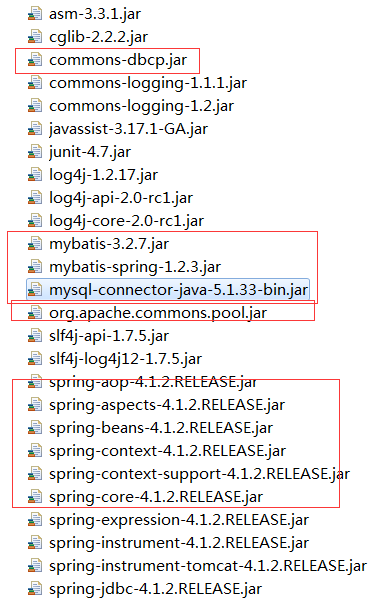
构建Myba配置文件:
<?xml version="1.0" encoding="UTF-8" ?>

<!DOCTYPE configuration

PUBLIC "-//mybatis.org//DTD Config 3.0//EN"

"http://mybatis.org/dtd/mybatis-3-config.dtd">

<configuration>

    <!--加载映射文件

        使用自动扫描器时,mapper.xml文件如果和mapper.java接口在一个目录则此处不用定义mappers

    -->

    <mappers>

         <package name="com.demo.ssm.mapper"/>

    </mappers>
构建Spring配置文件:
在classpath下创建applicationContext.xml,定义数据库链接池、SqlSessionFactory。
<?xml version="1.0" encoding="UTF-8"?>

<beans xmlns="http://www.springframework.org/schema/beans"

    xmlns:xsi="http://www.w3.org/2001/XMLSchema-instance"

    xmlns:context="http://www.springframework.org/schema/context"

    xsi:schemaLocation="http://www.springframework.org/schema/beans http://www.springframework.org/schema/beans/spring-beans.xsd

        http://www.springframework.org/schema/context http://www.springframework.org/schema/context/spring-context-4.1.xsd">

    <context:property-placeholder location="classpath:db.properties"/>

    <bean id="dataSource" class="org.apache.commons.dbcp.BasicDataSource" destroy-method="close">

       <property name="driverClassName" value="${jdbc.driver}"/>

        <property name="url" value="${jdbc.url}"/>

        <property name="username" value="${jdbc.username}"/>

        <property name="password" value="${jdbc.password}"/>

        <property name="maxActive" value="10"/>

        <property name="maxIdle" value="5"/>

    </bean>

    <!-- sqlSessionFactory -->

    <bean id="sqlSessionFactory" class="org.mybatis.spring.SqlSessionFactoryBean">

        <!--加载mybatis的配置文件 -->

        <property name="configLocation" value="mybatis/SqlMapConfig.xml"></property>

        <!-- 数据源 -->

        <property name="dataSource" ref="dataSource"></property>

    </bean>

</beans>
编写Mapper,这里有三种方法
- 第一种方法:Dao接口实现类继承SqlSessionDaoSupport
使用此种方法即原始dao开发方法,需要编写dao接口,dao接口实现类、映射文件。
1、sqlMapConfig.xml配置文件
<?xml version="1.0" encoding="UTF-8" ?>

<!DOCTYPE configuration

PUBLIC "-//mybatis.org//DTD Config 3.0//EN"

"http://mybatis.org/dtd/mybatis-3-config.dtd">

<configuration>

    <!--加载映射文件

        使用自动扫描器时,mapper.xml文件如果和mapper.java接口在一个目录则此处不用定义mappers

    -->

    <mappers>

        <mapper resource="sqlmap/User.xml"/>

    </mappers>

</configuration>
2、定义dao接口
public interface UserDao

{

    public User getUserById(int id) throws Exception;

}
3、dao接口实现类继承SqlSessionDaoSupport
public class UserDaoImpl extends SqlSessionDaoSupport implements UserDao

{

    public User getUserById(int id) throws Exception

    {

        // 继承SqlSessionDaoSupport

        SqlSession session = this.getSqlSession();

        User user = null;

        // 通过sqlsession调用selectOne方法获取一条结果集

        // 参数1:指定定义的statement的id,参数2:指定向statement中传递的参数

        user = session.selectOne("test.findUserById", id);

        return user;

    }

}
4、Spring配置文件
  <!-- 原始dao接口 -->

    <bean id="userDao" class="com.demo.ssm.dao.UserDaoImpl">

        <property name="sqlSessionFactory" ref="sqlSessionFactory"></property>

    </bean>
5、编写测试类测试运行
public class UserDaoImplTest

{

    private ApplicationContext applicationContext;

    @Before

    public void setup()

    {

        applicationContext=new ClassPathXmlApplicationContext("classpath:spring/applicationContext.xml");

    }

    @Test

    public void testGetUserById() throws Exception

    {

        UserDao userDao=(UserDao) applicationContext.getBean("userDao");

        User user=userDao.getUserById(1);

        System.out.println(user);

    }

}
第二种方法:使用org.mybatis.spring.mapper.MapperFactoryBean
此方法即mapper接口开发方法,只需定义mapper接口,不用编写mapper接口实现类。每个mapper接口都需要在spring配置文件中定义
1、在sqlMapConfig.xml中配置mapper.xml的位置
如果mapper.xml和mappre接口的名称相同且在同一个目录,这里可以不用配置
2、定义mapper接口
public interface UserMapper

{

    //根据用户id查询用户信息

    public User findUserById(int id) throws Exception;

}
3、Spring中定义
    <bean id="userMapper" class="org.mybatis.spring.mapper.MapperFactoryBean">

        <property name="mapperInterface" value="com.demo.ssm.mapper.UserMapper"></property>

        <property name="sqlSessionFactory" ref="sqlSessionFactory"></property>

    </bean>
4、编写测试类测试运行
public class UserMapperTest

{

    private ApplicationContext applicationContext;

    @Before

    public void setup()

    {

        applicationContext=new ClassPathXmlApplicationContext("classpath:spring/applicationContext.xml");

    }

    @Test

    public void testGetUserById() throws Exception

    {

        UserMapper userMapper=(UserMapper) applicationContext.getBean("userMapper");

        User user=userMapper.findUserById(1);

        System.out.println(user);

    }

}
- 第三种方法:使用mapper扫描器
此方法即mapper接口开发方法,只需定义mapper接口,不用编写mapper接口实现类。只需要在spring配置文件中定义一个mapper扫描器,自动扫描包中的mapper接口生成代代理对象。
1、mapper.xml文件编写
2、定义mapper接口
注意:mapper.xml的文件名和mapper的接口名称保持一致,且放在同一个目录
3、配置mapper扫描器
<!-- mapper批量扫描,从mapper包中扫描成mapper接口,自动创建 代理对象并在Spring容器中注册

        自动扫描出来的mapper的bean的id为mapper类型(首字母小写)

    -->

    <bean class="org.mybatis.spring.mapper.MapperScannerConfigurer">

        <!-- 指定扫描的包名 -->

        <property name="basePackage" value="com.demo.ssm.mapper"></property>

        <property name="sqlSessionFactoryBeanName" value="sqlSessionFactory"></property>

    </bean>
Spring系列之访问数据库的更多相关文章
- Spring Boot入门教程2-1、使用Spring Boot+MyBatis访问数据库(CURD)注解版
一.前言 什么是MyBatis?MyBatis是目前Java平台最为流行的ORM框架https://baike.baidu.com/item/MyBatis/2824918 本篇开发环境1.操作系统: ...
- Spring实战6:利用Spring和JDBC访问数据库
主要内容 定义Spring的数据访问支持 配置数据库资源 使用Spring提供的JDBC模板 写在前面:经过上一篇文章的学习,我们掌握了如何写web应用的控制器层,不过由于只定义了SpitterRep ...
- Spring 定时器 定时访问数据库并发送邮件
我这里有两个案例的方法: 第一种:使用Spring quartz: 我这里使用的jar:spring-context-support.jar.quartz-1.6.5.jar ============ ...
- Springboot 系列(十)使用 Spring data jpa 访问数据库
前言 Springboot data jpa 和 Spring jdbc 同属于 Spring开源组织,在 Spring jdbc 之后又开发了持久层框架,很明显 Spring data jpa 相对 ...
- Spring系列之不同数据库异常如何抽象的?
前言 使用Spring-Jdbc的情况下,在有些场景中,我们需要根据数据库报的异常类型的不同,来编写我们的业务代码.比如说,我们有这样一段逻辑,如果我们新插入的记录,存在唯一约束冲突,就会返回给客户端 ...
- Spring系列
Spring系列之访问数据库 阅读目录 一.概述 二.JDBC API的最佳实践 三.Spring对ORM的集成 回到顶部 一.概述 Spring的数据访问层是以统一的数据访问异常层体系为核心,结 ...
- spring boot访问数据库
1. Spring JAP 基本使用说明: Spring boot 访问数据库基本上都是通过Spring JPA封装的Bean作为API的,Spring JPA 将访问数据库通过封装,只要你的类实现了 ...
- Spring Boot实战之数据库操作
上篇文章中已经通过一个简单的HelloWorld程序讲解了Spring boot的基本原理和使用.本文主要讲解如何通过spring boot来访问数据库,本文会演示三种方式来访问数据库,第一种是Jdb ...
- Spring Boot(二):数据库操作
本文主要讲解如何通过spring boot来访问数据库,本文会演示三种方式来访问数据库,第一种是JdbcTemplate,第二种是JPA,第三种是Mybatis.之前已经提到过,本系列会以一个博客系统 ...
随机推荐
- (转)st(state-threads) coroutine和stack分析
目录(?)[-] STACK分配 THREAD初始化栈 Thread启动和切换 Thread退出 Thread初始线程 Thread生命周期 st(state-threads) https://gi ...
- NPOIHelp 按固定模板导出和直接导出
完整代码如下 using System; using System.Collections.Generic; using System.Data; using System.Text; using N ...
- DNS Bind服务配置解析
DNS域名解析服务(Domain Name System)是用于解析域名与IP地址对应关系的服务,功能上可以实现正向解析与反向解析: 一.DNS服务器工作模式分类: 1.主服务器:在特定区域内具有唯一 ...
- MYSQL之You can't specify target table for update in FROM clause解决办法
mysql中You can't specify target table for update in FROM clause错误的意思是说,不能先select出同一表中的某些值,再update这个表( ...
- linux内置软件安装命令
yum -y install epel-release
- python实现原地刷新方式输出-可用于百分比进度显示输出
方式1: import sys sys.stdout.write('\r' + '你的输出详情') sys.stdout.flush() 方式2: print('\r' + '你的输出详情', end ...
- LinuxMint下的Orionode源码安装
1. Orionode介绍 Eclipse-orion是Eclipse项目下面的一个子项目,orion是一个在在线版的代码编辑环境.其介绍参考http://wiki.eclipse.org/Orion ...
- level 1 -- unit 2 - what 引导的特殊疑问句
特殊疑问句 what 引导的特殊疑问句 常见结构如下: 1. what be sb/sth? 1.1 如 谓语动词是单数is what is your phone number ? what is y ...
- lua封装的位运算
1.移位运算基础 --与 同为1,则为1 --或 有一个为1,则为1 --非 true为 false,其余为true --异或 相同为0,不同为1 --ZZMathBit = {} function ...
- mysql日期问题
1.在java中,在当前时间的基础上增加30天.Date d = new Date(); SimpleDateFormat df = new SimpleDateFormat("yyyy ...