
T4文本模板转换过程
T4文本模板转换过程将文本模板文件作为输入,生成一个新的文本文件作为输出。 例如,可以使用文本模板生成 Visual Basic 或 C# 代码,还可以生成 HTML 报告。
有三个组件参与这一过程:引擎、宿主和指令处理器。 引擎对该过程进行控制(引擎与宿主和指令处理器交互),以生成输出文件;宿主提供与环境的所有交互(如定位文件和程序集); 指令处理器为文本模板添加功能(如从 XML 文件或数据库读取数据等)。
组件:
| 组件 | 说明 | 可自定义(是/否) |
| 引擎 | 引擎组件控制文本模板转换过程。 | 否 |
| 主机 | 宿主是引擎与用户环境之间的接口。 Visual Studio 是文本转换过程的宿主。 | 是。 可以编写自定义宿主。 |
| 指令处理器 | 指令处理器是处理文本模板中的指令的类。 可以使用指令从输入源向文本模板提供数据。 | 是。 可以编写自定义指令处理器。 |
引擎:
引擎以字符串形式从宿主接收模板,而宿主处理在转换过程中所用的所有文件。 接下来,引擎请求宿主定位所有自定义指令处理器和环境中的其他方面。 然后,引擎编译和运行生成转换类。 引擎将生成的文本返回给宿主,宿主通常将该文本保存到文件中。
宿主:
宿主负责转换过程之外与环境有关的所有操作,包括:
1)查找引擎或指令处理器请求的文本和二进制文件。 宿主可以搜索目录和全局程序集缓存以查找程序集。 宿主可以为引擎查找自定义指令处理器代码。 宿主还可以查找并读取文本文件,然后以字符串形式返回其内容。
2)提供标准程序集和命名空间的列表,供引擎用于创建生成转换类。
3)提供引擎在编译和执行生成转换类时所用的应用程序域。 将使用独立应用程序域,以免宿主应用程序受到模板代码错误的影响。
4)写入生成的输出文件。
5)设置生成的输出文件的默认扩展名。
6)处理文本模板转换错误。 例如,宿主可以将错误显示在用户界面中,也可以将错误写入文件。 (在 Visual Studio 中,错误显示在“错误消息”窗口中。)
7)在用户调用了指令但未提供值时,提供必需的参数值。 指令处理器可以指定指令名称和参数,可以请求宿主提供默认值(如果有)。
指令和指令处理器:
指令是文本模板中的命令。 它向生成过程提供参数。 通常,指令定义模型或其他输入的源和类型,以及输出文件的文件扩展名等。
指令处理器可以处理一个或多个指令。 转换模板之前,必须安装能够处理模板中的指令的指令处理器。
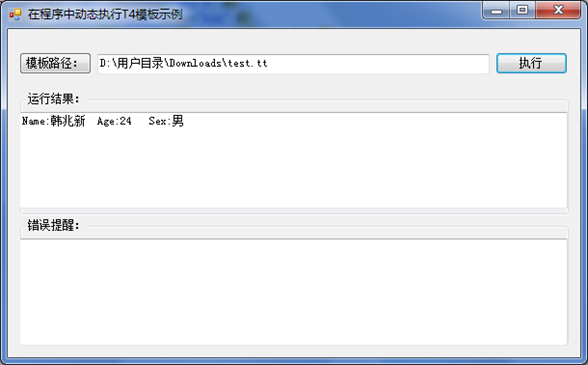
有了基本的概念,我们看下面的Demo(在程序中动态执行T4模板):
在程序中动态执行T4模板:
执行结果:
CustomTextTemplatingEngineHost.cs(自定义文本模板宿主)
using System;
using System.Collections.Generic;
using System.Linq;
using System.Text;
using Microsoft.VisualStudio.TextTemplating;
using System.CodeDom.Compiler;
using System.IO;
namespace CustomHost
{
public class CustomTextTemplatingEngineHost : ITextTemplatingEngineHost, ITextTemplatingSessionHost
{
#region ITextTemplatingEngineHost
internal string TemplateFileValue;
public string TemplateFile
{
get { return TemplateFileValue; }
}
private string fileExtensionValue = ".txt";
public string FileExtension
{
get { return fileExtensionValue; }
}
private Encoding fileEncodingValue = Encoding.UTF8;
public Encoding FileEncoding
{
get { return fileEncodingValue; }
}
private CompilerErrorCollection errorsValue;
public CompilerErrorCollection Errors
{
get { return errorsValue; }
}
public IList<string> StandardAssemblyReferences
{
get
{
return new string[]
{
typeof(System.Uri).Assembly.Location
};
}
}
public IList<string> StandardImports
{
get
{
return new string[]
{
"System"
};
}
}
public bool LoadIncludeText(string requestFileName, out string content, out string location)
{
content = System.String.Empty;
location = System.String.Empty;
if (File.Exists(requestFileName))
{
content = File.ReadAllText(requestFileName);
return true;
}
else
{
return false;
}
}
public object GetHostOption(string optionName)
{
object returnObject;
switch (optionName)
{
case "CacheAssemblies":
returnObject = true;
break;
default:
returnObject = null;
break;
}
return returnObject;
}
public string ResolveAssemblyReference(string assemblyReference)
{
if (File.Exists(assemblyReference))
{
return assemblyReference;
}
string candidate = Path.Combine(Path.GetDirectoryName(this.TemplateFile), assemblyReference);
if (File.Exists(candidate))
{
return candidate;
}
return "";
}
public Type ResolveDirectiveProcessor(string processorName)
{
if (string.Compare(processorName, "XYZ", StringComparison.OrdinalIgnoreCase) == 0)
{
//return typeof();
}
throw new Exception("Directive Processor not found");
}
public string ResolvePath(string fileName)
{
if (fileName == null)
{
throw new ArgumentNullException("the file name cannot be null");
}
if (File.Exists(fileName))
{
return fileName;
}
string candidate = Path.Combine(Path.GetDirectoryName(this.TemplateFile), fileName);
if (File.Exists(candidate))
{
return candidate;
}
return fileName;
}
public string ResolveParameterValue(string directiveId, string processorName, string parameterName)
{
if (directiveId == null)
{
throw new ArgumentNullException("the directiveId cannot be null");
}
if (processorName == null)
{
throw new ArgumentNullException("the processorName cannot be null");
}
if (parameterName == null)
{
throw new ArgumentNullException("the parameterName cannot be null");
}
return String.Empty;
}
public void SetFileExtension(string extension)
{
fileExtensionValue = extension;
}
public void SetOutputEncoding(System.Text.Encoding encoding, bool fromOutputDirective)
{
fileEncodingValue = encoding;
}
public void LogErrors(CompilerErrorCollection errors)
{
errorsValue = errors;
}
public AppDomain ProvideTemplatingAppDomain(string content)
{
return AppDomain.CreateDomain("Generation App Domain");
}
#endregion
#region ITextTemplatingSessionHost
public ITextTemplatingSession CreateSession()
{
return Session;
}
public ITextTemplatingSession Session
{
get;
set;
}
#endregion
}
}
“执行”按钮单击-》(T4文本模板转换过程)
CustomTextTemplatingEngineHost host = new CustomTextTemplatingEngineHost();
host.TemplateFileValue = txtPath.Text;
string input = File.ReadAllText(txtPath.Text);
host.Session = new TextTemplatingSession();
host.Session.Add("hzx", new People("韩兆新", 24, "男"));
string output = new Engine().ProcessTemplate(input, host);
txtResult.Text = output;
StringBuilder errorWarn = new StringBuilder();
foreach (CompilerError error in host.Errors)
{
errorWarn.Append(error.Line).Append(":").AppendLine(error.ErrorText);
}
txtError.Text = errorWarn.ToString();
申明People类可序列化(传递参数的类型)
[Serializable]
public class People
{
public People(string name, uint age, string sex)
{
this.Name = name;
this.Age = age;
this.Sex = sex;
}
public string Name
{ set; get; }
public uint Age
{ set; get; }
public string Sex
{ set; get; }
}
test.tt
<#@template debug="false" hostspecific="false" language="C#"#>
<#@ output extension=".txt" encoding="utf-8" #>
<#@ parameter type="Demo_T4.People" name="hzx" #>
Name:<#= hzx.Name #> Age:<#= hzx.Age #> Sex:<#= hzx.Sex #>
T4文本模板转换过程的更多相关文章
- 一个简单的代码生成器(T4文本模板运用)
说要写这篇文章有一段时间了,但因为最近各方面的压力导致心情十二分的不好,下班后往往都洗洗睡了.今天痛定思痛,终于把这件拖了很久的事做了.好,不废话了,现在看看"一个简单的代码生成器" ...
- 编写 T4 文本模板
文本模板由以下部件组成: 1)指令 - 控制模板处理方式的元素. 2)文本块 - 直接复制到输出的内容. 3)控制块 - 向文本插入可变值并控制文本的条件或重复部件的程序代码. 指令: 指令是控制模板 ...
- T4 文本模板编写准则
如果要在 Visual Studio 中生成程序代码或其他应用程序资源,遵守以下一般准则可能非常有帮助. 它们并不是一成不变的规则. 设计时 T4 模板准则 设计时 T4 模板是在设计时在 Visua ...
- 使用 T4 文本模板生成设计时代码
使用设计时 T4 文本模板,您可以在 Visual Studio 项目中生成程序代码和其他文件. 通常,您编写一些模板,以便它们根据来自模型的数据来改变所生成的代码. 模型是包含有关应用程序要求的 ...
- T4文本模板
<#...#> 可以包含语句 <#=...#> 用于表达式,提供“输出”操作 <#+ ...> 使用类功能控制块向文本模板添加方法.属性.字段,必须作为文件中最后 ...
- MVC开发T4代码生成之一----文本模板基础
T4文本模板 T4全写为Text Template Transformation Toolkit,是一种编程辅助工具,用来使程序代码自(懒)动(猿)生(福)成(利)的工具.MVC开发中大量使用了T4模 ...
- C#代码生成工具:文本模板初体验 使用T4批量修改实体框架(Entity Framework)的类名
转自:http://www.cnblogs.com/huangcong/archive/2011/07/20/1931107.html 在之前的文本模板(T4)初体验中我们已经知道了T4的用处,下面就 ...
- T4((Text Template Transformation Toolkit))模版引擎之基础入门 C#中文本模板(.tt)的应用
1 关于C#中文本模板(.tt)的简单应用https://blog.csdn.net/zunguitiancheng/article/details/78011145 任何一个傻瓜都能写出计算机能理解 ...
- T4模板之文本模板
网址:https://docs.microsoft.com/en-us/visualstudio/modeling/design-time-code-generation-by-using-t4-te ...
随机推荐
- 微软BI 之SSRS 系列 - 使用带参数的 MDX 查询实现一个分组聚合功能的报表
基于数据仓库上的 SSRS 报表展示,一般可以直接通过 SQL 查询,存储过程,视图或者表等多种方式将数据加载并呈现在报表中.但是如果是基于 Cube 多维数据集的数据查询,就不能再使用 SQL 的语 ...
- string format 格式化小数位
String具体的格式化数据的方法 int a = 12345678;格式为sring输出Label1.Text = string.Format("asdfadsf{0}adsfasdf&q ...
- flow 静态类型检查 js
1.flow介绍 https://ustbhuangyi.github.io/vue-analysis/prepare/flow.html#为什么用-flow 2.使用 (1)安装flow (2)项目 ...
- 使用 axios 详解
Vue.js 1.0 我们常使用 vue-resource (官方ajax库), Vue 2.0 发布后作者宣告不再对 vue-resource 进行更新, 推荐我们使用 axios (基于 Prom ...
- requestsManager:didFailRequest:withError: Error Domain=com.albertodebortoli.goldraccoon Code=-1000 "(null)" UserInfo={message=Unknown error!}
场景:最近IOS开发中需要用到FTP上传,最初是用GoldRaccoon 看后台FTPServer日志,一直都是disconnected.自己对FTP也是懂些皮毛,所以只剩下一坑的无奈.FTP服务器是 ...
- sqrtx-开平方
Implementint sqrt(int x). Compute and return the square root of x. 逐次逼近 class Solution { public: int ...
- 【转载】Java 网络编程
本文主要是自己在网络编程方面的学习总结,先主要介绍计算机网络方面的相关内容,包括计算机网络基础,OSI参考模型,TCP/IP协议簇,常见的网络协议等等,在此基础上,介绍Java中的网络编程. 一. ...
- idea 配置svn
1.情景展示 idea安装好后,如何配置svn? 2.分析 由于没有针对idea的svn插件,因此只能选择安装svn的客户端. 3.解决方案 第一步:下载小乌龟SVN客户端: 官网地址:htt ...
- 使用urllib2实现图片文件下载
# -*- coding: utf-8 -*- #python 27 #xiaodeng #使用urllib2实现图片文件下载 #来源:my2010Sam import urllib2 import ...
- 简单的BSON OID生成实现
简单的OID生成测试实现,只是简单的用用,切勿用于生产环境. /* 应该使用大端序的,这里没有做转换 * ObjectId是12-byte BSON类型,其结构为: * * 4-byte 值为Unix ...