
V-rep学习笔记:Geometric Constraint Solver(几何约束求解)
The geometric constraint solver is slower and less precise at solving kinematic problems, but might be easier and more intuitive to use. Moreover, it allows interacting with a mechanism in a more flexible way than the inverse kinematics calculation module. Following figures illustrate the geometric constraint solver applied to a complicated mechanism:
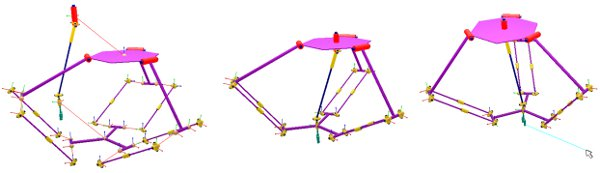
[Geometric constraint solver handling a complicated mechanism: (1) initial situation, (2) during simulation, (3) interaction with the mechanism]
V-REP's geometric constraint solver functionality operates in a similar way as the kinematics calculation module, with the difference that the solver will try to automatically identify kinematic chains, and handle them in an appropriate way (automatic constraint adjustments, loop closures, etc.). Typically, the user has to tell the solver:
- which objects (dummies) should coincide (in order to close a loop for instance)
- what mechanism has to be handled by the geometric constraint solver
- which additional constraints should be applied to the mechanism
Specifying closure constraints
Closure constraints can be seen as constraints that require two object's configurations (position and orientation) to be identical. The idea is illustrated in following figures:
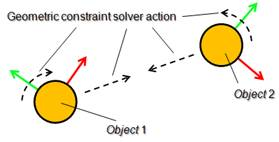
[The geometric constraint solver closure constraint]
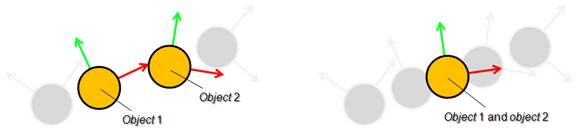
/V-REP3/V-REP_PRO_EDU/helpFiles/en/images/gcsOp2.jpg)
[Closing action of the geometric constraint solver (1) intermediate situation, (2) final situation]
GCS会试图将closure pair的位置以及姿态重合,因此机构要有足够的自由度。对于平面机构(如铰链四杆机构)来说使用GCS保持机构闭合就不合适,可以考虑用IK,tip-target来构成闭环。The geometric constraint solver will try to overlap the position and orientation of the two objects while trying to keep the mechanism coherent (i.e. by only adjusting the joints in IK mode in the mechanism to reach that overlap situation). The objects that the geometric constraint solver uses to specify closure constraints are dummies. To this end, two dummies need to be marked as closure pair. This can be adjusted in the dummy properties by selecting the opposite dummy as Linked dummy and specifying GCS, overlap constraint for the Link type. Following figure illustrates two linked dummies specifying a geometric constraint solver closure constraint:
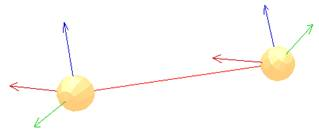
[Two linked dummies specifying a closure constraint]
Specifying the mechanism to be solved
All objects that can be reached from a given object by following a path that can go will be considered as the same mechanism:
- from one object to its parent object.
- from one object to its child objects.
- from one dummy to its linked dummy (however only links of type GCS, overlap constraint)
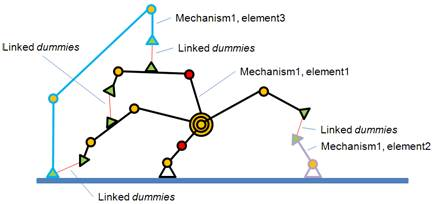
即按照上面3种方式从运动链(elements)上某一点开始探索,能够到达的节点都属于同一个机构。如果两个运动链没有公共的节点,但是由类型为GCS,overlap constraint的dummy相连,则这两个运动链仍属于同一个机构。Two object trees that don't share any common parent objects (referred hereafter as elements), can also be part of the same mechanism if two linked dummies join them. This is illustrated in following figure:
/V-REP3/V-REP_PRO_EDU/helpFiles/en/images/gcsOp4.jpg)
[One mechanism composed by 3 elements (object trees)]
The last parent object of the object that is chosen as the starting point of the mechanism exploration (path exploration) is referred to as the base object of the mechanism. When the geometric constraint solver tries to solve a mechanism, it will try to do so by keeping the base object of the mechanism in place(求解几何约束时选作base的object会固定住不动). This is important to remember. To specify a mechanism to be solved, select an object parented with the base object of the mechanism and in the geometric constraint solver dialog click insert new object. One same mechanism can only be registered once for solving. Mechanisms that do not include at least one joint in IK mode will not be handled by the solver.
Specifying additional constraints
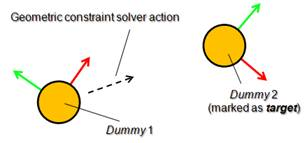
Additional positional constraints can be specified for a mechanism. This can be done with two linked dummies that form a tip-target pair (specify GCS, tip/GCS, target as Link type in the dummy properties). Following figures illustrate two linked dummies, where one is marked as target:
/V-REP3/V-REP_PRO_EDU/helpFiles/en/images/gcsOp5.jpg)
[The geometric constraint solver position constraint]
注意GCS, tip/GCS, target与GCS, overlap constraint的区别是:GCS, target不会被当做机构的一部分,解算时target不动tip移动到与target重合;而GCS, overlap constraint类型的dummy则属于同一个机构,解算时会同时移动直到重合。The dummy marked as target is not considered as part of the mechanism and therefore will not move during geometric constraint resolution, while the other dummy will try to reach the same position as the dummy marked as target.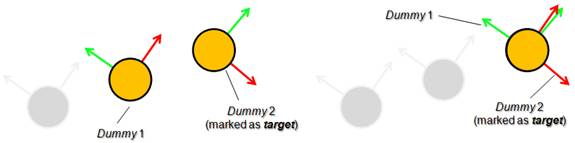
/V-REP3/V-REP_PRO_EDU/helpFiles/en/images/gcsOp6.jpg)
[Position constraint action of the geometric constraint solver (1) intermediate situation, (2) final situation]
使用GCS(几何约束求解器),可以用鼠标拖动场景中的物体进行直观地控制。During simulation, a mechanism that was previously registered to be solved with the geometric constraint solver can be manipulated in a flexible way with the mouse, when the mechanism navigation mode is selected. That mode can be enabled via following API call: simSetNavigationMode. Simply click and drag any shape object that is part of the mechanism, and the solver will try to take into account that additional position constraint.
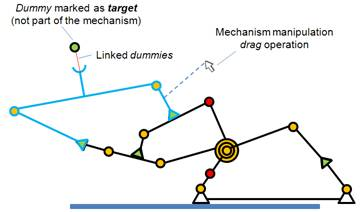
[Mechanism with two additional position constraints]
It is good practice to build your mechanism as a tree structure (i.e. where all objects in the mechanism have at least one common parent object) and have linked dummies be in charge of closing certain tree branches. By doing so you reduce the mechanism's complexity, you simplify the mechanism's scene hierarchy representation, and you will be able to handle the mechanism as a model.
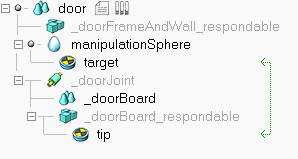
下面是一个简单的例子,用鼠标选中门并按住左键拖动,可以看到门能跟着鼠标运动。修改Model browser/Models/infrastructure/doors/manual door中的场景和代码,添加一个控制球和一组Dummy(类型分别设置为GCS, tip/GCS, target),然后在Calculation Modules的Geometric Constraint Solver选项页中将根节点door设为机构的base 。最后将旋转关节设为Inverse kinematics模式,进行仿真:
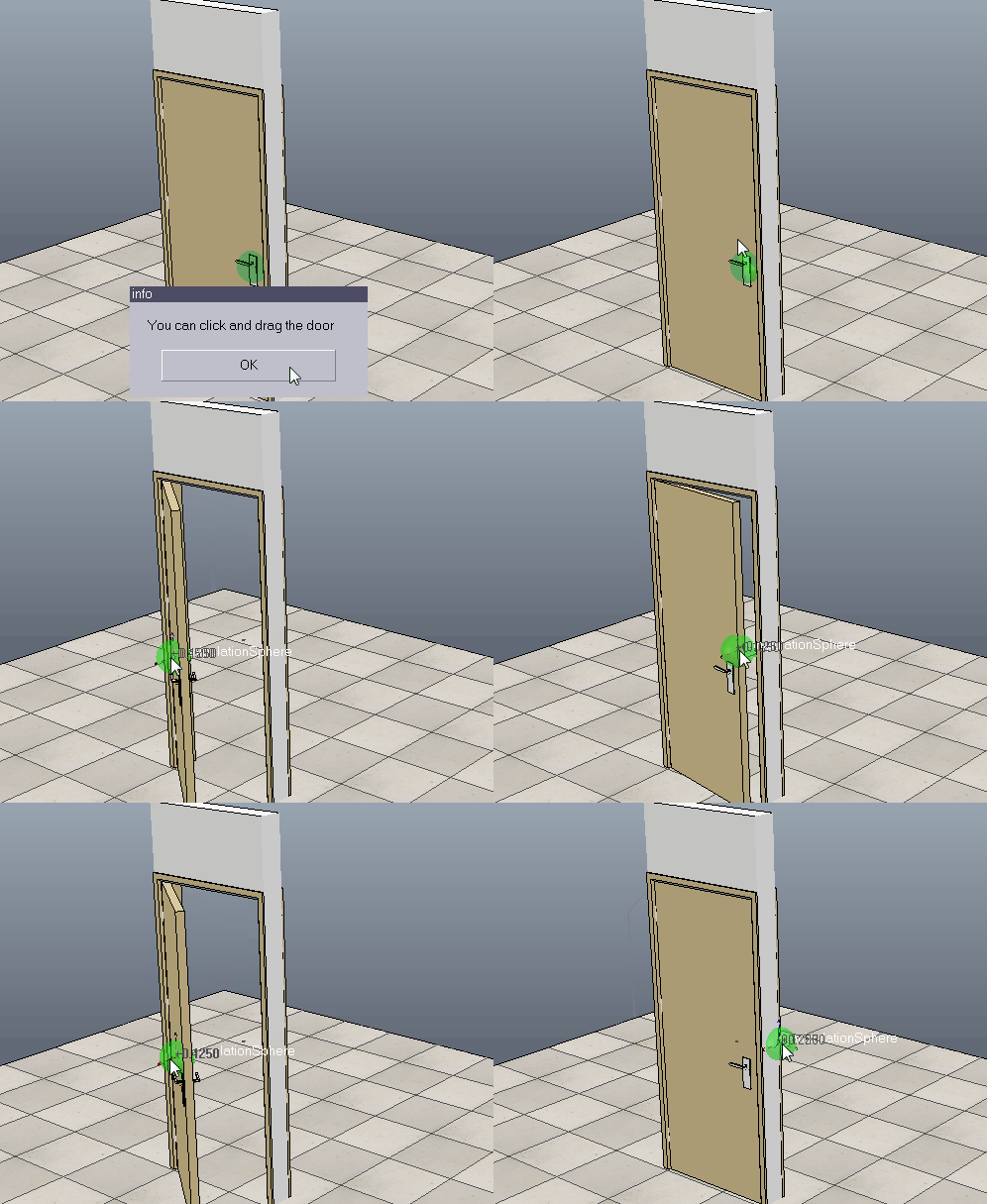
代码如下:
if (sim_call_type==sim_childscriptcall_initialization) then

    jointHandle=simGetObjectHandle('_doorJoint')

    sphereHandle=simGetObjectHandle('manipulationSphere')

    -- Retrieves the navigation and selection mode for the mouse

    initialMode=simGetNavigationMode()

    -- Sets the navigation and selection mode for the mouse.

    simSetNavigationMode(sim_navigation_objectshift+

                            sim_navigation_clickselection+

                            sim_navigation_ctrlselection+

                            sim_navigation_shiftselection+

                            sim_navigation_camerazoomwheel+

                            sim_navigation_camerarotaterightbutton)

    tipDummyHandle=simGetObjectHandle('tip')

    -- sim_intparam_prox_sensor_select_down: Allows to enable message or callback generation when a shape

    -- was clicked (down-click) in the scene. The click is a "geometric" click. This value is set to zero

    -- at simulation start and simulation stop.

    -- (-1: enabled for all visible shapes in the scene)

    simSetInt32Parameter(sim_intparam_prox_sensor_select_down, -)

    simDisplayDialog("info","You can click and drag the door",sim_dlgstyle_ok,false)

end

if (sim_call_type==sim_childscriptcall_sensing) then

    -- auxiliaryData[1]: objectID

    -- auxiliaryData2[1] ~ auxiliaryData2[3]: coordinates of clicked point

    local message,data,data2 = simGetSimulatorMessage()

    while message>- do  -- (-1 if no message is available or in case of an error)

        if message == sim_message_prox_sensor_select_down then

            -- move manipulation sphere according the position of clicked point

            simSetObjectPosition(sphereHandle,-,{data2[],data2[],data2[]})

            simSetObjectPosition(tipDummyHandle,-,{data2[],data2[],data2[]})

            simSetObjectParent(tipDummyHandle, data[], true)

            -- select the manipulation sphere to move

            simRemoveObjectFromSelection(sim_handle_all)

            simAddObjectToSelection(sim_handle_single,sphereHandle)

        end

        message,data,data2 = simGetSimulatorMessage()

    end

end

if (sim_call_type==sim_childscriptcall_cleanup) then

    simRemoveObjectFromSelection(sim_handle_all) -- removes all objects from the selection

    simSetInt32Parameter(sim_intparam_prox_sensor_select_down, ) -- 0: disabled

    simSetNavigationMode(initialMode)

end
下面是一个修改自V-REP_PRO_EDU\scenes\constraintSolverExample.ttt的例子,用鼠标选中机构上任意杆件进行拖拽,可以看到机构能跟着一起运动而不散开:
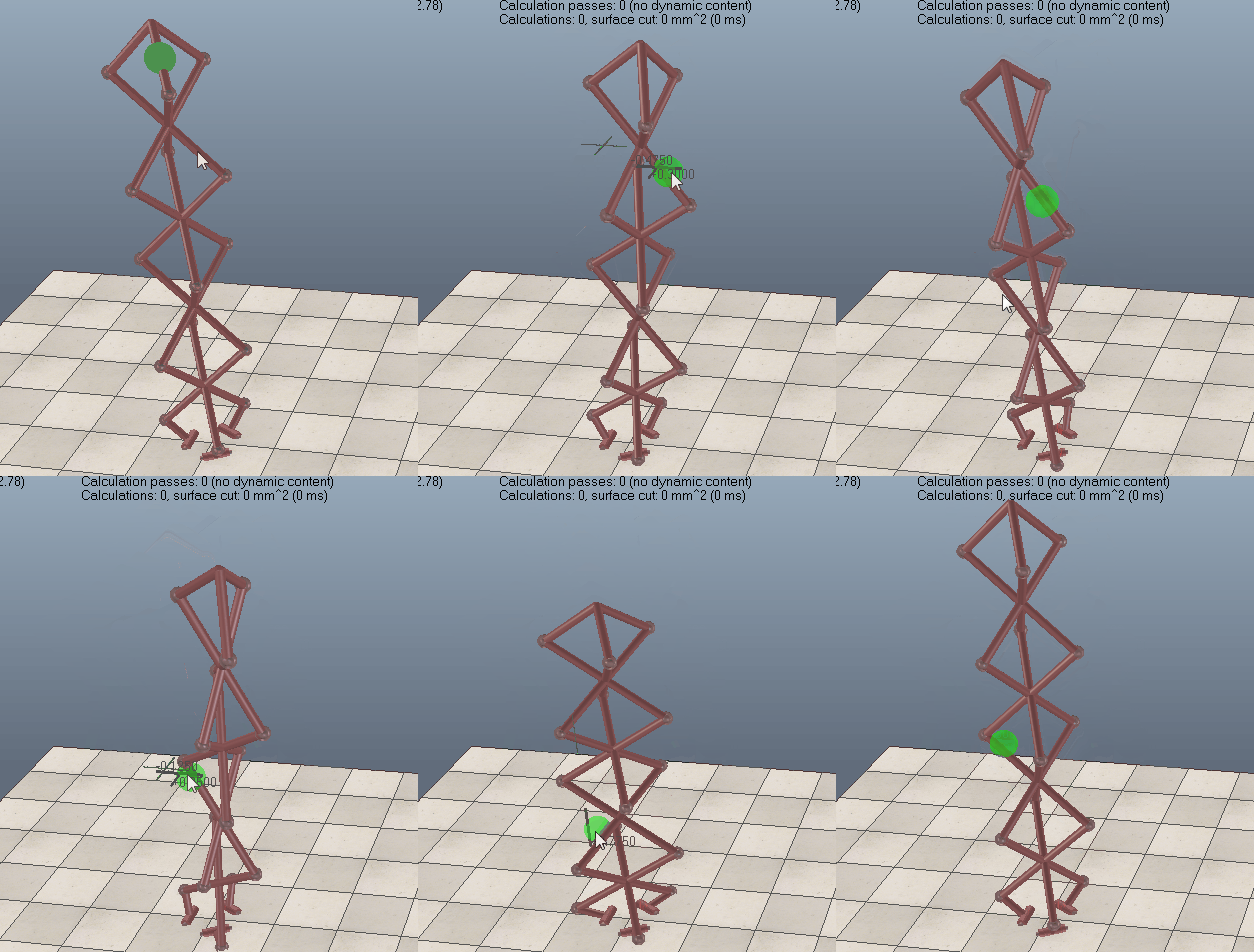
Geometric constraint solver operation
When building a mechanism that will be solved by the geometric constraint solver, make sure that the mechanism is coherent and that constraints are not impossible (i.e. that there are enough degrees of freedom for the mechanism to work). Following figures show an example of a mechanism and its resolution:
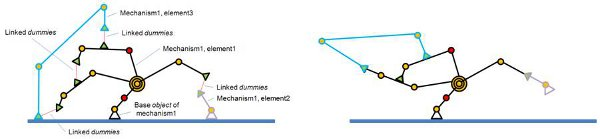
[(1) Mechanism containing 3 elements before and (2) during simulation]
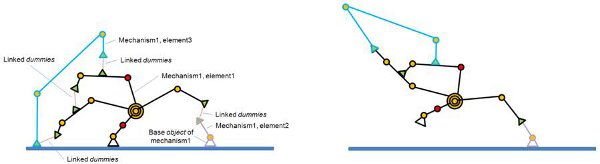
[Same mechanism, but different base object (1) before and (2) during simulation]
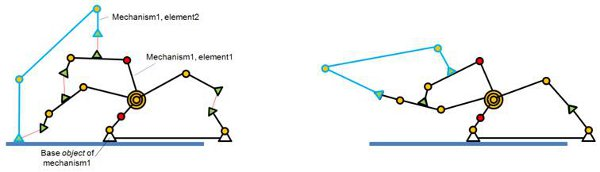
[(1) Mechanism containing 2 elements before and (2) during simulation]
参考:
Using the geometric constraint solver
Solving IK and FK for any type of mechanism
control the model using mouse in simulation mode
V-rep学习笔记:Geometric Constraint Solver(几何约束求解)的更多相关文章
- V-rep学习笔记:并联机构正逆运动学
Solving the FK problem of simple kinematic chains is trivial (just apply the desired joint values to ...
- <老友记>学习笔记
这是六个人的故事,从不服输而又有强烈控制欲的monica,未经世事的千金大小姐rachel,正直又专情的ross,幽默风趣的chandle,古怪迷人的phoebe,花心天真的joey——六个好友之间的 ...
- MySQL学习笔记一
MySQL 学习笔记 一 一.数据库简单介绍 1. 按照数据库的发展时间顺序,主要出现了以下类型数据库系统: Ø 网状型数据库 Ø 层次型数据库 Ø 关系型数据库 Ø 面向对象数据库 上面4中数据库系 ...
- 菜鸟的MySQL学习笔记(一)
本学习笔记是照搬慕课网<与MySQL的零距离接触>内容,特此感谢! 1-1 mysql的安装与配置 Windows环境下的MSI安装: 1.安装: 双击MSI文件->用户协议-> ...
- OGG学习笔记02-单向复制配置实例
OGG学习笔记02-单向复制配置实例 实验环境: 源端:192.168.1.30,Oracle 10.2.0.5 单实例 目标端:192.168.1.31,Oracle 10.2.0.5 单实例 1. ...
- Hibernate 马士兵 学习笔记 (转)
目录(?)[+] 第2课 Hibernate UML图 第3课 风格 第4课 资源 第5课 环境准备 第6课 第一个示例Hibernate HelloWorld 第7课 建立Annotation版本的 ...
- R语言与机器学习学习笔记
人工神经网络(ANN),简称神经网络,是一种模仿生物神经网络的结构和功能的数学模型或计算模型.神经网络由大量的人工神经元联结进行计算.大多数情况下人工神经网络能在外界信息的基础上改变内部结构,是一种自 ...
- 蒟蒻的长链剖分学习笔记(例题:HOTEL加强版、重建计划)
长链剖分学习笔记 说到树的链剖,大多数人都会首先想到重链剖分.的确,目前重链剖分在OI中有更加多样化的应用,但它大多时候是替代不了长链剖分的. 重链剖分是把size最大的儿子当成重儿子,顾名思义长链剖 ...
- Oracle基础学习笔记
Oracle基础学习笔记 最近找到一份实习工作,有点头疼的是,有阶段性考核,这...,实际想想看,大学期间只学过数据库原理,并没有针对某一数据库管理系统而系统的学习,这正好是一个机会,于是乎用了三天时 ...
随机推荐
- .NET零基础入门09:SQL必知必会
一:前言 仿佛到了更进一步的时候了,每一个程序员迟早都会遇到数据存储的问题.我们拿什么来存储程序产生的数据?举例来说,用什么来存储我们的打老鼠游戏每次的成绩呢?选择如下: 1:内存中.缺点,退出游戏, ...
- information_schema系列七
information_schema系列七 这个系列的文章主要是为了能够让自己了解MySQL5.7的一些系统表,统一做一下备注和使用,也希望分享出来让大家能够有一点点的受益. 第七篇主要看一下一下 ...
- sklearn中SVM调参说明
写在前面 之前只停留在理论上,没有实际沉下心去调参,实际去做了后,发现调参是个大工程(玄学).于是这篇来总结一下sklearn中svm的参数说明以及调参经验.方便以后查询和回忆. 常用核函数 1.li ...
- The "Out of socket memory" error
The "Out of socket memory" error I recently did some work on some of our frontend machines ...
- 单页面应用SPA和多页面应用MPA
单页面应用(SinglePage Web Application,SPA) 只有一张Web页面的应用,是一种从Web服务器加载的富客户端,单页面跳转仅刷新局部资源 ,公共资源(js.css等)仅需加载 ...
- Spring RestTemplate中几种常见的请求方式GET请求 POST请求 PUT请求 DELETE请求
Spring RestTemplate中几种常见的请求方式 原文地址: https://blog.csdn.net/u012702547/article/details/77917939 版权声明 ...
- 谈谈Enter回车键提交表单那些事 回车搜索 enter搜索
我们在做系统前端的时候,往往会用到form标签,采用jquery插件做表单验证.我们信誓旦旦的一位把一切都做好的时候,并且检查一遍又一遍的时候,意向不到的事情发生了,也许是出于一种意外,而这种意外我们 ...
- C++11 std::shared_ptr总结与使用
最近看代码,智能指针用的比较多,自己平时用的少,周末自己总结总结.方便后续使用. std::shared_ptr大概总结有以下几点: (1) 智能指针主要的用途就是方便资源的管理,自动释放没有指针引用 ...
- C# winform DevExpress上传图片到数据库【转】
实现功能如下图: 注明:此文使用的是DevExpress控件,winform 原生控件也是一样使用方法. 1.点击选择图片按钮,功能为通过对话框选择要上传的文件,并将该文件在下面的PictureEdi ...
- CentOS 6和CentOS 7防火墙的关闭
CentOS6.5查看防火墙的状态: 1 [linuxidc@localhost ~]$service iptable status 显示结果: 1 2 3 4 5 [linuxidc@localho ...