
nginx实现nginx/tomcat负载均衡
准备三台centos7虚拟机,全部安装nginx或者tomcat
虚拟机A 10.0.3.46 在index.html 中添加10.0.3.46作为标志
虚拟机B 10.0.3.66 使用这台做负载均衡
虚拟机C 10.0.3.110 默认页面不做修改
一.nginx之间的负载均衡:
[root@localhost nginx]# cat conf/nginx.conf|grep -v '#'|grep -v ^$

worker_processes  1;

events {

    worker_connections  1024;

}

http {

    include       mime.types;

    default_type  application/octet-stream;

    sendfile        on;

    keepalive_timeout  65;

	upstream webservers {     #这里是新添加上去的

		server 10.0.3.110 weight=1;     #server ip地址 weight=权重

		server 10.0.3.46 weight=1;

	}

    server {

        listen       80;

        server_name  localhost;

        location / {     #把原来括号里面的内容注释,添加以下内容

			proxy_pass http://webservers;     #设置代理?webservers与前面 upstream后面的命名一致

			proxy_set_header x-Real-IP $remote_addr;    #这个不懂什么意思

        }

        error_page   500 502 503 504  /50x.html;

        location = /50x.html {

            root   html;

        }

    }

}

[root@localhost nginx]#
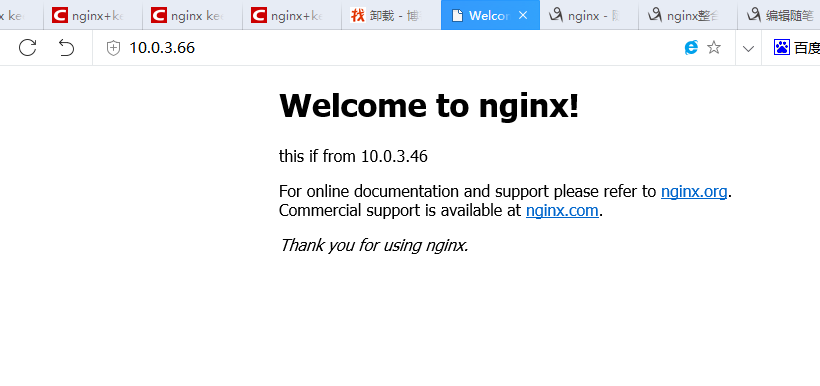
第一次进去
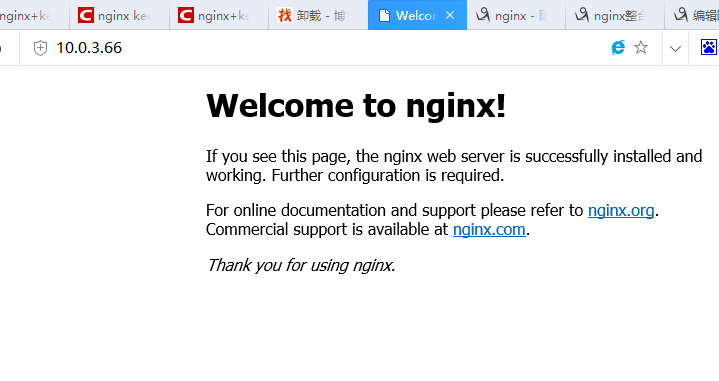
刷新之后
二:实现tomcat之间的负载均衡
[root@localhost nginx]# cat conf/nginx.conf|grep -v '#'|grep -v ^$

worker_processes  ;

events {

    worker_connections  ;

}

http {

    include       mime.types;

    default_type  application/octet-stream;

    sendfile        on;

    keepalive_timeout  ;

    upstream webservers {     #这里是新添加上去的,与nginx不同,只需要在ip后面添加端口即可

        server 10.0.3.110: weight=;     #server ip地址 weight=权重

        server 10.0.3.46: weight=;

    }

    server {

        listen       ;

        server_name  localhost;

        location / {     #把原来括号里面的内容注释,添加以下内容

            proxy_pass http://webservers;     #设置代理?webservers与前面 upstream后面的命名一致

            proxy_set_header x-Real-IP $remote_addr;    #这个不懂什么意思

        }

        error_page        /50x.html;

        location = /50x.html {

            root   html;

        }

    }

}

[root@localhost nginx]#
nginx实现nginx/tomcat负载均衡的更多相关文章
- centos 安装nginx + 多个tomcat负载均衡
今天在centos上安装了两个tomcat和nginx,进行配置.今天记录的只是最基本的实现测试.(不包含使用redis进行session共享) Nginx 是一款轻量级的Web 服务器/反向代理服务 ...
- 使用apache和nginx代理实现tomcat负载均衡及集群配置详解
实验环境: 1.nginx的代理功能 nginx proxy: eth0: 192.168.8.48 vmnet2 eth1: 192.168.10.10 tomcat server1: vmnet2 ...
- Linux下nginx+多个Tomcat负载均衡的实现
博主原创,转载请注明. 由于项目需要,共创建了10个Tomcat端,由nginx负责转发.9个Tomcat端口分别是8080,11000,12000,13000,14000,15000,16000,1 ...
- Nginx+tomcat负载均衡时静态页面报404
百度到的问题解决BLOG http://os.51cto.com/art/201204/326843.htm nginx+2台tomcat负载均衡,应用程序已部署,单独访问tomcat时,可以访问到所 ...
- nginx+tomcat负载均衡
最近练习nginx+tomcat负载均衡.根据一些资料整理了大体思路,最终实现了1个nginx+2个tomcat负载均衡. 安装JDK 1>进入安装目录,给所有用户添加可执行的权限 #chmod ...
- Linux下Nginx+Tomcat负载均衡和动静分离配置要点
本文使用的Linux发行版:CentOS6.7 下载地址:https://wiki.centos.org/Download 一.安装Nginx 下载源:wget http://nginx.org/pa ...
- 基于nginx的tomcat负载均衡和集群
要集群tomcat主要是解决SESSION共享的问题,因此我利用memcached来保存session,多台TOMCAT服务器即可共享SESSION了. 你可以自己写tomcat的扩展来保存SESSI ...
- linux+nginx+tomcat负载均衡,实现session同步
linux+nginx+tomcat负载均衡,实现session同步 花了一个上午的时间研究nginx+tomcat的负载均衡测试,集群环境搭建比较顺利,但是session同步的问题折腾了几个小时才搞 ...
- Nginx+keepalived做双机热备加tomcat负载均衡
Nginx+keepalived做双机热备加tomcat负载均衡 环境说明: nginx1:192.168.2.47 nginx2:192.168.2.48 tomcat1:192.168.2.49 ...
- nginx+tomcat负载均衡策略
測试环境均为本地,測试软件为: nginx-1.6.0,apache-tomcat-7.0.42-1.apache-tomcat-7.0.42-2.apache-tomcat-7.0.42-3 利用n ...
随机推荐
- Python Oracle连接与操作封装
一.封装方式一 #encoding:utf-8 import cx_Oracleclass Oracle_Status_Output: def __init__(self,db_name,db_ ...
- set循环遍历删除特定元素
使用Iterator迭代器 public class Demo { public static void main(String[] args) { Set<Object> obj = n ...
- python列表、集合、元祖、字典推导式
a = [1, 2, 3, 4, 5, 6, 7, 8]l=[i**2 for i in a if i**2>=16] #列表推导式+if判断print(l)print(type(l)) b={ ...
- FPGA中IBERT核的应用(转)
https://wenku.baidu.com/view/50a12d8b9ec3d5bbfd0a74f7.html (必看) 摘要 IBERT即集成式比特误码率测试仪,是Xilinx专门用于具 ...
- Redis部署与基本操作
1.安装 1)不指定安装位置,则会把redis的可执行文件安装到 redis-2.8.6/src/目录下 [root@CentOS6 ~]# ls anaconda-ks.cfg httpd-2. ...
- SharePoint REST API - 列表和列表项
博客地址:http://blog.csdn.net/FoxDave 本篇主要讲述如何用SharePoint REST操作列表和列表项.阅读本篇时请先了解前面讲述的REST介绍和基本操作. 废话不多 ...
- SQL server的高可用
SQL server 2012实现数据库中的表同步到局域网中的另外一个服务器上的数据库的方法: 1.发布.订阅功能 2.AlwayOn功能(最稳定.最优的方案) 3.修改程序,写两份数据,或者用触发器 ...
- jetty域证书更新
服务器:centos6.6 1.从正确的.pfx文件中导出.pem认证文件 #openssl pkcs12 -in example.pfx -nodes -out server.pem pfx文件可以 ...
- VS Code 使用小技巧
所有插件查找地址(https://marketplace.visualstudio.com/) 编码快捷方式(http://docs.emmet.io/cheat-sheet/) 安装插件出现 错误 ...
- 最新2018年三月可用Windows10激活密钥
Windows 10 Edition Product Key Windows 10 Home TX9XD-98N7V-6WMQ6-BX7FG-H8Q99 Windows 10 Home Single ...