
EF实体实现链接字符串加密
1、加密解密方法
using System;
using System.Security.Cryptography;
using System.Text;
namespace DBUtility
{
/// <summary>
/// DES加密/解密类。
/// </summary>
public class DESEncrypt
{
public DESEncrypt()
{
}
#region ========加密========
/// <summary>
/// 加密
/// </summary>
/// <param name="Text"></param>
/// <returns></returns>
public static string Encrypt(string Text)
{
return Encrypt(Text, "xxxxxxx");
}
/// <summary>
/// 加密数据
/// </summary>
/// <param name="Text"></param>
/// <param name="sKey"></param>
/// <returns></returns>
public static string Encrypt(string Text,string sKey)
{
DESCryptoServiceProvider des = new DESCryptoServiceProvider();
byte[] inputByteArray;
inputByteArray=Encoding.Default.GetBytes(Text);
des.Key = ASCIIEncoding.ASCII.GetBytes(System.Web.Security.FormsAuthentication.HashPasswordForStoringInConfigFile(sKey, "md5").Substring(0, 8));
des.IV = ASCIIEncoding.ASCII.GetBytes(System.Web.Security.FormsAuthentication.HashPasswordForStoringInConfigFile(sKey, "md5").Substring(0, 8));
System.IO.MemoryStream ms=new System.IO.MemoryStream();
CryptoStream cs=new CryptoStream(ms,des.CreateEncryptor(),CryptoStreamMode.Write);
cs.Write(inputByteArray,0,inputByteArray.Length);
cs.FlushFinalBlock();
StringBuilder ret=new StringBuilder();
foreach( byte b in ms.ToArray())
{
ret.AppendFormat("{0:X2}",b);
}
return ret.ToString();
}
#endregion
#region ========解密========
/// <summary>
/// 解密
/// </summary>
/// <param name="Text"></param>
/// <returns></returns>
public static string Decrypt(string Text)
{
return Decrypt(Text, "xxxxxxx");
}
/// <summary>
/// 解密数据
/// </summary>
/// <param name="Text"></param>
/// <param name="sKey"></param>
/// <returns></returns>
public static string Decrypt(string Text,string sKey)
{
DESCryptoServiceProvider des = new DESCryptoServiceProvider();
int len;
len=Text.Length/2;
byte[] inputByteArray = new byte[len];
int x,i;
for(x=0;x<len;x++)
{
i = Convert.ToInt32(Text.Substring(x * 2, 2), 16);
inputByteArray[x]=(byte)i;
}
des.Key = ASCIIEncoding.ASCII.GetBytes(System.Web.Security.FormsAuthentication.HashPasswordForStoringInConfigFile(sKey, "md5").Substring(0, 8));
des.IV = ASCIIEncoding.ASCII.GetBytes(System.Web.Security.FormsAuthentication.HashPasswordForStoringInConfigFile(sKey, "md5").Substring(0, 8));
System.IO.MemoryStream ms=new System.IO.MemoryStream();
CryptoStream cs=new CryptoStream(ms,des.CreateDecryptor(),CryptoStreamMode.Write);
cs.Write(inputByteArray,0,inputByteArray.Length);
cs.FlushFinalBlock();
return Encoding.Default.GetString(ms.ToArray());
}
#endregion
}
}
2、用的同种方法加密了链接字符串
web.config文件里
<connectionStrings>
<add name="DBEntities" connectionString="metadata=res://*/Entities.DBEntities.csdl|res://*/Entities.DBEntities.ssdl|res://*/Entities.DBEntities.msl;provider=System.Data.SqlClient;provider connection string="data source=.;initial catalog=dbtest;persist security info=True;user id=user;password=123456;MultipleActiveResultSets=True;App=EntityFramework"" providerName="System.Data.EntityClient" />
</connectionStrings>
只需要将connectionString里面的进行加密就行。并且,需要将"改成“,链接字符串才能链接数据库,否则会报错。
然后,加密后的字符串替换connectionString里的内容即可,如

3、修改EF实体生成文件
需要先定义一个属性,获取web.config里的加密字符串
using System;

using System.Collections.Generic;

using System.Linq;

using System.Text;

using System.Threading.Tasks;

namespace Apps.Common

{

    public class ConfigPara

    {

        public static string EFDBConnection {

            get {

                string connection = System.Configuration.ConfigurationManager.ConnectionStrings["DBContainer"].ConnectionString;

                return DESEncrypt.Decrypt(connection);

            }

        }

    }

}
然后,修改 DBEntities.Context.cs
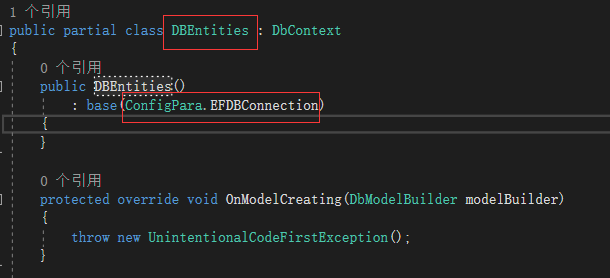
最后,修改 DBEntities.Context.tt

这样就可以了,去运行吧。
EF实体实现链接字符串加密的更多相关文章
- C# 数据库链接字符串加密工具
有些项目尤其是WinForm或者是WPF项目,针对一些工具形式的小项目,不想软件流出去之后,懂程序的的拿到手之后一看配置文件就知道了我们数据库的用户名和密码,如果外网能访问的话,那就麻烦大了.所以这里 ...
- 如何重写EF DBContext 获取链接字符串的方法
public partial class byvarDBFirst: DbContext { //使用自定义连接串 private static string GetEFConnctionString ...
- ASP.NET MVC5+EF6+EasyUI 后台管理系统(62)-EF链接串加密
系列目录 前言: 这一节提供一个简单的功能,这个功能看似简单,找了一下没找到EF链接数据库串的加密帮助文档,只能自己写了,这样也更加符合自己的加密要求 有时候我们发布程序为了避免程序外的SQL链接串明 ...
- EF删除,查询,Linq查询,Lambda查询,修改链接字符串
(1)//删除操作 public bool delete() { try { a_context = new AEntities(); b1 = new Table_1(); //删除只需要写主键就行 ...
- 构建ASP.NET MVC5+EF6+EasyUI 1.4.3+Unity4.x注入的后台管理系统(62)-EF链接串加密
前言: 这一节提供一个简单的功能,这个功能看似简单,找了一下没找到EF链接数据库串的加密帮助文档,只能自己写了,这样也更加符合自己的加密要求 有时候我们发布程序为了避免程序外的SQL链接串明文暴露,需 ...
- 【EF 1】EF实体框架 原理+实例
一.知识回顾 到目前为止,自己学到的链接数据库操作已经经历了几个阶段,分别是:学生信息管理和(第一次)机房收费时的直接连接数据库操作表格,然后是机房个人重构中应用的操作实体,在其中还利用了一个很重要的 ...
- EF实体框架之CodeFirst一
对于SQL Server.MySql.Oracle等这些传统的数据库,基本都是关系型数据库,都是体现实体与实体之间的联系,在以前开发时,可能先根据需求设计数据库,然后在写Model和业务逻辑,对于Mo ...
- EF实体框架之CodeFirst四
在EF实体框架之CodeFirst二中也提到数据库里面一般包括表.列.约束.主外键.级联操作.实体关系(E-R图).存储过程.视图.锁.事务.数据库结构更新等.前面几篇博客把表.存储过程.视图这些算是 ...
- [转载]C#字符串加密和解密
using System.Security.Cryptography; using System.IO; //默认密钥向量 private static byte[] Keys = { 0x12, 0 ...
随机推荐
- hibernate关系映射
多对一:比如多个订单对应同一个用户,需要在订单表中添加一个用户的属性 订单类: private Integer orderId; private Date createTime; private Us ...
- Mysql-如何正确的使用索引以及索引的原理
一. 介绍 二. 索引的原理 三. 索引的数据结构 四. 聚集索引与辅助索引 五. MySQL索引管理 六. 测试索引 七. 正确使用索引 八. 联合索引与覆盖索引 九. 查询优化神器-explain ...
- delete.go
package api import ( "net/http" "fmt" "io/ioutil" &quo ...
- BZOJ_1455_罗马游戏_可并堆
BZOJ_1455_罗马游戏_可并堆 Description 罗马皇帝很喜欢玩杀人游戏. 他的军队里面有n个人,每个人都是一个独立的团.最近举行了一次平面几何测试,每个人都得到了一个分数. 皇帝很喜欢 ...
- wireshark_帧信息
手头上有个嵌入网页的flash数据交互报表要做性能测试,单纯的F12开发者工具,或者Fiddler抓取的http或https协议的包是无法使用的.只能使用wireshark来解决该问题. 实 ...
- Windows上安装配置SSH教程(2)——在Windows XP和Windows 10上安装并配置OpenSSH for Windows
知识点汇总:http://www.cnblogs.com/feipeng8848/p/8559803.html ------------------------ 安装方式有3种: (1)Windows ...
- netty基本用法
1.客户端 ①HelloClient.java public class HelloClient { public static String host = "127.0.0.1" ...
- 手把手学会MySql主从配置
001 开启二进制日志. vi /data/mysql/port-3306/my.cnf log-bin=mysql-bin 002 在master上为从主机新建一个专门用于同步的账户,并授权REPL ...
- 使用elementUI的时候,使用Upload 上传的时候,使用 list-type 属性来设置文件列表的样式,before-upload方法失效
最近在做项目的时候,使用elementUI的时候,使用Upload 上传的时候,before-upload方法失效. 情况下:使用 list-type 属性来设置文件列表的样式. 最终的优化之后:(演 ...
- Java - 静态代理详讲
Java - 静态代理详讲 作者 : Stanley 罗昊 [转载请注明出处和署名,谢谢!] 写在前面:*此章内容比较抽象,所以需要结合实际操作进行讲解* *需要有 ...