
Android颜色配置器
一、Android Color设置
1、在xml文件中
想设置颜色直接设置background的属性或者其他的color属性。随便设置一个颜色如#000,再点击左边的颜色方块,弹出颜色选择器选择颜色
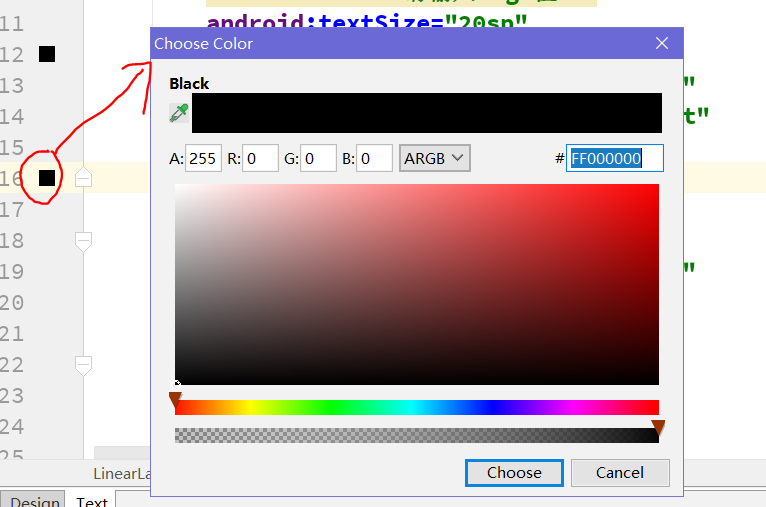
2、在java代码中
①Color.parseColor("#000");
tvShow.setBackgroundColor(Color.parseColor("#000"));
【提示】可以在布局文件中配置好颜色值,然后把用“#”表示的颜色带到java代码中用
②Color.BLACK 使用Color类自带的颜色,不过都是一些基本色
tvShow.setBackgroundColor(Color.BLACK);
③定义Color资源文件,通过R.color.myColor引用
int color = R.color.myColor;
tvShow.setBackgroundResource(R.color.myColor);
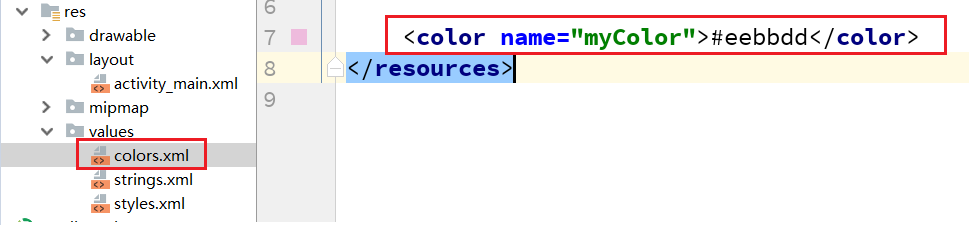
④Color.argb(a,r,g,b)方法:
tvShow.setBackgroundColor(Color.argb(255, 255, 0, 0));
分别是alpha、红(red)、绿(green)、蓝(blue)四个颜色值(ARGB)。每个数字取值0-255,因此一个颜色可以用一个整数来表示。为了运行效率,Android编码时用整数Color类实例来表示颜色。
【提示】通过此方法传入对应的透明度值,红色值,绿色值,蓝色值进行颜色配置。因此我们可以通过此方法做一个简单的颜色配置器。
二、颜色配置器案例
1、【效果】
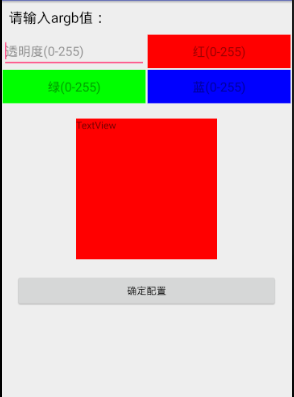
界面设计的比较粗糙,希望大家能学到实现效果,优化界面。
2、【项目结构】
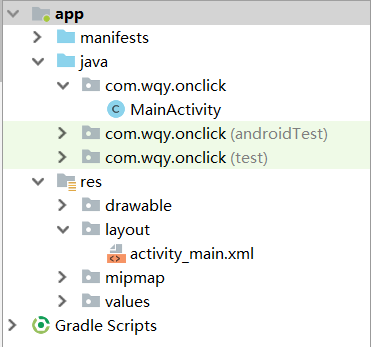
3、【代码】
①activity_main.xml布局文件
 <?xml version="1.0" encoding="utf-8"?>

 <LinearLayout xmlns:android="http://schemas.android.com/apk/res/android"

     xmlns:tools="http://schemas.android.com/tools"

     android:layout_width="match_parent"

     android:layout_height="match_parent"

     tools:context=".MainActivity"

     android:orientation="vertical">

     <TextView

         android:text="请输入argb值:"

         android:textSize="20sp"

         android:textColor="#000"

         android:layout_width="match_parent"

         android:layout_height="wrap_content"

         android:layout_margin="10dp"/>

     <LinearLayout

         android:layout_width="match_parent"

         android:layout_height="50dp"

         android:orientation="horizontal">

         <EditText

             android:id="@+id/etA"

             android:layout_width="0dp"

             android:layout_weight="1"

             android:layout_height="match_parent"

             android:layout_margin="1dp"

             android:hint="透明度(0-255)"

             android:inputType="number"/>

         <EditText

             android:id="@+id/etR"

             android:hint="红(0-255)"

             android:layout_width="0dp"

             android:layout_weight="1"

             android:layout_height="match_parent"

             android:background="#f00"

             android:layout_margin="1dp"

             android:gravity="center"

             android:inputType="number"/>

     </LinearLayout>

     <LinearLayout

         android:layout_width="match_parent"

         android:layout_height="50dp"

         android:orientation="horizontal">

         <EditText

             android:id="@+id/etG"

             android:hint="绿(0-255)"

             android:layout_width="0dp"

             android:layout_weight="1"

             android:layout_height="match_parent"

             android:background="#0f0"

             android:layout_margin="1dp"

             android:gravity="center"

             android:inputType="number"/>

         <EditText

             android:id="@+id/etB"

             android:hint="蓝(0-255)"

             android:layout_width="0dp"

             android:layout_weight="1"

             android:layout_height="match_parent"

             android:background="#00f"

             android:layout_margin="1dp"

             android:gravity="center"

             android:inputType="number"/>

     </LinearLayout>

     <TextView

         android:id="@+id/tv_show"

         android:text="TextView"

         android:layout_width="200dp"

         android:layout_height="200dp"

         android:background="#000"

         android:layout_gravity="center"

         android:layout_marginTop="20dp"

         />

     <Button

         android:id="@+id/btn"

         android:text="确定配置"

         android:layout_margin="20dp"

         android:layout_width="match_parent"

         android:layout_height="wrap_content" />

 </LinearLayout>
【提示】EditText 中hint属性:这是设置输入框内的提示文字。 inputType属性:设置输入框输入的文本类型,此处设置为整数型
②MainActivity.java文件
 public class MainActivity extends AppCompatActivity implements View.OnClickListener {

     private EditText etA;

     private EditText etR;

     private EditText etG;

     private EditText etB;

     private TextView tvShow;

     private Button btn;

     @Override

     protected void onCreate(Bundle savedInstanceState) {

         super.onCreate(savedInstanceState);

         setContentView(R.layout.activity_main);

         initView();

     }

     private void initView() {

         etA = (EditText) findViewById(R.id.etA);

         etR = (EditText) findViewById(R.id.etR);

         etG = (EditText) findViewById(R.id.etG);

         etB = (EditText) findViewById(R.id.etB);

         tvShow = (TextView) findViewById(R.id.tv_show);

         btn = (Button) findViewById(R.id.btn);

         btn.setOnClickListener(this);

     }

     @Override

     public void onClick(View v) {

         switch (v.getId()) {

             case R.id.btn:

                 submit();

                 break;

         }

     }

     private void submit() {

         // validate

         if (!etA.getText().equals("")&&!etB.getText().equals("")

                 &&!etR.getText().equals("")&&!etG.getText().equals("")) {

             //对用户输入的数值进行判断是否为空。避免空字符无法转换为int异常

             int et_a = Integer.parseInt(etA.getText().toString());

             int et_r = Integer.parseInt(etR.getText().toString());

             int et_g = Integer.parseInt(etG.getText().toString());

             int et_b = Integer.parseInt(etB.getText().toString());

             tvShow.setBackgroundColor(Color.argb(et_a, et_r, et_g, et_b));

         }else {

             Toast.makeText(this, "输入的值不能为空", Toast.LENGTH_SHORT).show();

         }

     }

 }
Android颜色配置器的更多相关文章
- Android 颜色配置表-颜色类
android开发中,常常会用到color.xml颜色配置,好的颜色配置可以让尼的应用让人看起来赏心悦目! 不罗嗦,上图先 该工程已经罗列了常用的颜色配置 附上工程链接:http://download ...
- 实用的android颜色配置表(亮瞎尼的双眼)
android开发中,常常会用到color.xml颜色配置,好的颜色配置可以让尼的应用让人看起来赏心悦目! 不罗嗦,上图先 该工程已经罗列了常用的颜色配置 附上工程链接:http://download ...
- 【转】android颜色对应的xml配置值
原文网址:http://www.cnblogs.com/etgyd/archive/2011/04/02/2003778.html android颜色对应的xml配置值 <?xml versio ...
- 基于Android的rgb七彩环颜色采集器
代码地址如下:http://www.demodashi.com/demo/11892.html 一.前言. 在大学期间,看到这个rgb灯,蛮好奇的,这么漂亮的颜色采集,并且可以同步到设备rbg灯颜色, ...
- Android Studio 配置SVN实现代码管理
Refference From:http://iaiai.iteye.com/blog/2267346 一.Android Studio配置SVN Android Studio关联配置SVN很简单,在 ...
- android 资讯阅读器
最近找申请到了一个不错的接口 , 非常适合拿来写一个资讯类的app. 现在着手写,随写随更.也算是抛砖引玉.烂尾请勿喷.╭(╯^╰)╮ android 资讯阅读器 第一阶段目标样式(滑动切换标签 , ...
- Android 颜色渲染(六) RadialGradient 环形渲染
Android 颜色处理(六) RadialGradient 环形渲染 public RadialGradient(float x, float y, float radius, int[] colo ...
- Android 颜色渲染(十) ComposeShader组合渲染
版权声明:本文为博主原创文章,未经博主允许不得转载. 目录(?)[+] Android 颜色处理(十) ComposeShader组合渲染 public ComposeShader(Shader sh ...
- Android 颜色渲染(五) LinearGradient线性渲染
版权声明:本文为博主原创文章,未经博主允许不得转载. Android 颜色处理(五) LinearGradient线性渲染 相信很多人都看过歌词同步的效果, 一是竖直方向的滚动,另一方面是水平方面的歌 ...
随机推荐
- 使用Java High Level REST Client操作elasticsearch
Java高级别REST客户端(The Java High Level REST Client)以后简称高级客户端,内部仍然是基于低级客户端.它提供了更多的API,接受请求对象作为参数并返回响应对象,由 ...
- 已操作文件的方式,新建一个用户alex
- CWMP开源代码研究——stun的NAT穿透
原创作品,转载请注明出处,严禁非法转载.如有错误,请留言! email:40879506@qq.com 参考: http://www.cnblogs.com/myblesh/p/6259765.htm ...
- DBSCAN
DBSCAN,英文全写为Density-based spatial clustering of applications with noise ,是在 1996 年由Martin Ester, Han ...
- js实现继承的5种方式
js是门灵活的语言,实现一种功能往往有多种做法,ECMAScript没有明确的继承机制,而是通过模仿实现的,根据js语言的本身的特性,js实现继承有以下通用的几种方式1.使用对象冒充实现继承(该种实现 ...
- AutoFac+MVC+WebApi源码----我踩过的坑
发现网上关于AutoFac的Demo源码比较少,综合MVC和WepApi的更少.所以贴出源码 WebApi项目(MVC4不需要引用,历史遗留问题,人懒没删) 建项目 新建类库IAutoFacDal(接 ...
- JavaScript初探之AJAX的应用
什么是 AJAX1. AJAX = 异步 JavaScript 和 XML. 2. AJAX 是一种用于创建快速动态网页的技术. 3. 通过在后台与服务器进行少量数据交换,AJAX 可以使网页实现异步 ...
- [LeetCode] Array Partition I 数组分割之一
Given an array of 2n integers, your task is to group these integers into n pairs of integer, say (a1 ...
- 运维技巧-Nginx日志格式
1.说一说 当你安装完nginx,输出的格式是比较乱的,这样我们就需要自己去定义一下,自己看着舒服的格式. 2.Nginx日志字段 $remote_addr 记录客户端IP,但她的值不是客户端提供的, ...
- NIO-学习
通道(Channel) 通道表示打开到 IO 设备(例如:文件.套接字)的连接.若需要使用 NIO 系统,需要获取用于连接 IO 设备的通道以及用于容纳数据的缓冲区.然后操作缓冲区,对数据进行处理.C ...