
ActiveMQ笔记(4):搭建Broker集群(cluster)
上一篇介绍了基于Networks of Borkers的2节点HA方案,这一篇继续来折腾Networks of Brokers,当应用规模日渐增长时,2节点的broker可能仍然抗不住访问压力,这时候就需要多加一些broker,弄一个更大规模的Broker集群,但是怎么合理设置broker之间的网络桥接,却是有讲究的,先来看一种不太好的设计:
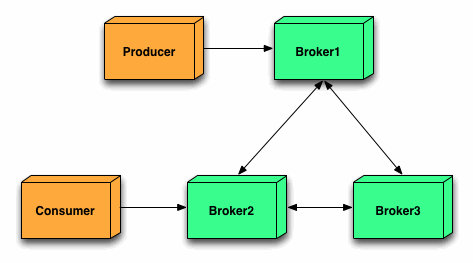
这个架构看上去没瑕疵,没毛病,3个broker之间两两互通,整体可用性极高,但是从消息的路由角度来看,却不是一个好的设计,当producer向broker1发送一条消息时,Consumer得到消息的路径可能有如下2条:
a) producer -> broker1 -> broker2
b) producer -> broker1 -> broker3 -> broker2
当broker更多时,情况会更复杂,比如下面这张图:
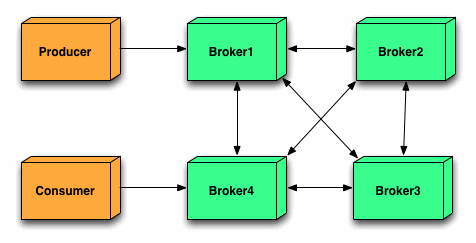
消息的路由途径将会更多:
a) producer -> broker1 -> broker4
b) producer -> broker1 -> broker2 -> broker4
c) producer -> broker1 -> broker2 -> broker3 -> broker4
d) producer -> broker1 -> broker3 -> broker4
不难想像,每多经过一个节点,消息处理的延时将会增加一些,如果Broker越多,情况越复杂,最终系统对外表现为消息处理有时很快,有时很慢,整体性能很不稳定,所以实际生产中,不要采用所有Broker之间两两互连的方案。
合理的方案如下:
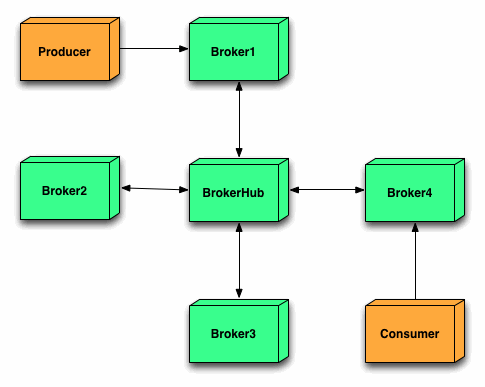
这张图的灵感,应该来自组建局域网中的星形网络,在中心放置一个Borker充当Hub,与其它所有Broker互连,这样不管Consumer连接到外围的哪个Broker,消息的路由途径都比较稳定(最多经过3个Broker),这种架构性能虽然稳定了,但是中心的Hub就变成单点隐患,如果中间的DockerHub挂了,整个系统也就废了。
改进后的架构如下:
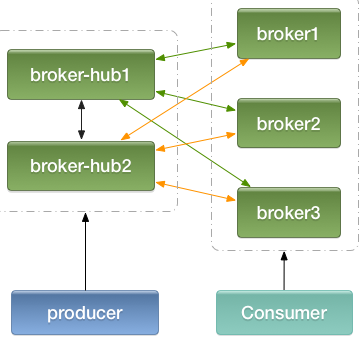
本质上仍然是一个星形网络,只不过将hub弄成二个互备,然后每个hub都与其它外围的broker相连,消费者连接到broker1/broker2/broker3,生产者(Producer)连接到hub1/hub2,消息的最长路径不超过3个broker (注:生产者也可以连接到broker1/2/3,与消费者一样,但是消息经过的最长路径会变成4)
如果以后要扩张,比如增加了Broker4,Broker5...,直接修改hub1/2上的配置,增加与新的broker的连接即可,不影响消息的路由途径长度。
最后,在本机演练一把,给出一些配置示例:
1、端口规划
activemq1: 61616 (broker1)

activemq2: 61626 (broker2)

activemq3: 61636 (broker3)

activemq4: 61646 (broker-hub1)

activemq5: 61656 (broker-hub2)
共5个activemq实例,端口61616、61626、61636为broker1、broker2、broker3,61645、61656为broker-hub1、broker-hub2
2、activemq.xml配置
以boker1为例,配置文件内容如下:
<beans
xmlns="http://www.springframework.org/schema/beans"
xmlns:xsi="http://www.w3.org/2001/XMLSchema-instance"
xsi:schemaLocation="http://www.springframework.org/schema/beans http://www.springframework.org/schema/beans/spring-beans.xsd
http://activemq.apache.org/schema/core http://activemq.apache.org/schema/core/activemq-core.xsd"> <bean class="org.springframework.beans.factory.config.PropertyPlaceholderConfigurer">
<property name="locations">
<value>file:${activemq.conf}/credentials.properties</value>
</property>
</bean> <broker xmlns="http://activemq.apache.org/schema/core" brokerName="broker1">
<persistenceAdapter>
<kahaDB directory="${activemq.data}/kahadb"/>
</persistenceAdapter>
<transportConnectors>
<transportConnector name="openwire"
uri="tcp://0.0.0.0:61616?maximumConnections=1000&wireFormat.maxFrameSize=104857600"/>
</transportConnectors>
</broker> <import resource="jetty.xml"/>
</beans>
broker2及broker3,大家参考该配置修改端口号及brokerName即可。
broker-hub1的配置:
<beans
xmlns="http://www.springframework.org/schema/beans"
xmlns:xsi="http://www.w3.org/2001/XMLSchema-instance"
xsi:schemaLocation="http://www.springframework.org/schema/beans http://www.springframework.org/schema/beans/spring-beans.xsd
http://activemq.apache.org/schema/core http://activemq.apache.org/schema/core/activemq-core.xsd"> <bean class="org.springframework.beans.factory.config.PropertyPlaceholderConfigurer">
<property name="locations">
<value>file:${activemq.conf}/credentials.properties</value>
</property>
</bean> <broker xmlns="http://activemq.apache.org/schema/core" brokerName="broker-hub1">
<networkConnectors>
<networkConnector uri="static:(tcp://127.0.0.1:61656,tcp://127.0.0.1:61616,tcp://127.0.0.1:61626,tcp://127.0.0.1:61636)" duplex="true"/>
</networkConnectors>
<persistenceAdapter>
<kahaDB directory="${activemq.data}/kahadb"/>
</persistenceAdapter>
<transportConnectors>
<transportConnector name="openwire"
uri="tcp://0.0.0.0:61646?maximumConnections=1000&wireFormat.maxFrameSize=104857600"/>
</transportConnectors>
</broker> <import resource="jetty.xml"/>
</beans>
broker-hub2的配置:
<beans
xmlns="http://www.springframework.org/schema/beans"
xmlns:xsi="http://www.w3.org/2001/XMLSchema-instance"
xsi:schemaLocation="http://www.springframework.org/schema/beans http://www.springframework.org/schema/beans/spring-beans.xsd
http://activemq.apache.org/schema/core http://activemq.apache.org/schema/core/activemq-core.xsd"> <bean class="org.springframework.beans.factory.config.PropertyPlaceholderConfigurer">
<property name="locations">
<value>file:${activemq.conf}/credentials.properties</value>
</property>
</bean> <broker xmlns="http://activemq.apache.org/schema/core" brokerName="broker-hub2">
<networkConnectors>
<networkConnector uri="static:(tcp://127.0.0.1:61616,tcp://127.0.0.1:61626,tcp://127.0.0.1:61636)" duplex="true"/>
</networkConnectors>
<persistenceAdapter>
<kahaDB directory="${activemq.data}/kahadb"/>
</persistenceAdapter>
<transportConnectors>
<transportConnector name="openwire"
uri="tcp://0.0.0.0:61656?maximumConnections=1000&wireFormat.maxFrameSize=104857600"/>
</transportConnectors>
</broker> <import resource="jetty.xml"/>
</beans>
3、java代码中spring配置文件
a) 生产者
 <bean id="jmsFactory" class="org.apache.activemq.pool.PooledConnectionFactory" destroy-method="stop">

     <property name="connectionFactory">

         <bean class="org.apache.activemq.ActiveMQConnectionFactory">

             <!--broker服务的地址-->

             <property name="brokerURL" value="failover:(tcp://localhost:61646,tcp://localhost:61656)"/>

             <!--默认值为1000,如果不需要这么大,可以调小-->

             <property name="maxThreadPoolSize" value="100"/>

             <!--<property name="userName" value="system"/>-->

             <!--<property name="password" value="manager"/>-->

         </bean>

     </property>

 </bean>
b) 消费者
 <bean id="jmsFactory" class="org.apache.activemq.pool.PooledConnectionFactory" destroy-method="stop">

     <property name="connectionFactory">

         <bean class="org.apache.activemq.ActiveMQConnectionFactory">

             <!--broker服务的地址-->

             <property name="brokerURL" value="failover:(tcp://localhost:61616,tcp://localhost:61626,tcp://localhost:61636)"/>

             <!--默认值为1000,如果不需要这么大,可以调小-->

             <property name="maxThreadPoolSize" value="100"/>

             <!--<property name="userName" value="system"/>-->

             <!--<property name="password" value="manager"/>-->

         </bean>

     </property>

 </bean>
ActiveMQ笔记(4):搭建Broker集群(cluster)的更多相关文章
- ActiveMQ: 搭建Broker集群(cluster)
上一篇介绍了基于Networks of Borkers的2节点HA方案,这一篇继续来折腾Networks of Brokers,当应用规模日渐增长时,2节点的broker可能仍然抗不住访问压力,这时候 ...
- ELK学习笔记之ElasticSearch的集群(Cluster),节点(Node),分片(Shard),Indices(索引),replicas(备份)之间关系
[Cluster]集群,一个ES集群由一个或多个节点(Node)组成,每个集群都有一个cluster name作为标识----------------------------------------- ...
- Dubbo入门到精通学习笔记(十四):ActiveMQ集群的安装、配置、高可用测试,ActiveMQ高可用+负载均衡集群的安装、配置、高可用测试
文章目录 ActiveMQ 高可用集群安装.配置.高可用测试( ZooKeeper + LevelDB) ActiveMQ高可用+负载均衡集群的安装.配置.高可用测试 准备 正式开始 ActiveMQ ...
- redis单点、redis主从、redis哨兵sentinel,redis集群cluster配置搭建与使用
目录 redis单点.redis主从.redis哨兵 sentinel,redis集群cluster配置搭建与使用 1 .redis 安装及配置 1.1 redis 单点 1.1.2 在命令窗口操作r ...
- ActiveMQ broker 集群, 静态发现和动态发现
下载 activemq 压缩包解压后,conf 目录下有各种示例配置文件,红线标出的是静态发现和动态发现的配置. 1. 静态配置 启动3个 broker,端口分别为61616,61618,61620, ...
- 超详细,多图文使用galera cluster搭建mysql集群并介绍wsrep相关参数
超详细,多图文使用galera cluster搭建mysql集群并介绍wsrep相关参数 介绍galera cluster原理的文章已经有一大堆了,百度几篇看一看就能有相关了解,这里就不赘述了.本文主 ...
- CentOS 7 环境搭建kafka集群
Kafka是一个MQ服务,流行的MQ服务器有三个,分别是ActiveMQ,RabbbitMQ和Kafka 目录说明:/home/fuqinqin/packages : 安装包存放目录/home/fuq ...
- activeMQ从入门到简单集群指南
1.什么是amq MQ是消息中间件,基于JAVA的JMS消息服务机制来传递信息. 2.mq的作用 MQ给程序之间提供了一个缓冲,避免了在程序交互频繁的情况下,提高程序性能瓶颈和数据的可靠性 3.mq怎 ...
- MongoDB 搭建分片集群
在MongoDB(版本 3.2.9)中,分片是指将collection分散存储到不同的Server中,每个Server只存储collection的一部分,服务分片的所有服务器组成分片集群.分片集群(S ...
随机推荐
- springboot(九):定时任务
在我们的项目开发过程中,经常需要定时任务来帮助我们来做一些内容,springboot默认已经帮我们实行了,只需要添加相应的注解就可以实现 1.pom包配置 pom包里面只需要引入springboot ...
- 安卓Design包之AppBar和Toolbar的联用
前面讲了Design包的的CoordinatorLayout和SnackBar的混用,现在继续理解Design包的AppBar; AppBarLayout跟它的名字一样,把容器类的组件全部作为AppB ...
- “全能”选手—Django 1.10文档中文版Part1
本文是博主翻译的Django1.10版本官方文档的第一部分,如时间充裕,争取一直翻译下去,经验不足,或有错漏,敬请指正. 另外对于公开文档进行翻译的版权问题不是很清楚,如有侵权请联系我! 另外,要转载 ...
- ASP.NET MVC5下载数据到Excel文件
项目中的一个功能是将数据导入到Excel文件中,这里使用NPOI操作Excel,代码如下: public class Excel : IDataTransfer { public Stream Exp ...
- Performance Monitor3:监控SQL Server的内存压力
SQL Server 使用的资源受到操作系统的调度,同时,SQL Server在内部实现了一套调度算法,用于管理从操作系统获取的资源,主要是对内存和CPU资源的调度.一个好的数据库系统,必定在内存中缓 ...
- iOS 原生HTTP POST请求上传图片
今天项目里做一个上传图片等个人信息的时候,使用了第三方AFNetworking - (AFHTTPRequestOperation *)POST:(NSString *)URLString param ...
- [jQuery]jQuery DataTables插件自定义Ajax分页实现
前言 昨天在博客园的博问上帮一位园友解决了一个问题,我觉得有必要记录一下,万一有人也遇上了呢. 问题描述 园友是做前端的,产品经理要求他使用jQuery DataTables插件显示一个列表,要实现分 ...
- 【python常用函数1】
## 1 ##获取输入值 a = raw_input("请输入:") if a == str(1): print "success" else: print & ...
- php-fpm优化
pid = run/php-fpm.pid #pid设置,默认在安装目录中的var/run/php-fpm.pid,建议开启 error_log = log/php-fpm.log #错误日志,默认在 ...
- Android中使用AsyncTask实现文件下载以及进度更新提示
Android提供了一个工具类:AsyncTask,它使创建需要与用户界面交互的长时间运行的任务变得更简单.相对Handler来说AsyncTask更轻量级一些,适用于简单的异步处理,不需要借助线程和 ...