
使用Git将本地仓库与GitHub远程仓库相关联
这篇文章详细讲解了如何生成SSH,并链接到GitHub,http://www.cnblogs.com/Gabriel-Wei/p/6564060.html
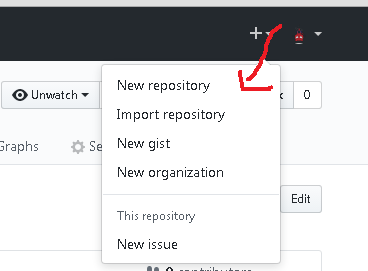
1.如果你的GitHub里面没有仓库,就自己生成一个,如图所示
2.如果你有自己仓库,想在电脑本地新建一个,你需要将GitHub的仓库地址复制下来,注意使用的是ssh,如图所示,
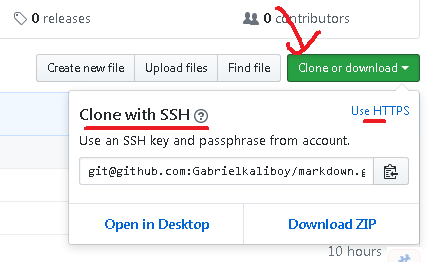
3.在电脑本地新建一个文件夹,将我们的远程仓库clone下来,
我是在d盘,test文件夹下面,直接右击选择git bash here

Administrator@LS--20160817QEI MINGW32 /d/test

输入下面的命令

$ git clone git@github.com:Gabrielkaliboy/markdown.git

git会返回下面的文字

Cloning into 'markdown'...

Warning: Permanently added the RSA host key for IP address '192.30.253.112' to the list of known hosts.

remote: Counting objects: 12, done.

remote: Compressing objects: 100% (8/8), done.

), reused 11 (delta 0), pack-reused 0

Receiving objects: 100% (12/12), 23.26 KiB | 0 bytes/s, done.

Resolving deltas: 100% (1/1), done.

Checking connectivity... done.
此时我们再去看我们的文件夹目录,已经顺利将文件clone到了本地
4.我们切入下载下来的文件夹(markdown),进行一些操作,我们可以看到多了一个单词,master
$ cd markdown
5.我们往markdown文件夹里面放多个文件,然后查看一下当前的状态
在markdown里面新建文件里面,查看一下当前的状态

$ git status

git会给我们返回这个信息

On branch master

Your branch is up-to-date with 'origin/master'.

Untracked files:

  (use "git add <file>..." to include in what will be committed)

        images/webDaily/

        "markdown\344\275\277\347\224\250\346\212\200\345\267\247.md"

        "\345\211\215\347\253\257\346\227\245\345\270\270\350\256\260\345\275\225.md"

nothing added to commit but untracked files present (use "git add" to track)
6.将多个文件同时提交到暂存区(或者将多个被修改的文件同时进行提交)
$ git add -A .
没有任何返回
7.我们再次查看一下当前的状态
输入命令:

$ git status

git返回:

On branch master

Your branch is up-to-date with 'origin/master'.

Changes to be committed:

  (use "git reset HEAD <file>..." to unstage)

        new file:   images/webDaily/1.jpg

        new file:   "markdown\344\275\277\347\224\250\346\212\200\345\267\247.md"

        new file:   "\345\211\215\347\253\257\346\227\245\345\270\270\350\256\260\345\275\225.md"
8.将暂存区的文件提交到GitHub分支
-m右面是此次提交的信息说明,输入命令:

$ git commit -m"提交新的文件"

Git会给我们返回:

[master eea6990] 提交新的文件

 3 files changed, 111 insertions(+)

 create mode 100644 images/webDaily/1.jpg

 create mode 100644 "markdown\344\275\277\347\224\250\346\212\200\345\267\247.md"

 create mode 100644 "\345\211\215\347\253\257\346\227\245\345\270\270\350\256\260\345\275\225.md"
9.再次查看当前的本地仓库状态
输入命令:

$ git status

Git返回的信息:

On branch master

Your branch is ahead of 'origin/master' by 1 commit.

  (use "git push" to publish your local commits)

nothing to commit, working directory clean
他提示我们将分支提交到主分支
10还没有结束,我们需要将我们的文件推送到分支
输入:

$ git push -u origin master

Git返回:

Counting objects: 7, done.

Delta compression using up to 2 threads.

Compressing objects: 100% (6/6), done.

Writing objects: 100% (7/7), 7.85 KiB | 0 bytes/s, done.

Total 7 (delta 0), reused 0 (delta 0)

To git@github.com:Gabrielkaliboy/markdown.git

   cd8d69d..eea6990  master -> master

Branch master set up to track remote branch master from origin.
11.此时再次查看一下仓库状态
$ git status

On branch master

Your branch is up-to-date with 'origin/master'.

nothing to commit, working directory clean
只要你对工作区没有任何的修改,工作区就是干净的
使用Git将本地仓库与GitHub远程仓库相关联的更多相关文章
- git本地仓库与github远程仓库链接协议问题
前提条件:有github账号,本地安装了git,能上网. 环境:ubuntu14.0.4LTS 首先在你得在github上创建一个仓库new repository,然后再本地创建一个文件夹mkdir ...
- Git - Git本地仓库与GitHub远程仓库关联
前言 Git本地仓库与GitHub仓库的关联逻辑如下 创建Key 在本地仓库下,新建Key文件夹,然后打开Key文件夹,单击鼠标右键,选择Git Bash Here. 输入命令:ssh-keygen ...
- iOS开发——源代码管理——git(分布式版本控制和集中式版本控制对比,git和SVN对比,git常用指令,搭建GitHub远程仓库,搭建oschina远程仓库 )
一.git简介 什么是git? git是一款开源的分布式版本控制工具 在世界上所有的分布式版本控制工具中,git是最快.最简单.最流行的 git的起源 作者是Linux之父:Linus Bened ...
- 初次使用git上传代码到github远程仓库
https://blog.csdn.net/loner_fang/article/details/80488385 2018年05月28日 21:02:31 蒲公英上的尘埃 阅读数:697 因为最近在 ...
- git笔记之eclipse使用github远程仓库进行版本号管理
原文地址:http://dtbuluo.com/90.html 这里记录一下eclipse开发工具中git的使用说明. 环境:centOS.eclipse-jee-kepler-SR2-linux-g ...
- 使用git上传代码到github远程仓库
一.新建代码库注册好github登录后,首先先在网页上新建代码库. 点击右上角"+"→New repository 进入如下页面:按照要求填写完成后,点击按钮创建代码库创建成功. ...
- 使用git把本地目录传到远程仓库
需求: 要把本地不为空的一个目录和远程现有的一个仓库关联 步骤如下: git init //生成.git目录 git add . //把当前目录里的文件加入到暂存区 git commit -m '上传 ...
- Git:四、连接GitHub远程仓库
1.拥有一个GitHub网站的账号 2.创建SSH Key 打开终端(Windows打开Git Bash),输入: ssh-keygen -t rsa -C "youremail@??.co ...
- 使用Git将本地文件提交到远程仓库
一 操作准备条件: git远程仓库已经建好了,本地文件已经存在了,现在要将本地代码推到git远程仓库保存. 解决办法如下: 1.(先进入项目文件夹)通过命令 git init 把这个目录变成git可以 ...
随机推荐
- 用ant打包可运行的jar文件 (将第三方jar包放进你自己的jar包)
http://blog.csdn.net/caiqcong/article/details/7618582 <span style="font-family:SimSun;font-s ...
- hessian原理解析一(客户端分析)
hessian 是一款开源的二进制远程通讯协议,使用简单方法提供了RMI功能,主要用于面向对象的消息通信. 优点:跨平台.多语言支持.使用简单 缺点:传递复杂对象性能会下降,不适合安全性高的应用 一 ...
- 你真的了解如何将 Nginx 配置为Web服务器吗
阅读之前,建议先阅读初识 Nginx. 之后,我们来了解一下 Nginx 配置. 抽象来说,将 Nginx 配置为 Web 服务器就是定义处理哪些 URLS 和如何处理这些URLS 对应的请求.具体来 ...
- [转载] 几张非常有意义的JavaScript基础学习思维图
原文:http://www.w3cfuns.com/forum.php?mod=viewthread&tid=5598364&extra=page%3D1%26filter%3Ddig ...
- cookie,sessionstorage,localstorage区别
都是保存在浏览器端,且同源的,区别如下: 1.携带 cookie数据始终在同源的http请求中携带(即使不需要),即cookie在浏览器和服务器间来回传递. 而sessionStorage和local ...
- 【12c】扩展数据类型(Extended Data Types)-- MAX_STRING_SIZE
[12c]扩展数据类型(Extended Data Types)-- MAX_STRING_SIZE 在12c中,与早期版本相比,诸如VARCHAR2, NAVARCHAR2以及 RAW这些数据类型的 ...
- [Bullet3]三种碰撞检测及实现
官方文档:http://bulletphysics.org 开源代码:https://github.com/bulletphysics/bullet3/releases API文档:http://bu ...
- 浅谈Activiti Modeler 的扩展
为什么要扩展 最近项目打算用activiti工作流中activiti modeler来做模块的可视化订阅,但是原生的activiti任务节点,有一些不符合业务需要,比如 配置项多,属性 ...
- Ant学习总结5(配合Ant视频8,9)
重点: Ant的属性介绍: <property name="build.dir" value="build"/>注意:一般对于常量都会定义成为属性 ...
- 在Angular中,如果权限值是异步请求所得,如何将其设置为HTTP请求头的Authorization?
遇到此问题的背景:项目需要实现单点登录,在前后端分离的前提下,前台如何保存token值成为了一个问题.想到的解决方案是,将token值统一存到一个前端程序,其他的前端程序去这个前端程序去取token( ...