
springmvc复习笔记----Restful 风格,PathVariable获取 Url实例
结构

包与之前相同
<?xml version="1.0" encoding="UTF-8"?>

<web-app xmlns:xsi="http://www.w3.org/2001/XMLSchema-instance" xmlns="http://java.sun.com/xml/ns/javaee" xsi:schemaLocation="http://java.sun.com/xml/ns/javaee http://java.sun.com/xml/ns/javaee/web-app_2_5.xsd" id="WebApp_ID" version="2.5">

  <display-name>springmvc01</display-name>

  <welcome-file-list>

<welcome-file>index.jsp</welcome-file>

  </welcome-file-list>

  <servlet>

    <servlet-name>springDispatcherServlet</servlet-name>

    <servlet-class>org.springframework.web.servlet.DispatcherServlet</servlet-class>

    <init-param>

      <param-name>contextConfigLocation</param-name>

      <param-value>classpath:spring-mvc.xml</param-value>

    </init-param>

  </servlet>

  <servlet-mapping>

    <servlet-name>springDispatcherServlet</servlet-name>

    <url-pattern>/</url-pattern>

  </servlet-mapping>

  <filter>

    <filter-name>characterEncodingfilter</filter-name>

    <filter-class>org.springframework.web.filter.CharacterEncodingFilter</filter-class>

    <init-param>

      <param-name>encoding</param-name>

      <param-value>utf8</param-value>

    </init-param>

  </filter>

  <filter-mapping>

  <filter-name>characterEncodingfilter</filter-name>

  <url-pattern>*</url-pattern>

  </filter-mapping>

</web-app>
<?xml version="1.0" encoding="UTF-8"?>

<beans xmlns:xsi="http://www.w3.org/2001/XMLSchema-instance"

    xmlns="http://www.springframework.org/schema/beans"

        xmlns:p="http://www.springframework.org/schema/p"

    xmlns:context="http://www.springframework.org/schema/context"

    xsi:schemaLocation="http://www.springframework.org/schema/beans

    http://www.springframework.org/schema/beans/spring-beans-4.3.xsd

    http://www.springframework.org/schema/context

    http://www.springframework.org/schema/context/spring-context-4.3.xsd">

<!--   自动扫描加载注解的包 -->

<context:component-scan base-package="com.ij34.bean"/>

<bean id="viewResolver" class="org.springframework.web.servlet.view.InternalResourceViewResolver">

<property name="prefix" value="/WEB-INF/view/"></property>

<property name="suffix" value=".jsp" ></property>

</bean>

</beans>
web.xml 、spring-mvc.xml不变
index.jsp
<%@ page language="java" contentType="text/html; charset=UTF-8"

    pageEncoding="UTF-8"%>

<% response.sendRedirect("articles/list")
list.jsp
<%@ page language="java" contentType="text/html; charset=UTF-8"

    pageEncoding="UTF-8"%>

<!DOCTYPE html PUBLIC "-//W3C//DTD HTML 4.01 Transitional//EN" "http://www.w3.org/TR/html4/loose.dtd">

<html>

<head>

<meta http-equiv="Content-Type" content="text/html; charset=UTF-8">

<title>Insert title here</title>

</head>

<body>

<table>

<tr>

<th colspan="2">文章列表</th>

</tr>

<tr>

<td>1</td>

<td><a href="${pageContext.request.contextPath }/articles/show/1" target="_blank">文章一</a></td>

</tr>

<tr>

<td>2</td>

<td><a href="${pageContext.request.contextPath }/articles/show/2" target="_blank">文章二</a></td>

</tr>

</table>

</body>

</html>
show.jsp
<%@ page language="java" contentType="text/html; charset=UTF-8"

    pageEncoding="UTF-8"%>

<!DOCTYPE html PUBLIC "-//W3C//DTD HTML 4.01 Transitional//EN" "http://www.w3.org/TR/html4/loose.dtd">

<html>

<head>

<meta http-equiv="Content-Type" content="text/html; charset=UTF-8">

<title>Insert title here</title>

</head>

<body>

<p style="font-style: 16;font-weight:bold " >${articles.name}</p>

<p>${articles.context }</p>

</body>

</html>
Article.java
package com.ij34.model;

public class Article {

   private String id;

   private String name;

   private String context;

   public Article() {

    // TODO Auto-generated constructor stub

}

   public Article(String name,String context) {

    this.name=name;

    this.context=context;

}

public String getId() {

    return id;

}

public void setId(String id) {

    this.id = id;

}

public String getName() {

    return name;

}

public void setName(String name) {

    this.name = name;

}

public String getcontext() {

    return context;

}

public void setcontext(String context) {

    this.context = context;

}

}
Testhello.java
package com.ij34.bean;

import org.springframework.stereotype.Controller;

import org.springframework.ui.Model;

import org.springframework.web.bind.annotation.PathVariable;

import org.springframework.web.bind.annotation.RequestMapping;

import org.springframework.web.servlet.ModelAndView;

import com.ij34.model.Article;

@Controller

@RequestMapping("/articles")  //外部请求的 包括update.jsp里${students.name }

public class Testhello {

  @RequestMapping("/list")   //@RequestMapping  请求映射

  public String list(Model model) {

       return "articles/list";

 }

  @RequestMapping("/show/{id}")

  public ModelAndView show(@PathVariable("id")int id){//@RequestParam  请求参数

       ModelAndView mav=new ModelAndView();

       if(id==1){

           mav.addObject("articles", new Article("文章一","这是文章1的内容!!!!!!!!"));

       }else if(id==2){

           mav.addObject("articles", new Article("文章二","这是文章2的内容!!!!!!!!"));

       }

       mav.setViewName("articles/show");

       return mav;

  }

}
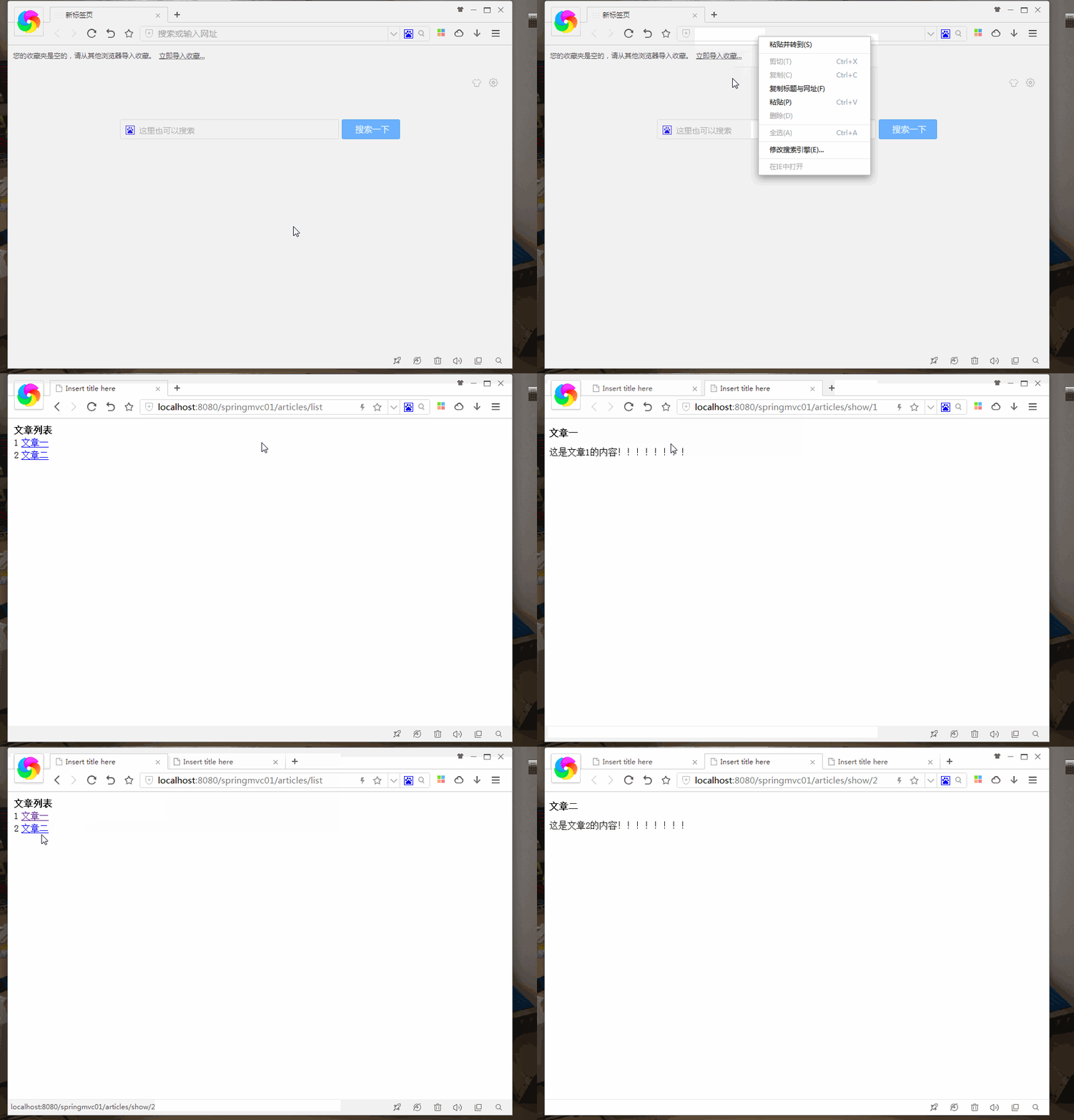
结果
springmvc复习笔记----Restful 风格,PathVariable获取 Url实例的更多相关文章
- springMVC+json构建restful风格的服务
首先.要知道什么是rest服务,什么是rest服务呢? REST(英文:Representational State Transfer,简称REST)描写叙述了一个架构样式的网络系统.比方 web 应 ...
- SpringMVC学习笔记-REST风格请求实现
RESTful概念及功能 RESTful的概念:RESTful是 一种资源定位及资源操作的风格,其本身既不是标准也不是协议,而是一种设计风格,可以使得软件整体层次更加分明.代码更加简洁,并且有利于实现 ...
- springMVC中添加restful 风格
RESTful架构:是一种设计的风格,并不是标准,只是提供了一组设计原则和约束条件,也是目前比较流行的一种互联网软件架构.它结构清晰.符合标准.易于理解.扩展方便,所以正得到越来越多网站的采用. 关于 ...
- springMvc框架之Restful风格
method: @Controller @RequestMapping("/test") public String MyController{ @RequestMapping(& ...
- springmvc+swagger构建Restful风格文档
本次和大家分享的是java方面的springmvc来构建的webapi接口+swagger文档:上篇文章分享.net的webapi用swagger来构建文档,因为有朋友问了为啥.net有docpage ...
- 《一头扎进SpringMvc视频教程》Rest风格的资源URL
5.@PathVariable和@RequestParam的区别 请求路径上有个id的变量值,可以通过@PathVariable来获取 @RequestMapping(value = "/ ...
- springmvc中配置RESTful风格控制器
一般的http请求中其实只需要get和post就可以满足项目需求了,而为什么还要使用restful可能就是为了使请求url看起来更加直观,好看吧.. restful常用的请求方式:get,post,p ...
- springmvc复习笔记----文件上传multipartResolver
结构 web.xml <?xml version="1.0" encoding=&q ...
- springmvc复习笔记----springmvc姓名年龄例子:RequestParam 试水
继续 继上节http://www.cnblogs.com/tk55/p/6652394.html 重要部分颜色突出 结构 包 web.xml 乱码处理方面设置 <url-pattern>* ...
随机推荐
- CountDownLatch/CyclicBarrie用法记录
在jdk1.5中,java提供了很多工具类帮助我们进行并发编程,其中就有CountDownLatch和CyclicBarrie 1.CountDownLatch的用法 CountDownLatch 位 ...
- Spring Boot 1.5升级2.1 主要问题汇总
我们目前工作的系统是基于Spring Boot 1.5.19.RELEASE.Spring Cloud Edgware.SR3开发的,因为一个新项目开发过程的体验,所以在考虑升级到Spring Boo ...
- PCA实现教程
数据是机器学习模型的生命燃料.对于特定的问题,总有很多机器学习技术可供选择,但如果没有很多好的数据,问题将不能很好的解决.数据通常是大部分机器学习应用程序中性能提升背后的驱动因素. 有时,数据可能很复 ...
- TCP/IP原理浅析
TCP/IP概述 TCP/IP起源于1969年美国国防部(DOD:The United States Department Of Defense)高级研究项目管理局(APRA:AdvancedRese ...
- Deeplearning.ai课程笔记--汇总
从接触机器学习就了解到Andrew Ng的机器学习课程,后来发现又出来深度学习课程,就开始在网易云课堂上学习deeplearning.ai的课程,Andrew 的课真是的把深入浅出.当然学习这些课程还 ...
- Perl文件句柄相关常量变量
文件句柄相关变量 对应的官方手册:http://perldoc.perl.org/perlvar.html#Variables-related-to-filehandles 默认情况下: $/:输入行 ...
- Python中斐波那契数列的赋值逻辑
斐波那契数列 斐波那契数列又称费氏数列,是数学家Leonardoda Fibonacci发现的.指的是0.1.1.2.3.5.8.13.21.34.······这样的数列.即从0和1开始,第n项等于第 ...
- Python爬虫之诗歌接龙
介绍 本文将展示如何利用Python爬虫来实现诗歌接龙. 该项目的思路如下: 利用爬虫爬取诗歌,制作诗歌语料库: 将诗歌分句,形成字典:键(key)为该句首字的拼音,值(value)为该拼音对 ...
- sql多表数据查询
有时候在sql遇到一次查询多张表的全部数据例如:创建一张虚拟表A ,表A中需要有表B和表C的全部数据(表B和表C并集,如图) 有两种方法一种是使用: 1):union,不过这种查询速度比较慢 /* B ...
- [转]Docker(三):Dockerfile 命令详解
本文转自:https://blog.csdn.net/ityouknow/article/details/79600406 上一篇文章Docker(二):Dockerfile 使用介绍介绍了 Dock ...