
Web API 2 使用SSL
在Server上启用SSL
稍后我会想在IIS 7 上配置SSL,现在先往下看。
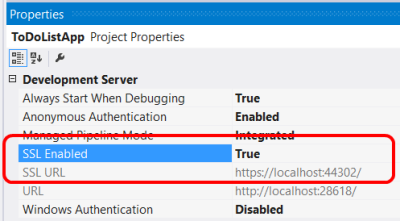
本地测试,您可以启用SSL的IIS Express Visual Studio。在属性窗口中,启用SSL设置为True。注意SSL URL的值,使用这个URL用于测试HTTPS连接。
执行SSL在Web API控制器
如果你有一个HTTPS和HTTP绑定,客户仍然可以使用HTTP访问网站。你可能会允许一些资源可以通过HTTP,而其他资源需要SSL。在这种情况下,使用一个操作过滤器需要SSL对受保护的资源。下面的代码显示了一个Web API检查SSL身份验证过滤器:
public class RequireHttpsAttribute : AuthorizationFilterAttribute

{

    public override void OnAuthorization(HttpActionContext actionContext)

    {

        if (actionContext.Request.RequestUri.Scheme != Uri.UriSchemeHttps)

        {

            actionContext.Response = new HttpResponseMessage(System.Net.HttpStatusCode.Forbidden)

            {

                ReasonPhrase = "HTTPS Required"

            };

        }

        else

        {

            base.OnAuthorization(actionContext);

        }

    }

}
这个过滤器添加到任何Web API需要SSL的操作:
public class ValuesController : ApiController

{

    [RequireHttps]

    public HttpResponseMessage Get() { ... }

}
SSL客户端证书
SSL提供了通过使用公钥基础设施证书身份验证。服务器必须提供一个服务器给客户端进行身份验证的证书。是不太常见的客户端提供一个证书服务器,但这是一个选择的对客户进行身份验证。使用客户端证书的SSL,您需要一种方法来签名证书分发给你的用户。对于许多应用程序类型,这不会是一个很好的用户体验,但在某些环境中(例如,企业)可能是可行的。
| 优势 | 劣势 |
|---|---|
| ——证书凭据比用户名/密码。SSL提供了一个完整的安全通道,与认证、消息完整性和消息加密。 | ——你必须获取和管理PKI证书。——客户机平台必须支持SSL客户端证书。 |
配置IIS接受客户端证书,打开IIS管理器和执行以下步骤:
- Click the site node in the tree view.
- Double-click the SSL Settings feature in the middle pane.
Under Client Certificates, select one of these options:
- Accept: IIS will accept a certificate from the client, but does not require one.
- Require: Require a client certificate. (To enable this option, you must also select "Require SSL")
你也可以设置这些选项ApplicationHost.config文件:
<system.webServer>

    <security>

        <access sslFlags="Ssl, SslNegotiateCert" />

        <!-- To require a client cert: -->

        <!-- <access sslFlags="Ssl, SslRequireCert" /> -->

    </security>

</system.webServer>
The SslNegotiateCert flag means IIS will accept a certificate from the client, but does not require one (equivalent to the "Accept" option in IIS Manager). To require a certificate, set the SslRequireCert flag. For testing, you can also set these options in IIS Express, in the local applicationhost.Config file, located in "Documents\IISExpress\config".
为了测试创建一个客户端证书
For testing purposes, you can use MakeCert.exe to create a client certificate. First, create a test root authority:
makecert.exe -n "CN=Development CA" -r -sv TempCA.pvk TempCA.cer
Makecert will prompt you to enter a password for the private key.
Next, add the certificate to the test server's "Trusted Root Certification Authorities" store, as follows:
- Open MMC.
- Under File, select Add/Remove Snap-In.
- Select Computer Account.
- Select Local computer and complete the wizard.
- Under the navigation pane, expand the "Trusted Root Certification Authorities" node.
- On the Action menu, point to All Tasks, and then click Import to start the Certificate Import Wizard.
- Browse to the certificate file, TempCA.cer.
- Click Open, then click Next and complete the wizard. (You will be prompted to re-enter the password.)
Now create a client certificate that is signed by the first certificate:
makecert.exe -pe -ss My -sr CurrentUser -a sha1 -sky exchange -n "CN=name"

     -eku 1.3.6.1.5.5.7.3.2 -sk SignedByCA -ic TempCA.cer -iv TempCA.pvk
在Web API中使用客户端证书
On the server side, you can get the client certificate by calling GetClientCertificate on the request message. The method returns null if there is no client certificate. Otherwise, it returns an X509Certificate2 instance. Use this object to get information from the certificate, such as the issuer and subject. Then you can use this information for authentication and/or authorization.
X509Certificate2 cert = Request.GetClientCertificate();

string issuer = cert.Issuer;

string subject = cert.Subject;
Web API 2 使用SSL的更多相关文章
- ASP.NET Web API Basic Identity 中的基本身份验证
缺点 用户凭证在请求中发送. 凭据作为明文发送. 每个请求都会发送凭据. 无法注销,除非结束浏览器会话. 易于跨站点请求伪造(CSRF); 需要反CSRF措施. 优点 互联网标准. 受所有主要浏览器支 ...
- 杂项:ASP.NET Web API
ylbtech-杂项:ASP.NET Web API ASP.NET Web API 是一种框架,用于轻松构建可以访问多种客户端(包括浏览器和移动设备)的 HTTP 服务. ASP.NET Web A ...
- ASP.NET Core Web API 与 SSL
SSL 一直没有真正研究过SSL,不知道下面的理解是否正确. SSL是Secure Sockets Layer的缩写,它用来保护服务器和客户端之前的通信.它是基于信任+加密的概念. 在介绍SSL的原理 ...
- Web APi之认证(Authentication)两种实现方式【二】(十三)
前言 上一节我们详细讲解了认证及其基本信息,这一节我们通过两种不同方式来实现认证,并且分析如何合理的利用这两种方式,文中涉及到的基础知识,请参看上一篇文中,就不再叙述废话. 序言 对于所谓的认证说到底 ...
- Web API 入门指南 - 闲话安全
Web API入门指南有些朋友回复问了些安全方面的问题,安全方面可以写的东西实在太多了,这里尽量围绕着Web API的安全性来展开,介绍一些安全的基本概念,常见安全隐患.相关的防御技巧以及Web AP ...
- ASP.NET MVC View 和 Web API 的基本权限验证
ASP.NET MVC 5.0已经发布一段时间了,适应了一段时间,准备把原来的MVC项目重构了一遍,先把基本权限验证这块记录一下. 环境:Windows 7 Professional SP1 + Mi ...
- 我所理解的RESTful Web API [Web标准篇]
REST不是一个标准,而是一种软件应用架构风格.基于SOAP的Web服务采用RPC架构,如果说RPC是一种面向操作的架构风格,而REST则是一种面向资源的架构风格.REST是目前业界更为推崇的构建新一 ...
- 新作《ASP.NET Web API 2框架揭秘》正式出版
我觉得大部分人都是“眼球动物“,他们关注的往往都是目光所及的东西.对于很多软件从业者来说,他们对看得见(具有UI界面)的应用抱有极大的热忱,但是对背后支撑整个应用的服务却显得较为冷漠.如果我们将整个“ ...
- 使用ASP.NET Web Api构建基于REST风格的服务实战系列教程【开篇】【持续更新中。。。】
最近发现web api很火,园内也有各种大神已经在研究,本人在asp.net官网上看到一个系列教程,原文地址:http://bitoftech.net/2013/11/25/detailed-tuto ...
随机推荐
- 进程同步控制(锁,信号量,事件), 进程通讯(队列和管道,生产者消费者模型) 数据共享(进程池和mutiprocess.Pool模块)
参考博客 https://www.cnblogs.com/xiao987334176/p/9025072.html#autoid-1-1-0 进程同步(multiprocess.Lock.Semaph ...
- Flink知识点
1. Flink.Storm.Sparkstreaming对比 Storm只支持流处理任务,数据是一条一条的源源不断地处理,而MapReduce.spark只支持批处理任务,spark-streami ...
- linux内存源码分析 - 内存回收(匿名页反向映射)
本文为原创,转载请注明:http://www.cnblogs.com/tolimit/ 概述 看完了内存压缩,最近在看内存回收这块的代码,发现内容有些多,需要分几块去详细说明,首先先说说匿名页的反向映 ...
- object detection[YOLOv2]
接着扯YOLO v2 相比较于YOLO v1,作者在之前模型上,先修修补补了一番,提出了YOLO v2模型.并基于imagenet的分类数据集和coco的对象检测数据集,提出了wordnet模型,并成 ...
- 我的微软最有价值专家(Microsoft MVP)之路
一.写在前面 2018年对我来说是幸运的一年,对我来说最幸运的事情有两个,一个是在离驾照考试过期还有一个月(报名之后一直没去考)终于拿到了我的驾照,还有一件事莫过于获得了微软MVP.期间,一直有朋友问 ...
- 让你一看就懂的快速排序算法(Java)
快速排序 你也许会被快速排序的文章弄得迷迷糊糊,其实大体上去看,快速排序就一步:找个数做基准数,把小于它的数移到它左边,把大于它的数移到它右边.这句话是核心.然后我们只需要让基准数左边的重复上面的步骤 ...
- 图解Redis之数据结构篇——简单动态字符串SDS
图解Redis之数据结构篇--简单动态字符串SDS 前言 相信用过Redis的人都知道,Redis提供了一个逻辑上的对象系统构建了一个键值对数据库以供客户端用户使用.这个对象系统包括字符串对象 ...
- OSS网页上传和断点续传(STSToken篇)
云账号AccessKey拥有所有API访问权限,在客户端不要直接使用,会泄露ak信息,造成安全问题.所以使用STS方式(临时账号权限)给客户端授权. C#版获取STSToken 一.下载阿里SDK(a ...
- Git使用过程中的问题
Q-1:怎么切换到远程的分支 本地已经有一个代码库了(是从github上clone的),但是现在远程库中一个新的branch,怎么拉取远程分支,并在本地创建该分支(内容一样).how to do? # ...
- Nginx会话保持之nginx-sticky-module模块
Nginx会话保持之nginx-sticky-module模块 - 天行健,君子以自强不息:地势坤,君子以厚德载物. - CSDN博客https://blog.csdn.net/huangjinjin ...