
Vue2.x源码学习笔记-Vue构造函数
我们知道使用vue.js开发应用时,都是new Vue({}/*options*/)
那Vue构造函数上有哪些静态属性和方法呢?其原型上又有哪些方法呢?
一般我都会在浏览器中输入Vue来look see see
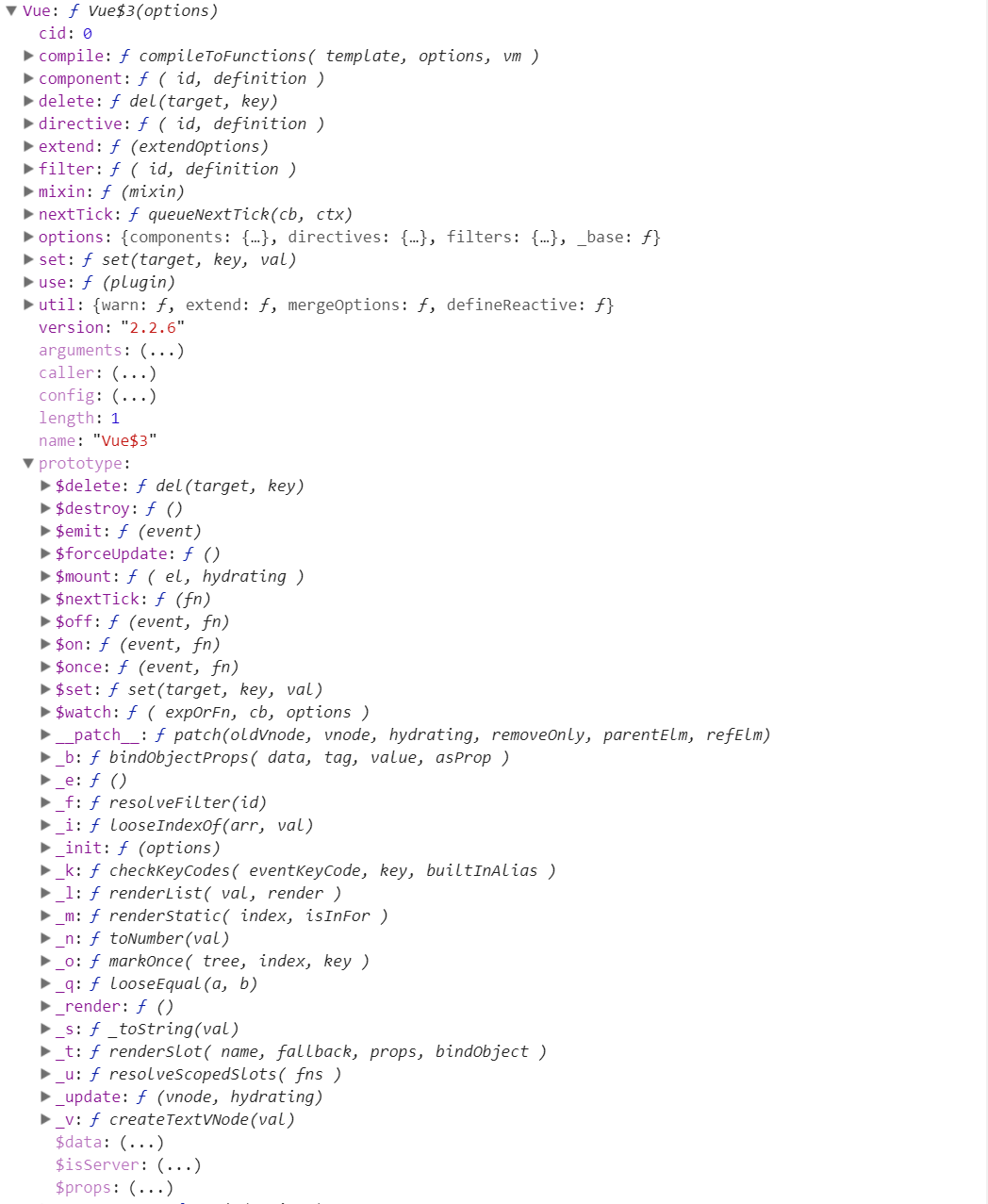
可以看到Vue构造函数上挂载了这么多属性和方法,so这么nb。
可以看到有很多的全局的api,以及实例的方法(其实就是Vue.prototype上的方法)。
那么问题来了,尤大是如何把这么多方法和属性挂载上去的。那么带着问题,进入vue源码 look see see去
现在写项目可能都使用es6+的语法,用webpack打包或者其他工具打包了。
先进入项目中,找到package.json文件,这里面有项目的依赖,有开发环境、生产环境等编译的启动脚本,有项目的许可信息等。
然而我们使用npm run dev时,其实就是package.json文件中scripts属性中dev属性,它是这么写的
"dev": "rollup -w -c build/config.js --environment TARGET:web-full-dev"
它执行了build/config.js文件(一个打包配置的文件),且带了个web-full-dev参数过去了,先这么理解这,我们去build/config.js文件中去看看,且搜下web-full-dev,会发现
// Runtime+compiler development build (Browser)

  'web-full-dev': {

    entry: path.resolve(__dirname, '../src/entries/web-runtime-with-compiler.js'),

    dest: path.resolve(__dirname, '../dist/vue.js'),

    format: 'umd',

    env: 'development',

    alias: { he: './entity-decoder' },

    banner

  },
我们可以发现入口文件是'../src/entries/web-runtime-with-compiler.js',然而src目录下的那么文件夹和文件都会编译成dist目录下的vue.js。
我们分别打开相关目录下的文件
/src/entries/web-runtime-with-compiler.js

--> /src/entries/web-runtime.js

--> /src/core/index.js

--> /src/core/instance/index.js
通过package.json文件,依次打开相关文件终于找到Vue构造函数了
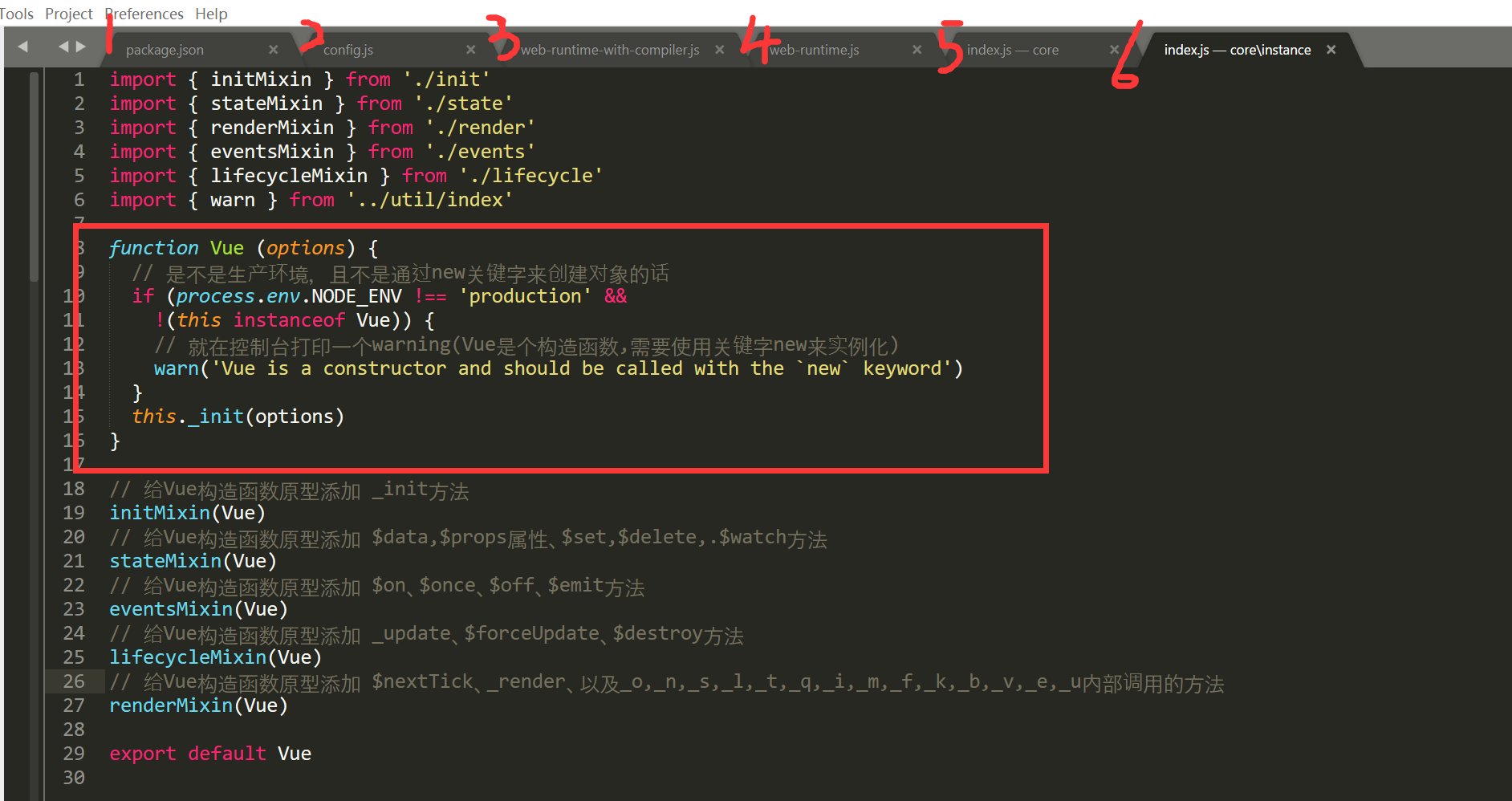
可以看到Vue构造函数是如此简单,一个if分支加上一个原型上的_init方法。那么怎么往这个构造函数上混入原型方法和静态属性和静态方法呢?
我们可以看到通过
// 给Vue构造函数原型添加 _init方法
initMixin(Vue)
// 给Vue构造函数原型添加 $data,$props属性、$set,$delete,.$watch方法
stateMixin(Vue)
// 给Vue构造函数原型添加 $on、$once、$off、$emit方法
eventsMixin(Vue)
// 给Vue构造函数原型添加 _update、$forceUpdate、$destroy方法
lifecycleMixin(Vue)
// 给Vue构造函数原型添加 $nextTick、_render、以及_o,_n,_s,_l,_t,_q,_i,_m,_f,_k,_b,_v,_e,_u内部调用的方法
renderMixin(Vue)
这几个方法就给Vue.prototype添加了这么多方法了。
接着沿刚才所提到的文件引入顺序一步步来看。/src/core/instance/index.js执行之后,是/src/core/index.js文件来看下源码
import Vue from './instance/index'

import { initGlobalAPI } from './global-api/index'

import { isServerRendering } from 'core/util/env'

initGlobalAPI(Vue) // 给Vue构造函数添加了一些静态方法和属性(属性: config, util, options, cid;

                   // 方法: set, delete, nextTick, use, mixin, extend, component, directive, filter方法)

// 给Vue构造函数的原型添加 $isServer 属性

Object.defineProperty(Vue.prototype, '$isServer', {

  get: isServerRendering

})

// 给Vue构造函数添加 version 属性

Vue.version = '__VERSION__'

export default Vue
可以看到initGlobalAPI方法给Vue构造函数添加了好多静态属性和方法(也就是官网api提到的全局api)。
我们可以先看下其源码
export function initGlobalAPI (Vue: GlobalAPI) {

  // config

  const configDef = {}

  configDef.get = () => config

  if (process.env.NODE_ENV !== 'production') {

    configDef.set = () => {

      warn(

        'Do not replace the Vue.config object, set individual fields instead.'

      )

    }

  }

  Object.defineProperty(Vue, 'config', configDef)

  // exposed util methods.

  // NOTE: these are not considered part of the public API - avoid relying on

  // them unless you are aware of the risk.

  Vue.util = {

    warn,

    extend,

    mergeOptions,

    defineReactive

  }

  Vue.set = set

  Vue.delete = del

  Vue.nextTick = nextTick

  Vue.options = Object.create(null)

  config._assetTypes.forEach(type => {

    Vue.options[type + 's'] = Object.create(null)

  })

  // this is used to identify the "base" constructor to extend all plain-object

  // components with in Weex's multi-instance scenarios.

  Vue.options._base = Vue

  extend(Vue.options.components, builtInComponents)

  initUse(Vue) // 给Vue构造函数添加 use方法

  initMixin(Vue) // 给Vue构造函数添加 mixin方法

  initExtend(Vue) // 给Vue构造函数添加 extend方法

  initAssetRegisters(Vue) // 给Vue构造函数添加 component, directive, filter方法

}
然后又给Vue.prototype原型添加了$isServer属性
再然后给Vue添加了version静态属性。
接着再看下/src/entries/web-runtime.js文件中的代码
// install platform specific utils 安装平台相对应的方法

Vue.config.mustUseProp = mustUseProp

Vue.config.isReservedTag = isReservedTag

Vue.config.getTagNamespace = getTagNamespace

Vue.config.isUnknownElement = isUnknownElement

// install platform runtime directives & components 安装平台相对应的指令和组件

extend(Vue.options.directives, platformDirectives)

extend(Vue.options.components, platformComponents)

// install platform patch function 如果是环境是浏览器的话, 给Vue构造函数添加__patch__函数

Vue.prototype.__patch__ = inBrowser ? patch : noop

// public mount method 给Vue构造函数添加 $mount 函数

Vue.prototype.$mount = function (

  el?: string | Element,

  hydrating?: boolean

): Component {

  el = el && inBrowser ? query(el) : undefined

  return mountComponent(this, el, hydrating)

}
可以看到
1. 根据不同的平台重写config对象中mustUseProp, isReservedTag, getTagNamespace, isUnknowElement属性的值。
2. 通过exend方法,扩展指令对象和组件对象
先不关心extend方法的具体实现,看看他把我们的Vue.options.directives和Vue.options.components变成了什么鸟样
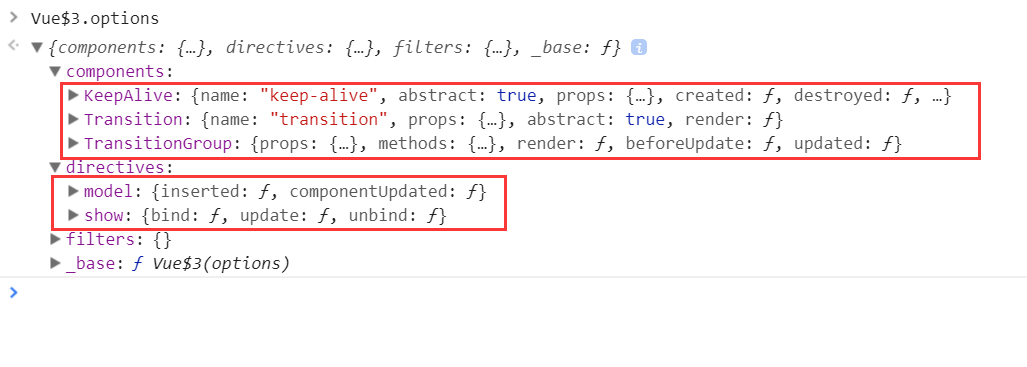
内置指令和组件就是这么来的啊,很好,继续往下see see
3. 然后给Vue.prototype添加__patch__(虚拟dom相关) 和 $mount(挂载元素)方法
接着看下/src/entries/web-runtime-with-compiler.js 文件的代码:
const mount = Vue.prototype.$mount

// 重写Vue构造函数原型上的$mount方法

Vue.prototype.$mount = function (

  el?: string | Element,

  hydrating?: boolean

): Component {

  el = el && query(el)

  /* istanbul ignore if */

  if (el === document.body || el === document.documentElement) {

    process.env.NODE_ENV !== 'production' && warn(

      `Do not mount Vue to <html> or <body> - mount to normal elements instead.`

    )

    return this

  }

  const options = this.$options

  // resolve template/el and convert to render function

  if (!options.render) {

    let template = options.template

    if (template) {

      if (typeof template === 'string') {

        if (template.charAt(0) === '#') {

          template = idToTemplate(template)

          /* istanbul ignore if */

          if (process.env.NODE_ENV !== 'production' && !template) {

            warn(

              `Template element not found or is empty: ${options.template}`,

              this

            )

          }

        }

      } else if (template.nodeType) {

        template = template.innerHTML

      } else {

        if (process.env.NODE_ENV !== 'production') {

          warn('invalid template option:' + template, this)

        }

        return this

      }

    } else if (el) {

      template = getOuterHTML(el)

    }

    if (template) {

      /* istanbul ignore if */

      if (process.env.NODE_ENV !== 'production' && config.performance && mark) {

        mark('compile')

      }

      const { render, staticRenderFns } = compileToFunctions(template, {

        shouldDecodeNewlines,

        delimiters: options.delimiters

      }, this)

      options.render = render

      options.staticRenderFns = staticRenderFns

      /* istanbul ignore if */

      if (process.env.NODE_ENV !== 'production' && config.performance && mark) {

        mark('compile end')

        measure(`${this._name} compile`, 'compile', 'compile end')

      }

    }

  }

  return mount.call(this, el, hydrating)

}

/**

 * Get outerHTML of elements, taking care

 * of SVG elements in IE as well.

 */

function getOuterHTML (el: Element): string {

  if (el.outerHTML) {

    return el.outerHTML

  } else {

    const container = document.createElement('div')

    container.appendChild(el.cloneNode(true))

    return container.innerHTML

  }

}

Vue.compile = compileToFunctions // 给Vue构造函数添加 compile方法
该文件中重写Vue构造函数原型上的$mount方法,且给vue添加了compile属性
至此Vue上的静态属性和方法,还有原型上的方法怎么来的就这么看完了。
一个构造函数有了,那怎么玩它呢,必然new它,得到的实例,究竟它有哪些属性,属性怎么一步一步挂载到实例上去的,下篇帖子用个小例子说明。
总结: 该笔记主要记录Vue构造函数上的静态属性和方法还有原型方法是如何一步一步添加到Vue构造函数上的。并没有解读属性或者方法的源码。
Vue2.x源码学习笔记-Vue构造函数的更多相关文章
- Vue2.x源码学习笔记-Vue源码调试
如果我们不用单文件组件开发,一般直接<script src="dist/vue.js">引入开发版vue.js这种情况下debug也是很方便的,只不过vue.js文件代 ...
- Vue2.x源码学习笔记-Vue实例的属性和方法整理
还是先从浏览器直观的感受下实例属性和方法. 实例属性: 对应解释如下: vm._uid // 自增的id vm._isVue // 标示是vue对象,避免被observe vm._renderProx ...
- Vue2.x源码学习笔记-Vue静态方法和静态属性整理
Vue静态方法和静态属性,其实直接在浏览器中可以查看到的,如下 圈起来的是其静态属性,但是有的属性对象中的属性的值又是函数.未圈起来的则是函数. 其实它来自如下各个目录下的js文件 // src/co ...
- Vue源码学习1——Vue构造函数
Vue源码学习1--Vue构造函数 这是我第一次正式阅读大型框架源码,刚开始的时候完全不知道该如何入手.Vue源码clone下来之后这么多文件夹,Vue的这么多方法和概念都在哪,完全没有头绪.现在也只 ...
- Vue2.x源码学习笔记-从一个小例子查看vm实例生命周期
学习任何一门框架,都不可能一股脑儿的从入口代码从上到下,把代码看完, 这样其实是很枯燥的,我想也很少有人这么干,或者这么干着干着可能干不下去了. 因为肯定很无聊. 我们先从一个最最简单的小例子,来查看 ...
- Vue源码学习三 ———— Vue构造函数包装
Vue源码学习二 是对Vue的原型对象的包装,最后从Vue的出生文件导出了 Vue这个构造函数 来到 src/core/index.js 代码是: import Vue from './instanc ...
- Vue2.x源码学习笔记-源码目录结构整理
先从github上下载或者clone一个vue分支项目 https://github.com/vuejs/vue 查看下目录结果 先列出一些目录 Vue |— build 打包相关的配置文件,其中最重 ...
- Vue源码学习二 ———— Vue原型对象包装
Vue原型对象的包装 在Vue官网直接通过 script 标签导入的 Vue包是 umd模块的形式.在使用前都通过 new Vue({}).记录一下 Vue构造函数的包装. 在 src/core/in ...
- 最新 Vue 源码学习笔记
最新 Vue 源码学习笔记 v2.x.x & v3.x.x 框架架构 核心算法 设计模式 编码风格 项目结构 为什么出现 解决了什么问题 有哪些应用场景 v2.x.x & v3.x.x ...
随机推荐
- 2017-11-09 中文代码示例之Vuejs入门教程(一)
"中文编程"知乎专栏原链 为了检验中文命名在主流框架中的支持程度, 在vuejs官方入门教程第一部分的示例代码中尽量使用了中文命名. 所有演示都在本地测试通过, 源码在这里. 下面 ...
- Java 创建线程/停止线程
继承 Thread 类 class MyThread1 extends Thread{ @Override public void run(){ System.out.println("继承 ...
- Redis 保护模式
默认 redis 启用了保护模式,即如果是远程链接不能进行 CRUD 等操作,如果进行该操作报错如下 (error) DENIED Redis is running in protected mode ...
- loadrunner 脚本录制-Protocol Advisor协议分析器的使用
脚本录制-Protocol Advisor协议分析器的使用 by:授客 QQ:1033553122 1.启动Protocol Advisor File > Protocol Advisor &g ...
- Android为TV端助力 EventBus.getDefault()开源框架
在onCreate里面执行 EventBus.getDefault().register(this);意思是让EventBus扫描当前类,把所有onEvent开头的方法记录下来,如何记录呢?使用Map ...
- Android-简单总结一下图片压缩
最近项目需要用到图片压缩,所以简单总结一下.大致分为三种压缩. 图片质量压缩. 意思就是降低图片的质量,针对文件处理,但本身的像素点并不会减少. 本来像素点是这样的,经过算法计算,若一个像素点周围所存 ...
- C#多线程图片爬虫
写了个简单的多线程图片爬虫,整理一下.数据已经爬下来了,图片URL需要自行拼接,首先从Lawyers表中取的RawData字段,RawData中有一个list字段是json格式的数据,需要的只是lis ...
- DBA思考系列——学会拒绝不合理的需求
DBA思考系列--学会拒绝不合理的需求 一直以来,个性都比较随意,一般很少拒绝开发人员的一些需求(有点老好人的感觉). 这点一直被老大诟病,也一直在反省!最近又有一件事情,让我觉得:应该学会拒绝不 ...
- Java常考面试题(经典)
什么是Java虚拟机?为什么Java被称作是“平台无关的编程语言”? Java虚拟机是一个可以执行Java字节码的虚拟机进程.Java源文件被编译成能被Java虚拟机执行的字节码文件. Java被设计 ...
- MySQL open_tables和opened_tables
官网解释参见:https://dev.mysql.com/doc/refman/5.7/en/table-cache.html 其他可供参考的文章有: 关于表限制参数的使用:https://dba.s ...