
Up-to-date cache with EclipseLink and Oracle
Up-to-date cache with EclipseLink and Oracle

One of the most useful feature provided by ORM libraries is a second-level cache, usually called L2. L2 object cache reduces database access for entities and their relationships. It is enabled by default in the most popular JPA implementations like Hibernate or EclipseLink. That won’t be a problem, unless a table inside a database is not modified directly by third-party applications, or by the other instance of the same application in a clustered environment. One of the available solutions to this problem is in-memory data grid, which stores all data in a memory, and is distributed across many nodes inside a cluster. Such a tools like Hazelcast or Apache Ignite has been described several times in my blog. If you are interested in one of that tools I recommend you read one of my previous article bout it: Hazelcast Hot Cache with Striim.
However, we won’t discuss about it in this article. Today, I would like to talk about Continuous Query Notification feature provided by Oracle Database. It solves a problem with updating or invalidating a cache when the data changes in the database. Oracle JDBC drivers provide support for it since 11g Release 1. This functionality is based on receiving invalidation events from the JDBC drivers. Fortunately, EclipseLink extends that feature in their solution called EclipseLink Database Change Notification. In this article I’m going to show you how to implement it using Spring Data JPA together with EclipseLink library.
How it works
The most useful functionality provided by the Oracle Database Continuous Query Notification is an ability to raise database events when rows in a table were modified. It enables client applications to register queries with the database and receive notifications in response to DML or DDL changes on the objects associated with the queries. To detect modifications, EclipseLink DCN uses Oracle ROWID to intercept changes in the table. ROWID is included to all queries for a DCN-enabled class. EclipseLink also retrieves ROWID of saved entity after an insert operation, and maintains a cache index on that ROWID. It also selects the database transaction ID once for each transaction to avoid invalidating the cache during the processing of transaction.
When a database sends a notification it usually contains the followoing information:
- Names of the modifying objects, for example a name of changed table
- Type of change. The possible values are INSERT, UPDATE,DELETE, ALTER TABLE, or DROP TABLE
- Oracle’s ROWID of changed record
Running Oracle database locally
Before starting working on our sample application we need to have Oracle database installed. Fortunately, there are some Docker images with Oracle Standard Edition 12c. The command visible below starts Oracle XE version and exposes it on default 1521 port. It is also possible to use web console available under port 9080.
|
1
|
$ docker run -d --name oracle -p 9080:8080 -p 1521:1521 sath89/oracle-12c |
We need to have sysdba role in order to be able to grant privilege CHANGE NOTIFICATION to our database. The default password for user system is oracle.
|
1
|
GRANT CHANGE NOTIFICATION TO PIOMIN; |
You may use any Oracle client like Oracle SQL Developer to connect with database or just login to a web console. Since I run Docker on Windows it is available on my laptop under address http://192.168.99.100:9080/em. Of course it is Oracle, so you need to settle in for a long haul, and wait until it starts. You can observer a progress of an installation by running command docker logs -f oracle. When you finally see a “100% complete” log entry you may grant the required privileges to the existing user or create a new one with a set of needed privileges, and proceed to the next step.
Sample application
The sample application source code is available on GitHub under address https://github.com/piomin/sample-eclipselink-jpa.git. It is Spring Boot application that uses Spring Data JPA as a data access layer implementation. Because the default JPA provider used in that project is EclipseLink, we should remember about excluding Hibernate libraries from starters spring-boot-starter-data-jpa andspring-boot-starter-web. Besides a standard EclipseLink library for JPA, we also have to include EclipseLink implementation for Oracle database (org.eclipse.persistence.oracle) and Oracle JDBC driver.
|
1
2
3
4
5
6
7
8
9
10
11
12
13
14
15
|
<dependency> <groupId>org.eclipse.persistence</groupId> <artifactId>org.eclipse.persistence.jpa</artifactId> <version>2.7.1</version></dependency><dependency> <groupId>org.eclipse.persistence</groupId> <artifactId>org.eclipse.persistence.oracle</artifactId> <version>2.7.1</version></dependency><dependency> <groupId>com.oracle</groupId> <artifactId>ojdbc7</artifactId> <version>12.1.0.1</version></dependency> |
The next step is to provide connection settings to Oracle database launched as a Docker container. Do not try to do it through application.yml properties, because Spring Boot by default uses HikariCP for connection pooling. This in turn causes a conflict with Oracle datasource during application bootstrap. The following datasource declaration would work succesfully.
|
1
2
3
4
5
6
7
8
9
|
@Beanpublic DataSource dataSource() { final DriverManagerDataSource dataSource = new DriverManagerDataSource(); dataSource.setDriverClassName("oracle.jdbc.driver.OracleDriver"); dataSource.setUrl("jdbc:oracle:thin:@192.168.99.100:1521:xe"); dataSource.setUsername("piomin"); dataSource.setPassword("Piot_123"); return dataSource;} |
EclipseLink with Database Change Notification
EclipseLink needs some specific configuration settings to succesfully work with Spring Boot and Spring Data JPA. These settings may be provided inside @Configuration class that extends JpaBaseConfiguration class. First, we should setEclipseLinkJpaVendorAdapter as default JPA vendor adapter. Then, we may configure some additional JPA settings like detailed logging level or automatic creation of database objects during application startup. However, the most important thing for us in the fragment of source code visible below is Oracle Continuous Query Notification settings.
EclipseLink CQN support is enabled by theOracleChangeNotificationListener listener which integrates with Oracle JDBC in order to received database change notifications. The full class name of the listener should be passed as a value of eclipselink.cache.database-event-listener property. EclipseLink by default enabled L2 cache for all entities, and respectively all tables in the persistence unit are registered for a change notification. You may exclude some of them by using the databaseChangeNotificationTypeattribute of the @Cache annotation on the selected entity.
|
1
2
3
4
5
6
7
8
9
10
11
12
13
14
15
16
17
18
19
20
21
22
23
24
|
@Configuration@EnableAutoConfigurationpublic class JpaConfiguration extends JpaBaseConfiguration { protected JpaConfiguration(DataSource dataSource, JpaProperties properties, ObjectProvider jtaTransactionManager, ObjectProvider transactionManagerCustomizers) { super(dataSource, properties, jtaTransactionManager, transactionManagerCustomizers); } @Override protected AbstractJpaVendorAdapter createJpaVendorAdapter() { return new EclipseLinkJpaVendorAdapter(); } @Override protected Map getVendorProperties() { HashMap map = new HashMap(); map.put(PersistenceUnitProperties.WEAVING, InstrumentationLoadTimeWeaver.isInstrumentationAvailable() ? "true" : "static"); map.put(PersistenceUnitProperties.DDL_GENERATION, "create-or-extend-tables"); map.put(PersistenceUnitProperties.LOGGING_LEVEL, SessionLog.FINEST_LABEL); map.put(PersistenceUnitProperties.DATABASE_EVENT_LISTENER, "org.eclipse.persistence.platform.database.oracle.dcn.OracleChangeNotificationListener"); return map; }} |
What is worth mentioning EclipseLink’s CQN integration has some important limitations:
- Changes to an object’s secondary tables will not trigger it to be invalidate unless a version is used and updated in the primary table
- Changes to an object’s
OneToMany,ManyToMany, andElementCollectionrelationships will not trigger it to be invalidate unless a version is used and updated in the primary table
The conclusion from these limitations is obvious. We should enable optimistic locking by including an @Version in our entities. The column with @Version in the primary table will always be updated, and the object will always be invalidated. There are three entities implemented. Entity Order is in many-to-one relationship with Product and Customerentities. All these classes has @Version feature enabled.
|
1
2
3
4
5
6
7
8
9
10
11
12
13
14
15
16
17
18
19
20
21
22
23
24
25
26
27
28
29
30
31
32
33
34
35
36
37
38
39
40
41
42
43
44
45
46
47
48
49
50
51
52
53
54
55
56
57
58
59
60
61
62
63
64
65
66
67
68
69
70
71
72
73
|
@Entity@Table(name = "JPA_ORDER")public class Order { @Id @SequenceGenerator(sequenceName = "SEQ_ORDER", allocationSize = 1, initialValue = 1, name = "orderSequence") @GeneratedValue(generator = "orderSequence", strategy = GenerationType.SEQUENCE) private Long id; @ManyToOne private Customer customer; @ManyToOne private Product product; @Enumerated private OrderStatus status; private int count; @Version private long version; public Long getId() { return id; } public void setId(Long id) { this.id = id; } public Customer getCustomer() { return customer; } public void setCustomer(Customer customer) { this.customer = customer; } public Product getProduct() { return product; } public void setProduct(Product product) { this.product = product; } public OrderStatus getStatus() { return status; } public void setStatus(OrderStatus status) { this.status = status; } public int getCount() { return count; } public void setCount(int count) { this.count = count; } public long getVersion() { return version; } public void setVersion(long version) { this.version = version; } @Override public String toString() { return "Order [id=" + id + ", product=" + product + ", status=" + status + ", count=" + count + "]"; }} |
Testing
After launching your application you see the following logs generated with Finest level.
|
1
2
3
|
[EL Finest]: connection: 2018-03-23 15:45:50.591--ServerSession(465621833)--Thread(Thread[main,5,main])--Registering table [JPA_PRODUCT] for database change event notification.[EL Finest]: connection: 2018-03-23 15:45:50.608--ServerSession(465621833)--Thread(Thread[main,5,main])--Registering table [JPA_CUSTOMER] for database change event notification.[EL Finest]: connection: 2018-03-23 15:45:50.616--ServerSession(465621833)--Thread(Thread[main,5,main])--Registering table [JPA_ORDER] for database change event notification. |
The registration are stored in tableuser_change_notification_regs, which is available for your application’s user (PIOMIN).
|
1
2
3
4
5
6
|
$ SELECT regid, table_name FROM user_change_notification_regs; REGID TABLE_NAME---------- --------------------------------------------------------------- 326 PIOMIN.JPA_PRODUCT 326 PIOMIN.JPA_CUSTOMER 326 PIOMIN.JPA_ORDER |
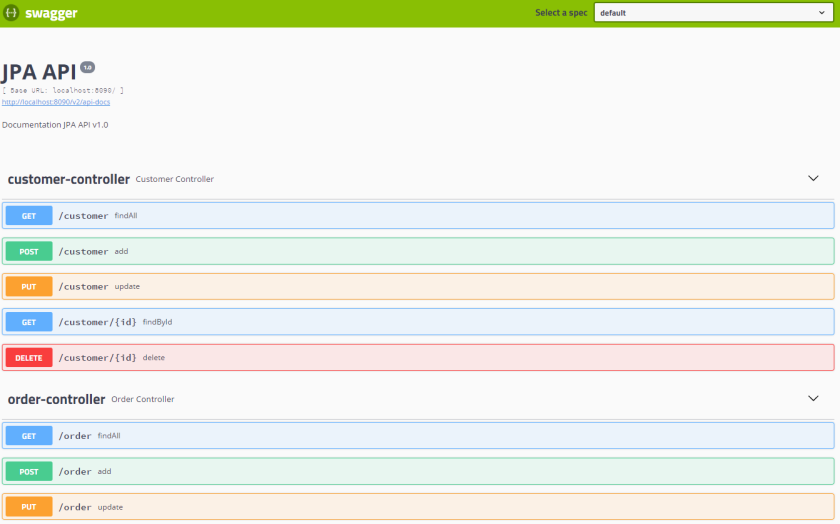
Our sample application exposes Swagger documentation of API, which may be accessed under addresshttp://localhost:8090/swagger-ui.html. You can create or find some entities using it. If try to find the same entity several times you would see that the only first invoke generates SQL query in logs, while all others are taken from a cache. Now, try to change that record using any Oracle’s client like Oracle SQL Developer, and verify if cache has been succesfully refreshed.
Summary
When I first heard about Oracle Database Change Notification supported by EclipseLink JPA vendor, my expectations were really high. It is very interesting solution, which guarantees automatic cache refresh after changes performed on database tables by third-party application avoiding your cache. However, I had some problems with that solution during tests. In some cases it just doesn’t work, and the detection of errors was really troublesome. It would be fine if such a solution could be also available for other databases than Oracle and JPA vendors like Hibernate.
Up-to-date cache with EclipseLink and Oracle的更多相关文章
- Oracle buffer cache
Buffer Cache buffer cache 结构图 HASH链 ORACLE使用HASH算法,把buffer cache中每个buffer的buffer header串联起来,组成多条hash ...
- Date Picker Calendar For Oracle Forms 6i
Giving date picker calendar option to user for date type fields in Oracle Forms. I am providing you ...
- Oracle内存详解之 Library cache 库缓冲
Oracle内存详解之 Library cache 库缓冲 2017年11月09日 11:38:39 阅读数:410更多 个人分类: 体系结构 Library cache是Shared pool的一部 ...
- oracle 12cR2 smart flash cache实测
最近一直在处理新系统的性能优化问题,这两天特地测试了下oracle 11gR2开始引入的smart flash cache. 其介绍参考MOS文档,How To Size the Database S ...
- Oracle内存详解之二 Library cache 库缓冲-转载
Library cache是Shared pool的一部分,它几乎是Oracle内存结构中最复杂的一部分,主要存放shared curosr(SQL)和PLSQL对象(function,procedu ...
- 【转】oracle数据库开发的一些经验积累
1.不安装Oracle客户连接Oracle 8的方法 请将以下文件拷贝到运行文件所在目录 一.ODBC动态库 : ctl3d32.dll msvcrt40.dll odbc16gt.dll odbc ...
- Oracle Database 11g express edition
commands : show sys connect sys as sysdba or connect system as sysdba logout or disc clear screen or ...
- Oracle调优总结(经典实践 重要)
转载:http://langgufu.iteye.com/blog/1974211 Problem Description:1.每个表的结构及主键索引情况2.每个表的count(*)记录是多少3.对于 ...
- 部分常见ORACLE面试题以及SQL注意事项
部分常见ORACLE面试题以及SQL注意事项 一.表的创建: 一个通过单列外键联系起父表和子表的简单例子如下: CREATE TABLE parent(id INT NOT NULL, PRIMARY ...
随机推荐
- Spring中RedirectAttributes的用法
RedirectAttributes 是Spring mvc 3.1版本之后出来的一个功能,专门用于重定向之后还能带参数跳转的的工具类.他有两种带参的方式: 第一种: redirectAttribut ...
- Python Note1: Pycharm的安装与使用
前言 曾经学过一段时间python,虽然现在工作了主要使用C#和C++,但是觉得还是有必要在业余的时候学习学习python,提升下自己的知识面,毕竟技多不压身,加油吧! 安装与激活Pycharm 个人 ...
- 你不知道的JavaScript——this词法
https://www.cnblogs.com/hutaoer/p/3423782.htmlhttps://www.cnblogs.com/vicky-li/p/8669549.htmlhttps:/ ...
- Python 中关于 round 函数的小坑
参考: http://www.runoob.com/w3cnote/python-round-func-note.html
- Git发生SSL certificate problem: certificate ha错误的解决方法
这两天,不知道为什么,用Git提交代码到服务器时,总出现SSL certificate problem: unable to get local issuer certificate while ac ...
- Python魔法方法(magic method)细解几个常用魔法方法(下)
接上文,再介绍最后几个常用的魔法方法. 关于__dict__: 先上个例子: class Test(object): fly = True def __init__(self, age): self. ...
- Java多线程2:线程的使用及其生命周期
一.线程的使用方式 1.继承Thread类,重写父类的run()方法 优点:实现简单,只需实例化继承类的实例,即可使用线程 缺点:扩展性不足,Java是单继承的语言,如果一个类已经继承了其他类,就无法 ...
- 老男孩python学习自修第十九天【异常处理】
1.常见的错误 TypeError 类型错误 NameError 没有该变量 ValueError 不期望的值 AttributeError 没有该属性 UnboundLocalError 没有该局部 ...
- SELECT IDENT_CURRENT(tableName)和自增长列的纠结
项目中要用到一个功能:主表主键为自增长,要求在插入主表数据前先获得主表要插入数据的主键ID值,用在插入子表时获取主键ID.在网上搜了一下,发现SELECT IDENT_CURRENT(TableNam ...
- hdu-3374(kmp+最小表示法)
题意:给你一个字符串,这个字符串我们可以把把他变成n个字符串按照以下规则:将当前字符串第一个放到字符串最后一位,字符串的下标依次向前推一位,比如:s[1] s[2 ]s[3] s[4]->s[2 ...